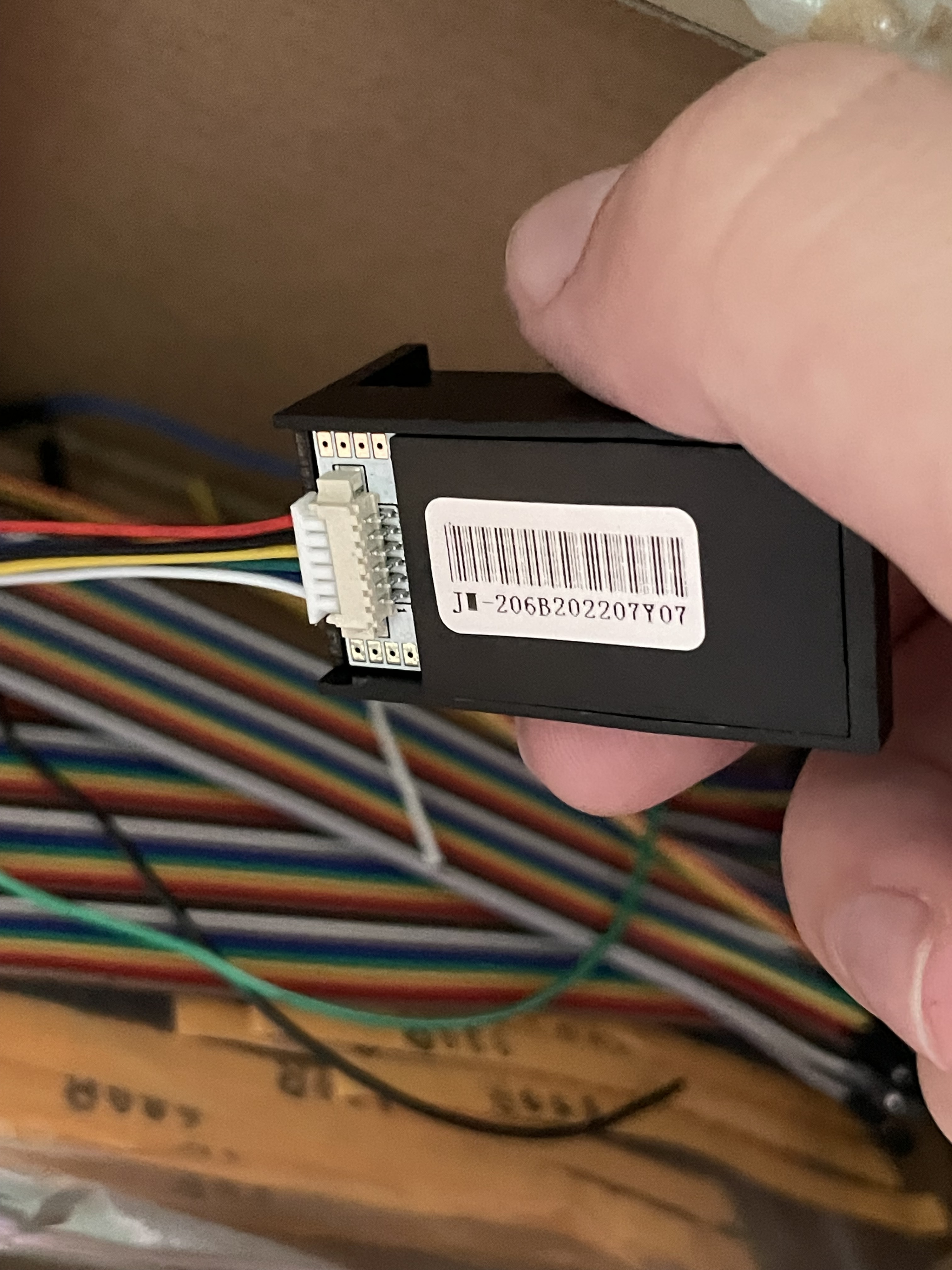
Hi guys recently I bought this fingerprint sensor I also saw one guy here has it bu he hasn't figured out which cable is used for what.
Can someone here who knows this model help me please because it seems it's not a common fingerprint sensor model?
Where did you get it from?
What did the seller say the model number was?
Is there any other information printed on the module?
I got it from emag, here is the link: Модул за четец на пръстови отпечатъци с оптичен сензор Arduino Clone AS608 - eMAG.bg
You can see the seller scammed me it's obviously not that model from the picture.
He written it is Arduino Clone AS608 but it isnt
looks like this maybe??
JM-206B
good luck.. ~q
The only thing I know is that it uses uart interface with 6 pins and also the first pin is the white cable.
With that information can you tell me what are the other cables? Which is ground and which is power etc
There's a lot of guesswork here. You could assume that red and black are +5V and 0V - BUT THEY MIGHT NOT BE!
There's 6 pins in total. If the various random bit of spec I found are correct, then the sensor might support both a USB and UART interface. That would be D+ & D- for USB and TX & RX for the UART.
If you could guess the 2 power pins, then you could deduce the USB pair through trial and error and also the UART pins through trial and error.
But, without any user manual / datasheet, you would not know the commands to send to the sensor, even if you did figure out the connections. You might get lucky using a command set from another fingerprint sensor, but then again you might not.
I would suggest asking the seller for the correct user manual and if they don't provide it, send the sensor back.
I have checked this sensor also uses AS608 chip so probably the instructions are the same but don't know about the pins
If you are not able to return the sensor, then you are stuck with it.
You could start by assuming that the red and black are the supply to the sensor. If you assume a 5V supply, then I would use a current limiting power supply to limit at, say, 50mA and connect the red and black wires up.
I can't see the colours of the other wires clearly, but USB typically uses green (D+) and white (D-). You could try using a USB cable and try and see if your PC recognises a USB device.
If that works, then you only have 2 wires left, which would be UART TX & RX.
But it's all a gamble without proper documentation.
Thanks man I will just use a multimeter to detect the ground and hot pin.
It is possible just to buy new from better seller but that's is not the case. I just want to make this one to work  . Seems like it's an unique one
With some trial and unsuccess finally I found the right combination. It is standard UART starting from left (red wire). So for everyone who has the same model like me the combination is:
GND: red wire
RX: black wire
TX: yellow wire
3.3V: green wire
Happy coding 
Now we got another problem. Which library works with this sh*t ?
I tried adafruit and it doesn’t recognize it.
if you have idea guys feel free to comment let all of the guys who have this shtty chinese model know how to make it work  !
!
What errors are reported?
Did you see other libraries in the IDE?
If you don't know the exact sensor you have, you could consider looking for identifying information on any chips on the controller board. You may need to disassemble the sensor to see all the parts.
The error is “The fingerprint sensor is not found  “
“
It is throw when finger.verifyPassword() is sent it looks like this library cannot communicate with my fingerprint sensor.
I saw other libraries but without knowing which one is for my model its like guessing
Post your sketch. (use <CODE> button to format the code and the errors)