One has GND and VCC on separate ends, the other has GND and VCC on the same end, but the pins in between are the same.
The pin specification in the RF24_config.h are for softspi only, which has not been tested with the RF24Audio library. The lib uses pins 11,12,13 by default for SPI.
If you are getting audio out on the transmitter side, that is a good sign that everything is working except for the radio modules. Since the audio library uses the RF24 core library, you can try running some of the example sketches included with RF24 (File > Examples > RF24 > GettingStarted) to ensure the radio modules are working correctly. If the radios work with the RF24 example files, they should work fine with the audio library. See here for general troubleshooting: GitHub - nRF24/RF24: OSI Layer 2 driver for nRF24L01 on Arduino & Raspberry Pi/Linux Devices
Hello TMRh20: Thanks for the information I went over to Github as you suggested. I want to thank you and Proz0r for the information on the Github page. I added 100uf Capacitors to all the power supply pins and at the VCC pins of the two Arduino Pro Minis. I also soldered 10uf Capacitors directly to the pins of the transceivers. It now works fantastic. Again, thank you for all your work. This is exacty what I have been looking for for the past few months. I also posted this information on the Github page.
i spent all day with my small project. as source i used microphone /Breakout Board for Electret Microphone (Sparkfun BOB-09964) /. I made a small step but, i can here my voice (i can say clearly) in headphones BUT there is additional TERRIBLE interference with something. I attached some record from it and some freq. analyse.
Do u have a clue what is it ?
thnx
John
I don't know if you have corrected your noise problem yet but I had the same noise. If you are using TMRh20 preamp try installing a .1uf ceramic cap at the input (AO). In my case it eliminated the noise I had.
Hi I face the same problem, very noisy output. I use computer output that is getting transmitted but the receiver is giving very noisy output
with mic condenser i dont get any output
Hi I had a quick doubt on sampling rate and nrf transfer rate.
Lets say nrf transfer rate is 1mbps = 125 kbytes/sec
Now with sampling rate = 48khz, and bit depth = 16 (2 bytes), the amount of data per sec is 48000*2=96000 bytes i.e, 96kbytes, which is well enough to be sent by nrf running at 1mbps.
then why can't we transmit at cd quality, which is almost equals to our 96 kBps?
Technically the audio input voltage should be between 0-5v , and the input can be sensitive to the input level, so a pre-amp is needed, and needs to be adjusted accordingly.
NRF Transfer Rates:
w/Auto-ack
1MBPS = 47-49KB/s
2MBPS = 68-69KB/s
wo/Auto-ack:
1MBPS = 100KB/s
2MBPS = 200KB/s
Technically the radios can transmit a lot of data, but it still has to be processed and played back. The RF24Audio library is more focused on simplicity, and its heavy use of interrupts reduces the available processing power for audio, limiting it to about 24khz SR max.
The sketch here can handle higher quality audio, at up to about 70KB/s
On preamp what i understand is: input->preamp->amp->speaker.
Here with arduino we have: input->preamp->digitized data..(nrf transmission)..digitized data->preamp->amp->speaker.
So we need two preamps - one at sending end before converting it to digital, and the other at recipient end after the digital data gets converted back to analog audio. Kindly clarify on this part.
Could you please provide a simple preamp circuit that can be used for this purpose.
As you said wo/auto-ack the transfer rate can be 100kB/s, so can your rf24audio lib leverage this thing, or can it be modified to achieve better result.
I saw #define tenbit option; does it improves things a little bit?
I've posted a very basic preamp on the 1st page of this thread which functioned OK for me with an iPod as input. This may not work with all types of devices, but google has lots of information on arduino preamps and microphone inputs.
debojitk:
As you said wo/auto-ack the transfer rate can be 100kB/s, so can your rf24audio lib leverage this thing, or can it be modified to achieve better result.
Yes, it would need to be modified.
debojitk:
I saw #define tenbit option; does it improves things a little bit?
Not really, the extra processing required somewhat nullifies the benefits.
Thanks for your response.
Can it me made in a way where both the devices would be on receiving mode always, and one can press the transmit button to transmit to the other and releasing the transmit button would automatically enable the receiving mode, so that communication becomes a little hassle free.
Also any idea to make a full duplex communication?
debojitk:
Can it me made in a way where both the devices would be on receiving mode always, and one can press the transmit button to transmit to the other and releasing the transmit button would automatically enable the receiving mode, so that communication becomes a little hassle free.
Thats precisely how it works.
debojitk:
Also any idea to make a full duplex communication?
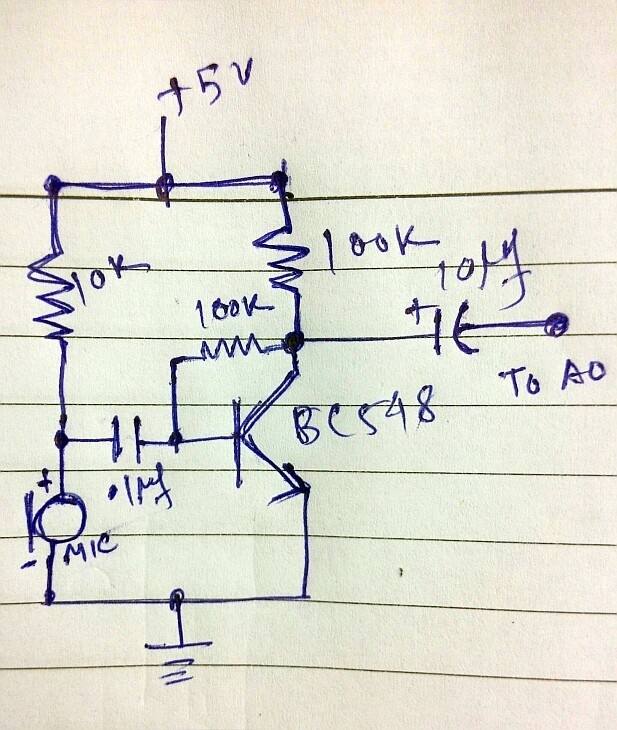
I made the mic preamp out of BC548B.
I bought a class D PAM8403 based amp (very good amplification, very small circuit) board that I connected to the output.
When I connect the preamp directly to the amp the gain is quite good, but when it goes through the arduino the gain drops to less than half. Also a noise is introduced that is bearable (higher noise when powered with arduino usb) though. If I increase the arduino volume (with = key press), even one level the noise goes off, but the sound also goes off. All in all it gives best output with the default (startup) volume settings.
Any idea to get a good gain. Actually I promised my kid to make a walkie talkie out of this; To make the size smaller i bought a pair of arduino pro mini. Please help me out of this problem so that I get succeeded. Attached herewith the pre amp circuit that gives best gain for my case.
One thing I must say is that the noise response is not quite good, because when i provide computer sound output (which is pretty clean and already preamp-ed) i get a noisy output but when it directly connected to the amplifier the sound is just good. Please suggest if anything can be done to it. I am already very much grateful for the library you developed.
The high pitched noise can generally be eliminated just by using a battery for a power supply. It seems to come from the computer/usb.
There are a couple of options to deal with the gain, but since you have your pre-amp already made and an amplifier connected, it might be easiest to adjust things Arduino-wise.
Problem: The RF24Audio lib uses the internal 5v analog reference. If your pre-amp is not adjusted to the right output levels, the input signal just won't be strong enough to provide good gain on the output.
Software solution
Edit the RF24Audio.cpp file
On line 562 find this:
#if defined(ADMUX)
 ADMUX = (pin & 0x07) | _BV(REFS0); //Enable the ADC PIN and set 5v Analog Reference
 #endif
change it to this:
#if defined(ADMUX)
 ADMUX = (pin & 0x07) | _BV(REFS0) | _BV(REFS1); //Enable the ADC PIN and set 1.1v Analog Reference
 #endif
Explanation: The above will configure the library to use the 1.1v analog voltage reference, instead of 5v, which will provide much higher gain.
Note: You may need to lower the output voltage on your pre-amp. I believe this could be done using a variable resistor connected between collector and emitter, or by creating a voltage divider on VCC. You may also want to run the pre-amp off a lower voltage like 3.3v.
External Solution
Use an external voltage source to control the analog reference, possibly a simple voltage divider.
Change the same line as above to ADMUX = (pin & 0x07)
Sorry for my extreme late reply.
As i told earlier i was trying to make 2 way walkie talkie kind of thing. For good range I chose to go with fm transmitter/receiver options, but those are altogether different domain, and really very difficult to get proper result. And i did not get success with fm transmitter thing :(.
So back to pavilion - again pursuing your solution.
I considered using batteries instead.
Could you please tell me how can i connect 9v batteries to run a arduino. Also do i need to use battery at the transmitting end or at both end. For the time being i am just concentrating on getting a clear one way transmission.
Also the software solution seems to be promising. I will apply your suggestions asap and revert.
debojitk:
Could you please tell me how can i connect 9v batteries to run a arduino. Also do i need to use battery at the transmitting end or at both end. For the time being i am just concentrating on getting a clear one way transmission.
External (non-USB) power can come either from an AC-to-DC adapter (wall-wart) or battery. The adapter can be connected by plugging a 2.1mm center-positive plug into the board's power jack. Leads from a battery can be inserted in the Gnd and Vin pin headers of the POWER connector.
The receiver is more important to operate off batteries.
Per the video, there should only be a small hum when actively transmitting:
Do I see a standard low power NRF with whip antenna for BOTH ends ?
How far are you getting with these ?
I have been trying an alternative antenna which I got from ebay THIS ONE it seems to give a bit better performance that the standard antenna that comes with the nrf board
I cant give any values, but I would imagine it is a better listener than transmitter, I get about 25% more distance with it
Do I see a standard low power NRF with whip antenna for BOTH ends ?
How far are you getting with these ?
Thanks, and yup. I haven't actually tested the full range, I've only used them around the house. I pretty much get full house coverage (small house) but in one room I have a large closet with old metal doors which cause spotty reception in that room.
mcnobby:
I have been trying an alternative antenna which I got from ebay THIS ONE it seems to give a bit better performance that the standard antenna that comes with the nrf board
I cant give any values, but I would imagine it is a better listener than transmitter, I get about 25% more distance with it
A properly tuned antenna can make a big difference, and the radiation pattern is important as well. The channel/frequency used in relation to the antenna can also make a bit of a difference. Object penetration seems better with lower channels/frequencies, which would make sense I guess.
Now I am getting some errors in the code.
Whene I run the examples from the library, it gives me error as below.
"
C:\Program Files (x86)\Arduino\libraries\RF24Audio-master\RF24Audio.cpp: In function 'void __vector_11()':
C:\Program Files (x86)\Arduino\libraries\RF24Audio-master\RF24Audio.cpp:460:4: error: 'radio' was not declared in this scope
radio.writeFast(&buffer,32);
^
Error compiling.
This report would have more information with
"Show verbose output during compilation"
enabled in File > Preferences."
It is giving me this error in all the library examples.
Can you help me to solve this error.

 as source i used microphone /Breakout Board for Electret Microphone (Sparkfun BOB-09964) /. I made a small step but, i can here my voice (i can say clearly) in headphones BUT there is additional TERRIBLE interference with something. I attached some record from it and some freq. analyse.