I have a sketch I wrote 8 years for an Arduino Nano but it works (or not) the same on an Uno. It runs one Nanopixel through a rainbow and the other nanopixel simulates a red heartbeat. Recently I rebuilt the sketch to use the rainbow() function, but while it does a great job, is what I originally wanted and makes the sketch substantially smaller, the heartbeat() function (which runs fine when run independently) won't run.
the new code is:
#include <Adafruit_NeoPixel.h>
#ifdef __AVR__
#include <avr/power.h>
#endif
#define NUM_LEDS 2

Adafruit_NeoPixel strip = Adafruit_NeoPixel(NUM_LEDS, 3, NEO_GRB + NEO_KHZ800);
Adafruit_NeoPixel altpixel = Adafruit_NeoPixel(NUM_LEDS, 5, NEO_GRB + NEO_KHZ800);

void setup() {
  strip.setBrightness(100);
  altpixel.setBrightness(100);
  strip.begin();
  altpixel.begin();
}

void loop() {
  heartbeat();
  rainbow(50);
}
//this part should continuously blink pin 5 but doesn't yet
void heartbeat() {
  altpixel.setPixelColor(0, altpixel.Color(255, 0, 0));  // set pixel 5 to red
  altpixel.show();
  delay(50);

  altpixel.setPixelColor(0, altpixel.Color(0, 0, 0));  // set pixel 5 to black
  altpixel.show();
  delay(200);

  altpixel.setPixelColor(0, altpixel.Color(255, 0, 0));  // set pixel 5 to red
  altpixel.show();
  delay(50);

  altpixel.setPixelColor(0, altpixel.Color(0, 0, 0));  // set pixel 5 to black
  altpixel.show();
  delay(700);
}
void rainbow(int wait) {
  for (long firstPixelHue = 0; firstPixelHue < 5 * 65536; firstPixelHue += 256) {
    for (int i = 0; i < strip.numPixels(); i++) {
      int pixelHue = firstPixelHue + (i * 65536L / strip.numPixels());
      strip.setPixelColor(i, strip.gamma32(strip.ColorHSV(pixelHue)));
    }
    strip.show();
    delay(wait);
  }
}
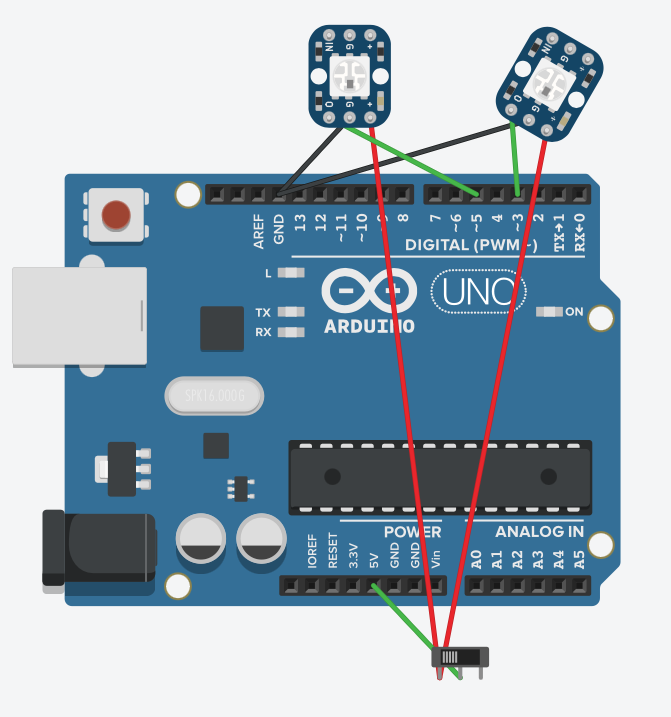
where the rainbow is connected to pin 3 and the heartbeat is pin 5.
the old code, while massive, does what I want except the rainbow transition isn't smooth
#include <Adafruit_NeoPixel.h>
#ifdef __AVR__
#include <avr/power.h>
#endif

#define PIN 3

#define ALTPIN 5


#define NUM_LEDS 2

#define BRIGHTNESS 100

#define BRIGHTNESS2 100

Adafruit_NeoPixel strip = Adafruit_NeoPixel(NUM_LEDS, PIN, NEO_GRB + NEO_KHZ800);

Adafruit_NeoPixel altpixel = Adafruit_NeoPixel(NUM_LEDS, ALTPIN, NEO_GRB + NEO_KHZ800);


int gamma[] = {
  0, 0, 0, 0, 0, 0, 0, 0, 0, 0, 0, 0, 0, 0, 0, 0,
  0, 0, 0, 0, 0, 0, 0, 0, 0, 0, 0, 0, 1, 1, 1, 1,
  1, 1, 1, 1, 1, 1, 1, 1, 1, 2, 2, 2, 2, 2, 2, 2,
  2, 3, 3, 3, 3, 3, 3, 3, 4, 4, 4, 4, 4, 5, 5, 5,
  5, 6, 6, 6, 6, 7, 7, 7, 7, 8, 8, 8, 9, 9, 9, 10,
  10, 10, 11, 11, 11, 12, 12, 13, 13, 13, 14, 14, 15, 15, 16, 16,
  17, 17, 18, 18, 19, 19, 20, 20, 21, 21, 22, 22, 23, 24, 24, 25,
  25, 26, 27, 27, 28, 29, 29, 30, 31, 32, 32, 33, 34, 35, 35, 36,
  37, 38, 39, 39, 40, 41, 42, 43, 44, 45, 46, 47, 48, 49, 50, 50,
  51, 52, 54, 55, 56, 57, 58, 59, 60, 61, 62, 63, 64, 66, 67, 68,
  69, 70, 72, 73, 74, 75, 77, 78, 79, 81, 82, 83, 85, 86, 87, 89,
  90, 92, 93, 95, 96, 98, 99, 101, 102, 104, 105, 107, 109, 110, 112, 114,
  115, 117, 119, 120, 122, 124, 126, 127, 129, 131, 133, 135, 137, 138, 140, 142,
  144, 146, 148, 150, 152, 154, 156, 158, 160, 162, 164, 167, 169, 171, 173, 175,
  177, 180, 182, 184, 186, 189, 191, 193, 196, 198, 200, 203, 205, 208, 210, 213,
  215, 218, 220, 223, 225, 228, 231, 233, 236, 239, 241, 244, 247, 249, 252, 255
};


void setup() {
  //Serial.begin(115200);

  strip.setBrightness(BRIGHTNESS);
  altpixel.setBrightness(BRIGHTNESS2);
  strip.begin();
  altpixel.begin();
  //  strip.show();
  //  altpixel.show();
}

void loop() {

  colorWipe2(strip.Color(255, 0, 0), 3000);  //red

  colorWipe(altpixel.Color(255, 0, 0), 50);
  colorWipe(altpixel.Color(0, 0, 0), 70);
  colorWipe(altpixel.Color(255, 0, 0), 50);
  colorWipe(altpixel.Color(0, 0, 0), 3000);
  colorWipe(altpixel.Color(0, 0, 0), 3000);

  colorWipe2(strip.Color(255, 32, 0), 3000);  //red2

  colorWipe(altpixel.Color(255, 0, 0), 50);
  colorWipe(altpixel.Color(0, 0, 0), 70);
  colorWipe(altpixel.Color(255, 0, 0), 50);
  colorWipe(altpixel.Color(0, 0, 0), 3000);
  colorWipe(altpixel.Color(0, 0, 0), 3000);

  colorWipe2(strip.Color(255, 64, 0), 3000);  //redorange

  colorWipe(altpixel.Color(255, 0, 0), 50);
  colorWipe(altpixel.Color(0, 0, 0), 70);
  colorWipe(altpixel.Color(255, 0, 0), 50);
  colorWipe(altpixel.Color(0, 0, 0), 3000);
  colorWipe(altpixel.Color(0, 0, 0), 3000);

  colorWipe2(strip.Color(255, 96, 0), 3000);  //redorange2

  colorWipe(altpixel.Color(255, 0, 0), 50);
  colorWipe(altpixel.Color(0, 0, 0), 70);
  colorWipe(altpixel.Color(255, 0, 0), 50);
  colorWipe(altpixel.Color(0, 0, 0), 3000);
  colorWipe(altpixel.Color(0, 0, 0), 3000);

  colorWipe2(strip.Color(255, 128, 0), 3000);  //orange

  colorWipe(altpixel.Color(255, 0, 0), 50);
  colorWipe(altpixel.Color(0, 0, 0), 70);
  colorWipe(altpixel.Color(255, 0, 0), 50);
  colorWipe(altpixel.Color(0, 0, 0), 3000);
  colorWipe(altpixel.Color(0, 0, 0), 3000);


  colorWipe2(strip.Color(255, 160, 0), 3000);  //orange2

  colorWipe(altpixel.Color(255, 0, 0), 50);
  colorWipe(altpixel.Color(0, 0, 0), 70);
  colorWipe(altpixel.Color(255, 0, 0), 50);
  colorWipe(altpixel.Color(0, 0, 0), 3000);
  colorWipe(altpixel.Color(0, 0, 0), 3000);

  colorWipe2(strip.Color(255, 192, 0), 3000);  //yelloworange

  colorWipe(altpixel.Color(255, 0, 0), 50);
  colorWipe(altpixel.Color(0, 0, 0), 70);
  colorWipe(altpixel.Color(255, 0, 0), 50);
  colorWipe(altpixel.Color(0, 0, 0), 3000);
  colorWipe(altpixel.Color(0, 0, 0), 3000);

  colorWipe2(strip.Color(255, 224, 0), 3000);  //yelloworange2

  colorWipe(altpixel.Color(255, 0, 0), 50);
  colorWipe(altpixel.Color(0, 0, 0), 70);
  colorWipe(altpixel.Color(255, 0, 0), 50);
  colorWipe(altpixel.Color(0, 0, 0), 3000);
  colorWipe(altpixel.Color(0, 0, 0), 3000);

  colorWipe2(strip.Color(255, 255, 0), 3000);  //yellow

  colorWipe(altpixel.Color(255, 0, 0), 50);
  colorWipe(altpixel.Color(0, 0, 0), 70);
  colorWipe(altpixel.Color(255, 0, 0), 50);
  colorWipe(altpixel.Color(0, 0, 0), 3000);
  colorWipe(altpixel.Color(0, 0, 0), 3000);

  colorWipe2(strip.Color(191, 255, 0), 3000);  //yellow2

  colorWipe(altpixel.Color(255, 0, 0), 50);
  colorWipe(altpixel.Color(0, 0, 0), 70);
  colorWipe(altpixel.Color(255, 0, 0), 50);
  colorWipe(altpixel.Color(0, 0, 0), 3000);
  colorWipe(altpixel.Color(0, 0, 0), 3000);

  colorWipe2(strip.Color(128, 255, 0), 3000);  //yellowgreen

  colorWipe(altpixel.Color(255, 0, 0), 50);
  colorWipe(altpixel.Color(0, 0, 0), 70);
  colorWipe(altpixel.Color(255, 0, 0), 50);
  colorWipe(altpixel.Color(0, 0, 0), 3000);
  colorWipe(altpixel.Color(0, 0, 0), 3000);

  colorWipe2(strip.Color(64, 255, 0), 3000);  //yellowgreen2

  colorWipe(altpixel.Color(255, 0, 0), 50);
  colorWipe(altpixel.Color(0, 0, 0), 70);
  colorWipe(altpixel.Color(255, 0, 0), 50);
  colorWipe(altpixel.Color(0, 0, 0), 3000);
  colorWipe(altpixel.Color(0, 0, 0), 3000);

  colorWipe2(strip.Color(0, 255, 0), 3000);  //green

  colorWipe(altpixel.Color(255, 0, 0), 50);
  colorWipe(altpixel.Color(0, 0, 0), 70);
  colorWipe(altpixel.Color(255, 0, 0), 50);
  colorWipe(altpixel.Color(0, 0, 0), 3000);
  colorWipe(altpixel.Color(0, 0, 0), 3000);

  colorWipe2(strip.Color(0, 255, 128), 3000);  //green2

  colorWipe(altpixel.Color(255, 0, 0), 50);
  colorWipe(altpixel.Color(0, 0, 0), 70);
  colorWipe(altpixel.Color(255, 0, 0), 50);
  colorWipe(altpixel.Color(0, 0, 0), 3000);
  colorWipe(altpixel.Color(0, 0, 0), 3000);

  colorWipe2(strip.Color(0, 255, 224), 3000);  //aqua

  colorWipe(altpixel.Color(255, 0, 0), 50);
  colorWipe(altpixel.Color(0, 0, 0), 70);
  colorWipe(altpixel.Color(255, 0, 0), 50);
  colorWipe(altpixel.Color(0, 0, 0), 3000);
  colorWipe(altpixel.Color(0, 0, 0), 3000);

  colorWipe2(strip.Color(0, 128, 224), 3000);  //aqua2

  colorWipe(altpixel.Color(255, 0, 0), 50);
  colorWipe(altpixel.Color(0, 0, 0), 70);
  colorWipe(altpixel.Color(255, 0, 0), 50);
  colorWipe(altpixel.Color(0, 0, 0), 3000);
  colorWipe(altpixel.Color(0, 0, 0), 3000);

  colorWipe2(strip.Color(0, 0, 255), 3000);  //blue

  colorWipe(altpixel.Color(255, 0, 0), 50);
  colorWipe(altpixel.Color(0, 0, 0), 70);
  colorWipe(altpixel.Color(255, 0, 0), 50);
  colorWipe(altpixel.Color(0, 0, 0), 3000);
  colorWipe(altpixel.Color(0, 0, 0), 3000);

  colorWipe2(strip.Color(32, 0, 255), 3000);  //blue2

  colorWipe(altpixel.Color(255, 0, 0), 50);
  colorWipe(altpixel.Color(0, 0, 0), 70);
  colorWipe(altpixel.Color(255, 0, 0), 50);
  colorWipe(altpixel.Color(0, 0, 0), 3000);
  colorWipe(altpixel.Color(0, 0, 0), 3000);

  colorWipe2(strip.Color(64, 0, 255), 3000);  //purple

  colorWipe(altpixel.Color(255, 0, 0), 50);
  colorWipe(altpixel.Color(0, 0, 0), 70);
  colorWipe(altpixel.Color(255, 0, 0), 50);
  colorWipe(altpixel.Color(0, 0, 0), 3000);
  colorWipe(altpixel.Color(0, 0, 0), 3000);

  colorWipe2(strip.Color(64, 0, 192), 3000);  //purple2

  colorWipe(altpixel.Color(255, 0, 0), 50);
  colorWipe(altpixel.Color(0, 0, 0), 70);
  colorWipe(altpixel.Color(255, 0, 0), 50);
  colorWipe(altpixel.Color(0, 0, 0), 3000);
  colorWipe(altpixel.Color(0, 0, 0), 3000);

  colorWipe2(strip.Color(64, 0, 128), 3000);  //indigo

  colorWipe(altpixel.Color(255, 0, 0), 50);
  colorWipe(altpixel.Color(0, 0, 0), 70);
  colorWipe(altpixel.Color(255, 0, 0), 50);
  colorWipe(altpixel.Color(0, 0, 0), 3000);
  colorWipe(altpixel.Color(0, 0, 0), 3000);

  colorWipe2(strip.Color(128, 0, 192), 3000);  //indigo2

  colorWipe(altpixel.Color(255, 0, 0), 50);
  colorWipe(altpixel.Color(0, 0, 0), 70);
  colorWipe(altpixel.Color(255, 0, 0), 50);
  colorWipe(altpixel.Color(0, 0, 0), 3000);
  colorWipe(altpixel.Color(0, 0, 0), 3000);

  colorWipe2(strip.Color(255, 0, 255), 3000);  //purpleb

  colorWipe(altpixel.Color(255, 0, 0), 50);
  colorWipe(altpixel.Color(0, 0, 0), 70);
  colorWipe(altpixel.Color(255, 0, 0), 50);
  colorWipe(altpixel.Color(0, 0, 0), 3000);
  colorWipe(altpixel.Color(0, 0, 0), 3000);

  colorWipe2(strip.Color(192, 0, 255), 3000);  //purpleb2

  colorWipe(altpixel.Color(255, 0, 0), 50);
  colorWipe(altpixel.Color(0, 0, 0), 70);
  colorWipe(altpixel.Color(255, 0, 0), 50);
  colorWipe(altpixel.Color(0, 0, 0), 3000);
  colorWipe(altpixel.Color(0, 0, 0), 3000);

  colorWipe2(strip.Color(128, 0, 255), 3000);  //violet

  colorWipe(altpixel.Color(255, 0, 0), 50);
  colorWipe(altpixel.Color(0, 0, 0), 70);
  colorWipe(altpixel.Color(255, 0, 0), 50);
  colorWipe(altpixel.Color(0, 0, 0), 3000);
  colorWipe(altpixel.Color(0, 0, 0), 3000);

  colorWipe2(strip.Color(255, 0, 192), 3000);  //violet2

  colorWipe(altpixel.Color(255, 0, 0), 50);
  colorWipe(altpixel.Color(0, 0, 0), 70);
  colorWipe(altpixel.Color(255, 0, 0), 50);
  colorWipe(altpixel.Color(0, 0, 0), 3000);
  colorWipe(altpixel.Color(0, 0, 0), 3000);


  colorWipe2(strip.Color(255, 0, 128), 3000);  //violetred

  colorWipe(altpixel.Color(255, 0, 0), 50);
  colorWipe(altpixel.Color(0, 0, 0), 70);
  colorWipe(altpixel.Color(255, 0, 0), 50);
  colorWipe(altpixel.Color(0, 0, 0), 3000);
  colorWipe(altpixel.Color(0, 0, 0), 3000);

  colorWipe2(strip.Color(255, 0, 64), 3000);  //violetred2

  colorWipe(altpixel.Color(255, 0, 0), 50);
  colorWipe(altpixel.Color(0, 0, 0), 70);
  colorWipe(altpixel.Color(255, 0, 0), 50);
  colorWipe(altpixel.Color(0, 0, 0), 3000);
  colorWipe(altpixel.Color(0, 0, 0), 3000);
}

void colorWipe(uint32_t c, uint8_t wait) {
  for (uint16_t i = 0; i < altpixel.numPixels(); i++) {
    altpixel.setPixelColor(i, c);
    altpixel.show();
    delay(wait);
  }
}

void colorWipe2(uint32_t c, uint8_t wait) {
  for (uint16_t i = 0; i < strip.numPixels(); i++) {
    strip.setPixelColor(i, c);
    strip.show();
    delay(wait);
  }
}


// Input a value 0 to 255 to get a color value.
// The colours are a transition r - g - b - back to r.
uint32_t Wheel(byte WheelPos) {
  WheelPos = 255 - WheelPos;
  if (WheelPos < 85) {
    return strip.Color(255 - WheelPos * 3, 0, WheelPos * 3, 0);
  }
  if (WheelPos < 170) {
    WheelPos -= 85;
    return strip.Color(0, WheelPos * 3, 255 - WheelPos * 3, 0);
  }
  WheelPos -= 170;
  return strip.Color(WheelPos * 3, 255 - WheelPos * 3, 0, 0);
}

uint8_t red(uint32_t c) {
  return (c >> 8);
}
uint8_t green(uint32_t c) {
  return (c >> 16);
}
uint8_t blue(uint32_t c) {
  return (c);
}
Any thoughts? I feel like I'm missing something basic but it's eluding me. Thanks in advance 


