Where can I get the data after grounding that pin to get it to download. Do I use a different program or is it just in the IDE?
Something should be printed out on the IDE serial monitor. It looks like you need to ground that pin and then reset (or cycle the power to) the UNO to get the information to print out.
1 Like
Okay I'll do that right now
This might sound stupid but do I just remove it from it's place or what
I'm not sure I understand. Pin 14 is called A0 on the Arduino UNO header. You need to insert a jumper cable into the female header next to A0 (on the Analog In header) and the other end of the jumper cable goes into the socket on the female header in the position marked GND - there's 2 of them on the POWER header.
EDIT: Ah now I see. If I follow the link on the YouTube page, I find a web page with this drawing:

Now it makes a bit more sense!
OK, so it looks like you need to press and hold the left hand button on the breadboard whilst resetting the UNO.
1 Like
I did change some of the variable assigned but all of it are just the same from the yt video
EDIT: sorry for not including the image of the diagram
OK, do i press this red button on the board? is it the reset button for the UNO?
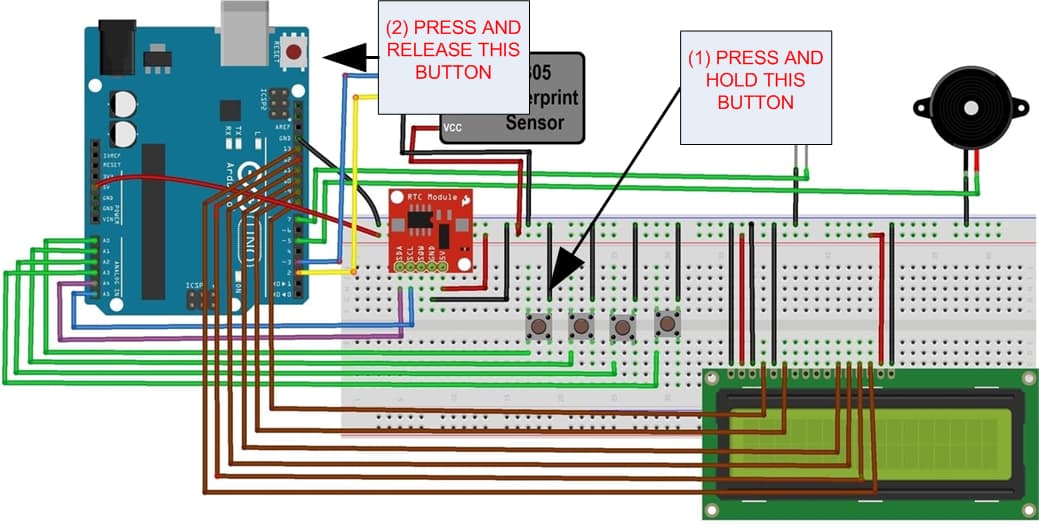
That should cause the code to print something out on the IDE serial monitor. The buzzer should also make a sound and the LCD should say "Downloading Data".
1 Like
Okay, ill do that right now
I swear you just saved me oh my days. I appreciate you so much brother
this is actually for my research

Now, Im just gonna fix my rtc and get the time working properly
I'm also gonna add more users and I'll update you guys how it went
Which version of the IDE are you using ?
2.3.2
This topic was automatically closed 180 days after the last reply. New replies are no longer allowed.