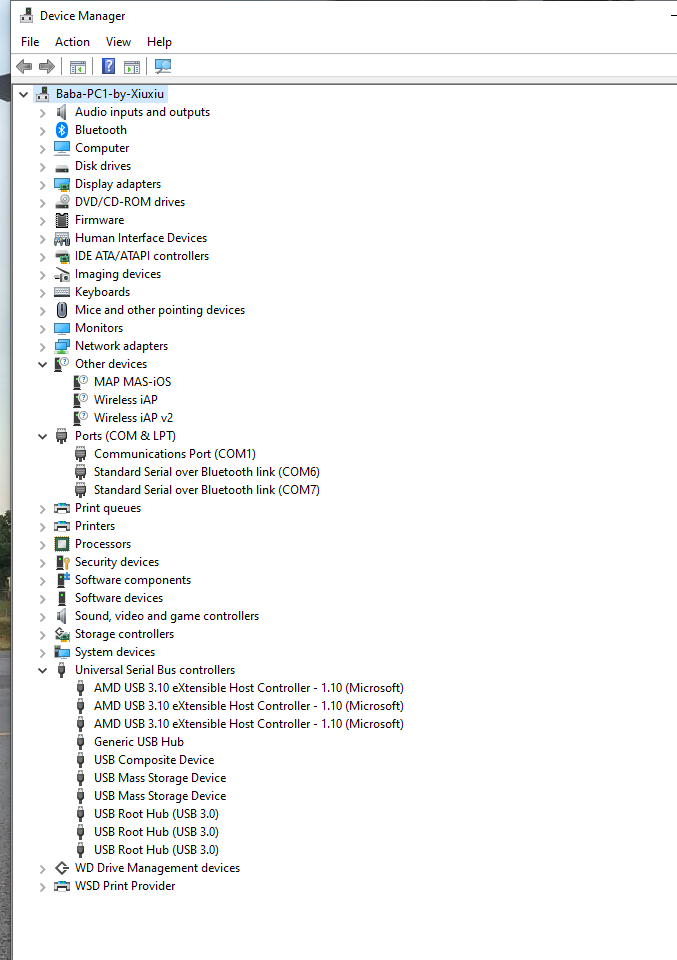
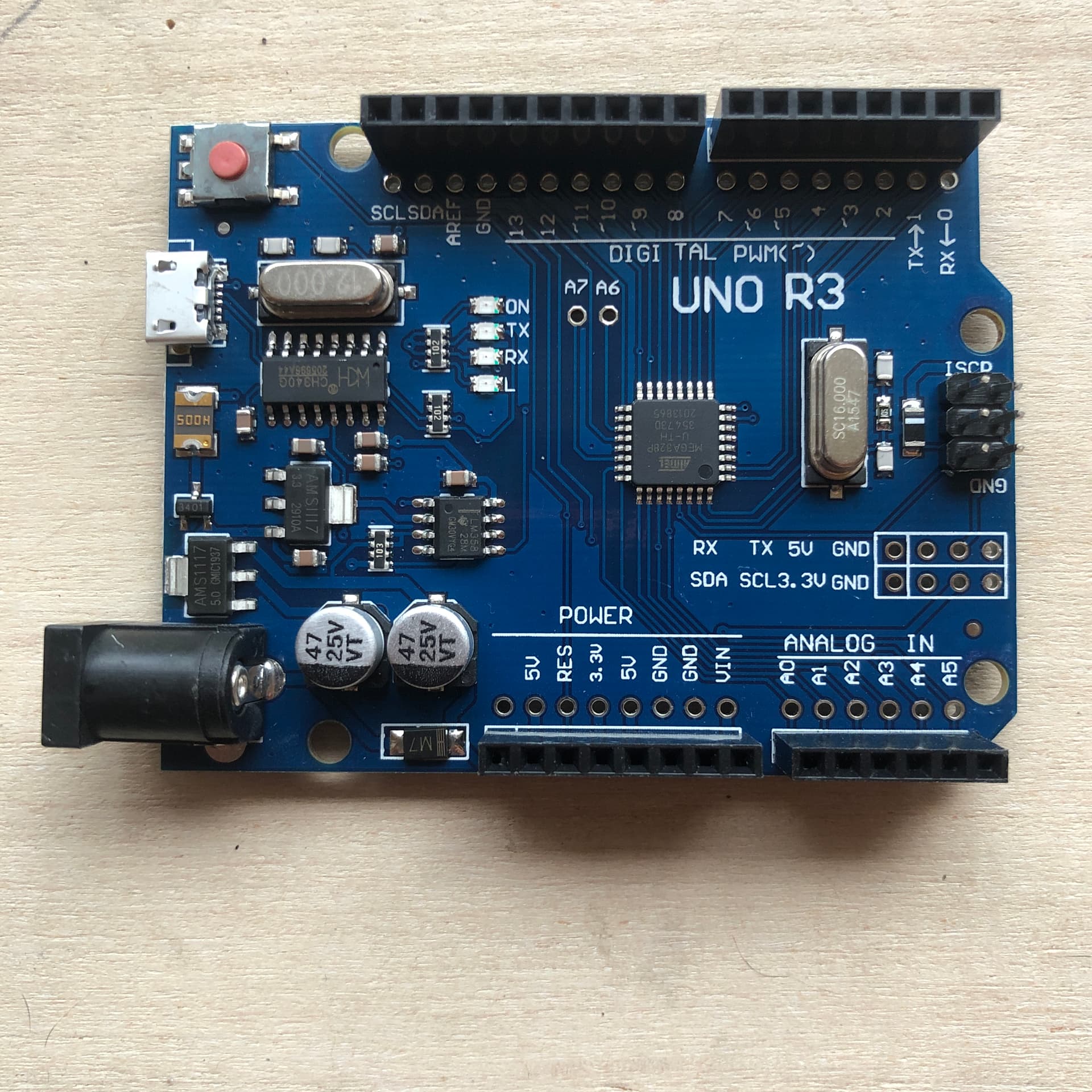
I have beat myself up trying to get two completely different UNO R3 CH340G to show up in Device Manager Win10 Ports or USB serial devices or "Other Devices" to no avail. Nadan, ZIp. Zilch.
Tried different cords. Installed, uninstalled and reinstalled many times the recommended CH341SER files/ drivers. With the UNO cards connected, one red LED steady, one LED blinking red. With UNO cards not connected. Does. Not. Matter.
This is not one bad card, nor a bad cable, but multiple failed attempts with different cards from different suppliers.
After unzipping and running the CH341SER's SETUP.EXE, then doing the INSTALL, with UNO card plugged in, here is what is indicated:
I'm at the end of my resources here, spent the entire afternoon on this mess. I'm thinking why not just use the Tx/Rx pins...the heck with this dumb CH340G mess. Arg. Arg I say. Arg.
"The drive is successfully pre-installed in advance" indicates (to my knowledge) that there is no board; the message would be different if there is a board detected.
So the first thing I would check is the cable. The image of the board seems to show a micro-USB connector and micro-USB cables come in two flavours, power-only and data/sync. It sounds like you're using the first one.
Even if the various USB mini to USB-A cables were of the wrong flavor, there is absolutely no way that the USB-A to USB-B PRINTER Cable I use to comm with various printers would not comm with the UNO card... Cables are not the problem.
USB doesn't work that way; if you get data transfer using the same cables with cameras/phones/etc, then you can assume the cables to be capable of transferring data.
Sounds that way, yeah.
Have you tried a different computer? I know it's a stretch, but it's a process of elimination. Have a laptop lying around somewhere?
I saw something elsewhere on this forum just after replying to your first response concerning same Win10 comm issue, work-around was using WinXP, and found that this is WINDOWS 10 issue as well! My trusty ol Toshiba laptop WinXP recognizes the knockoff UNO in Device MGR / Ports so I think I am over the hump, though haven't done anything other than see this major step FWD...
Maybe - although I've been running 10 for eons and it detects everything just fine - certainly CH340's, which I've used loads of.
If it were a 10-specific problem I would have expected it to be related to driver signing, and this would have involved some alerts/dialogs along the lines of "you're trying to install stuff that we (Microsoft) never approved; up yours" that are pretty difficult to miss (but fortunately, usually possible to evade).
Anyway, we know a couple of things:
Your Arduino clones apparently work OK, as expected.
Your old Toshiba laptop recognizes them just fine and it still boots up. Cool!
Your WIn 10 machine also works fine, given that you can apparently do everything with it, except so far recognizing these CH340's.
So what's left is to figure out what in your Win10 machine makes it that the CH340's don't install - or at least not appear as expected.
Select the striked-out link for WINDOWS OLDER DRIVER VERSION, it works even though it is strike-out font. I have no idea why they have this in strike-out font.
Save ZIP file to your desired location and then transfer (if necessary, e.g. my old WinXP laptop is not connected to the web) extracted file group to an older 32 bit OS computer, such as WinXP.
Connect Arduino w/ CH340G USB to the WinXP PC with apporpriate USB cable.
Extract and open the unzipped "CH340_Windows" file on the older computer, and select the file "SETUP_32.EXE"
On the popup command box select "INSTALL", then wait for the install to complete, which may take several minutes.
When the "INSTALL success" message appears, unplug the Arduino CH340 UNO card from the old PC, and plug it into the newer PC running Win10 and the card will now be recognized and show up in your DEVICE MANAGER / Ports (COMM & LPT).
The screenshot would have been/will be different depending on whether the Arduino is plugged into the PC. If the USB device is enumerated, it will show up somewhere in that tree. If it's a simple case of having the wrong driver installed, it'll usually end up in the Universal Serial Bus controllers category and generally be easily recognizable since it disappears the instant you unplug it.
Yeah, I'm not even...this is an official Win10 OS and I have no other issues with it, so I can live with using my trusty old 32 bit OS. In fact I have a FREE graphics program running on it that is 8 bit that came bundled with my first scanner bed purchased in 1995, it is far better than ANYTHING I've seen since and it was the program that Adobe ripped off, pirated, then started charging a gazillion dollars for since then. I refuse to spend a nickel on anything bearing the Adobe brand, hate them. Also running a freeware solar system programmed by a guy in Switzerland at the same time, it runs everything I need for skywatching, orerry, solar/lunar cycles, planetary info, on and on, this guy was GREAT! I'll gladly share with anyone who has something that can run old 8-bit, this program like the Micrographix PRO LLE is so much better than the stuff you have to pay for now it's ridiculous, seeing as how this stuff is going on 30 years OLD. It's weird to think that I've been using 'puters now for 42 years...longer than so many geeks have even been around, lol.
Can't wait to get some servos working via UNO, and install them to throw turnouts on my HO model railroad I started building in 2022!
YOU GUYS ROCK! Thanks for being here and willing to help me out getting my first - and most certainly NOT my last - Arduino project off the ground. Giant grins!
Go get em! You have liftoff; now enjoy building some code.
I'm still using both scanners I got in the early 2000s since they're still on par with today's technology. One works just like that on Win10 with the original software & drivers; the other needs a little nudge by modifying an INF file and disabling diver signing under Win10. Otherwise, no problems.