I'm working with a rotary encoder (like the one at Rotary Encoder + Extras : ID 377 : $4.50 : Adafruit Industries, Unique & fun DIY electronics and kits) along with an Arduino Uno. I have the encoder portion of it working, but I'm struggling to get the push button worked out.
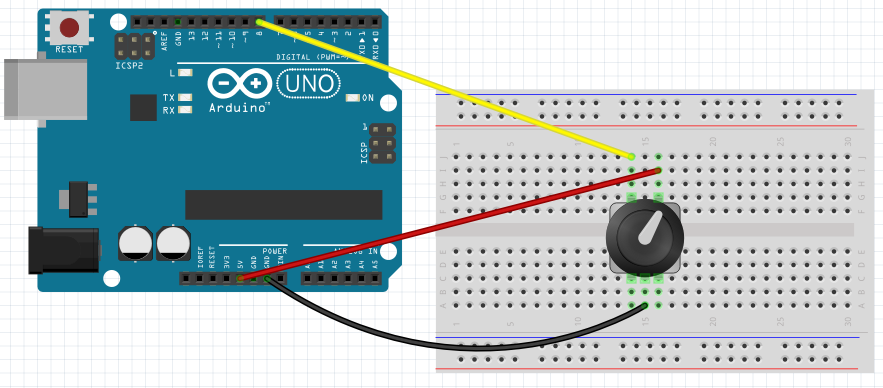
Taking the encoder out of the equation and just focusing on the push button, my wiring looks like this:
For my code, I started out with the standard Button sketch, changed the pin to 8, and added some print statements:
const int buttonPin = 8;     // the number of the pushbutton pin
const int ledPin =  13;      // the number of the LED pin

// variables will change:
int buttonState = 0;         // variable for reading the pushbutton status

void setup() {
    Serial.begin(115200);  // output

  // initialize the LED pin as an output:
  pinMode(ledPin, OUTPUT);
  // initialize the pushbutton pin as an input:
  pinMode(buttonPin, INPUT);
}

void loop(){
  // read the state of the pushbutton value:
  buttonState = digitalRead(buttonPin);

  // check if the pushbutton is pressed.
  // if it is, the buttonState is HIGH:
  if (buttonState == HIGH) {
    // turn LED on:
    digitalWrite(ledPin, HIGH);
    Serial.println("PRESSED");
  }
  else {
    // turn LED off:
    digitalWrite(ledPin, LOW);
    Serial.println("button is off");
  }

  delay(250);
}
When I run my sketch, it starts off fine and for a short time the results are correct - when the push button isn't pressed "button is off" is printed, and when pressed, "PRESSED" is printed, but after a few seconds, buttonState is always HIGH and "PRESSED" is continuously printed (even though the button isn't really pressed).
I've tried adding a resistor on the voltage, like:
...and on the ground, and on the data line as well, but get the same results. I've tried trouble-shooting this but am stumped. Any suggestions?
Thanks,
Jeff

 The switch will be LOW when pressed.