//THIS EXAMPLE SHOWS HOW VVM ESP32 4G LTE MODULE CAN CONNECT TO MQTT PUBLIC BROKER HIVEMQ USING TINYGSMCLIENT AND PUBSUBCLIENT LIBRARY
//THE DEVICE CAN PUBLISH AS WELL AS SUBSCRIBE TOPICS VIA 4G MQTT
//FOR VVM PRODUCT DETAILS VISIT www.vv-mobility.com

#define TINY_GSM_MODEM_SIM7600  // SIM7600 AT instruction is compatible with A7670
#define SerialAT Serial1
#define SerialMon Serial
#define TINY_GSM_USE_GPRS true
#include <TinyGsmClient.h>
#include <SocketIOclient.h>
#include <ArduinoHttpClient.h>
#include <DHT.h>
#include <DHT_U.h>
#include <ArduinoJson.h>
#define RXD2 27    //VVM MODULE RXD INTERNALLY CONNECTED
#define TXD2 26    //VVM MODULE TXD INTERNALLY CONNECTED
#define powerPin 4 ////VVM MODULE ESP32 PIN D4 CONNECTED TO POWER PIN OF A7670C CHIPSET, INTERNALLY CONNECTED
#define DHTPIN 5   // Pin which is connected to the DHT sensor
#define DHTTYPE DHT22   // DHT 22 (AM2302)
#define USE_SERIAL Serial
DHT dht(DHTPIN, DHTTYPE);
JsonDocument doc;
char jsonOutput[128];
const char* serverUrl = "192.168.1.238";
const int serverPort = 3000;


char a, b;

const char apn[]      = ""; //APN automatically detects for 4G SIM, NO NEED TO ENTER, KEEP IT BLANK


TinyGsm        modem(SerialAT);

TinyGsmClient client(modem);
HttpClient http = HttpClient(client, serverUrl, serverPort);
void setup()
{
  Serial.begin(115200);

  pinMode(powerPin, OUTPUT);
  digitalWrite(powerPin, LOW);
  delay(100);
  digitalWrite(powerPin, HIGH);
  delay(1000);
  digitalWrite(powerPin, LOW);

  Serial.println("\nconfiguring VVM Module. Kindly wait");

  delay(10000);

  SerialAT.begin(115200, SERIAL_8N1, RXD2, TXD2);

  dht.begin();
  // Restart takes quite some time
  // To skip it, call init() instead of restart()
  DBG("Initializing modem...");
  if (!modem.init()) {
    DBG("Failed to restart modem, delaying 10s and retrying");
    return;
  }
  // Restart takes quite some time
  // To skip it, call init() instead of restart()
  DBG("Initializing modem...");
  if (!modem.restart()) {
    DBG("Failed to restart modem, delaying 10s and retrying");
    return;
  }

  String name = modem.getModemName();
  DBG("Modem Name:", name);

  String modemInfo = modem.getModemInfo();
  DBG("Modem Info:", modemInfo);

  Serial.println("Waiting for network...");
  if (!modem.waitForNetwork()) {
    Serial.println(" fail");
    delay(5000);
    return;
  }
  Serial.println(" success");

  if (modem.isNetworkConnected()) {
    Serial.println("Network connected");
  }

  // GPRS connection parameters are usually set after network registration
  Serial.print(F("Connecting to "));
  Serial.print(apn);
  if (!modem.gprsConnect(apn)) {
    Serial.println(" fail");
    delay(10000);
    return;
  }
  Serial.println(" success");

  if (modem.isGprsConnected()) {
    Serial.println("LTE module connected");

  }


}

void loop()
{

  // Read temperature and humidity values
  float h = dht.readHumidity();
  float t = dht.readTemperature();

  // Check if any reads failed and exit early (to try again).
  if (isnan(h) || isnan(t)) {
    Serial.println("Failed to read from DHT sensor!");
    return;
  }

  Serial.print("Humidity: ");
  Serial.print(h);
  Serial.print(" %\t");
  Serial.print("Temperature: ");
  Serial.print(t);
  Serial.println(" *C");
  String postData = "{\"temperature\":" + String(t) + ",\"humidity\":" + String(h) + "}";
  http.beginRequest();
  http.post("/api/device-data");
  http.sendHeader("Content-Type", "application/json");
  http.sendHeader("Content-Length", postData.length());

  http.beginBody();
  http.print(postData);


  // read the status code and body of the response
  int statusCode = http.responseStatusCode();
  String response = http.responseBody();

  Serial.print("Status code: ");
  Serial.println(statusCode);
  Serial.print("Response: ");
  Serial.println(response);

  delay(2000); // Delay between sensor readings
}
15:08:57.586 -> Response:
15:08:59.587 -> Humidity: 56.20 %	Temperature: 25.10 *C
An your question is ...?
My question is my sim is able to make gprs connection but not able to send data to my node js server
And you put debug Serial.printXXX everywhere wher you could get useful information and you shared that information?
I am very new to this arduino thing i want solution please correct my code if i am wrong
No way telling anything as all necessary information is missing.
what you want i have given my code and below that the response i am getting it
And what do you see on the serial monitor?
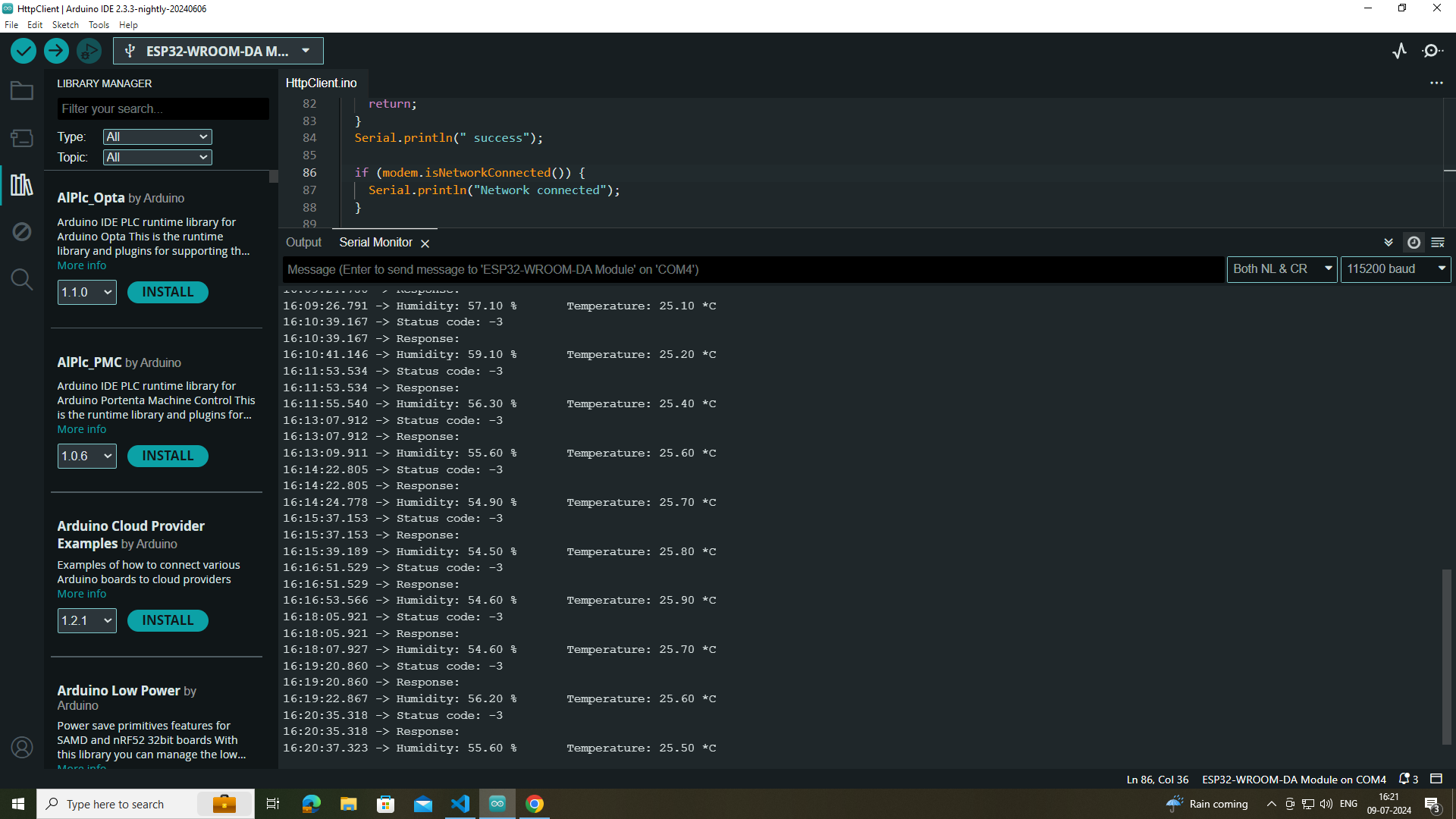
And what does "Status code: -3" tell you?
http connection problem i googled it and searched on chatgpt they states http is not able to make connection
Well then debug the cause of it.
so you are not able to understand my code
LOL ... you don't know your code. You need to post the output of your serial monitor and check if you understand what it tells you. This does not mean you should post a screenshot that does not tell anything useful. You need to check if your code successfully initializes your modem. As the debug statements are ther I doubt "your code" was actually written by you.
I am able to connect my modem to gprs successfully only the issue is when i am trying to send temperature and humidity data to my server it gives me status code -3
Probably you miss the endRequest().
Revisit my code again once
I see a http.beginRequest(); but no http.endRequest().
I modified my code by adding your suggestion but it didn't worked
Where did you add what? When you control the server just do a tcpdump there and look if anything is received.
Other option: try to get some arbitrary html page and dump it on Serial. if that works you have at least a working communication to the outside world.