Verify baud in your sketch (Serial.begin(xxxxx);) matches baud in the IDE (lower right).

Ok, does the distance measured change if you vary the distance from the obstacle ( and does the distance correspond roughly )?
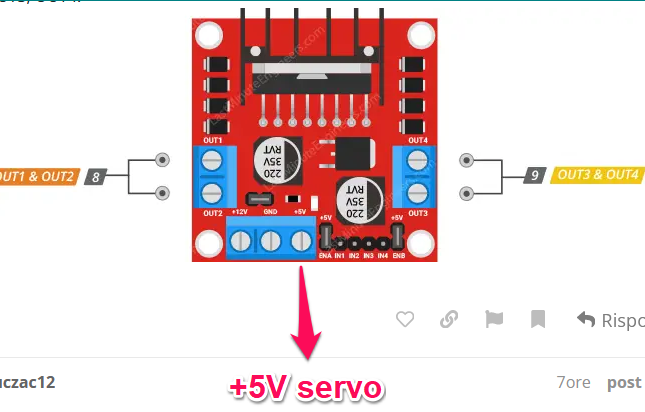
Regarding the servo, connect the servo +5V to the +5V output from the motor controller ( the 3° connection that is unused in your photo ), this is because the servo is quite 'current hungry' and I doubt the esp32 +5V can deliver this current
P.S.
Motors in series and parallel:
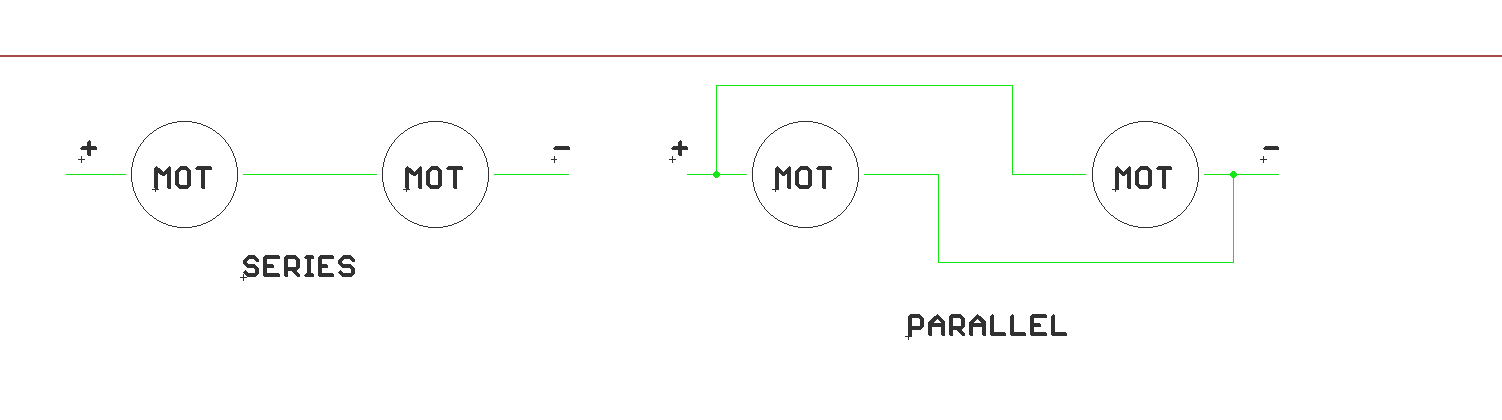
Why do you show motors in series and parallel when this project has two motors and two motor channels on the L298N? There is no need for series or parallel. One motor will be connected to one motor driver channel.
distance measure works, and the the dc motors respond with stop and backing.
but the servo with +5V output from the motor controller , still firmly stuck on the right position...
You will need to show a wiring diagram.
Simply because I asked him if the motors where in series or in parallel, he replied he had now idea how to distinguish
Yes, you did.
Somewhere buried in the 60+ posts is a reference where ESP32 Pin 12 might cause issues due to how that pin is used by the ESP32. Try another pin, for example Pin 19.
As @xfpd suggests, check which pin is connected to the servo.
In your original sketch and in the one I posted it was pin 12, if you have moved to pin 19 ( it is a good idea not to use pin 12 as it may influence the booting ) then update the code SERVO_PIN define from 12 to 19
#define SERVO_PIN 12 //seeting servo pin
also forgot to add that the car has 4 motors ( two for each channel of the controller )
This is a long thread, and things have changed, but Post #51 is the last link I saw to the motors... the title says 2WD...
@zuczac12 - Would you post a drawing and your current code? Thank you.
Ok it has two wheels ( my mistake )
Updated drawing and code would be helpful for everyone.

Yes, that is my simulation (link above) showing two motors with FWD, ENA, REV and a servo using a level shifter ? for the ESP32... and I think my comment on the code was that it was very slow in response to anything.
thats my wiring and i added the echo pin with voltage divider to the common GND.
and thats the new code
#include <ESP32Servo.h>
Servo servo;  // create servo object to control a servo

//mine
#define trigger_pin 23
#define echo_pin 35
// orig
//#define trigger_pin 5
//#define echo_pin 18
#define SERVO_PIN 13 //setting servo pin

// Setting Motor A
int enable1Pin = 14;
int motor1Pin1 = 27;
int motor1Pin2 = 26;

//Settin Motor B
int enable2Pin = 32;
int motor2Pin3 = 25;
int motor2Pin4 = 33;

// Setting PWM properties
//const int frequency = 3000;
//const int pwm_channel = 0;
//const int resolution = 8;

void setup() {
  servo.attach(SERVO_PIN);  // attaches the servo on pin 12 to the servo objectư
  pinMode(trigger_pin,OUTPUT); // attaches the trigger pin to 5 pin
  pinMode(echo_pin,INPUT); // attaches echo pin to 18 pin

  //modding motor A
  pinMode(enable1Pin, OUTPUT);
  pinMode(motor1Pin1, OUTPUT);
  pinMode(motor1Pin2, OUTPUT);

  //modding Motor B
  pinMode(enable2Pin, OUTPUT);
  pinMode(motor2Pin3, OUTPUT);
  pinMode(motor2Pin4, OUTPUT);

  // initaite serial monitor
  Serial.begin(9600);
}

void loop() {
  //default moving forward
  MoveForward();
  delay(200);

  //centering servo
  servo.write(90);
  Serial.println("servo centering");
  delay(200);
  int CurrentDistance = DistanceMeasure();

  if(CurrentDistance<20){
    int CalculatedDistanceLeft = 0; //setting var for left and right distances
    int CalculatedDistanceRight = 0;
    delay(200);

    //car will stop
    StopCar();
    delay(200);

    //car backwards
    MoveBackward();
    delay(200);

    //left distance calc
    CalculatedDistanceLeft = ServoLookLeft();
    delay(200);

    //right  distance calc
    CalculatedDistanceRight = ServoLookRight(); //right distance calc
    delay(200);

    //calcauting shortest distance
    if(CalculatedDistanceRight <= CalculatedDistanceLeft)
      {TurnLeft();}
    else
      {TurnRight();}
  }
}


//servo seek clear path funcs


//getting distance from hc-sr04
//sro4 calc distance
int DistanceMeasure(){
  long t;    //var time to calculate distance
  float distance; //var to store diatnce

  //setting hc-sro4
  digitalWrite(trigger_pin,LOW);
  delayMicroseconds(5);
  digitalWrite(trigger_pin,HIGH);
  delayMicroseconds(100);
  digitalWrite(trigger_pin,LOW);

  //time to singanl get back
  t = pulseIn(echo_pin, HIGH);

  //calculation of distance
  distance = (t*0.034)/2;

  Serial.print("Distance (cm): ");
  Serial.print(distance);
  Serial.print(" Duration (us): ");
  Serial.println(t);
  return distance;
}


//servo turn left
int ServoLookLeft(){
  Serial.println("ServoLookLeft");
  int distanceLeft = 0;
  delay(500);

  servo.write(180); //lefting servo and taking value
  delay(2000);
  distanceLeft = DistanceMeasure();
  return distanceLeft;
}


//servo turn right
int ServoLookRight(){
  Serial.println("ServoLookRight");
  int ditanceRight = 0;
  delay(500);

  servo.write(0); //lefting servo and taking value
  delay(2000);
  ditanceRight = DistanceMeasure();
  return ditanceRight;
}


int SeekClearPath(){
  Serial.println("SeekClearPath");
  int ditanceRight = 0;
  int ditanceLeft = 0;

  ditanceRight=ServoLookRight();
  ditanceLeft=ServoLookLeft();
  //lcd.clear();

  //centering  servo back
  servo.write(90);
  delay(1000);
}


//car movement functions

//move forward
void MoveForward(){
  Serial.println("MoveForward");
  //Set speed motor A and B
  analogWrite(enable1Pin,200);
  analogWrite(enable2Pin,200);

  digitalWrite(motor1Pin1, LOW);
  digitalWrite(motor1Pin2, HIGH);
  digitalWrite(motor2Pin3, HIGH);
  digitalWrite(motor2Pin4, LOW);
  //lcd.clear();
}

//move backward
void MoveBackward(){
  Serial.println("MoveBackward");
  analogWrite(enable1Pin,200);
  analogWrite(enable2Pin,200);

  digitalWrite(motor1Pin1, HIGH);
  digitalWrite(motor1Pin2, LOW);
  digitalWrite(motor2Pin3, LOW);
  digitalWrite(motor2Pin4, HIGH);
  //lcd.clear();
  delay(700);
}

//turn car left
void TurnLeft(){
  Serial.println("TurnLeft");
   //Set speed motor A and B
  analogWrite(enable1Pin,200);
  analogWrite(enable2Pin,200);

  digitalWrite(motor1Pin1, LOW);
  digitalWrite(motor1Pin2, HIGH);
  digitalWrite(motor2Pin3, LOW);
  digitalWrite(motor2Pin4, LOW);
  //lcd.clear();
  delay(850);

  //Stop motor for half second
  StopCar();
}


//turn car  right
void TurnRight(){
  Serial.println("TurnRight");
   //turn right
  analogWrite(enable1Pin,200);
  analogWrite(enable2Pin,200);

  digitalWrite(motor1Pin1, LOW);
  digitalWrite(motor1Pin2, LOW);
  digitalWrite(motor2Pin3, LOW);
  digitalWrite(motor2Pin4, HIGH);
  //lcd.clear();
  delay(850);

  //Stop motor for half second
  StopCar();
}

// stop car
void StopCar(){
  Serial.println("StopCar");
  analogWrite(enable1Pin,0);
  analogWrite(enable2Pin,0);

  digitalWrite(motor1Pin1,LOW);
  digitalWrite(motor1Pin2, LOW);
  digitalWrite(motor2Pin3,LOW);
  digitalWrite(motor2Pin4, LOW);
  delay(700);
}
Your drawing shows Servo on Pin 19 and your code shows Servo on Pin 13. You need to make those agree.
fixed it
Very good!
with the usb into the esp32 the servo was stuck.
supplied the esp32 with 9v battery ,and somehow servo moved.
but now the wheels wont spin.