Prompted by a recent topic on debugging using the Uno R4 WiFi where I discovered that the board has an on-board debug probe, I thought that I would give it a try, but have hit a problem
Details :
IDE 2.3.3
OS Windows 11
Board selected Arduino UNO R4 WiFi
Board files version 1.2.2
Programmer selected from Tools/Programmer ARM CMIS_DAP compatible
The sketch
int x = 123;

void setup()
{
	Serial.begin(115200);
}

void loop()
{
}
The sketch has been set to "Optimize for debugging", verified and uploaded
Clicking the Start Debugging button produces the following output
[2024-11-18T08:11:00.575Z] SERVER CONSOLE DEBUG: onBackendConnect: gdb-server session connected. You can switch to "DEBUG CONSOLE" to see GDB interactions.
"C:\\Users\\micro\\AppData\\Local\\Arduino15\\packages\\arduino\\tools\\openocd\\0.11.0-arduino2/bin/openocd" -c "gdb_port 50000" -c "tcl_port 50001" -c "telnet_port 50002" -s "c:\\Users\\micro\\AppData\\Local\\Temp\\.arduinoIDE-unsaved20241018-3632-fb8ek5.pcshg\\sketch_nov18a" -f "C:/Program Files/Arduino IDE/resources/app/plugins/cortex-debug/extension/support/openocd-helpers.tcl" -f interface/cmsis-dap.cfg -f "C:\\Users\\micro\\AppData\\Local\\Arduino15\\packages\\arduino\\hardware\\renesas_uno\\1.2.2/debugger/select_swd.cfg" -f "C:\\Users\\micro\\AppData\\Local\\Arduino15\\packages\\arduino\\hardware\\renesas_uno\\1.2.2/debugger/R7FA4M1AB.cfg"
Open On-Chip Debugger 0.11.0+dev-gab95bac57-dirty (2021-05-11-10:45)
Licensed under GNU GPL v2
For bug reports, read
        http://openocd.org/doc/doxygen/bugs.html
CDRTOSConfigure
swd
adapter speed: 1000 kHz

Info : Listening on port 50001 for tcl connections
Info : Listening on port 50002 for telnet connections
Error: unable to open CMSIS-DAP device 0x2341:0x1002
Error: unable to find a matching CMSIS-DAP device

[2024-11-18T08:11:00.722Z] SERVER CONSOLE DEBUG: onBackendConnect: gdb-server session closed
GDB server session ended. This terminal will be reused, waiting for next session to start...
Is there anything else that I need to set up to use the debugger ?
I encountered this error once when I was experimenting with using different Windows drivers for the CMSIS-DAP USB device of the UNO R4 WiFi, which is used by the Arduino IDE debugger.
Try this:
Download the "Zadig" driver installation tool from this website: http://zadig.akeo.ie/
Plug your USBasp into your computer.
Start "Zadig".
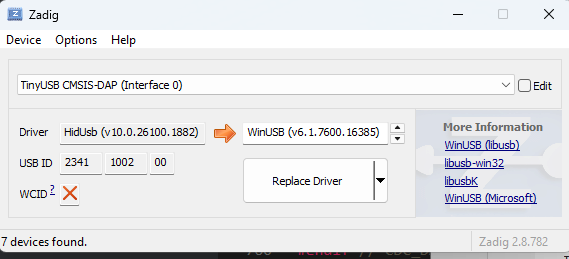
Select "TinyUSB CMSIS-DAP" from the drop-down menu in the "Zadig" window. If it doesn't show up on the menu, then select Options > List all devices from the Zadig menus and check again. The board also produces another USB device with the similar name "TinyUSB CDC". This device is not used by Arduino IDE's debugger, and uses a different driver, so make sure you select the correct device.
Now check to see which driver is shown in the "Driver" field of the Zadig window.
For example, here you can see that the "HidUsb" driver is being used for my board:
(ignore the driver name field to the right. That is the driver that would be installed if you clicked the "Replace Driver" button, not the one that is currently in use. In this case we are only using Zadig as a convenient way to see which driver is in use, rather than as a driver installation tool as usual.)
From my experiments, this is the correct driver. If you find that a different driver is being used for your board, let me know and I'll provide instructions for getting it to use HidUsb.
I have followed the instructions in https://docs.arduino.cc/tutorials/uno-r4-wifi/debugger/ and the board is connected directly to the PC and I can upload sketches and use the Serial monitor. The programmer is set to ARM CMIS-DAP compatible as per the instructions
However, when clicking the "Start Debugging" icon, after a short time with the "Getting debug info..." being displayed the debugger fails to start with the message
"OpenOCD GDB Server Quit Unexpectedly. See gdb-server output for more details".
The full gdb-server output is as follows
Waiting for gdb server to start...[2025-02-14T08:40:50.352Z] SERVER CONSOLE DEBUG: onBackendConnect: gdb-server session connected. You can switch to "DEBUG CONSOLE" to see GDB interactions.
"C:\\Users\\micro\\AppData\\Local\\Arduino15\\packages\\arduino\\tools\\openocd\\0.11.0-arduino2/bin/openocd" -c "gdb_port 50000" -c "tcl_port 50001" -c "telnet_port 50002" -s "c:\\Users\\micro\\Documents\\Arduino\\___dummy_save" -f "C:/Users/micro/AppData/Local/Programs/arduino-ide/resources/app/plugins/cortex-debug/extension/support/openocd-helpers.tcl" -f interface/cmsis-dap.cfg -f "C:\\Users\\micro\\AppData\\Local\\Arduino15\\packages\\arduino\\hardware\\renesas_uno\\1.3.2/debugger/select_swd.cfg" -f "C:\\Users\\micro\\AppData\\Local\\Arduino15\\packages\\arduino\\hardware\\renesas_uno\\1.3.2/debugger/R7FA4M1AB.cfg"
Open On-Chip Debugger 0.11.0+dev-gab95bac57-dirty (2021-05-11-10:45)
Licensed under GNU GPL v2
For bug reports, read
        http://openocd.org/doc/doxygen/bugs.html
CDRTOSConfigure
swd
adapter speed: 1000 kHz

Info : Listening on port 50001 for tcl connections
Info : Listening on port 50002 for telnet connections
Error: unable to open CMSIS-DAP device 0x2341:0x1002
Error: unable to find a matching CMSIS-DAP device

[2025-02-14T08:40:50.475Z] SERVER CONSOLE DEBUG: onBackendConnect: gdb-server session closed
GDB server session ended. This terminal will be reused, waiting for next session to start...
I anm using Windows 11, my IDE version is 2.3.4 and the Uno R4 boards package is 1.3.2
Any ideas as to the problem and how I can move forward with this to diagnose what is causing the problem and how to fix it ?
Yes,
Sometimes, I encountered the same error. At that time, I closed the gdb-server tab, then retry to push the debug button.
I'm sorry I don't have more idea I hope you'll get good information from Windows user!
Just in case, I'll post the message I get when it's successful.
Open On-Chip Debugger 0.11.0+dev-gab95bac57-dirty (2021-05-11-10:57)
Licensed under GNU GPL v2
For bug reports, read
        http://openocd.org/doc/doxygen/bugs.html
CDRTOSConfigure
swd
adapter speed: 1000 kHz

Info : Listening on port 50001 for tcl connections
Info : Listening on port 50002 for telnet connections
Info : CMSIS-DAP: SWD  Supported
Info : CMSIS-DAP: FW Version = 2.0.0
Info : CMSIS-DAP: Serial# = 123456789101112
Info : CMSIS-DAP: Interface Initialised (SWD)
Info : SWCLK/TCK = 0 SWDIO/TMS = 0 TDI = 0 TDO = 0 nTRST = 0 nRESET = 0
Info : CMSIS-DAP: Interface ready
Info : clock speed 1000 kHz
Info : SWD DPIDR 0x5ba02477
Info : ra4m1.cpu: hardware has 6 breakpoints, 4 watchpoints
Info : starting gdb server for ra4m1.cpu on 50000
Info : Listening on port 50000 for gdb connections
Info : accepting 'gdb' connection on tcp/50000
target halted due to debug-request, current mode: Thread
xPSR: 0x21000000 pc: 0x00009d80 msp: 0x20007ec8
target halted due to debug-request, current mode: Thread
xPSR: 0x01000000 pc: 0x00001f34 msp: 0x20003990
force hard breakpoints
I don't think that many people are using the debug features.... Anyway, I solved the problem I had because I was not hooked DIRECTLY to my laptop like I said. I was using a USB hub. Once I got that out of the picture, I was able to debug. New laptops just have 2 or 3 USB c ports, and 1 is power... All my peripheral devices seem to be USB2. So, hubs
As an aside, I am in awe of people developing code only using print statements. Serious respect.
Hi @UKHeliBob. Do you have access to any other computers/machines you can try it on?
I ask because I have one specific Windows 11 machine where I encounter this problem, but it works just fine on all my other machines (including virtual machines running on the same computer as the problematic machine, with the same USB connection to the board).
On that one problematic machine, the error occurs even if I only run the openocd command directly. And that command is identical/equivalent to the command used on the other machines. So it isn't a problem caused by Arduino IDE.
The problem also occurs with other CMSIS-DAP devices; not solely with the UNO R4 WiFi.
I have tried all sorts of things with the drivers and security settings on the problematic machine, but never managed to find a solution. Everything about the USB device looks the same on the problematic Windows machine as on the working machines.
The problematic machine is one where I have performed lots of experiments and has all sorts of things installed. The working machines are closer to a vanilla installation, though still have various things installed that are common for an Arduino user. I get the feeling that I could work around the problem by reinstalling Windows on that machine but I haven't been motivated to try it as I can always just switch to a working machine when I need to use a CMSIS-DAP device.
I don't have another Win 11 PC to try but starting a debugging session on a Win 10 PC fails in the same way. Having said that, the Win 10 PC used to be mine so has broadly the same range of applications installed as my main Win 11 PC
I have been considering setting the Win 11 PC back to its factory settings as it is not quite set up in the way that I would like, but I cannot summon up the energy to do it at the moment
I have now been able to try the debugger on a Win 10 PC that has almost nothing else installed on it except IDE 2.3.4 which I installed to test the debugger
Unfortunately the same error occurs and the debugger will not run. The common factor is the board. I have reverted to an earlier version of the firmware then updated it to 0.4.1 again, all to no avail
This portion of the error message
Error: unable to open CMSIS-DAP device 0x2341:0x1002
Error: unable to find a matching CMSIS-DAP device
refers to what seems to be the address of the onboard debugger. Can I confirm this in some way and attempt to connect to it by some other means such as running openocd manually ?
I have a problem with using the debugger with my Uno R4 Wifi
I am using IDE 2.3.5 on Windows 11 and have firmware 0.6.0 installed using the firmware updater. The Blink example has been uploaded to the board and it works correctly. The sketch is flagged as "Optimise for Debugging" in the IDE and I am running the IDE as an Administrator and I have no breakpoints set
Clicking the "start Debugging" button causes this message to be shown in the Output window of the IDE
The gdb-server window has the following in it
Waiting for gdb server to start...[2025-06-24T09:14:34.698Z] SERVER CONSOLE DEBUG: onBackendConnect: gdb-server session connected. You can switch to "DEBUG CONSOLE" to see GDB interactions.
"C:\\Users\\micro\\AppData\\Local\\Arduino15\\packages\\arduino\\tools\\openocd\\0.11.0-arduino2/bin/openocd" -c "gdb_port 50000" -c "tcl_port 50001" -c "telnet_port 50002" -s "c:\\Users\\micro\\AppData\\Local\\Temp\\.arduinoIDE-unsaved2025524-23028-1m9nm1e.bcei\\Blink" -f "C:/Program Files/Arduino IDE/resources/app/plugins/cortex-debug/extension/support/openocd-helpers.tcl" -f interface/cmsis-dap.cfg -f "C:\\Users\\micro\\AppData\\Local\\Arduino15\\packages\\arduino\\hardware\\renesas_uno\\1.4.1/debugger/select_swd.cfg" -f "C:\\Users\\micro\\AppData\\Local\\Arduino15\\packages\\arduino\\hardware\\renesas_uno\\1.4.1/debugger/R7FA4M1AB.cfg"
Open On-Chip Debugger 0.11.0+dev-gab95bac57-dirty (2021-05-11-10:45)
Licensed under GNU GPL v2
For bug reports, read
        http://openocd.org/doc/doxygen/bugs.html
CDRTOSConfigure
swd
adapter speed: 1000 kHz

Info : Listening on port 50001 for tcl connections
Info : Listening on port 50002 for telnet connections
Error: unable to open CMSIS-DAP device 0x2341:0x1002
Error: unable to find a matching CMSIS-DAP device

[2025-06-24T09:14:34.812Z] SERVER CONSOLE DEBUG: onBackendConnect: gdb-server session closed
GDB server session ended. This terminal will be reused, waiting for next session to start...
The problem seems to be centered around
Error: unable to open CMSIS-DAP device 0x2341:0x1002
Error: unable to find a matching CMSIS-DAP device
I have never been able to run the debugger, which is frustrating, although I have tried it with several versions of the IDE and firmware over a period of about a year
I was prompted to try again having seen your latest update to Arduino Uno R4 debugger "Quit Unexpectedly" but thought it best to start a new topic rather than hijacking that one as the problem seems to be slightly different
Any help that you can give would be appreciated. Let me know if you need more information
I just checked again on that machine and now the fault does not occur. That is unfortunate because it is difficult to perform any investigation when I can't personally reproduce the fault.
I did see one report of a possible solution:
I did experience the same problem with the Zero board a the time I was having it with the UNO R4 WiFi, so the fact that the topic is about a Zero does not necessarily mean it is irrelevant.
However, I'm not sure the problem reported in that forum topic is the same one you are experiencing (which I also experienced). I say this because the error message shared in that topic consists only of:
Error: unable to open CMSIS-DAP device 0x3eb:0x2157
whereas the error message we encountered has an additional error:
(note the presence of the "unable to find a matching CMSIS-DAP device" error)
but maybe it is worth giving OpenOCD 0.12.0 a try, lacking any better ideas.
I can't vouch for the link provided in that topic as a source of OpenOCD. I would suggest instead obtaining it from the link under the "Assets" section of the release in the official OpenOCD GitHub repository:
 If it doesn't show up on the menu, then select Options > List all devices from the Zadig menus and check again.
 The board also produces another USB device with the similar name "TinyUSB CDC". This device is not used by Arduino IDE's debugger, and uses a different driver, so make sure you select the correct device.




 I hope you'll get good information from Windows user!
