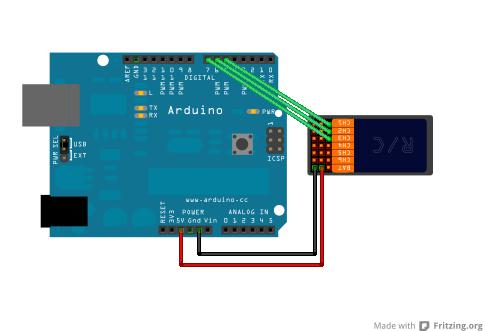
I have a simple RC receiver, transmitter, an Arduino Mega, and an S51 servo.
I want to write my own code to control my servo, but if I send a signal from the transmitter, I want the RC transmitter to override anything that is happening in the code.
I cannot seem to find a single example of this override online. This should be very easy.
So far I connected the servo to the RC receiver and the receiver to the Arduino Mega and I am able to control it through the RC transmitter.
// First Example in a series of posts illustrating reading an RC Receiver with
// micro controller interrupts.
//
// Subsequent posts will provide enhancements required for real world operation
// in high speed applications with multiple inputs.
//
// http://rcarduino.blogspot.com/
//
// Posts in the series will be titled - How To Read an RC Receiver With A Microcontroller

// See also http://rcarduino.blogspot.co.uk/2012/04/how-to-read-multiple-rc-channels-draft.html

#define THROTTLE_SIGNAL_IN 0 // INTERRUPT 0 = DIGITAL PIN 2 - use the interrupt number in attachInterrupt
#define THROTTLE_SIGNAL_IN_PIN 2 // INTERRUPT 0 = DIGITAL PIN 2 - use the PIN number in digitalRead

#define NEUTRAL_THROTTLE 1500 // this is the duration in microseconds of neutral throttle on an electric RC Car
volatile int val;

volatile int nThrottleIn = NEUTRAL_THROTTLE; // volatile, we set this in the Interrupt and read it in loop so it must be declared volatile
volatile unsigned long ulStartPeriod = 0; // set in the interrupt
volatile boolean bNewThrottleSignal = false; // set in the interrupt and read in the loop
// we could use nThrottleIn = 0 in loop instead of a separate variable, but using bNewThrottleSignal to indicate we have a new signal
// is clearer for this first example

#include <Servo.h>
Servo servo;
#define SERVO_PIN 3

void setup()
{
  // tell the Arduino we want the function calcInput to be called whenever INT0 (digital pin 2) changes from HIGH to LOW or LOW to HIGH
  // catching these changes will allow us to calculate how long the input pulse is
  attachInterrupt(THROTTLE_SIGNAL_IN, calcInput, CHANGE);
  servo.attach(SERVO_PIN);
  Serial.begin(9600);
}

void loop()
{
  // if a new throttle signal has been measured, lets print the value to serial, if not our code could carry on with some other processing
  if (bNewThrottleSignal)
  {

    //val = map(nThrottleIn, 1092, 1928, 0, 180);
    Serial.println(nThrottleIn);
    delay(100);
    //servo.write(val);

    // set this back to false when we have finished
    // with nThrottleIn, while true, calcInput will not update
    // nThrottleIn
    bNewThrottleSignal = false;
  }

   else {
    Serial.println("Bla bla bla, we are here because the transmitter is not on");
    delay(100);
   }

}


void calcInput()
{
  // if the pin is high, its the start of an interrupt
  if (digitalRead(THROTTLE_SIGNAL_IN_PIN) == HIGH)
  {
    // get the time using micros - when our code gets really busy this will become inaccurate, but for the current application its
    // easy to understand and works very well
    ulStartPeriod = micros();
  }
  else
  {
    // if the pin is low, its the falling edge of the pulse so now we can calculate the pulse duration by subtracting the
    // start time ulStartPeriod from the current time returned by micros()
    if (ulStartPeriod && (bNewThrottleSignal == false))
    {
      nThrottleIn = (int)(micros() - ulStartPeriod);
      ulStartPeriod = 0;

      // tell loop we have a new signal on the throttle channel
      // we will not update nThrottleIn until loop sets
      // bNewThrottleSignal back to false
      bNewThrottleSignal = true;
    }
  }
}