Bonjour,
J'utilise l'IDE 2.1.1
Comme le titre l'indique j'ai un pb avec cet écran et son interface Adafruit RA8875
J'ai eu d'abord un écran tactile capacitif Adafruit 2,8" avec les bibliothèques Adafruit_STMPE610 et ILI9341, je n'ai aucun pb tactile ou graphique avec cet écran, mais il est trop petit dans la voiture.
J'ai donc maintenant l'Adafruit 7" tft 2354, l'interface Adafruit RA8875, les bibliothèques Adafruit GFX et RA8875.
Pour le côté Graphics ou Text de l'écran, pas de problème, c'est le codage côté Touch qui est pénible.
Vu que cet écran servira d'affichage et uniquement de boutons à toucher, c'est embètant.
Il doit servir à la lecture des paramètres moteur et à la commande de certains organes, dont le ventilo en PWM via thermostat en PID, donc que le touch soit interprété comme étant sur le bon bouton , ça aide 
De nombreuses heures de test de code et de recherche web pour enfin obtenir un résultat positif pour une action tactile.
J'espère que je publierai correctement mon code, j'essaie d'expliquer l'objectif du code dans mes commentaires (désolé sont en anglais) pour résoudre les problèmes tactiles de l'écran tft. Je ne sais pas si les couleurs du code sont OK dans le message ?
Vous pouvez sauter rapidement la partie graphique, il n'y a aucun problème avec ça
Pour résumer : j'ai un problème de calibrage, les valeurs de cet écran stockées dans le RA8875 sont erronées, je les ai donc corrigées dans le code ci-dessous, et j'ai également esayyé d'avoir pour UN touch, UN seul point graphique à l'écran, j'ai eu plusieurs points avant d'utiliser le code ci-dessous (et aux mauvais endroits sans mon code d'étalonnage)
Je me demande même si mon écran tft Adafruit ou mon matériel RA8875 fonctionnent bien ? ?
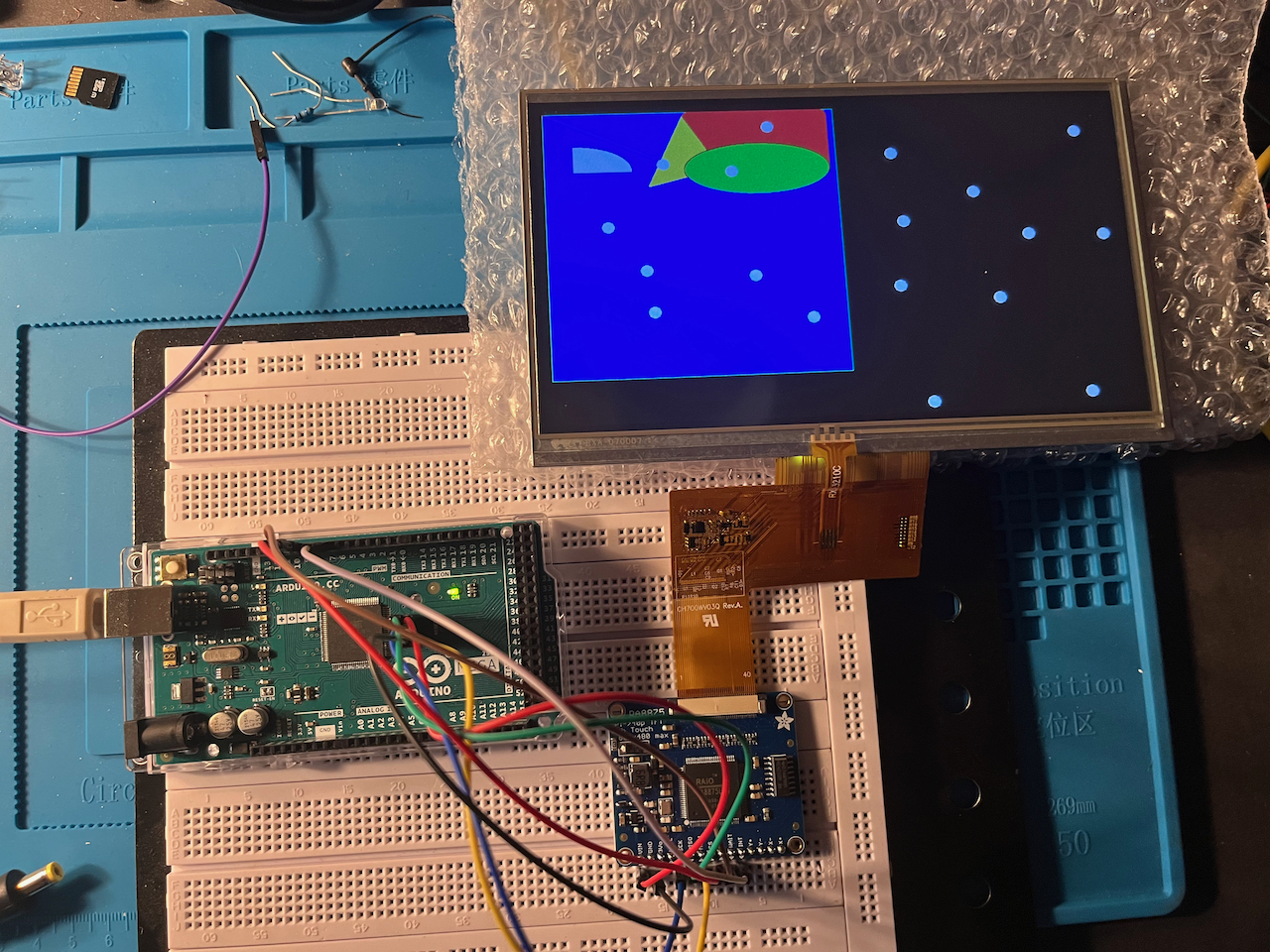
image du résultat avec ce code sans point érroné
Good touch points
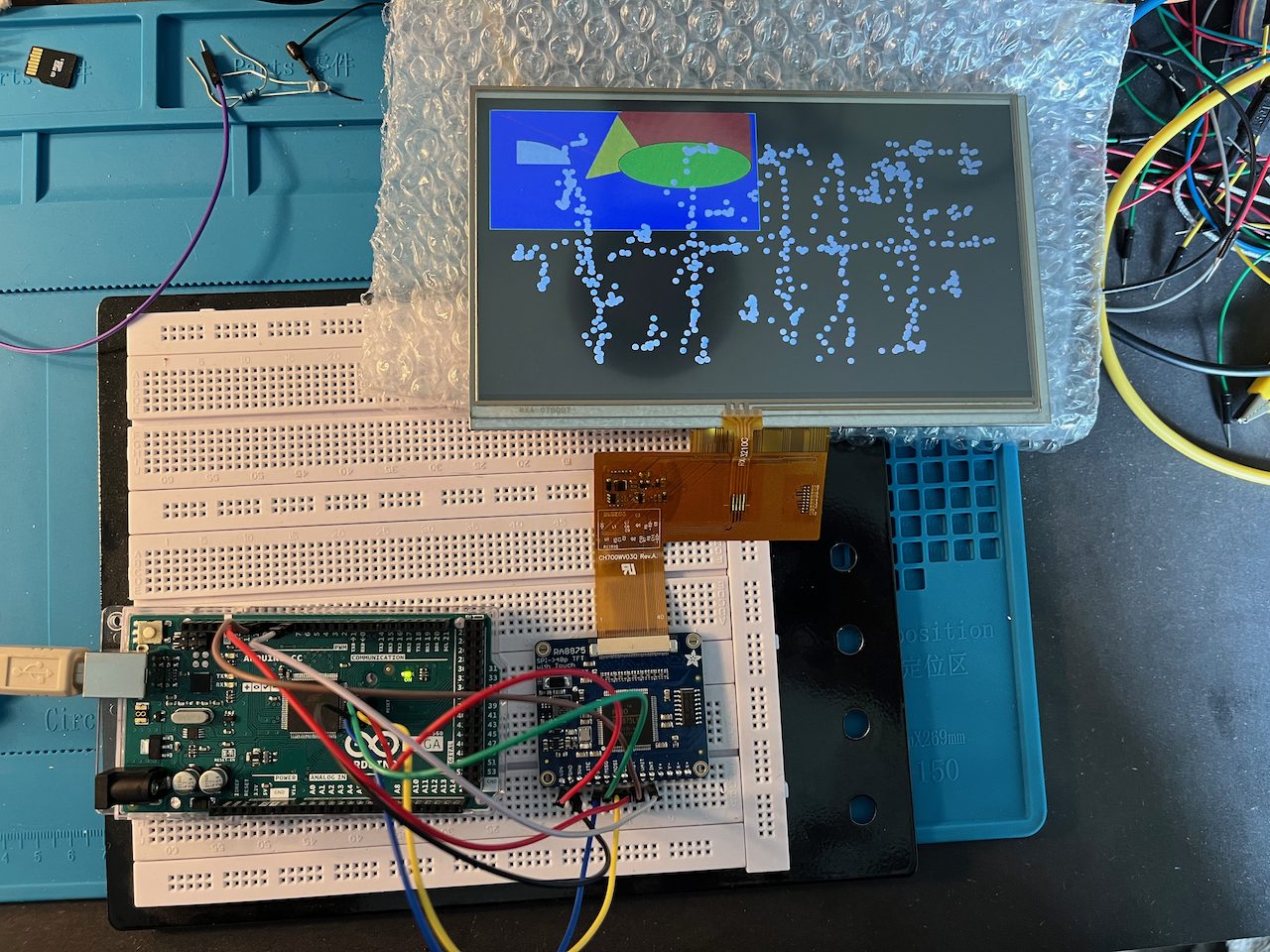
Et image de ce que j'ai obtenu avec le build test d'Adafruit, les zones périphériques sont hors zone tactile et beaucoup de points pour chaque contactau mauvais endroit
Bad touch points
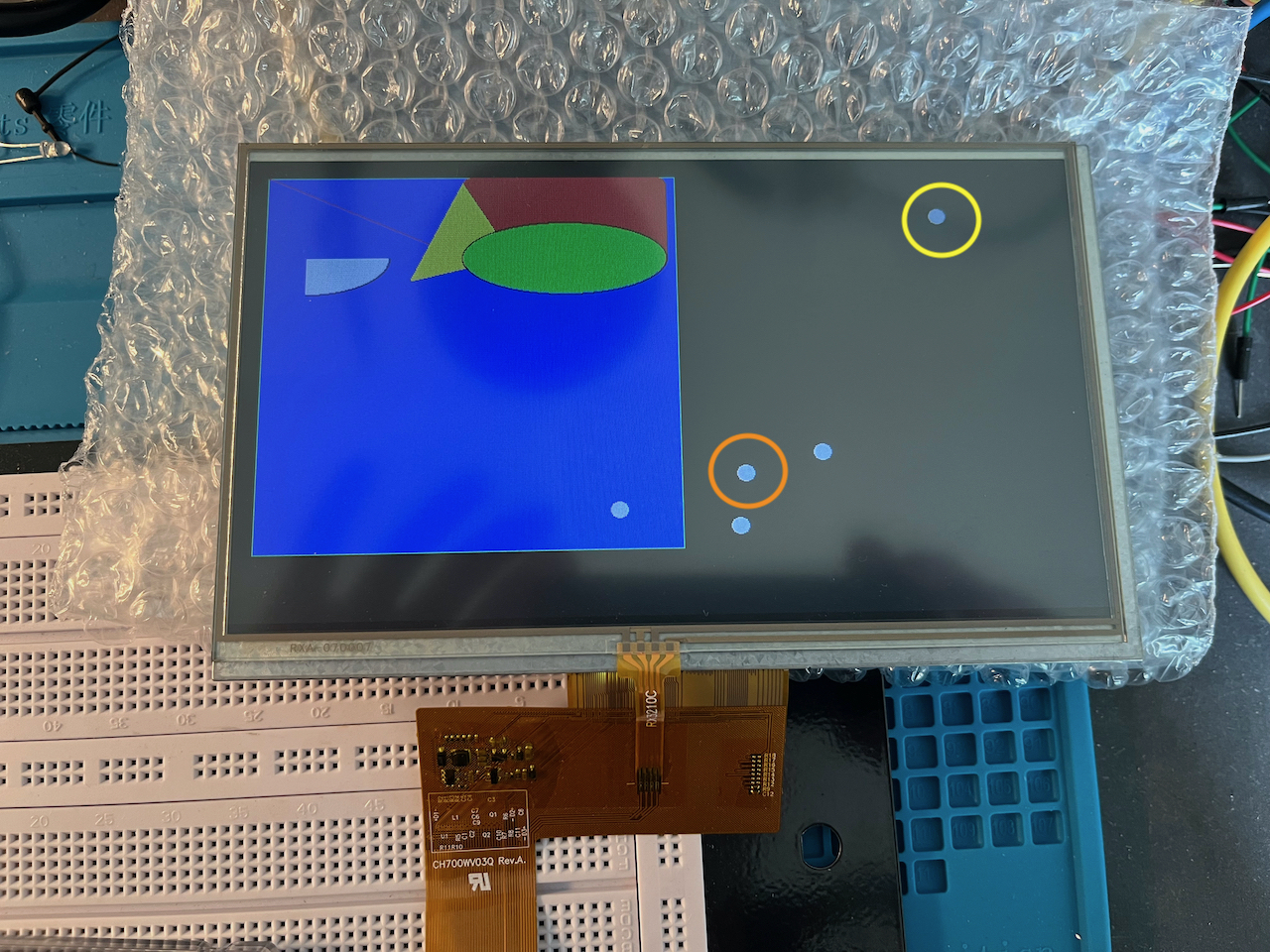
Edit : malheureusement le pb n'est pas résolu, le dernier point hors de portée tactile apparaît seul après le point correct précédent dans la copie du serial monitor ci desous, je ne sais plus que faire ou alors je pense avoir un pb hardware...
C'est aléatoire , assez rare mais 1 point sur 10 corrects environ et ces points "fantome" apparaissent toujours dans la même zone de l'écran : 1/4 sup droit. Le point entouré de jaune est apparu seul 2s après celui entouré en orange normal au touch lui ...
mauvais point
Merci
Philippe
RA8875 start
Found RA8875
tft.PWM1out(255)
Waiting for touch events ...
Touch: 1
t 456, 753
ct 349, 369
Touch cal 456 , 753
Touch: 0
Touch: 1
t 591, 783
ct 463, 387
Touch cal 591 , 783
Touch: 0

......

Touch: 1
t 687, 659
ct 544, 312
Touch cal 687 , 659
Touch: 0
**Touch: 1**
**t 838, 233**            //Bad dot without any touch , about 2s after previous correct dot !!!
**ct 671, 56**
**Touch cal 838 , 233**
**Touch: 0**
// this is an example from me for a calibration value adaptation and for ONE touch = ONE dot at the RIGHT place for my tft 7" Adafruit tft touch screen.
//the Adafruit example RA8875 ts_calibration.ino does'nt store calibration value in EEPROM , so even if it is working , it is useless , no memory storage of calibration
//
//I have an Arduino MEGA 2560 Rev 3, an Adafruit RA8875 interface ID : 1590 , an Adafruit 7" 800x480 resistive touch tft dysplay ID : 2354
//I think the Adafruit_RA8875 Library is very poor regarding touch code , I have another 2.8" capacitive touch screen using Adafruit_STMPE610 Library ,
//it is much easier to use and more powerfull...
//I have also tried RA8875-0.70b11 Library from Github but cannot use it correctly with my tft.
//___________________________I apologize for the mistakes, I'm a newbie with coding______________________________
//I tried to explain well with my comments, I am French, writing English correctly is sometimes not easy
//**********************************************************************************************************************************************
//______________The goal is to make a V8 331ci engine controller and parameter display for a first gen 1965 Mustang Fastback____________________
//*********************************************************************************************************************************************


#include <SPI.h>
#include "Adafruit_GFX.h"
#include "Adafruit_RA8875.h"

// Library only supports hardware SPI at this time
// Connect SCLK to MEGA ICSP pin3 (Hardware SPI clock)
// Connect MISO to MEGA ICSP pin1 (Hardware SPI MISO)
// Connect MOSI to MEGA ICSP pin4 (Hardware SPI MOSI)
#define RA8875_INT 7
#define RA8875_CS 10
#define RA8875_RESET 9
Adafruit_RA8875 tft = Adafruit_RA8875(RA8875_CS, RA8875_RESET);

uint16_t tx, ty, ctx, cty, px, py;
uint16_t px1, py1;
uint8_t cpt=1;


void setup()
{

//______________________I kept the running test , it is running fine____________________

  Serial.begin(9600);
  Serial.println("RA8875 start");

  // Initialize the display using RA8875_800x480
  if (!tft.begin(RA8875_800x480)) {
    Serial.println("RA8875 Not Found!");
    while (1);
  }

  Serial.println("Found RA8875");

  tft.displayOn(true);
  tft.GPIOX(true);      // Enable TFT - display enable tied to GPIOX
  tft.PWM1config(true, RA8875_PWM_CLK_DIV1024); // PWM output for backlight
  tft.PWM1out(255);

  pinMode(RA8875_INT, INPUT);
  digitalWrite(RA8875_INT, HIGH);
  tft.touchEnable(true);
  tft.fillScreen(RA8875_WHITE);
  delay(100);

  // With hardware accelleration this is instant
  tft.fillScreen(RA8875_WHITE);
  delay(2000);

  // Play with PWM
  for (uint8_t i=255; i!=0; i-=5 )
  {
    tft.PWM1out(i);
    delay(100);
  }
  for (uint8_t i=0; i!=255; i+=5 )
  {
    tft.PWM1out(i);
    delay(100);
  }
  tft.PWM1out(255);

    Serial.println("tft.PWM1out(255) ");

  tft.fillScreen(RA8875_RED);
  delay(500);
  tft.fillScreen(RA8875_YELLOW);
  delay(500);
  tft.fillScreen(RA8875_GREEN);
  delay(500);
  tft.fillScreen(RA8875_CYAN);
  delay(500);
  tft.fillScreen(RA8875_MAGENTA);
  delay(500);
  tft.fillScreen(RA8875_BLACK);
  delay(500);

  // Try some GFX acceleration!
  tft.drawCircle(100, 100, 50, RA8875_BLACK);
  tft.fillCircle(100, 100, 49, RA8875_GREEN);

  tft.fillRect(11, 11, 398, 398, RA8875_BLUE);
  tft.drawRect(10, 10, 400, 400, RA8875_GREEN);
  tft.fillRoundRect(200, 10, 200, 100, 10, RA8875_RED);
  tft.drawPixel(10,10,RA8875_BLACK);
  tft.drawPixel(11,11,RA8875_BLACK);
  tft.drawLine(10, 10, 200, 100, RA8875_RED);
  tft.drawTriangle(200, 15, 250, 100, 150, 125, RA8875_BLACK);
  tft.fillTriangle(200, 16, 249, 99, 151, 124, RA8875_YELLOW);
  tft.drawEllipse(300, 100, 100, 40, RA8875_BLACK);
  tft.fillEllipse(300, 100, 98, 38, RA8875_GREEN);
  // Argument 5 (curvePart) is a 2-bit value to control each corner (select 0, 1, 2, or 3)
  tft.drawCurve(50, 100, 80, 40, 3, RA8875_BLACK);
  tft.fillCurve(50, 100, 78, 38, 3, RA8875_WHITE);


//
//_____________________ End of the running test __________________________
//


  Serial.println("Waiting for touch events ...");
}


void loop()
{   //*************************************************************************************************************************************************************
  //___________________________After hours of searching and testing codes, below is the easiest one I found to get my touchscreen working properly__________________
  //************************************************************************************************************************************************************

  // Wait around for touch events

    while (tft.touched())
    { delay(500);                    //delay and 2 tft.touched to avoid accidental or to short touch, I have tried 500 or more, it is OK for me
      (tft.touched())==false;         //my goal is only button touch
      while (tft.touched())
      {
      Serial.print("Touch: "); Serial.println(cpt);
      tft.touchRead(&tx, &ty);
      px = tx; py = ty;                     // first values stored
      tft.touchEnable(false);    //security for false touch
      delay(10);


//_____________________________the following code is essential, otherwise several dots are displayed around my touch for one only touch______________________
//                              because tft.touchRead() is always storing several values and often wrong values for tx ty
//_____________________________________________I saw it in the Serial monitor, the firs values for tx and ty are OK _______________________________________________


      while (cpt>0 ) { cpt--; px1 = tx; py1 = ty; }  //values for first px1 and py1
      if ((px1!=px)||(py1!=py)) { cpt=1; }  // if there is differents coordonates , return to the while , if not go to else
        else {
          ctx = ((px-40)/1.189);              //this is my own calculation to have a calibrate touch screen ...
          cty = ((py-140)/1.659);             //8875 EEPROM stored calibration for Adafruit tft screen touc 800x480 are wrong ...

      Serial.print("t ");Serial.print(px); Serial.print(", "); Serial.println(py);
      Serial.print("ct ");Serial.print(ctx); Serial.print(", "); Serial.println(cty);
      Serial.print("Touch cal "); Serial.print(tx); Serial.print(" , "); Serial.println(ty);
      //Draw a circle
      tft.fillCircle(ctx,  cty, 8, RA8875_WHITE);
      delay(1000);
        }

  delay(1000);
  tft.touchEnable(true);      //putting touch on
  }
}
}