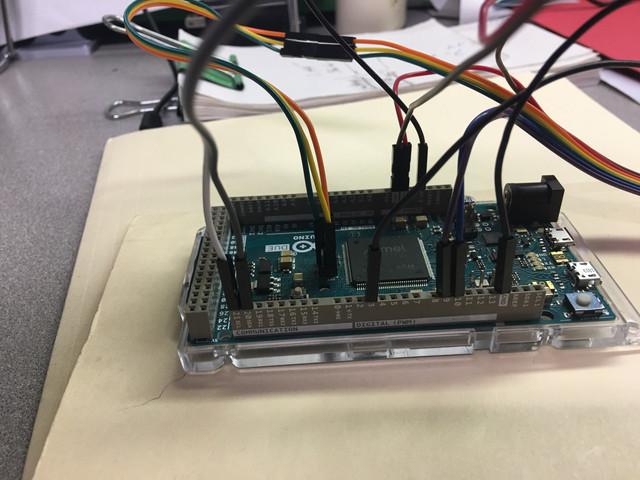
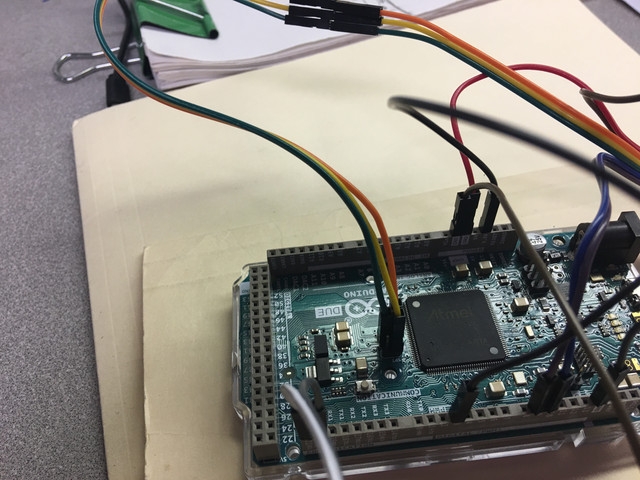
7" screen_RA8875_ STMPE610 coding help

I just bought these components from Adafruit and I'm trying to get them to work together. I have taken some code from another example used by Adafruit and I have gotten most of the way there I think but just need some help getting it right.
The graphics come up on the screen and the touch sense registers but the calibration is way off and I could use a direction to go to figure out how to fix it. I used a calibration test from the RA8875 library that isn't from Adafruit to get the numbers I'm using now, Adafruit didn't have a calibration example for the Adafruit RA8875 library.

The second problem is when I was uploading the code to the Arduino after a bit it would lose the STMPE610 touch controller. The serial window would say touchscreen didn't start and I would unplug the USB and let it sit a bit and come back to it and then it would find it, am I overheating it somehow, the screen has 125mA draw plus whatever the RA8875 and STMPE610 draw. I'm currently powering everything from the Arduino but in my project it will be powered seperately.
Thanks for any help.

//This example implements a simple sliding On/Off button. The example
// demonstrates drawing and touch operations.
//
//Thanks to Adafruit forums member Asteroid for the original sketch!
//
#include <Adafruit_GFX.h>
#include <SPI.h>
#include <Wire.h>
#include <Adafruit_RA8875.h>
#include <Adafruit_STMPE610.h>

// This is calibration data for the raw touch data to the screen coordinates
#define TS_MINX 281
#define TS_MINY 127
#define TS_MAXX 871
#define TS_MAXY 701

#define RA8875_CS 10
#define RA8875_RESET 9

Adafruit_RA8875 tft = Adafruit_RA8875(RA8875_CS, RA8875_RESET);
uint16_t tx, ty;

Adafruit_STMPE610 ts = Adafruit_STMPE610();

boolean RecordOn = false;

#define FRAME_X 210
#define FRAME_Y 180
#define FRAME_W 100
#define FRAME_H 50

#define REDBUTTON_X FRAME_X
#define REDBUTTON_Y FRAME_Y
#define REDBUTTON_W (FRAME_W/2)
#define REDBUTTON_H FRAME_H

#define GREENBUTTON_X (REDBUTTON_X + REDBUTTON_W)
#define GREENBUTTON_Y FRAME_Y
#define GREENBUTTON_W (FRAME_W/2)
#define GREENBUTTON_H FRAME_H

void drawFrame()
{
  tft.drawRect(FRAME_X, FRAME_Y, FRAME_W, FRAME_H, RA8875_BLACK);
}

void redBtn()
{
  tft.fillRect(REDBUTTON_X, REDBUTTON_Y, REDBUTTON_W, REDBUTTON_H, RA8875_RED);
  tft.fillRect(GREENBUTTON_X, GREENBUTTON_Y, GREENBUTTON_W, GREENBUTTON_H, RA8875_BLUE);
  drawFrame();
  tft.setCursor(GREENBUTTON_X + 6 , GREENBUTTON_Y + (GREENBUTTON_H / 2));
  tft.setTextColor(RA8875_WHITE);
  tft.setTextSize(2);
  tft.println("ON");
  RecordOn = false;
}

void greenBtn()
{
  tft.fillRect(GREENBUTTON_X, GREENBUTTON_Y, GREENBUTTON_W, GREENBUTTON_H, RA8875_GREEN);
  tft.fillRect(REDBUTTON_X, REDBUTTON_Y, REDBUTTON_W, REDBUTTON_H, RA8875_BLUE);
  drawFrame();
  tft.setCursor(REDBUTTON_X + 6 , REDBUTTON_Y + (REDBUTTON_H / 2));
  tft.setTextColor(RA8875_WHITE);
  tft.setTextSize(2);
  tft.println("OFF");
  RecordOn = true;
}

void setup() {

  Serial.begin(9600);
  tft.begin(RA8875_800x480);

  if (!ts.begin()) {
    Serial.println("Unable to start touchscreen.");
  }
  else {
    Serial.println("Touchscreen started.");
  }
  tft.displayOn(true);
  tft.GPIOX(true);      // Enable TFT - display enable tied to GPIOX
  tft.PWM1config(true, RA8875_PWM_CLK_DIV1024); // PWM output for backlight
  tft.PWM1out(255);
  tft.fillScreen(RA8875_BLUE);
  // origin = left,top landscape (USB left upper)
  tft.setRotation(1);
  redBtn();
}

void loop()
{
  // See if there's any  touch data for us
  if (! ts.bufferEmpty())
  {
    // Retrieve a point
    TS_Point p = ts.getPoint();
    // Scale using the calibration #'s
    // and rotate coordinate system
    p.x = map(p.x, TS_MINY, TS_MAXY, 0, tft.height());
    p.y = map(p.y, TS_MINX, TS_MAXX, 0, tft.width());
    int y = tft.height() - p.x;
    int x = p.y;

    if (RecordOn)
    {
      if ((x > REDBUTTON_X) && (x < (REDBUTTON_X + REDBUTTON_W))) {
        if ((y > REDBUTTON_Y) && (y <= (REDBUTTON_Y + REDBUTTON_H))) {
          Serial.println("Red btn hit");
          redBtn();
        }
      }
    }
    else //Record is off (RecordOn == false)
    {
      if ((x > GREENBUTTON_X) && (x < (GREENBUTTON_X + GREENBUTTON_W))) {
        if ((y > GREENBUTTON_Y) && (y <= (GREENBUTTON_Y + GREENBUTTON_H))) {
          Serial.println("Green btn hit");
          greenBtn();
        }
      }
    }

    Serial.println(RecordOn);
  }
}
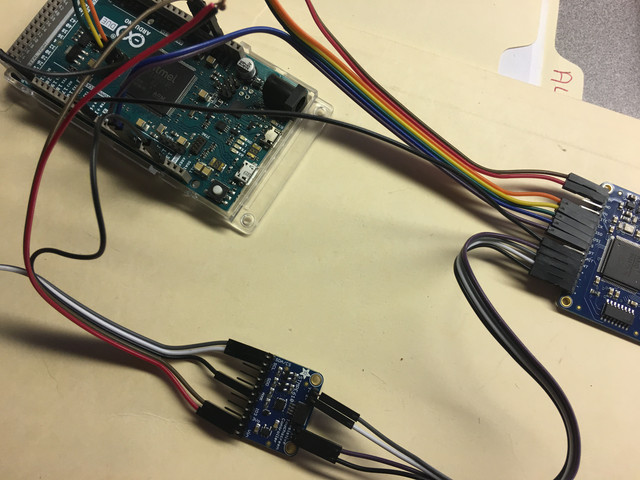
Posting a schematic, showing all connections, power and ground, not a frizzy drawing would be a big help. Does the Adafruit code work properly per there specification? Remember the Arduino a Power Supply it is NOT!

The Adafruit example for each component works as intended but they don't give an example for running all components at the same time and that is what I'm attempting to do but it seems the calibration is way off on my code.
The STMPE610 is on the I2C address and the RA8875 is on SPI with the 7" screen plugged into it.
[/img]
[/img]
[/img]

here's a quick sketch of where everything is connected.

[/img]

Please provide links to the actual display that you have bought. e.g. Adafruit sale page.

I would expect to see a Display Shield that plugs into the Uno / Zero / Due ...
And Adafruit library(s) installed via the IDE Library Manager.
Run all the examples that come with the Adafruit library(s)

Quote library examples by name. Describe any problems. e.g. what you expected + what you got.

I don't have an Adafruit screen nor STMPE610 Touch Panel.
But I can read the documentation if you provide the hardware links.

None of your photos show a TFT screen.

David.

The screen is plugging into the RA8875.
In the schematic I forgot to show the Vin and GND wires on the STMPE610 connecting to the Due 3.3V and GND pins.
I ran the buildtest.ino from the RA8875 examples and I thought it ran as coded.
I also ran the scroll.ino , textmode.ino and they ran as coded.
I tried the ts_calibration.ino even though it was for the RA8875 touch screen component but it just ran and didn't ask for any points to pick on the screen and it just ran continuously without stopping.

I ran the touchtest.ino from the STMPE example( there was only one example) and it ran as coded.

I have not done my code properly to get the calibration right on the touch screen, the graphics of the buttons in my code shows up approximately in the middle of the screen and operates as coded when you find where they lie on the touch screen.
here are components from Adafruit site.
7" screen
7" datasheet
RA8875
Ra8875 datasheet
STMPE610
STMPE datasheet

Ah-ha. You have a brain-dead TFT display Panel with a separate RA8875 controller board.

From memory, the RA8875 is perfectly capable of reading a resistive Touch Panel.
Also from memory, you have to do some mangling to disable the RA8875 Touch control.

Why do you have a separate STMPE610 board ?

If Adafrut are "selling" this to you, they should provide some documentation and examples to connect the STMPE610 board to the Panel (or RA8875 board).

Personally, I would use the native RA8875 controller functions.
There should be an Adafruit_RA8875 example.

As I wrote earlier. I don't have your hardware. But now that you have provided links I can read the same documentation as you. So I can possibly walk you through any problems.

David.

david_prentice:
Ah-ha. You have a brain-dead TFT display Panel with a separate RA8875 controller board.

From memory, the RA8875 is perfectly capable of reading a resistive Touch Panel.
Also from memory, you have to do some mangling to disable the RA8875 Touch control.

Why do you have a separate STMPE610 board ?

If Adafrut are "selling" this to you, they should provide some documentation and examples to connect the STMPE610 board to the Panel (or RA8875 board).

Personally, I would use the native RA8875 controller functions.
There should be an Adafruit_RA8875 example.

As I wrote earlier. I don't have your hardware. But now that you have provided links I can read the same documentation as you. So I can possibly walk you through any problems.

David.

Hi David,
I bought the components because that is what the Adafruit site said I was going to need to make it all work nice. The screen said I'll need the RA8875 and the RA8875 said I would need the STMPE610 because the RA8875 touch wasn't very good and the STMPE610 would work better.
The reason I buy things from Adafruit is because they have well thought out tutorials that show wiring and code to get you up and running quickly. They just seem to have dropped the ball on support for these items for some reason and looking at their forums all they answer with is these are pretty old items and then point you to the GitHub pages for the respective components which everyone is already working from and having problems with but they provide nothing else.
I found out how to wire the RA8875 and STMPE610 from a forum post on the Adafruit site but the code was a mess on the same post and was unusable. It didn't come from Adafruit but from someone trying to get it all working on a Due like me.
P.S. sorry about the PM, just had a question from a really old thread.

david_prentice:
From memory, the RA8875 is perfectly capable of reading a resistive Touch Panel.
Also from memory, you have to do some mangling to disable the RA8875 Touch control.

I uploaded the buildtest.ino and played with it again and the touch events are all over the place, I touch the panel on 1 side of the screen and the white dot that it's suppose to draw at the touch spot shows up on the other side of the screen so I'm not sure about it's accuracy.

I was able to get closer today with this code, the graphics show up correctly and operate as coded but the touch events are rotated 90 CCW which I'm sure is related to the Defines for TS MIN and MAX at the top but I'm just making a wild stab in the dark about that.

//This example implements a simple sliding On/Off button. The example
// demonstrates drawing and touch operations.
//
//Thanks to Adafruit forums member Asteroid for the original sketch!
//
#include <Adafruit_GFX.h>
#include <SPI.h>
#include <Wire.h>
#include <Adafruit_RA8875.h>
#include <Adafruit_STMPE610.h>

// This is calibration data for the raw touch data to the screen coordinates
#define TS_MINX 3800
#define TS_MINY 4000
#define TS_MAXX 150
#define TS_MAXY 130


Adafruit_STMPE610 ts = Adafruit_STMPE610();
#define RA8875_CS 10
#define RA8875_RESET 9
Adafruit_RA8875 tft = Adafruit_RA8875(RA8875_CS, RA8875_RESET);

boolean RecordOn = false;

#define FRAME_X 210
#define FRAME_Y 180
#define FRAME_W 100
#define FRAME_H 50

#define REDBUTTON_X FRAME_X
#define REDBUTTON_Y FRAME_Y
#define REDBUTTON_W (FRAME_W/2)
#define REDBUTTON_H FRAME_H

#define GREENBUTTON_X (REDBUTTON_X + REDBUTTON_W)
#define GREENBUTTON_Y FRAME_Y
#define GREENBUTTON_W (FRAME_W/2)
#define GREENBUTTON_H FRAME_H

void drawFrame()
{
  tft.drawRect(FRAME_X, FRAME_Y, FRAME_W, FRAME_H, RA8875_BLACK);
}

void redBtn()
{
  tft.fillRect(REDBUTTON_X, REDBUTTON_Y, REDBUTTON_W, REDBUTTON_H, RA8875_RED);
  tft.fillRect(GREENBUTTON_X, GREENBUTTON_Y, GREENBUTTON_W, GREENBUTTON_H, RA8875_BLUE);
  drawFrame();
  tft.setCursor(GREENBUTTON_X + 6 , GREENBUTTON_Y + (GREENBUTTON_H / 2));
  tft.setTextColor(RA8875_WHITE);
  tft.setTextSize(2);
  tft.println("ON");
  RecordOn = false;
}

void greenBtn()
{
  tft.fillRect(GREENBUTTON_X, GREENBUTTON_Y, GREENBUTTON_W, GREENBUTTON_H, RA8875_GREEN);
  tft.fillRect(REDBUTTON_X, REDBUTTON_Y, REDBUTTON_W, REDBUTTON_H, RA8875_BLUE);
  drawFrame();
  tft.setCursor(REDBUTTON_X + 6 , REDBUTTON_Y + (REDBUTTON_H / 2));
  tft.setTextColor(RA8875_WHITE);
  tft.setTextSize(2);
  tft.println("OFF");
  RecordOn = true;
}

void setup(void)
{
  Serial.begin(9600);
  tft.begin(RA8875_800x480);
  if (!ts.begin()) {
    Serial.println("Unable to start touchscreen.");
  }
  else {
    Serial.println("Touchscreen started.");
  }
  tft.displayOn(true);
  tft.GPIOX(true);      // Enable TFT - display enable tied to GPIOX
  tft.PWM1config(true, RA8875_PWM_CLK_DIV1024); // PWM output for backlight
  tft.PWM1out(255);
  tft.fillScreen(RA8875_BLUE);
  redBtn();
}

void loop()
{
  // See if there's any  touch data for us
  if (!ts.bufferEmpty())
  {
    // Retrieve a point
    TS_Point p = ts.getPoint();
    // Scale using the calibration #'s
    // and rotate coordinate system
    p.x = map(p.x, TS_MINY, TS_MAXY, 0, tft.height());
    p.y = map(p.y, TS_MINX, TS_MAXX, 0, tft.width());
    int y = tft.height() - p.x;
    int x = p.y;

    if (RecordOn)
    {
      if ((x > REDBUTTON_X) && (x < (REDBUTTON_X + REDBUTTON_W))) {
        if ((y > REDBUTTON_Y) && (y <= (REDBUTTON_Y + REDBUTTON_H))) {
          Serial.println("Red btn hit");
          redBtn();
        }
      }
    }
    else //Record is off (RecordOn == false)
    {
      if ((x > GREENBUTTON_X) && (x < (GREENBUTTON_X + GREENBUTTON_W))) {
        if ((y > GREENBUTTON_Y) && (y <= (GREENBUTTON_Y + GREENBUTTON_H))) {
          Serial.println("Green btn hit");
          greenBtn();
        }
      }
    }

    Serial.println(RecordOn);
  }
}

Seriously. Adafruit_RA8875 has an example called ts_calibration.ino

Make sure that you have the correct INT, CS, RESET pin defines.
Run the sketch.

You can force a fresh calibration with #define FORCE_CALIBRATION true

I strongly advise you to stick with the native RA8875 Touch functions.
i.e. disconnect your STMPE610 board.

David.

david_prentice:
Seriously. Adafruit_RA8875 has an example called ts_calibration.ino

Make sure that you have the correct INT, CS, RESET pin defines.
Run the sketch.

You can force a fresh calibration with #define FORCE_CALIBRATION true

I strongly advise you to stick with the native RA8875 Touch functions.
i.e. disconnect your STMPE610 board.

David.

I haven't had any luck with using the RA8875 calibration example, When I load the buildtest.ino and run it after calibration I still show a point 10 - 15mm away from where I actually touched the screen.
The calibration points are right on in the calibration example but with another example like the builtest.ino they are off.

I have made a grid of buttons using just the RA8875 and the graphics and the touch seem to work OK. I haven't figured out how to make the RA8875 switch button color when a button is pressed yet but I will keep trying.
I have noticed that the text I want on each button doesn't show up on the screen like it does with the STMPE610, could anyone perhaps give me a hint at what I'm missing to get that done?

#include <SPI.h>
#include "Adafruit_GFX.h"
#include "Adafruit_RA8875.h"

#define RA8875_INT 3
#define RA8875_CS 10
#define RA8875_RESET 9

Adafruit_RA8875 tft = Adafruit_RA8875(RA8875_CS, RA8875_RESET);
uint16_t tx, ty;

int x, y;
const byte row = 4;
const byte col = 2;
byte lastHit = 0;
byte currentHit = 0;
Adafruit_GFX_Button btn[row * col];


void setup() {
  
  Serial.begin(9600);
  Serial.println("RA8875 start");

  if (!tft.begin(RA8875_800x480)) {
    Serial.println("RA8875 Not Found!");
    while (1);
  }

  Serial.println("Found RA8875");

  tft.displayOn(true);
  tft.GPIOX(true);      // Enable TFT - display enable tied to GPIOX
  tft.PWM1config(true, RA8875_PWM_CLK_DIV1024); // PWM output for backlight
  tft.PWM1out(255);

  pinMode(RA8875_INT, INPUT);
  digitalWrite(RA8875_INT, HIGH);

  tft.touchEnable(true);
  btnGrid();

  Serial.print("Status: "); Serial.println(tft.readStatus(), HEX);
  Serial.println("Waiting for touch events ...");
}

void loop() {

  float xScale = 1024.0F / tft.width();
  float yScale = 1024.0F / tft.height();

  while (tft.touched()) {

    tft.touchRead(&tx, &ty);
    Serial.print(tx); Serial.print(", "); Serial.println(ty);


    for (uint8_t b = 0; b < row * col; b++) {
      if (btn[b].contains(x, y)) {
        btn[b].press(true);
        btn[b].drawButton(true);
        currentHit = b;
      } else if (btn[b].contains(x, y) == false) {
        btn[b].press(false);
        if (b == lastHit) {
          btn[b].drawButton(false);
        }
      } else {
        return;
      }
    }
    lastHit = currentHit;
    delay(500);
  }
}

void btnGrid() {

  int left, top;
  int l = 10;
  int t = 30;
  int w = 200;
  int h = 60;
  byte hgap = 40;
  byte vgap = 40;
  byte id = 0;
  char *titleStr[row * col] = {"4", "5", "6", "8", "11", "13", "Load", "1"};
  for (byte j = 0; j < row; j++) {
    for (byte i = 0; i < col; i++) {
      left = l + i * (w + vgap);
      top = t + j * (h + hgap);
      btn[id].initButtonUL( &tft, left, top, w, h, RA8875_WHITE, RA8875_RED, RA8875_GREEN, titleStr[id], 3 );
      if (id == currentHit) {
        // inverted
        btn[id].drawButton(true);
      } else {
        btn[id].drawButton(false);
      }
      id++;
    }
  }
}

I suggest that you start with a simple "draw dot at stylus position" sketch e.g.

#include <SPI.h>
#include "Adafruit_GFX.h"
#include "Adafruit_RA8875.h"

#define RA8875_INT     4     //pin #25 on CON1
#define RA8875_CS      10    //pin #6  on CON4
#define RA8875_RESET   9     //pin #7  on CON4

Adafruit_RA8875 tft = Adafruit_RA8875(RA8875_CS, RA8875_RESET);

void setup()
{
    Serial.begin(9600);
    Serial.println("Hello, RA8875!");

    /* Initialize the display using 'RA8875_480x272' or 'RA8875_800x480' */
    if (!tft.begin(RA8875_800x480))
    {
        Serial.println("RA8875 not found ... check your wires!");
        while (1);
    }

    /* Enables the display and sets up the backlight */
    Serial.println("Found RA8875");
    tft.displayOn(true);
    tft.GPIOX(true); // Enable TFT - display enable tied to GPIOX
    tft.PWM1config(true, RA8875_PWM_CLK_DIV1024); // PWM output for backlight
    tft.PWM1out(255);

    tft.fillScreen(RA8875_BLACK);
    tft.textMode();
    tft.textSetCursor(0, 30);
    tft.textColor(RA8875_WHITE, RA8875_RED);
    tft.textWrite("draw horiz line left to right, then vertical top to bot");
    tft.graphicsMode();

    /* Enable the touch screen */
    Serial.println("Enabled the RA8875 touch screen");
    pinMode(RA8875_INT, INPUT_PULLUP);
    tft.touchEnable(true);

    Serial.println("Waiting for touch events ...");
    Serial.println("Observe directions when drawing horiz and vertical lines");
    Serial.println("if horiz line is drawn vertically,  swap tx, ty mapping");
    Serial.println("if horiz direction is wrong, swap TS_LEFT, TS_RT");
    Serial.println("if vertical direction is wrong, swap TS_TOP, TS_BOT");
}

const int TS_LEFT = 980, TS_RT = 60, TS_TOP = 920, TS_BOT = 80;

void loop()
{
    uint16_t tx, ty, tz;
    tz = tft.touched();
    if (tz) {
        //touchRead() just returns 0-1023 for stylus positions
        tft.touchRead(&tx, &ty); //eat any pending touch
        while (digitalRead(RA8875_INT)); //HIGH means not touched
        tft.touchRead(&tx, &ty);
        int16_t x = map(tx, TS_LEFT, TS_RT, 0, tft.width());
        int16_t y = map(ty, TS_TOP, TS_BOT, 0, tft.height());
        if (x >= 2 && y >= 2) tft.fillCircle(x, y, 2, RA8875_WHITE);
    }
}

Note that my #defines are for my BuyDisplay screen.
And for some reason it crashes after a while.

If and when my simple sketch works ok for you, we can try Adafruit_GFX_Buttons.

David.

p.s.
The Adafruit "ts_calibration.ino" sketch works but you have to carefully jab each of the FOUR calibration circles. If you are too slow it skips a circle.

A successful calibration will show a black dot following your stylus perfectly.

I ran your example and it worked fine after I changed the top / bottom and right / left like the code said to do.
The touch events for the white dots were still off by 5 - 10mm from where I touched.

I haven't had a problem running ts_calibration.ino, all dots were picked and then the black dots were exactly where I touched the screen but it doesn't seem to save that calibration data for any other example to use.

I used the button grid on the last code I uploaded because I had done that for another project and it was easy to switch out the ts(other touch screen) for tft(for RA8875). The other screen used case functions for the switching of the button colors and I haven't had time to try to adapt it to the RA8875 but see your uploaded code has a mapping feature to it.

The touch events for the white dots were still off by 5 - 10mm from where I touched.

Well it should be pretty straightforward to adjust the TS_LEFT and TS_RT values. The names are self explanatory. (as opposed to the TS_MINX style in other Adafruit examples)

The ts_calibration sketch stores calibration data as a matrix in EEPROM. But you still need a user function to map the matrix to pixel coordinates. i.e. like my TS_LEFT method

I strongly advise disconnecting any STMPE610 board. Whatever Resistive Touch controller is used it will be applying voltages and reading ADC values. You don't want STMPE applying voltages at the same time as RA8875 applying different voltages.

If you get reliable stylus positioning, we can try Adafruit_GFX_Button programs.
And yes, we can calculate exact TS_LEFT, TS_RT, ... values in a proper calibration sketch. But at least my "values" allowed you to get the directions correct.

David.

david_prentice:
Well it should be pretty straightforward to adjust the TS_LEFT and TS_RT values. The names are self explanatory. (as opposed to the TS_MINX style in other Adafruit examples)

The ts_calibration sketch stores calibration data as a matrix in EEPROM. But you still need a user function to map the matrix to pixel coordinates. i.e. like my TS_LEFT method

I strongly advise disconnecting any STMPE610 board. Whatever Resistive Touch controller is used it will be applying voltages and reading ADC values. You don't want STMPE applying voltages at the same time as RA8875 applying different voltages.

If you get reliable stylus positioning, we can try Adafruit_GFX_Button programs.
And yes, we can calculate exact TS_LEFT, TS_RT, ... values in a proper calibration sketch. But at least my "values" allowed you to get the directions correct.

David.

I have removed the STMPE610 a while ago so it's not interfering with the RA8875.

I got the correct directions for the horizontal and vertical lines per your example but like I said the white circles for stylus touches were off by a bit.

How do I get the matrix from the EEPROM so I can add it to my example?

The earlier code using a button grid displays correctly and it registers touch coordinates in the serial window, I don't know if the coordinates are correct though so getting them from the EEPROM should solve that problem if they are not.

Thanks for the help.

I have the touch function working with the graphics but can't seem to get any text to show on the screen. I have a simple on/off button that should say ON with the touch of the green button and OFF with the touch of the red button. I tried tft.textWrite but that doesn't seem to work, as it doesn't show text and when the green button is hit it doesn't want to shift back to red when the red button is hit.
If anyone has a suggestion I would appreciate it.
Sorry about code but can't find code tags in editor.

#include <SPI.h>
#include "Adafruit_GFX.h"
#include "Adafruit_RA8875.h"

#define RA8875_INT     3
#define RA8875_CS      10
#define RA8875_RESET   9

Adafruit_RA8875 tft = Adafruit_RA8875(RA8875_CS, RA8875_RESET);

boolean RecordOn = false;

#define FRAME_X 210
#define FRAME_Y 180
#define FRAME_W 200
#define FRAME_H 100

#define REDBUTTON_X FRAME_X
#define REDBUTTON_Y FRAME_Y
#define REDBUTTON_W (FRAME_W/2)
#define REDBUTTON_H FRAME_H

#define GREENBUTTON_X (REDBUTTON_X + REDBUTTON_W)
#define GREENBUTTON_Y FRAME_Y
#define GREENBUTTON_W (FRAME_W/2)
#define GREENBUTTON_H FRAME_H

void drawFrame()
{
  tft.drawRect(FRAME_X, FRAME_Y, FRAME_W, FRAME_H, RA8875_WHITE);
}

void redBtn()
{
  tft.fillRect(REDBUTTON_X, REDBUTTON_Y, REDBUTTON_W, REDBUTTON_H, RA8875_RED);
  tft.fillRect(GREENBUTTON_X, GREENBUTTON_Y, GREENBUTTON_W, GREENBUTTON_H, RA8875_BLACK);
  drawFrame();
  tft.setCursor(GREENBUTTON_X + 6 , GREENBUTTON_Y + (GREENBUTTON_H / 2));
  tft.setTextColor(RA8875_WHITE);
  tft.setTextSize(2);
  tft.println("ON");
  RecordOn = false;
}

void greenBtn()
{
  tft.fillRect(GREENBUTTON_X, GREENBUTTON_Y, GREENBUTTON_W, GREENBUTTON_H, RA8875_GREEN);
  tft.fillRect(REDBUTTON_X, REDBUTTON_Y, REDBUTTON_W, REDBUTTON_H, RA8875_BLACK);
  drawFrame();
  tft.setCursor(REDBUTTON_X + 6 , REDBUTTON_Y + (REDBUTTON_H / 2));
  tft.setTextColor(RA8875_WHITE);
  tft.setTextSize(2);
  tft.println("OFF");
  RecordOn = true;
}


void setup() {

  Serial.begin(9600);
  Serial.println("Hello, RA8875!");

  /* Initialize the display using 'RA8875_480x272' or 'RA8875_800x480' */
  if (!tft.begin(RA8875_800x480))
  {
    Serial.println("RA8875 not found ... check your wires!");
    while (1);
  }

  /* Enables the display and sets up the backlight */
  Serial.println("Found RA8875");
  tft.displayOn(true);
  tft.GPIOX(true); // Enable TFT - display enable tied to GPIOX
  tft.PWM1config(true, RA8875_PWM_CLK_DIV1024); // PWM output for backlight
  tft.PWM1out(255);

  tft.fillScreen(RA8875_BLACK);
  tft.textMode();
  tft.textWrite("Choose how many petals you need.");
  tft.graphicsMode();
  redBtn();

  /* Enable the touch screen */
  Serial.println("Enabled the RA8875 touch screen");
  pinMode(RA8875_INT, INPUT_PULLUP);
  tft.touchEnable(true);

}

const int TS_MAXX = 980, TS_MINX = 60, TS_MAXY = 920, TS_MINY = 80;

void loop()
{
  uint16_t tx, ty, tz;
  tz = tft.touched();
  if (tz) {
    //touchRead() just returns 0-1023 for stylus positions
    tft.touchRead(&tx, &ty); //eat any pending touch
    while (digitalRead(RA8875_INT)); //HIGH means not touched
    tft.touchRead(&tx, &ty);
    int16_t x = map(tx, TS_MINX, TS_MAXX, 0, tft.width());
    int16_t y = map(ty, TS_MINY, TS_MAXY, 0, tft.height());

    if (RecordOn)
    {
      if ((x > REDBUTTON_X) && (x < (REDBUTTON_X + REDBUTTON_W))) {
        if ((y > REDBUTTON_Y) && (y <= (REDBUTTON_Y + REDBUTTON_H))) {
          Serial.println("Red btn hit");
          redBtn();
        }
      }
    }
    else //Record is off (RecordOn == false)
    {
      if ((x > GREENBUTTON_X) && (x < (GREENBUTTON_X + GREENBUTTON_W))) {
        if ((y > GREENBUTTON_Y) && (y <= (GREENBUTTON_Y + GREENBUTTON_H))) {
          Serial.println("Green btn hit");
          greenBtn();
        }
      }
    }
  }
}

You use tft.textMode() when you want to write text.
And tft.graphicsMode() when you want graphics.

I have done that in the setup Like your previous code post but I was trying to add text on top of the button graphics and it locks everything up when I try.
Where it says tft.printIn("ON"); I tried tft.textMode(); and tft.textWrite() but no text appeared.