This is also an usefull topic
https://forum.arduino.cc/t/how-to-wire-a-piezo-as-an-impact-sensor/901726
I have made my own version based on that topic but I must say that I have had an defect in my analog input reading after one night/day with unpowered Seeeduino board and connected piezo wiring. I had done a long test of running board and connected piezo continuesly for some days without problems. I had to think about a comment from @Wawa that the input is max Vcc + 0.5V... maybe I add a diode from analog input to Vcc to catch this?
I keep the lowest and the highest reading and use the substraction as 'sensorresponse'.
My code:
<code>
// these constants won't change:
const int piezoSensor = A5; // the piezo is connected to analog pin 5

// these variables will change:
long int sensorReading = 0;      // variable to store the value read from the sensor pin
long int sensorReadingLow = 1024;  //max value
long int sensorReadingHigh = 0;
int counter = 0;


void setup()
{
  Serial.begin(115200);       // use the serial port
}

void loop() {
  counter++;
  // read the sensor and store it in the variable sensorReading:
  sensorReading = analogRead(piezoSensor);
  if (sensorReading > sensorReadingHigh) {
    sensorReadingHigh = sensorReading;
  }
  if (sensorReading < sensorReadingLow) {
    sensorReadingLow = sensorReading;
  }

  if (counter > 10000 ) {
    Serial.print("Sensor Reading = ");
    Serial.print(sensorReading);
    Serial.print("  Sensor Reading range = ");
    Serial.println(sensorReadingHigh - sensorReadingLow);

    counter = 0; //reset
    sensorReadingHigh = 0;
    sensorReadingLow = 1024; //max value
  }
}
</code>
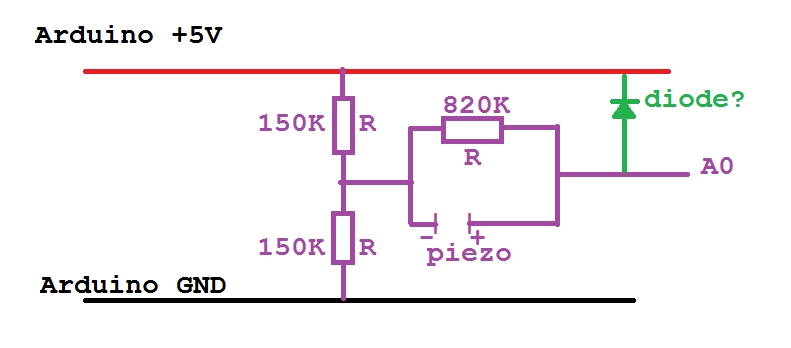
Grtz
Jan