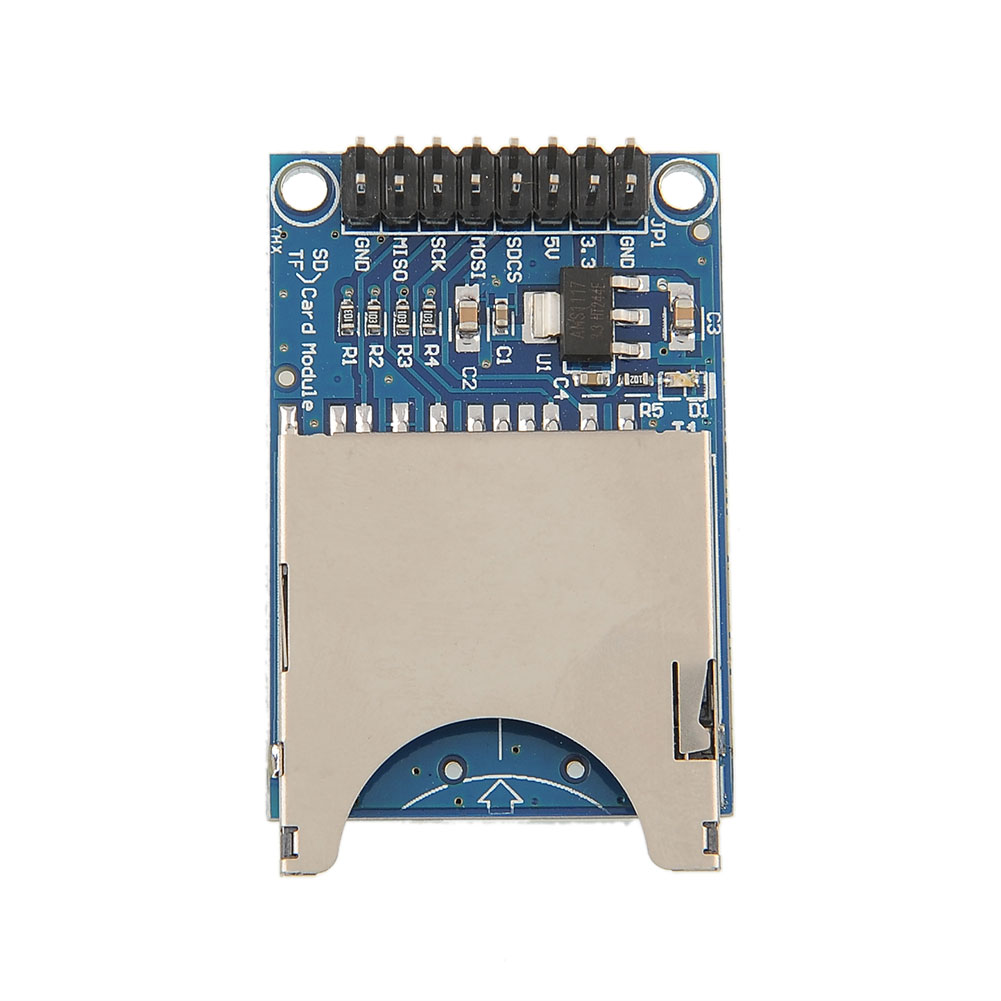
I am trying to connect an SD card to a Pro Micro.
I have attached the 5V power (Vcc) and ground (Gnd) from the Pro Micro to the SD Card Module.
I attached:
Pro Micro <---> SD Card Module
10 <---> SDCS
16 <---> MOSI
14 <---> MISO
15 <---> SCK
I loaded the sketch "arduino-1.0.5/libraries/SD/examples/CardInfo/CardInfo.ino"
I changed
const int chipSelect = 4;
to
const int chipSelect = 10;
Set Tools --> Board --> Arduino Leonardo
From the Serial Monitor I get:
Initializing SD card...initialization failed. Things to check:
* is a card is inserted?
* Is your wiring correct?
* did you change the chipSelect pin to match your shield or module?
Hi. As I´m having the same problem as @RandallR two years ago, I will re-use his thread. I hope this is OK.
I´m trying to do the same thing as he tried. I have an Arduino Pro Micro and I bought a SD Card adapter. After looking on the internet, I came with this same setup in different places, so I have test it up, and I got the same error. However, don´t know why, it has worked just once (detected the SD Card, but not formated in the FAT partition he wanted), and then getting again the same error.
Any idea what can be the problem?
Thanks in advance.
Using a 5v Pro Micro and going to the 5v input on the sd card. Also using a slightly modified CardInfo program from the SD Card demo.
I have also hunted around and found references to changing the SS_PIN in Sd2PinMap.h... also found SS in pins_arduino.h under the SparkFun board info... both set to 10.
I am assuming that MOSI on the Pro Micro goes to MOSI on the SD Card, and MISO goes to MISO (etc), and that you don't swap them around (like serial transmit to receive)...
Output of my modified program shown below (the actual program shown below that)...
SS_PIN 10
SS 10
MOSI_PIN 16
MOSI 16
MISO_PIN 14
MISO 14
SCK_PIN 15
SCK 15

Initializing SD card...initialization failed. Things to check:
* is a card inserted?
* is your wiring correct?
* did you change the chipSelect pin to match your shield or module?
And the program...
/*
 SD card test

This example shows how use the utility libraries on which the'
SD library is based in order to get info about your SD card.
Very useful for testing a card when you're not sure whether its working or not.

The circuit:
 * SD card attached to SPI bus as follows:
** MOSI - pin 11 on Arduino Uno/Duemilanove/Diecimila
** MISO - pin 12 on Arduino Uno/Duemilanove/Diecimila
** CLK - pin 13 on Arduino Uno/Duemilanove/Diecimila
** CS - depends on your SD card shield or module.
Pin 4 used here for consistency with other Arduino examples


created  28 Mar 2011
by Limor Fried
modified 9 Apr 2012
by Tom Igoe
*/
// include the SD library:
#include <SPI.h>
#include <SD.h>

// set up variables using the SD utility library functions:
Sd2Card card;
SdVolume volume;
SdFile root;

// change this to match your SD shield or module;
// Arduino Ethernet shield: pin 4
// Adafruit SD shields and modules: pin 10
// Sparkfun SD shield: pin 8
const int chipSelect = 10;

void setup()
{
 // Open serial communications and wait for port to open:
 Serial.begin(9600);
 while (!Serial) {
   ; // wait for serial port to connect. Needed for Leonardo only
 }

 Serial.print("SS_PIN ");
 Serial.println(SS_PIN);
 Serial.print("SS ");
 Serial.println(SS);

 Serial.print("MOSI_PIN ");
 Serial.println(MOSI_PIN);
 Serial.print("MOSI ");
 Serial.println(MOSI);

 Serial.print("MISO_PIN ");
 Serial.println(MISO_PIN);
 Serial.print("MISO ");
 Serial.println(MISO);

 Serial.print("SCK_PIN ");
 Serial.println(SCK_PIN);
 Serial.print("SCK ");
 Serial.println(SCK);

 Serial.print("\nInitializing SD card...");

 // we'll use the initialization code from the utility libraries
 // since we're just testing if the card is working!
 if (!card.init(SPI_HALF_SPEED, chipSelect)) {
   Serial.println("initialization failed. Things to check:");
   Serial.println("* is a card inserted?");
   Serial.println("* is your wiring correct?");
   Serial.println("* did you change the chipSelect pin to match your shield or module?");
   return;
 } else {
   Serial.println("Wiring is correct and a card is present.");
 }

 // print the type of card
 Serial.print("\nCard type: ");
 switch (card.type()) {
   case SD_CARD_TYPE_SD1:
     Serial.println("SD1");
     break;
   case SD_CARD_TYPE_SD2:
     Serial.println("SD2");
     break;
   case SD_CARD_TYPE_SDHC:
     Serial.println("SDHC");
     break;
   default:
     Serial.println("Unknown");
 }

 // Now we will try to open the 'volume'/'partition' - it should be FAT16 or FAT32
 if (!volume.init(card)) {
   Serial.println("Could not find FAT16/FAT32 partition.\nMake sure you've formatted the card");
   return;
 }


 // print the type and size of the first FAT-type volume
 uint32_t volumesize;
 Serial.print("\nVolume type is FAT");
 Serial.println(volume.fatType(), DEC);
 Serial.println();

 volumesize = volume.blocksPerCluster();    // clusters are collections of blocks
 volumesize *= volume.clusterCount();       // we'll have a lot of clusters
 volumesize *= 512;                            // SD card blocks are always 512 bytes
 Serial.print("Volume size (bytes): ");
 Serial.println(volumesize);
 Serial.print("Volume size (Kbytes): ");
 volumesize /= 1024;
 Serial.println(volumesize);
 Serial.print("Volume size (Mbytes): ");
 volumesize /= 1024;
 Serial.println(volumesize);


 Serial.println("\nFiles found on the card (name, date and size in bytes): ");
 root.openRoot(volume);

 // list all files in the card with date and size
 root.ls(LS_R | LS_DATE | LS_SIZE);
}


void loop(void) {

}
I have got your code to work on an Uno and on a Leonardo (using the ICSP pins).
But I can't get it to work on my Sparkfun ProMicro. Mine seems to be trying to use the wrong pins for Mosi Miso and SCK and I can't see where the constants MOSI_PIN etc are defined. Because they are constants I can't change them in code. Sorry, I got things mixed up. The program would not load onto my Micro and what I was seeing was the output from my Uno which was also connected to the PC. (Failure to load is a problem at my end). Your output suggests that your program does use the correct pins.
I finally got the program to upload to my ProMicro and it worked perfectly - just the same as with the Uno and Leonardo.
Do you by chance know what the SS_PIN and SS constants were reported in the program's output? Did you have to change the SS_PIN constants in any of the Arduino header files to get it to work?
If not, I shall change them back and explore the hardware configuration...
Just confirming my wiring (and checked with multimeter):
Pro Micro Pin 10 -> SD Module CS
Pro Micro Pin 16 -> SD Module MOSI
Pro Micro Pin 14 -> SD Module MISO
Pro Micro Pin 15 -> SD Module SCK
I have two SD Card modules that I tried, shall investigate the remaining bits and report back.
Thanks for your help... it led me to look more closely at the hardware rather than the software.
I previously tried another (similar) SD Card module and it still didn't work.
Today I got hold of another Pro Micro board and wired it up off the breadboard and success... so either the breadboard or the Pro Micro I was using had the issue...
I have also changed the code back in the Arduino libraries from 10 to 17 (just to keep it as per standard) and it still works... I assume the initialisation with the 10 overrides the constants...
I know this is old but I'm having the same issue with a Pro Micro 5V 16Mhz clone. Everything works fine except for the Catalex micro SD module. I connected the CS to 10 and it won't read the card..
If you are pretty sure it is wired up correctly and code is good (you can check the thread below), only thing I would suggest would be to check the SD card format...
/*
 SD card test

This example shows how use the utility libraries on which the'
SD library is based in order to get info about your SD card.
Very useful for testing a card when you're not sure whether its working or not.

The circuit:
 * SD card attached to SPI bus as follows:
** MOSI - pin 11 on Arduino Uno/Duemilanove/Diecimila
** MISO - pin 12 on Arduino Uno/Duemilanove/Diecimila
** CLK - pin 13 on Arduino Uno/Duemilanove/Diecimila
** CS - depends on your SD card shield or module.
Pin 4 used here for consistency with other Arduino examples


created  28 Mar 2011
by Limor Fried
modified 9 Apr 2012
by Tom Igoe
*/
// include the SD library:
#include <SPI.h>
#include <SD.h>

// set up variables using the SD utility library functions:
Sd2Card card;
SdVolume volume;
SdFile root;

// change this to match your SD shield or module;
// Arduino Ethernet shield: pin 4
// Adafruit SD shields and modules: pin 10
// Sparkfun SD shield: pin 8
const int chipSelect = 10;

void setup()
{
 // Open serial communications and wait for port to open:
 Serial.begin(9600);
 while (!Serial) {
   ; // wait for serial port to connect. Needed for Leonardo only
 }

 Serial.print("SS_PIN ");
 Serial.println(SS_PIN);
 Serial.print("SS ");
 Serial.println(SS);

 Serial.print("MOSI_PIN ");
 Serial.println(MOSI_PIN);
 Serial.print("MOSI ");
 Serial.println(MOSI);

 Serial.print("MISO_PIN ");
 Serial.println(MISO_PIN);
 Serial.print("MISO ");
 Serial.println(MISO);

 Serial.print("SCK_PIN ");
 Serial.println(SCK_PIN);
 Serial.print("SCK ");
 Serial.println(SCK);

 Serial.print("\nInitializing SD card...");

 // we'll use the initialization code from the utility libraries
 // since we're just testing if the card is working!
 if (!card.init(SPI_HALF_SPEED, chipSelect)) {
   Serial.println("initialization failed. Things to check:");
   Serial.println("* is a card inserted?");
   Serial.println("* is your wiring correct?");
   Serial.println("* did you change the chipSelect pin to match your shield or module?");
   return;
 } else {
   Serial.println("Wiring is correct and a card is present.");
 }

 // print the type of card
 Serial.print("\nCard type: ");
 switch (card.type()) {
   case SD_CARD_TYPE_SD1:
     Serial.println("SD1");
     break;
   case SD_CARD_TYPE_SD2:
     Serial.println("SD2");
     break;
   case SD_CARD_TYPE_SDHC:
     Serial.println("SDHC");
     break;
   default:
     Serial.println("Unknown");
 }

 // Now we will try to open the 'volume'/'partition' - it should be FAT16 or FAT32
 if (!volume.init(card)) {
   Serial.println("Could not find FAT16/FAT32 partition.\nMake sure you've formatted the card");
   return;
 }


 // print the type and size of the first FAT-type volume
 uint32_t volumesize;
 Serial.print("\nVolume type is FAT");
 Serial.println(volume.fatType(), DEC);
 Serial.println();

 volumesize = volume.blocksPerCluster();    // clusters are collections of blocks
 volumesize *= volume.clusterCount();       // we'll have a lot of clusters
 volumesize *= 512;                            // SD card blocks are always 512 bytes
 Serial.print("Volume size (bytes): ");
 Serial.println(volumesize);
 Serial.print("Volume size (Kbytes): ");
 volumesize /= 1024;
 Serial.println(volumesize);
 Serial.print("Volume size (Mbytes): ");
 volumesize /= 1024;
 Serial.println(volumesize);


 Serial.println("\nFiles found on the card (name, date and size in bytes): ");
 root.openRoot(volume);

 // list all files in the card with date and size
 root.ls(LS_R | LS_DATE | LS_SIZE);
}


void loop(void) {

}
The result:
SS_PIN 17
SS 17
MOSI_PIN 16
MOSI 16
MISO_PIN 14
MISO 14
SCK_PIN 15
SCK 15

Initializing SD card...initialization failed. Things to check:
* is a card inserted?
* is your wiring correct?
* did you change the chipSelect pin to match your shield or module?
(Why SS is 17 ? I try with 17 and dosn't work too...)