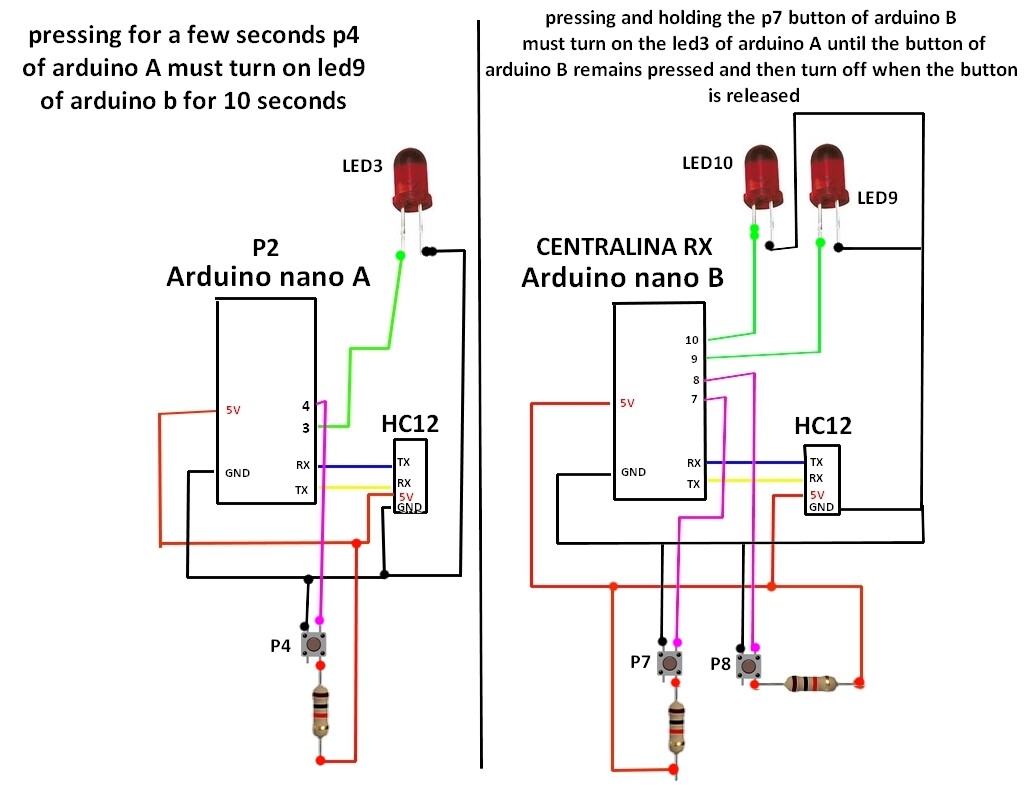
hello everyone, I have a problem that I can't figure out, I have two arduino nanos and two hc12s that I use to communicate with each other, my problem concerns the pressed button, I would like that when I hold down the button for example on the arduino A the state of the button pressed on arduino B is transmitted and consequently a led lights up on arduino B for the time that the arduino A button remains pressed while arduino B should have a button that makes me turn on the arduino A led for 10 seconds and then switch off, this via the hc12 modules
can anyone help me figure out how to do it? I enclose code that I had prepared both part A and part B, but it doesn't work well because the button can't always be intercepted in the loop.
#include <SoftwareSerial.h>
int stato = LOW;
const int ledPin9 = 9;
const int ledPin10 = 10;
const int buttonPin7 = 7;
const int buttonPin8 = 8;
int buttonState7 = 0;
int buttonState8 = 0;
void setup() {
    Serial.begin(9600);


     pinMode(LED_BUILTIN, OUTPUT);
   pinMode(buttonPin7, INPUT_PULLUP);
    pinMode(buttonPin8, INPUT_PULLUP);
    pinMode(ledPin9, OUTPUT);
    pinMode(ledPin10, OUTPUT);
}

void loop() {

  buttonState7 = digitalRead(buttonPin7);//accende a stato 2/3
 buttonState8 = digitalRead(buttonPin8);//accende a stato 4/5
 if (buttonState7 == LOW)
           {
          Serial.print("P2SON");
          delay(1500);
              }
          if (buttonState7 == HIGH)
        {
              Serial.print("P2SOFF");
          delay(1500);

         }

          if (buttonState8 == LOW)
           {
          Serial.print("P4SON");
          delay(1500);
           }
          if (buttonState8 == HIGH)
        {
              Serial.print("P4SOFF");
          delay(1500);

         }

   if(Serial.available() > 0)
    {
        String input = Serial.readString();
        if(input == "P1")
        {
          digitalWrite(ledPin9, HIGH);  // Turn the LED on (Note that LOW is the voltage level
          delay(10000);                      // Wait for a second
          digitalWrite(ledPin9, LOW);  // Turn the LED off by making the voltage HIGH
          //delay(500);
            }
            if(input == "P2")
        {
          digitalWrite(ledPin9, HIGH);  // Turn the LED on (Note that LOW is the voltage level
          delay(10000);                      // Wait for a second
          digitalWrite(ledPin9, LOW);  // Turn the LED off by making the voltage HIGH
         // delay(500);
            }
             if(input == "P3")
        {
          digitalWrite(ledPin9, HIGH);  // Turn the LED on (Note that LOW is the voltage level
          delay(10000);                      // Wait for a second
          digitalWrite(ledPin9, LOW);  // Turn the LED off by making the voltage HIGH
          //delay(500);
            }
             if(input == "P4")
        {
          digitalWrite(ledPin10, HIGH);  // Turn the LED on (Note that LOW is the voltage level
          delay(10000);                      // Wait for a second
          digitalWrite(ledPin10, LOW);  // Turn the LED off by making the voltage HIGH
         // delay(500);
            }
             if(input == "P5")
        {
          digitalWrite(ledPin10, HIGH);  // Turn the LED on (Note that LOW is the voltage level
          delay(10000);                      // Wait for a second
          digitalWrite(ledPin10, LOW);  // Turn the LED off by making the voltage HIGH
         // delay(500);
            }
             if(input == "P6")
        {
          digitalWrite(ledPin10, HIGH);  // Turn the LED on (Note that LOW is the voltage level
          delay(10000);                      // Wait for a second
          digitalWrite(ledPin10
          , LOW);  // Turn the LED off by making the voltage HIGH
         // delay(500);
            }
        }


    }
#include <SoftwareSerial.h>

const int buttonPin = 4;
int buttonState = 0;
int dalia = 0;
const int ledPin3 = 3;
void setup() {
    Serial.begin(9600);

      pinMode(ledPin3, OUTPUT);
      pinMode(buttonPin, INPUT);
}

void loop() {

  buttonState = digitalRead(buttonPin);
   if (buttonState == LOW) {
    // turn LED on:
    Serial.print("P2");
     delay(1500);
  }

    if(Serial.available() > 0)
    {
        String input = Serial.readString();
        if(input == "P2SON")
        {
          digitalWrite(ledPin3, HIGH);
          delay(100);
           }
           if(input == "P2SOFF")
            {
              digitalWrite(ledPin3, LOW);
          delay(100);
           }


         //if (dalia == 0) {

           // Serial.println("P2S ACCESO A STATO");
             //digitalWrite(ledPin3, HIGH);
              //dalia=1;
         //}else{
         //Serial.println("P2S SPENTO A STATO");
            // digitalWrite(ledPin3, LOW);
              //dalia=0;


          }

       }
void off(){

}