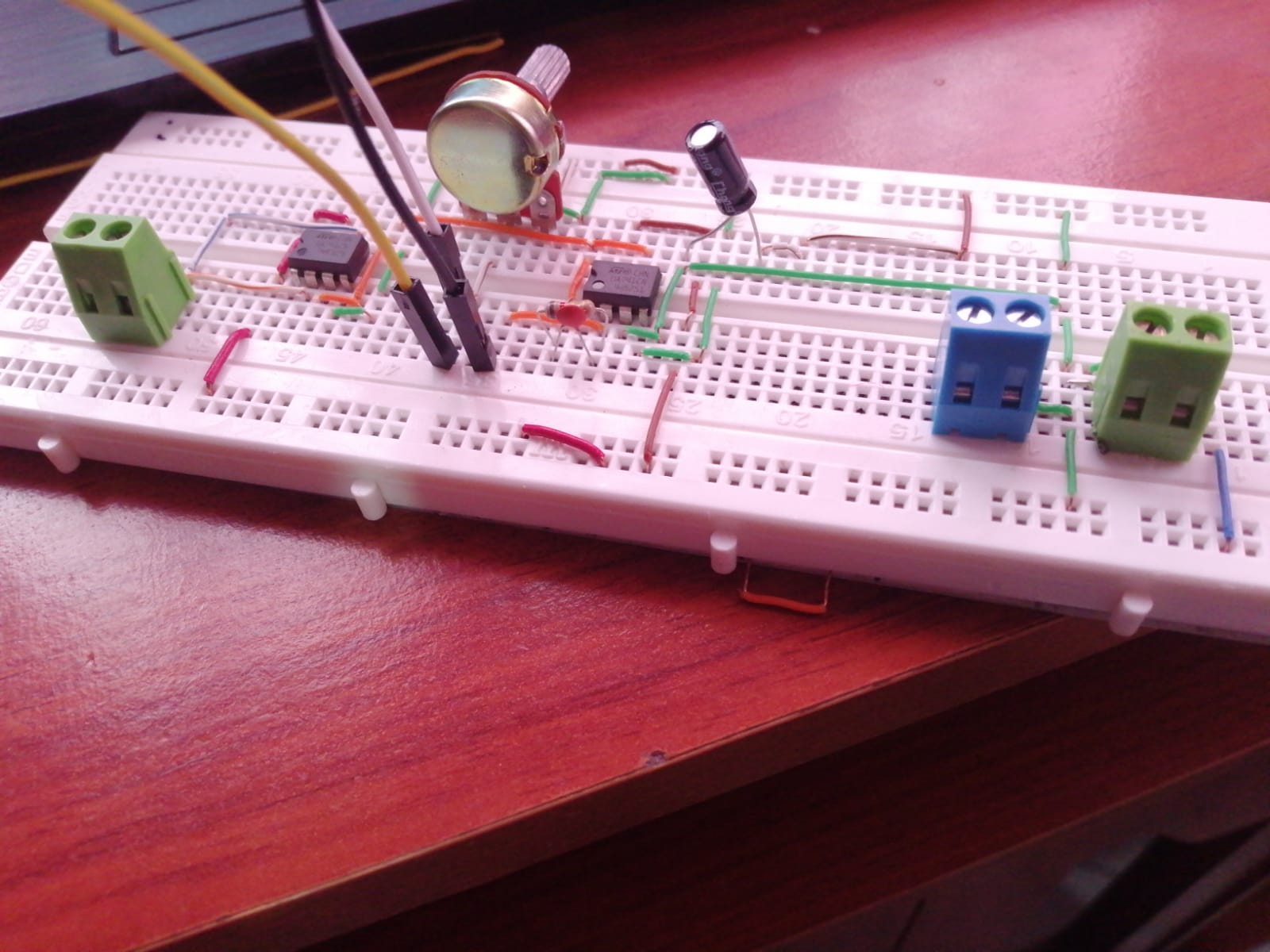
@Surbyte tengo una duda es que tengo este circuito para el sensor A201 elaborado en mi protoboard pero no logro tener valores exactos no se si la señal A0 la estoy conectando mal.

@Surbyte podrias mirar este codigo que tengo en matlab y decirme cual es el error
SETUP SERIAL
function [s,flag] = setupSerial(comPort)
% iniciar la comunicacion serial entre Arduino y MATLAB
% the input value is the COMPORT should be changed as per requirement
% we ensure that the Arduino is also communicatiing with MATLAB at this
% time. A predefined code on the Arduino acknowledges this.
% if setup is complete then the value of setup is retruned as 1 else 0
flag = 1;
s = serial(comPort); % me vota un error en esta parte del codigo
set(s,'DataBits', 8 );
set(s,'StopBits', 1 );
set(s,'BaudiRate', 9600);
set(s,'Parity', 'none');
fopen(s);
a='b';
while (a ~='a')
    a=fread(s,1,'uchar');
end
if (a=='a')
    disp('serial read');
end
fprintf(s,'%c','a');
mbox = msgbox('Serial Commucation setup.'); uiwait(mbox);
fscanf(s,'%u');
end
CLOSE SERIAL
clear all
if ~isempty(instrfind)
    fclose(instrfind);
    delete(instrfind);
end
close all
disp('Serial Port Closed')
ReadFSR
function[force] = readFSR(out)
       fprintf(out.s,'F');
       % read voltages from accelerometer and reorder
       force= fscanf(out.s,'%d');
end
fsr.m
clc;
close all;
clear all; %#ok<CLALL>

%% 1. specifies the COM port that the Aduino board is connected to
comPort = '/dev/tty.usbmodem1a12131';%This can be found out using the device manager (wi
%connect MATLAB to the accelerometer
if (~exist('serialFlag','var'))
    [fsr.s,serialFlag] = setupSerial(comPort); % me vota otro error
end
%% initalize the figure and buttons that we will plot in if it does not exist
if(~exist('h', 'var') || ~ishandle(h))
    h=figure(1);
end
if(~exist('text1','var'))
    text1 = uicontrol('Style','text','String','X: 0 degress',...
        'pos',[450 100 100 25],'parent',h);
end
if(~exist('text2','var'))
    text1 = uicontrol('Style','text','String','Y: 0 degress',...
        'pos',[450 75 100 25],'parent',h);
end
if(~exist('button','var'))
    button = uicontrol('Style','togglebutton','String','Stop & Close Serial Port',...
        'pos',[0 0 200 25],'parent',h);
end


%%Calibrate the sensor
weights=[0 20 50 70 100 120 150 200 220 250];
m1=zeros(length(weights), 1)';
%%Read the values for each weight and assign it
for i=2:length(weights)
    mbox = msbox(['Place' num2str(weights(i)) 'grams on thr FSR']); uiwait(mbox);
    m1(i) = readFSR(fsr)

    while (m1(i) < m1(i-1)) || m1(i) ==0;
        m1(i) = readFSR(fsr)
    end
end
m=m1;
%%
% weights=[0 10 20 50 100 150 200]
% m= [0 30 60 100 350 700 1800]

P1=polyfit( m, weights, 2); % Setup the curve fitting

%Setup the graph
myaxes = axes('xlim',[-20,20],'ylim',[-20,20],'zlim',...
    [0 250]);
view(3);
grid on;
axis equal;
bold on;

%Draw the 3d sphere
[xsphere ysphere zsphere] = sphere();
h(1) = surface(xsphere,ysphere,zsphere);

%Add the 3d spehere
combinedobject = hgtransform('parent',myaxes);
set(h,'parent', combinedobject)
drawnow
%% Acquire data and plot

while (get(button,'Value')== 0)
    [voltage]  =  readFSR(fsr) %Read data from the FSR
    mass= polyval(P1,voltage) % In grams
    if(mass > 0)
        force=mass*9.81 % In Newton

        %Update the readouts on the figure
        set(text1,'String',['Mass: ' num2str(round(mass)) 'mass'])
        set(text2,'String',['Force: ' num2str(round(force)) 'N'])

        %Move sphere along z axis
        translation = makehgtform('translate',[0 0 mass]);
        set(combinedobject, 'matrix',translation);

        %Scale sphere to 1/10th of the mass
        scaling = makehgtform('scale', mass/10)
        set(combinedobject, 'matrix', scaling);

        %Set the translation and scaling to the sphere
        set(combinedobject,'matrix', traslation*scaling);
    end
    %Pause
    pause(0.1);
end
% when graph closed, close serial
closeSerial;
es mirar esos dos errores para probar el codigo
No uso MATLAB y las preguntas de MATLAB son para el foro correspondiente.
Aca solo respondemos de arduino.
Tu debes ir por partes.
Veo que saltas de un lugar a otro con gran velocidad sin resolver practicamente nada o al menos no lo explicas.
Que pasó con tu interfaz electrónica conectada al pin A0?
Antes de mirar el pin A0, coloca un tester y observa como es la salida. Si es inestable no necesitas poner el arduino porque será inestable también.
Asi que retrocede e intenta descubrir que va mal.
Hay varios esquemas sugeridos en la Nota de Aplicacion de tu sensor.
Si, está mal conectado por varias razones.
- Lo estás conectando a la tensión de referencia (ver esquema en #12).
- La tensión de referencia es negativa y no puedes enviar tensiones negativas a los pines analógicos.
- Tienes que conectarlo a la salida del circuito, si no ¿para que ponerlo?
Es muy probable que el pin A0 se haya malogrado, asegúrate que sigue trabajando.