Pump motor causing problems with Uno

I have a fairly straightforward motor control system for an underwater robot, and it all worked well until we added a small DC impeller pump Gikfun DC 2.5V-6V Micro Submersible Mini Water Pump with 1m Silicone Tube (Pack of 3pcs) EK1374 - Amazon.com .
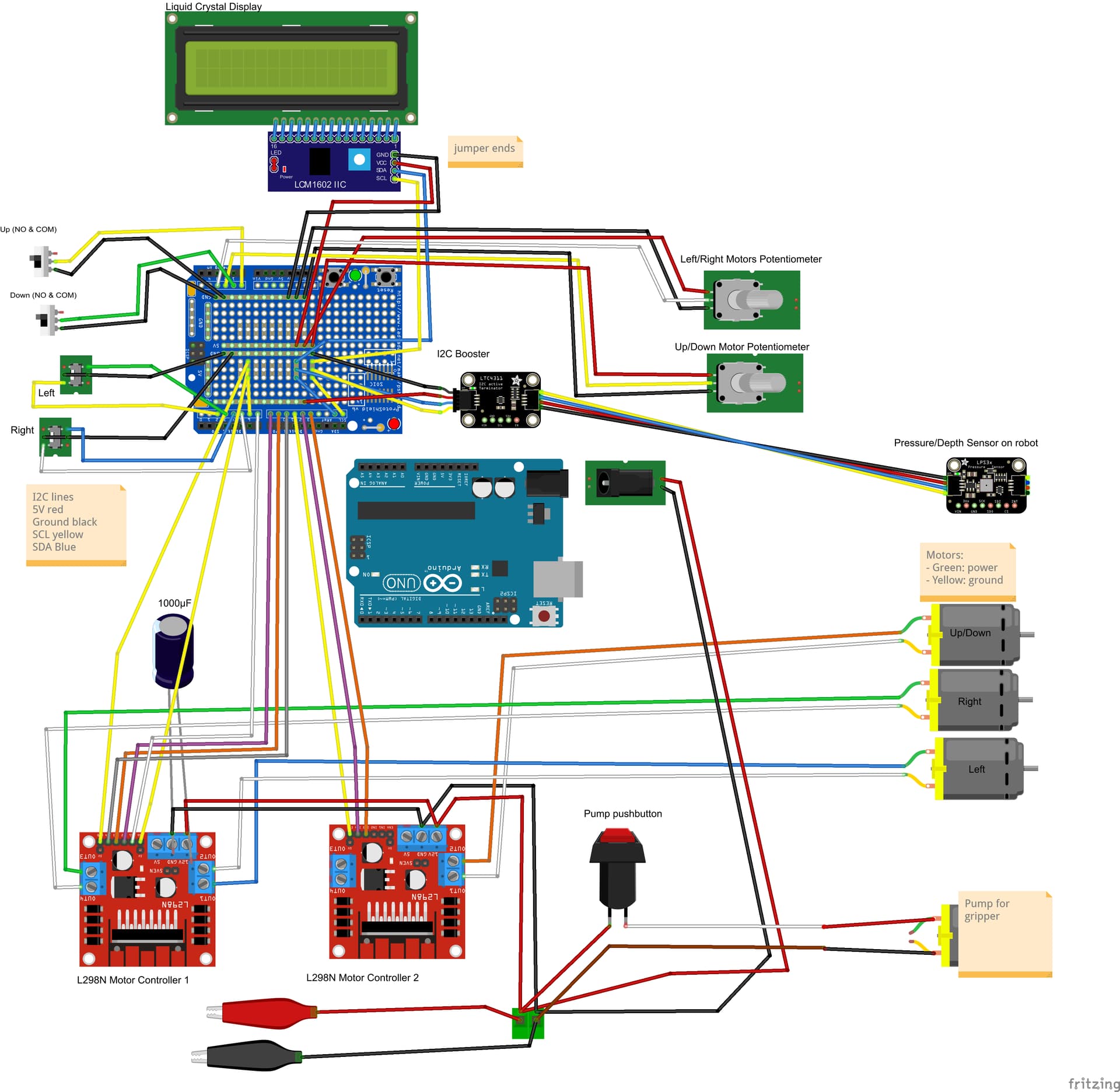
Here is a diagram of the system

The Arduino Uno controls 3 thrusters (waterproof DC motors with propellers) via 2 L298n motor controllers, 4x20 LCD display on I2C, and an Adafruit pressure sensor also on I2C. The entire system is powered by a 12V battery, with the 12V going to the Arduino Uno and to the motor controller boards.

We added a DC pump that isused intermittently, and added it the to 12V DC power, with a simple pushbutton control. When we push the button, it resets the Uno or hangs it up.
Solutions we tried: 1) Use a CastleLink BEC to power the pump motor and separate it electrically from the system - no change.
2) Keep a 5V source on the Uno through the USB cable (connect to a computer or power pack). This worked most of the time.
3) Power the pump through the spare channel on the L298n, controlling it with the switch through the Enable pin. Still messes the display and hangs up the Arduino when the button is pressed.

My guess is that there is alot of noise coming from the pump motor.
I should note that the motor is rated for 6V but we are powering it at 12V, however that has not been a problem in systems that are all analog electronics.

I have no I/O pins left on the Uno to serve as input from the pushbutton and output to the motor controller, but I feel this can be solved electrically.

Your thoughts and suggestions will be greatly appreciated!

Why are you "guessing" and not actually checking to see if there is "noise" or there is a voltage drop causing the problem? People on the forum cannot do the tests for you.

The solution is to use good engineering and construction practices: use generously over-rated power supplies, completely separate the motor power supply and the Arduino power supply, keeping motor wiring separate and as far as possible from the Arduino wiring, and to add individual brush noise filtering capacitors to the motors.

Shielded wiring may be required in some cases, and be sure to connect all the grounds in a "star" configuration.

Is there a kick back diode connected across the motor? It's surely needed.

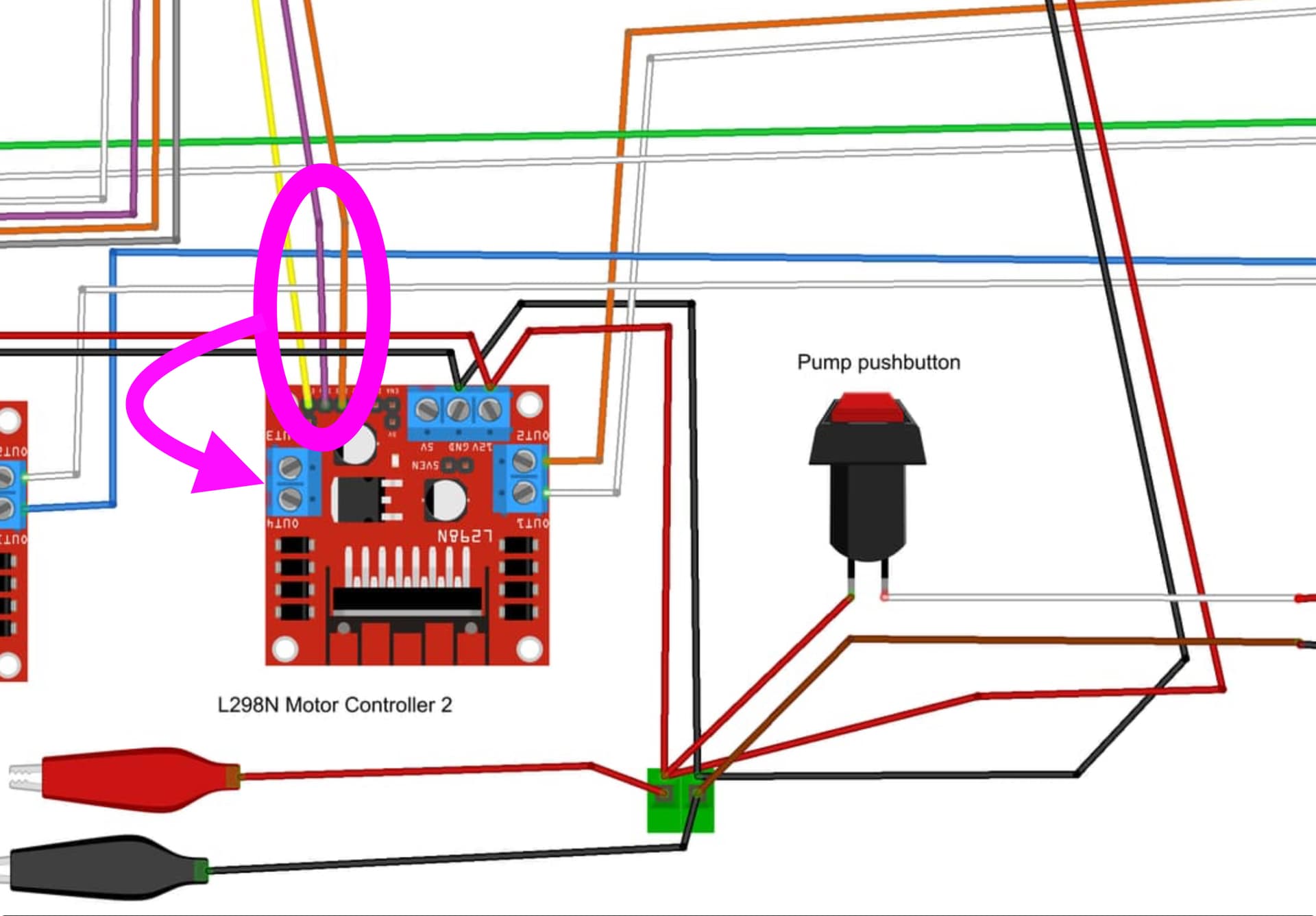
  • Your 2nd motor controller wiring needs to be corrected.

Thank you for recommendations for parts - we've got them in the lab and I will try it out.

thanks for pointing thta out - it is correct on the actual component but not updated in the drawing

Nice project. Hint: you are burning a lot of your battery energy using these. I recommend you get some drivers that use MOSFET outputs. Take the current the motor draws times 3 (voltage drop in L298) that will let you know how much is just warming things up.

If you have any unused Analog inputs they can be used as digital ports.

Following the advice given previously adding a small cap across the switch can also help.

This I would think is the major cause of your problem. Try running it at 6V. Even a seperate battery would help but be sure the grounds are all connected.

I am using this circuit to control an underwater robot. It works perfectly outside of the water. In the water, the Arduino (Uno R3) will intermittently lock up when the thruster motors are running. I noticed that the heat sinks on the L298ns are getting very hot. Sometimes the LCD display goes dark or displays incorrect symbols.

I added a BEC (programmable Castle model) to buffer the power going to the Arduino (prevent voltage spikes and sinks), but the Arduino still locked up.

Questions:

  1. What could be causing the Uno to lock up?
  2. Would replacing the Uno R3 with an R4 help (the code functions well on the R3)
  3. Would an alternative motor controller be helpful in preventing the problem?

thanks!

I don't see in your diagram a GND connection between the Uno and the L298s

Probably not.

That depends on the current that your motors are sinking (we don't know the specs). But it's a common sense here that there are better controllers that the L298. The L298 is old and wastes a lot of power.

In the absence of a actual schematic and links to the hardware in use (what, for example, is a "programmable Castle model"?), the cause could be practically anything.

You don't know what's causing your problem, so the answer is "who knows".

See previous answer.

Provide an actual schematic and links to any hardware being used, show clear, well lit, in focus pictures of your wiring and we can begin.

What are you using for your power source?

Running motors will require significantly more effort underwater than in the air and will consequently draw more current. That, in turn, will make the controllers run hotter. Can I also ask how the electronics are protected from water ingress and damp?

The Castle Creations CC BEC will regulate the voltage to the Arduino but can still be affected by brownout if the motors are overtaxing the power source. Brownout, if significant enough can cause the MCU to reset. I think you can probably reduce the output of the BEC to around 7V output. The regulator on the Arduino will run a little cooler and this might also provide a little more headroom against brownout. A more efficient motor controller board might also help reduce power demand. In any case, the power supply needs to be able to supply adequate current to the 4 motors, their controllers, the UNO board as well as all of the other peripherals.

I concur with the above that simply replacing the UNO R3 board with a UNO R4 is not likely to help. The cause of the problem needs to be established and addressed.

You could measure the voltage (drop) at the Arduino/BEC output and/or the power source while running in the air and underwater for comparison to see how the power supply is being affected.

With nothing to power the circuit? Impossible!

With the picture you posted, it is very hard to determine what you have and how it is wired.

The processor locking up is probably caused by electrical noise and/or overheating. Power surges on the power source can also cause problems.

Get rid of the L298 drivers and replace them with a properly sized driver using MOSFET outputs. You are losing about 3 volts to each motor as heat.

If the motors do not need to reverse, a simple MOSFET circuit can be used to drive them, even with PWM.

Is this being powered with a battery or through a cable to the surface? If a cable is involved, it will add an inductive component to the power source.

The current surge placed on the power source when starting loaded motors could explain why it works when it is not in the water.

Water conducts electricity everywhere, so electronics should not be submerged.

I2C is not "split" between two I2C devices. All I2C devices use VCC, GND, SDA and SCl.

That motor should have a flyback diode too.
The other motors already have flyback diodes through the L298.

Make sure the power to the Arduino doesn't drop due to bad (thin) wiring between battery and Arduino.

Hot L298s is normal for these dinosaur chips. Better drivers will fix that, but it also will push more current to the motors, which puts a higher strain on the supply.

The submersible motors only work with one supply polarity.
A mosfet switch would have been a better choice than H-bridge motor drivers.

Post your code.

diagram.json code for the wokwi nerds

{
  "version": 1,
  "author": "foreignpigdog x",
  "editor": "wokwi",
  "parts": [
    { "type": "wokwi-arduino-nano", "id": "nano", "top": -62.4, "left": -106.1, "attrs": {} },
    {
      "type": "wokwi-slide-switch",
      "id": "sw1",
      "top": 59.4,
      "left": -176.5,
      "rotate": 270,
      "attrs": { "value": "1" }
    },
    {
      "type": "wokwi-slide-switch",
      "id": "sw2",
      "top": 97.8,
      "left": -176.5,
      "rotate": 270,
      "attrs": { "value": "1" }
    },
    { "type": "wokwi-potentiometer", "id": "pot1", "top": 133.1, "left": -125, "attrs": {} },
    { "type": "wokwi-potentiometer", "id": "pot2", "top": 133.1, "left": -201.8, "attrs": {} },
    {
      "type": "wokwi-led",
      "id": "led1",
      "top": -145.2,
      "left": 64.2,
      "rotate": 90,
      "attrs": { "color": "white" }
    },
    {
      "type": "wokwi-led",
      "id": "led2",
      "top": -164.4,
      "left": 64.2,
      "rotate": 90,
      "attrs": { "color": "yellow" }
    },
    {
      "type": "wokwi-led",
      "id": "led3",
      "top": -183.6,
      "left": -142.6,
      "rotate": 270,
      "attrs": { "color": "magenta", "flip": "1" }
    },
    {
      "type": "wokwi-led",
      "id": "led4",
      "top": -145.2,
      "left": -142.6,
      "rotate": 270,
      "attrs": { "color": "orange", "flip": "1" }
    },
    {
      "type": "wokwi-led",
      "id": "led5",
      "top": -164.4,
      "left": -142.6,
      "rotate": 270,
      "attrs": { "color": "yellow", "flip": "1" }
    },
    {
      "type": "wokwi-led",
      "id": "led6",
      "top": -183.6,
      "left": 64.2,
      "rotate": 90,
      "attrs": { "color": "magenta" }
    },
    {
      "type": "wokwi-led",
      "id": "led7",
      "top": -212.4,
      "left": 64.2,
      "rotate": 90,
      "attrs": { "color": "orange" }
    },
    {
      "type": "wokwi-led",
      "id": "led8",
      "top": -231.6,
      "left": 64.2,
      "rotate": 90,
      "attrs": { "color": "yellow" }
    },
    {
      "type": "wokwi-led",
      "id": "led9",
      "top": -250.8,
      "left": 64.2,
      "rotate": 90,
      "attrs": { "color": "#aaa" }
    },
    {
      "type": "wokwi-text",
      "id": "text1",
      "top": -153.6,
      "left": 105.6,
      "attrs": { "text": "LEFT" }
    },
    {
      "type": "wokwi-text",
      "id": "text2",
      "top": -220.8,
      "left": 105.6,
      "attrs": { "text": "RIGHT" }
    },
    {
      "type": "wokwi-text",
      "id": "text3",
      "top": 67.2,
      "left": -201.6,
      "attrs": { "text": "UP" }
    },
    {
      "type": "wokwi-text",
      "id": "text4",
      "top": 105.6,
      "left": -230.4,
      "attrs": { "text": "DOWN" }
    },
    {
      "type": "wokwi-text",
      "id": "text5",
      "top": -153.6,
      "left": -220.8,
      "attrs": { "text": "UP/DOWN" }
    },
    { "type": "wokwi-vcc", "id": "vcc1", "top": -229.64, "left": 153.6, "attrs": {} },
    { "type": "wokwi-gnd", "id": "gnd1", "top": -105.6, "left": 239.4, "attrs": {} },
    {
      "type": "wokwi-pushbutton",
      "id": "btn1",
      "top": -176.2,
      "left": 163.2,
      "attrs": { "color": "green", "xray": "1" }
    },
    {
      "type": "wokwi-led",
      "id": "led10",
      "top": -195.6,
      "left": 388.2,
      "attrs": { "color": "red", "flip": "1" }
    },
    { "type": "wokwi-relay-module", "id": "relay1", "top": -182.2, "left": 259.2, "attrs": {} },
    {
      "type": "wokwi-text",
      "id": "text6",
      "top": -115.2,
      "left": 259.2,
      "attrs": { "text": "INDEPENDENT PUMP" }
    },
    {
      "type": "wokwi-text",
      "id": "text7",
      "top": 211.2,
      "left": -201.6,
      "attrs": { "text": "L/R" }
    },
    {
      "type": "wokwi-text",
      "id": "text8",
      "top": 211.2,
      "left": -124.8,
      "attrs": { "text": "U/D" }
    },
    {
      "type": "wokwi-lcd2004",
      "id": "lcd1",
      "top": 54.4,
      "left": 53.6,
      "attrs": { "pins": "i2c" }
    },
    {
      "type": "wokwi-slide-switch",
      "id": "sw3",
      "top": -94.4,
      "left": 67.7,
      "rotate": 90,
      "attrs": { "value": "1" }
    },
    {
      "type": "wokwi-slide-switch",
      "id": "sw4",
      "top": -94.2,
      "left": -138.1,
      "rotate": 270,
      "attrs": { "value": "" }
    },
    { "type": "wokwi-text", "id": "text9", "top": -96, "left": 96, "attrs": { "text": "RIGHT" } },
    {
      "type": "wokwi-text",
      "id": "text10",
      "top": -96,
      "left": -182.4,
      "attrs": { "text": "LEFT" }
    },
    {
      "type": "board-bmp180",
      "id": "bmp1",
      "top": 5.16,
      "left": 56.54,
      "rotate": 180,
      "attrs": {}
    },
    {
      "type": "wokwi-text",
      "id": "text11",
      "top": 19.2,
      "left": 124.8,
      "attrs": { "text": "PRESSURE" }
    }
  ],
  "connections": [
    [ "nano:A0", "sw1:2", "yellow", [ "v0" ] ],
    [ "sw2:2", "nano:A1", "limegreen", [ "h0" ] ],
    [ "nano:GND.1", "sw1:1", "black", [ "v0" ] ],
    [ "nano:GND.1", "sw2:1", "black", [ "v0" ] ],
    [ "pot1:SIG", "nano:A2", "yellow", [ "v19.2", "h28.4" ] ],
    [ "pot2:SIG", "nano:A3", "white", [ "v28.8", "h95.6" ] ],
    [ "pot1:VCC", "nano:5V", "red", [ "v38.4", "h66.4" ] ],
    [ "pot1:GND", "nano:GND.1", "black", [ "v48", "h86.4" ] ],
    [ "pot2:VCC", "nano:5V", "red", [ "v38.4", "h172" ] ],
    [ "pot2:GND", "nano:GND.1", "black", [ "v48", "h192" ] ],
    [ "nano:13", "led4:A", "orange", [ "v9.6", "h-9.6", "v-86.4" ] ],
    [ "nano:GND.1", "led4:C", "black", [ "v0" ] ],
    [ "nano:GND.1", "led5:C", "black", [ "v0" ] ],
    [ "nano:GND.1", "led3:C", "black", [ "v0" ] ],
    [ "nano:11", "led5:A", "yellow", [ "v0" ] ],
    [ "nano:12", "led3:A", "magenta", [ "v0" ] ],
    [ "nano:GND.1", "led2:C", "black", [ "v0" ] ],
    [ "nano:6", "led2:A", "yellow", [ "v0" ] ],
    [ "nano:7", "led1:A", "white", [ "v0" ] ],
    [ "nano:8", "led6:A", "magenta", [ "v0" ] ],
    [ "nano:GND.1", "led6:C", "black", [ "v0" ] ],
    [ "nano:6", "led8:A", "green", [ "v0" ] ],
    [ "nano:GND.1", "led9:C", "black", [ "v0" ] ],
    [ "nano:9", "led7:A", "gold", [ "v0" ] ],
    [ "nano:10", "led9:A", "gray", [ "v0" ] ],
    [ "nano:GND.1", "led8:C", "black", [ "v0" ] ],
    [ "nano:GND.1", "led7:C", "black", [ "v0" ] ],
    [ "nano:GND.1", "led1:C", "black", [ "v0" ] ],
    [ "vcc1:VCC", "btn1:1.l", "red", [ "v0" ] ],
    [ "gnd1:GND", "led10:C", "black", [ "v-9.6", "h192.4" ] ],
    [ "gnd1:GND", "relay1:GND", "black", [ "v0" ] ],
    [ "relay1:VCC", "btn1:2.r", "red", [ "h-19.2", "v9.6" ] ],
    [ "btn1:2.r", "relay1:IN", "red", [ "h0" ] ],
    [ "vcc1:VCC", "relay1:COM", "red", [ "v9.6", "h230.4", "v39.8" ] ],
    [ "relay1:NO", "led10:A", "red", [ "h0" ] ],
    [ "lcd1:GND", "nano:GND.1", "black", [ "h0" ] ],
    [ "lcd1:VCC", "nano:5V", "red", [ "h0" ] ],
    [ "lcd1:SDA", "nano:A4", "yellow", [ "h0" ] ],
    [ "lcd1:SCL", "nano:A5", "cyan", [ "h0" ] ],
    [ "nano:2", "sw4:3", "violet", [ "v-28.8", "h-207" ] ],
    [ "nano:3", "sw4:1", "magenta", [ "v-9.6", "h-197.4" ] ],
    [ "nano:GND.1", "sw4:2", "black", [ "v0" ] ],
    [ "nano:GND.1", "sw3:2", "black", [ "v0" ] ],
    [ "nano:4", "sw3:1", "#4f4", [ "v-48", "h67.2", "v19.4" ] ],
    [ "nano:5", "sw3:3", "limegreen", [ "v-38.4", "h67.2", "v28.8" ] ],
    [ "bmp1:VCC", "nano:5V", "red", [ "h0" ] ],
    [ "bmp1:GND", "nano:GND.1", "black", [ "h0" ] ],
    [ "bmp1:SCL", "nano:A5", "cyan", [ "h0" ] ],
    [ "bmp1:SDA", "nano:A4", "yellow", [ "h0" ] ],
    [ "nano:3.3V", "bmp1:3.3V", "gold", [ "v0" ] ]
  ],
  "dependencies": {}
}
See post #5
Did you do it?

Connect everything like this

@DianeBMaker
Small addition to the absolutely correct circuit: solder the diode and the capacitor directly to the motor terminals. That means no wire leads between the motor and the diode/capacitor.