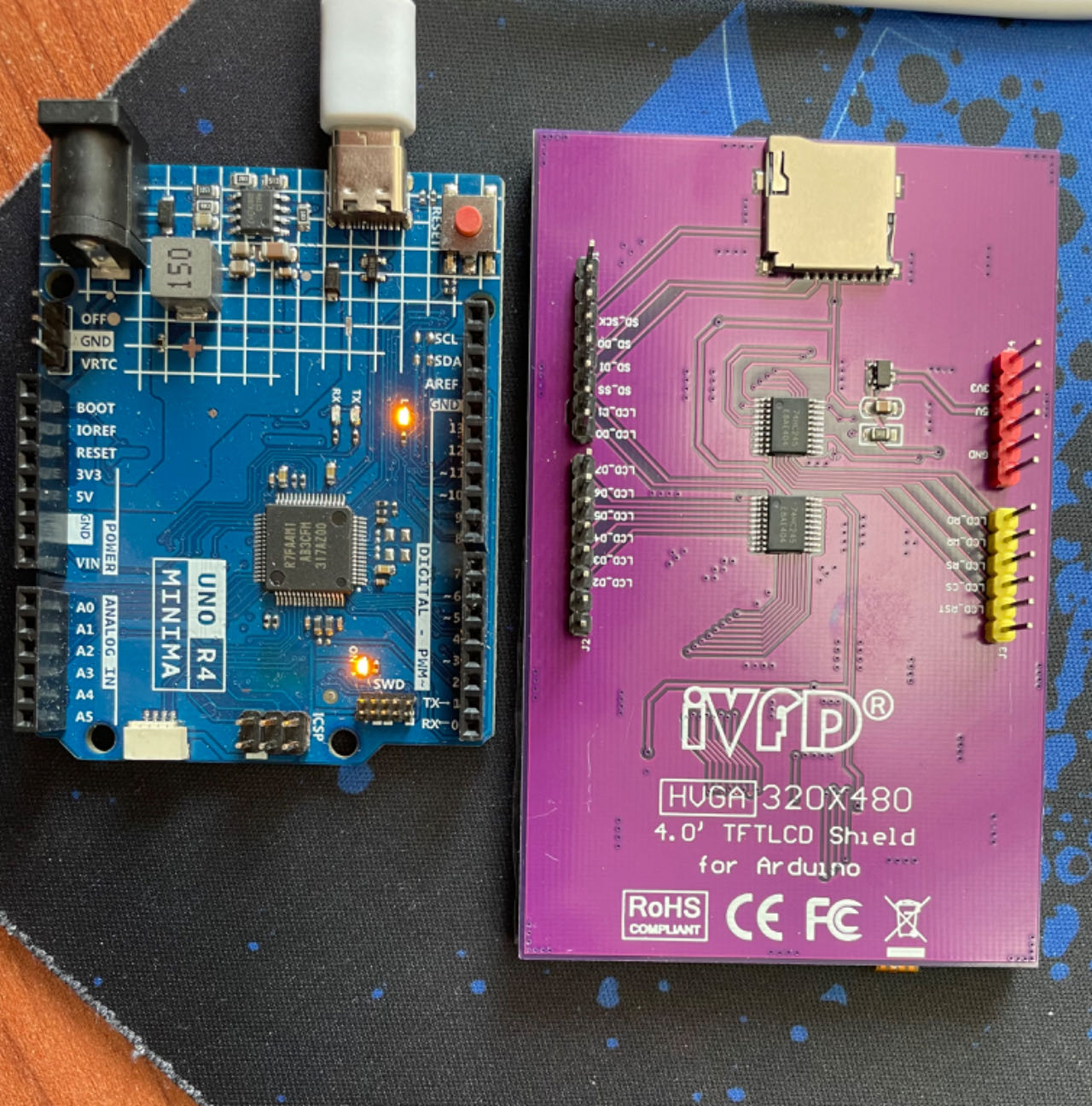
Hi everyone,
I can't get the screen I bought to work with my R4. The screen generate images when used with R3 and other libraries, but I need a more powerful microcontroller and a library that can display sprites, and so I bought an Arduino R4.
All I have got now is a white screen.
Hardware:
I'm using an Arduino R4 Minima
A 4.0 inch TFT Screen ILI9486 shield
Library:
GFX library for Arduino
Program: GFX library for Arduino's "Hello World!" Example. I changed the code slightly (the display class, ILI9486).
I have found that video that shows ILI9486 working with R4

that leads to this Instructable:
When I upload the code below to my R4, there no message error during compilation nor upload, which is an improvement, however the screen remains depressingly blank.
What do I do wrong?
/*******************************************************************************
 * Start of Arduino_GFX setting
 *
 * Arduino_GFX try to find the settings depends on selected board in Arduino IDE
 * Or you can define the display dev kit not in the board list
 * Defalult pin list for non display dev kit:
 * Arduino Nano, Micro and more: CS:  9, DC:  8, RST:  7, BL:  6, SCK: 13, MOSI: 11, MISO: 12
 * ESP32 various dev board     : CS:  5, DC: 27, RST: 33, BL: 22, SCK: 18, MOSI: 23, MISO: nil
 * ESP32-C3 various dev board  : CS:  7, DC:  2, RST:  1, BL:  3, SCK:  4, MOSI:  6, MISO: nil
 * ESP32-S2 various dev board  : CS: 34, DC: 38, RST: 33, BL: 21, SCK: 36, MOSI: 35, MISO: nil
 * ESP32-S3 various dev board  : CS: 40, DC: 41, RST: 42, BL: 48, SCK: 36, MOSI: 35, MISO: nil
 * ESP8266 various dev board   : CS: 15, DC:  4, RST:  2, BL:  5, SCK: 14, MOSI: 13, MISO: 12
 * Raspberry Pi Pico dev board : CS: 17, DC: 27, RST: 26, BL: 28, SCK: 18, MOSI: 19, MISO: 16
 * RTL8720 BW16 old patch core : CS: 18, DC: 17, RST:  2, BL: 23, SCK: 19, MOSI: 21, MISO: 20
 * RTL8720_BW16 Official core  : CS:  9, DC:  8, RST:  6, BL:  3, SCK: 10, MOSI: 12, MISO: 11
 * RTL8722 dev board           : CS: 18, DC: 17, RST: 22, BL: 23, SCK: 13, MOSI: 11, MISO: 12
 * RTL8722_mini dev board      : CS: 12, DC: 14, RST: 15, BL: 13, SCK: 11, MOSI:  9, MISO: 10
 * Seeeduino XIAO dev board    : CS:  3, DC:  2, RST:  1, BL:  0, SCK:  8, MOSI: 10, MISO:  9
 * Teensy 4.1 dev board        : CS: 39, DC: 41, RST: 40, BL: 22, SCK: 13, MOSI: 11, MISO: 12
 ******************************************************************************/
#include <Arduino_GFX_Library.h>

#define GFX_BL DF_GFX_BL // default backlight pin, you may replace DF_GFX_BL to actual backlight pin


/* More dev device declaration: https://github.com/moononournation/Arduino_GFX/wiki/Dev-Device-Declaration */
#if defined(DISPLAY_DEV_KIT)
Arduino_GFX *gfx = create_default_Arduino_GFX();
#else /* !defined(DISPLAY_DEV_KIT) */


/* More data bus class: https://github.com/moononournation/Arduino_GFX/wiki/Data-Bus-Class */
Arduino_DataBus *bus = create_default_Arduino_DataBus();

/* More display class: https://github.com/moononournation/Arduino_GFX/wiki/Display-Class */
// THE ONLY LINE I HAVE CHANGED
Arduino_GFX *gfx = new Arduino_ILI9486(bus, 7 /* RST */, 0 /* rotation */, false /* IPS */);


#endif /* !defined(DISPLAY_DEV_KIT) */
/*******************************************************************************
 * End of Arduino_GFX setting
 ******************************************************************************/

void setup(void)
{
  Serial.begin(9600);
  // Serial.setDebugOutput(true);
  // while(!Serial);
  Serial.println("Arduino_GFX Hello World example");

#ifdef GFX_EXTRA_PRE_INIT
  GFX_EXTRA_PRE_INIT();
#endif

  // Init Display
  if (!gfx->begin())
  {
    Serial.println("gfx->begin() failed!");
  }
  gfx->fillScreen(BLACK);

#ifdef GFX_BL
  pinMode(GFX_BL, OUTPUT);
  digitalWrite(GFX_BL, HIGH);
#endif

  gfx->setCursor(10, 10);
  gfx->setTextColor(RED);
  gfx->println("Hello World!");

  delay(5000); // 5 seconds
  Serial.println("Ta mere");
}

void loop()
{
  gfx->setCursor(random(gfx->width()), random(gfx->height()));
  gfx->setTextColor(random(0xffff), random(0xffff));
  gfx->setTextSize(random(6) /* x scale */, random(6) /* y scale */, random(2) /* pixel_margin */);
  gfx->println("Hello World!");

  delay(1000); // 1 second
  Serial.println("Ta mere");
}