i'm working on a university project for which we need to work with serial output from a ph-controller for fish-tanks.
The serial output from the "black box" is supposed to have this format:
Data rate: 9600 bits per second (fix)
Data bits: 8
Parity: none
Stop bits: 1
Signal lines: TxD, RxD, GND
Flow control: none
So this would be the SERIAL_8N1 config, which to my knowledge is the default.
We are using a RS232 <-> TTL converter and receiving data blocks like this:
93
98
51
5
10
144
67
144
49
49
4
2
53
5
2
8
106
there are four slightly different ones, every two seconds.
We don't really know what to make of this, since converting it with an ascii table only gives us more gibberish...
The output is supposed to be Date, Time, Temp, Ph-Value but we don't know how exactly.
This is the code we used so far:
byte incomingByte = 0; // for incoming serial data

void setup() {
  Serial.begin(9600); // opens serial port, sets data rate to 9600 bps
}

void loop() {
  // send data only when you receive data:
  if (Serial.available() > 0) {
    // read the incoming byte:
    incomingByte = Serial.read();

    // say what you got:
    Serial.println(incomingByte);
  }
}
We've been trying to find a solution via this forum we couldn't really find a similar problem so yeah, please help
Do you have a manual or data sheet for the sensor that describes the data format?
Having the sensor and the serial monitor connected to the serial port at the same time can cause problems. I would suggest using a second serial port for the sensor and use the (hardware) Serial port for program upload, output and debug prints. The second port can be an extra hardware serial port like on a Mega or a software serial port.
Here is an example to read the sensor using software serial. Connect the sensor TX to pin 5 and the sensor RX to pin 7. What is the output with this code?
#include <SoftwareSerial.h>

SoftwareSerial ss(5, 7);

void setup()
{
   Serial.begin(115200);  // *********** set serial monitor baud to 115200 *********
   Serial.println("\n software serial ph reader /n");
   ss.begin(9600);
}

void loop()
{
   if (ss.available() > 0)
   {
      Serial.print(char(ss.read()));
   }
}
So i tried your code @groundFungus but all i got was "software serial ph reader /n" in the serial monitor once.
@J-M-L: The time and date werent set right, but i dont know what date they were set to (I had to recalibrate because i turned it off by accident). Now I changed the time and date so now these values came at about: 10:06:30, Fr. 01.01.10
I tried converting it to a unix timestamp like you did, but i get 07/06/2019 @ 4:26am (UTC) for the first 4 bytes which isn't correct.
Heres the Serial i receive:
93
32
35
9
2
19
34
9
2
32
32
4
0
41
13
2
18
9
10
In the manual it says the output looks like this (but it's for the industrial device, much more features like Rx, Ox and so on. But the pattern could be similar):
"Result:
...
E11:36 Fr, 20.01.
E1 (Lv ) Air
E2 (pH-)07.01 pH
E3(Rx)+507 mV
E4 (Te+ ) 21.4 °C
E5 (Ox )110.4 %
E6(Co) 958 uS
E7 (AP) 1014 mB
E8 (Co)
E11:37 Fr, 20.01.
..
"
oh there I was too slow with my edit haha.
It's a german company: "IKS aquastar midi ph" but theres nothing to find. I only got the few info i have from emailing them, but thats all they could tell me.
Looking quickly at the the doc it seems you are supposed to receive ASCII
So something is wrong in the setup.
Can you describe your exact wiring ?
You likely need to use groundFungus’ code as you can’t have both your PC and the pH meter on the same serial line , here is a slightly modified version
#include <SoftwareSerial.h>

SoftwareSerial phReader(2, 3);
// SoftwareSerial(rxPin, txPin)
// rxPin: the pin on which to receive serial data
// txPin: the pin on which to transmit serial data
// ==> connect pin 2 (Rx) to pH meter Tx
// ==> connect pin 3 (Tx) to pH meter Rx
// ==> connect GND together

void setup()
{
  Serial.begin(115200);  // *********** set serial monitor baud to 115200 *********
  Serial.println("\n software serial ph reader\n");
  phReader.begin(9600);
}

void loop()
{
  static unsigned long lastChrono =0;
  static bool waitingForFrame = true;
  if (!waitingForFrame && (millis() - lastChrono > 750)) {
    // probably got the full frame, go to next line
    Serial.println();
    waitingForFrame = true;
  }

  if (phReader.available() > 0)
  {
    uint8_t b = phReader.read();
    lastChrono = millis();
    Serial.print(char(b));  Serial.write(' '); // let's try ASCII printing first
  }
}
connect Arduino pin 2 (Rx) to pH meter Tx connect Arduino pin 3 (Tx) to pH meter Rx connect GND of Arduino to GND of pH meter open the Serial monitor at 115200 bauds
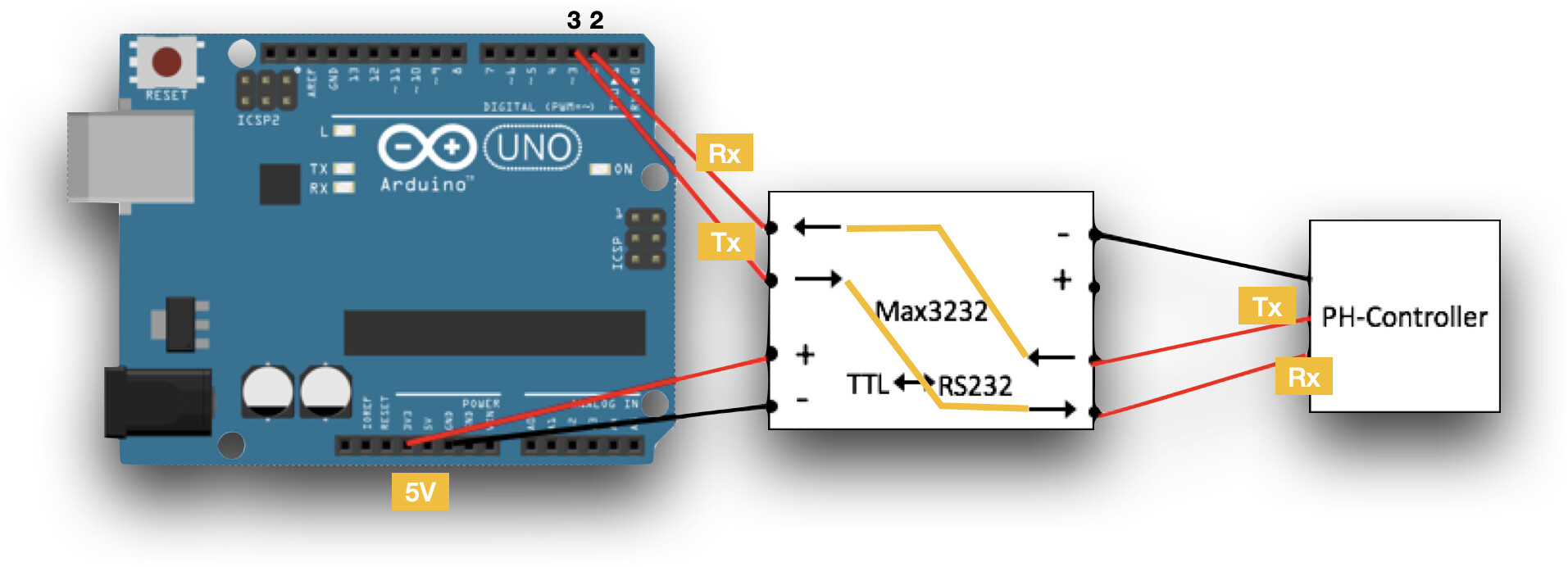
I'm using a MAX3232 on a breakout-board, on the ph-Controller theres just a MiniDin6-Cable coming out, on which i measured the currents to find out which wires are GND and which ones have voltage (about 9V).
This is my wiring:
I tried your code and now i got this (the first three "blocks", always start with a "]" :
 software serial ph reader /n
] ⸮ ⸮ ⸮ ⸮ ⸮ ⸮ ⸮ ⸮ s e ⸮ ⸮ ⸮ ⸮ ⸮ ⸮ ⸮ ⸮ ⸮ ⸮  ] g { ⸮ ⸮ ⸮ ⸮ ⸮ ⸮ ⸮ ⸮ ⸮ ⸮ ⸮ ⸮ ^ y = ] ⸮ { ⸮ o ⸮ ⸮ ⸮ ⸮ ⸮ ⸮ ⸮ ⸮ ⸮  o ⸮ ⸮
Do you have any idea what that could be?
Could it be that the other three wires, on which i don't measure any voltage, are needed for something?
You did not put any labels. Can you confirm the pins are connected the right way (confirm the orange labels / path)
how did you find out Tx and Rx on the pH meter side ?
it seems you are powering your MAX3232 with 3.3 V. --> the Arduino logic level is 5V so you should likely power it with 5V. What's your exact MAX3232 board model ?
On the board there are just the arrows, but i'm pretty sure the labels are correct like you placed them. On the ph-controller-side is just tried this way and the other way around. But with the first code I had, the other way around didn't give me any output so i assumed this was the right way, since i received at least something.
Powering it with 5V didn't change the output. In some tutorial on the MAX3232 i read that it could get very hot when powered with 5V instead of 3.3V so i just did that.
it's weird indeed may be random noise as there are lots of FF
Did you wire to 5V ? 3.3V will be seen as a HIGH on the Arduino side, so that's why it's probably working but if the signal is a bit weak you would have issues.
(by the way change the '/n' into '\n' in the welcome message, it was meant to have an extra line break)
have you installed the "firmware updates" they mention in the doc ?
also I had a small bug in my "going to next line" code, use this
#include <SoftwareSerial.h>

SoftwareSerial phReader(2, 3);
// SoftwareSerial(rxPin, txPin)
// rxPin: the pin on which to receive serial data
// txPin: the pin on which to transmit serial data
// ==> connect pin 2 (Rx) to pH meter Tx
// ==> connect pin 3 (Tx) to pH meter Rx
// ==> connect GND together

void setup()
{
  Serial.begin(115200);  // *********** set serial monitor baud to 115200 *********
  Serial.println("\n software serial ph reader\n");
  phReader.begin(9600);
}

void loop()
{
  static unsigned long lastChrono = 0;
  static bool frameStarted = false;

  if (frameStarted && (millis() - lastChrono > 500)) {
    // probably got the full frame, go to next line
    Serial.println();
    frameStarted = false;
  }

  if (phReader.available() > 0)
  {
    uint8_t b = phReader.read();
    lastChrono = millis();
    frameStarted = true;
    Serial.print(b, HEX);  Serial.write(' ');
  }
}
and could you grab many sequences like 30 seconds worth of recording
I warmed up the thermometer to see which values change and i noticed that only in the blocks that end with "3D" changes happen, and only between column 7 (BF) and 12(BF).
And i just noticed that in the longest block in column (or byte) 4 the value changes from changes from 9F to 9D, thats probably because the ph-value changed by 0.01 (because of false temp change)
if I look at UNIX time:
Time: 02:47:02 Sa, 02.01.2010 --> 0x4B3EA596 (paris) or 0x4B3EB3A6 (UTC) and I see no 4B in the data
(when you said 02:47:02 is that 2am or 2pm ? (2pm would be 0x4B3F4E56 but still start with 0x4B anyway)
Temp: 22.4 C (or 22.5 C) => 0x41B33333 or 0x41B40000 in IEEE float on 4 bytes again nothing very similar
Ph: 7.15 => 0x40E4CCCD in IEEE float on 4 bytes again nothing very similar
and the data is not in ASCII either....
it might be windows time, which is handled differently, (your date if UTC would be 40180.61599537 or 01CA8BBA:71A07700 in microsoft format) but I don't see anything that looks like being increased over time anyway ...
Could you record for 1 minute and not change anything in the measure... this way we shall see what part could represent the date/time if any
the last point I could see is that SoftwareSerial it's not exact enough in timings to communicate with devices that might be super picky. In that case you would need to go to hardware Serial and need an Arduino with two hardware Serial ports. Do you have a MEGA by any chance ?
I didn't have much time today, but i checked again what the output is like without software.serial! It's exactly the same output when using the hardware serial, so i don't think that's the problem.
So I took the values for more than a minute and these are the blocks that changed (the long blocks):
The other blocks stayed the same, but in my last post I only changed temperature and the block that ends with 3D changed. So we know which block contains what info, but not how its hidden in the numbers
I'm pretty sure this is what the blocks translate to (took these values now and copied the output):