I have tried searching but could not find an answer. I am trying to do it myself and am progressing very, very slowly. I am not sure it can be done.
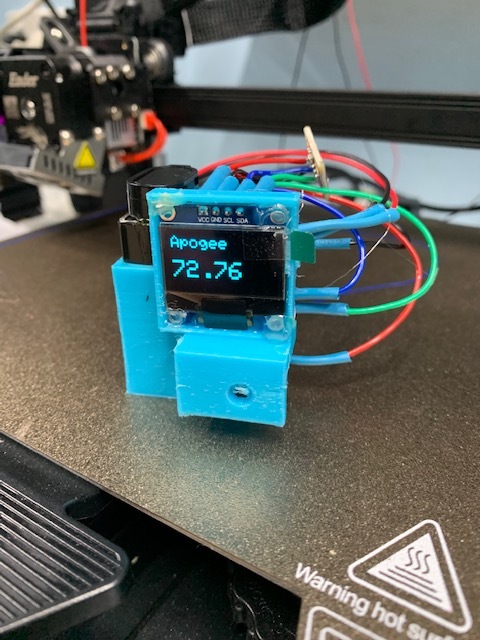
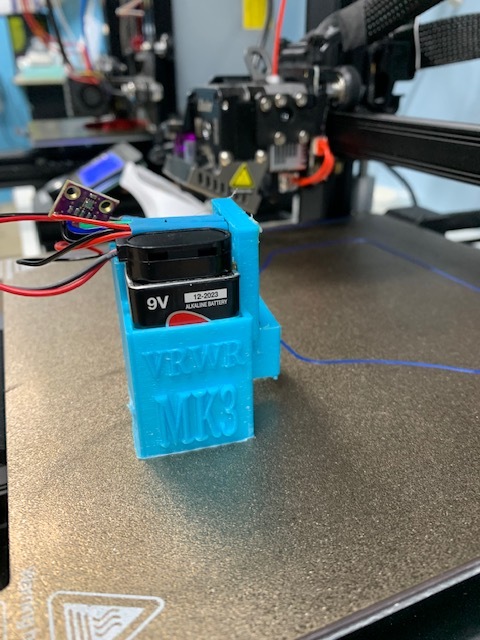
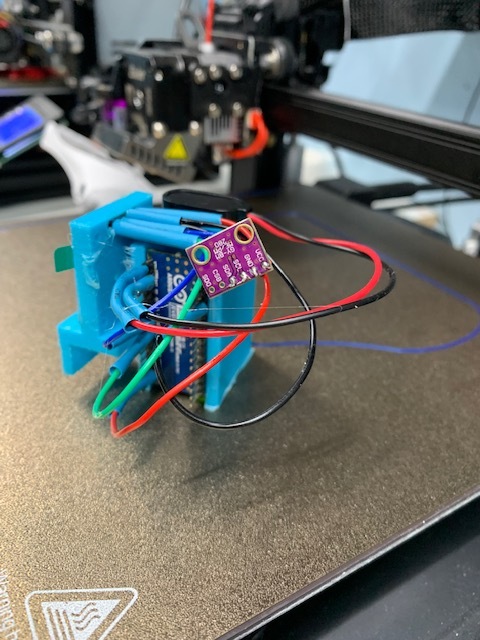
I am using a BMP 280 with a mini and OLED.
I want to use it in class so my students can graph the results of the highest altitude achieved. It needs to keep the maximum height achieved and it will then operate a servo to release the parachute.
If anyone is interested in looking I will attach the code I have so far. I am really crap at writing sketches so if you just want to tell me that do not bother. I already know I have been trying to learn for 4 or 5 years but find it really difficuilt.
Even if someone could tell me it is possible it might give me the motivation to continue. Any constructive suggestions and/or directions by this community would be most appreciated.
#include <Wire.h>
#include <Adafruit_GFX.h>
#include <Adafruit_SSD1306.h>
#include <Adafruit_Sensor.h>
#include <Adafruit_BMP280.h>
#define SCREEN_WIDTH 128 // OLED display width, in pixels
#define SCREEN_HEIGHT 64 // OLED display height, in pixels
// Declaration for an SSD1306 display connected to I2C (SDA, SCL pins)
Adafruit_SSD1306 display(SCREEN_WIDTH, SCREEN_HEIGHT, &Wire, -1);
Adafruit_BMP280 bmp; // I2C
void setup() {
  Serial.begin(9600);
  Serial.println(F("BMP280 test"));
  bmp.begin(0x76);
  if (!display.begin(SSD1306_SWITCHCAPVCC, 0x3C)) {
    Serial.println(F("SSD1306 allocation failed or couldn't find a valid bme280"));
    for (;;);
  }
  delay(200);
  display.clearDisplay();
  display.setTextColor(WHITE);
    delay(100);

}
void loop() {


  //read temperature and humidity
  float t = bmp.readTemperature();
  float h = bmp.readPressure();
float  A  = bmp.readAltitude(1025.20);////base altitude
if (isnan(h) || isnan(t)) {
 Serial.println("Failed to read from bmp sensor!");
  }
   display.clearDisplay();
  display.setTextSize(1);
  display.setCursor(0, 0);
  display.print("Temperature: ");
  display.setTextSize(2);
  display.setCursor(30, 10);
  display.print(t);
  display.print(" ");
   display.setTextSize(2);
  display.print("C");
  display.setTextSize(1);
  display.setCursor(0, 35);
  display.print("Pressure: ");
  display.setTextSize(2);
  display.setCursor(30, 45);
  display.print(h / 1000);
  display.print("kPa");
  display.display();
  delay(500);
   display.clearDisplay();
  display.setTextSize(2);
  display.setCursor(0, 0);
  display.print("Base");
    display.setCursor(0, 20);
  display.print("Height");
  display.setTextSize(3);
  display.setCursor(10, 35);
     display.print(A, 2);
    display.print("m");
  display.display();
  ////if B is greater than A the rocket is going up
  float B  = bmp.readAltitude(1025.20);
  delay(1000);
   Serial.print(F("Temperature = "));
  Serial.print(bmp.readTemperature());
  Serial.println(" *C");
  Serial.print(F("Pressure = "));
  Serial.print(bmp.readPressure() / 100); //displaying the Pressure in hPa
  Serial.println(" hPa");
  Serial.print(F("Approx altitude = "));
  Serial.print(bmp.readAltitude(1025.2)); //
  Serial.println(" m");
  Serial.println();
   if (A<B){
      ////if B is greater than A the rocket is going up
      display.clearDisplay();
       display.setTextSize(2);
    display.setCursor(0, 0);
  display.print("Going Up!");
         display.display();
    }

          if (A>B){
               display.clearDisplay();
     display.print("descending");
          }
   if (A>B){

       display.clearDisplay();
        display.setTextSize(2);
    display.setCursor(0, 0);
     display.print("descending");
       display.display();
          }
           if (A==B){
             display.clearDisplay();
     display.print("Same");
       display.display();
       }

          Serial.print(A, 0);
           Serial.print(B, 0);
  delay(2000);
 display.setTextSize(3);
    display.clearDisplay();
  display.setCursor(0, 0);
  display.print(B, 2);
   display.setCursor(0, 40);
  display.setTextSize(2);
  display.print("Max height");
 display.display();
  delay(2000);
}
Why does an altimeter on a rocket need a display? Will someone be in the rocket to read the display? Display processing takes up a lot of processing power.
Next why all the serial prints? Will the project be hooked up to a computer that someone will be looking at as they ride the rocket to wherever? Serial prints take up a lot of CPU processing power.
For 5.5 seconds the CPU will be doing nothing. By nothing it will take no readings as delay() stops the CPU from dong.
I'd use serial prints for code debugging but take them out for the real world.
Add a global float called MaxAltitude. Set it to zero. Whenever you read the altitude, compare to the max. If the actual altitude is greater, set max to it.
I'm not sure what that gives you though in terms of graphing. I suspect you want to graph the altitude against time, not just a single point for the max.
Usually, such systems are logging their data to an SD card to be recovered later. Are you transmitting live telemetry?
Thank you Idahowalker. I have the serial prints just to look at while I am trying to write the sketch. They will all be taken out. Intend to take a reading about every 500 milliseconds with my final sketch. The display is for when the rocket lands so the kids can easily record the data. They are only grade six. We will just be collecting the maximum altitude.
The issue that I have is I cannot work out how to just display the maximum height reached. It is not keeping that.
I will try to be clearer. When the rocket lands I will be happy if it simply displayed the highest altitude reached. Nothing else.
I appreciate you taking the time to reply. It helps a lot.
Thank you wildbill. I am researching your ideas and think they will help. Using MaxAltitude in the search has led me to another post where someone is asking the same question. I will continue there tomorrow.
I just want the OLED to display the maximum altitude reached. This would also allow me to operate a servo in the future.
Thank you very much for taking the time to reply. I greatly appreciate it.
Cheers.
Did you try, so you can view the numbers and see the things as to why and what not?
And you do know that you should be using a float instead of an int. AND with every loop MaximumHeightReached is redefined? Which means it is reset to 0. Place MaximumHeightReached as a global instead of as a local variable or declare MaximumHeightReached as static inside loop().
option a
float MaximumHeightReached=0.0f;
void loop() {

  float t = bmp.readTemperature();
  float h = bmp.readPressure();
  float CurrentHeightReached  = bmp.readAltitude(1025.20);
another option
void loop() {

  float t = bmp.readTemperature();
  float h = bmp.readPressure();
  float CurrentHeightReached  = bmp.readAltitude(1025.20);
static float MaximumHeightReached=0.0f;
The idea is to retain MaximumHeightReached, not recreate and reset to 0 with each loop().
Thank you. You are very kind. I have great difficulty even understanding the tutorials you kindly linked. I have tried many online and still do but either my brain is damaged or it is just not capable of learning any more.
Your sketch is working very well and your effort is greatly appreciated.
////With thanks to Idahowalker
#include <Wire.h>
#include <Adafruit_GFX.h>
#include <Adafruit_SSD1306.h>
#include <Adafruit_Sensor.h>
#include <Adafruit_BMP280.h>
#define SCREEN_WIDTH 128 // OLED display width, in pixels
#define SCREEN_HEIGHT 64 // OLED display height, in pixels
// Declaration for an SSD1306 display connected to I2C (SDA, SCL pins)
Adafruit_SSD1306 display(SCREEN_WIDTH, SCREEN_HEIGHT, &Wire, -1);
Adafruit_BMP280 bmp; // I2C
void setup() {
Serial.begin(9600);
///Serial.println(F("BMP280 test"));
bmp.begin(0x76);
if (!display.begin(SSD1306_SWITCHCAPVCC, 0x3C)) {
Serial.println(F("SSD1306 allocation failed or couldn't find a valid bme280"));
for (;;);
}
display.setTextColor(WHITE);
}
void loop() {
float t = bmp.readTemperature();
  float h = bmp.readPressure();
float CurrentHeightReached = bmp.readAltitude(1025.20);
static float MaximumHeightReached = 0.0f;
if (isnan(h) || isnan(t)) {
Serial.println("Failed to read from bmp sensor!");
}
if (MaximumHeightReached < CurrentHeightReached)
{
MaximumHeightReached = CurrentHeightReached;
display.clearDisplay();
display.setTextSize(3);
display.setCursor(0, 0);
display.print("Apogee");
display.setCursor(20, 31);
display.print(MaximumHeightReached, 2);
display.display();
delay(250);
}
}
 I have been trying to learn for 4 or 5 years but find it really difficuilt.