Hello,
for my school I would like with an esp8266 to control a ribbons of 240 leds in wifi which can be managed from a web page and light each led separately or several and choose its color, I manage to light all the ribbons in color (http: // ip / led = red) but not each separate led with the command (I added a separate power supply for the ribbons).
thank you
Good on you! 
.
.
.
.
.
{Was there supposed to be a question here? With no code shown according to the forum instructions, and no circuit diagram or photographs, clearly there is no question.  }
}
What does this mean?
#include <ESP8266WiFi.h>
#include <FastLED.h>

#define NUM_LEDS 24
#define LED_PIN 16

CRGB leds[NUM_LEDS];


const char* ssid = "Wifi bureau";
const char* password = "*********";

int ledPin = 16;
WiFiServer server(80);
int n;
void setup()
{
  FastLED.addLeds<WS2812B, LED_PIN, GRB>(leds, NUM_LEDS);
  FastLED.setBrightness(100);


  // initialisation de la communication série
  Serial.begin(115200);

  delay(100);

  // initialisation de la sortie pour la led
  pinMode(ledPin, OUTPUT);
  digitalWrite(ledPin, LOW);

  // Connexion wifi
  Serial.println();
  Serial.print("Connecting to ");
  Serial.println(ssid);

  WiFi.begin(ssid, password);

  // connection  en cours ...
  while (WiFi.status() != WL_CONNECTED)
  {
    delay(500);
    Serial.print(".");
  }

  // Wifi connecter
  Serial.println("WiFi connecter");

  // Démmarrage du serveur.
  server.begin();
  Serial.println("Serveur demarrer !");

  // Affichage de l'adresse IP
  Serial.print("Utiliser cette adresse URL pour la connexion :");
  Serial.print("http://");
  Serial.print(WiFi.localIP());
  Serial.println("/");

}

void loop()
{

WiFiClient client;


  // Vérification si le client est connecter.
  client = server.available();
  if (!client)
  {
    return;
  }

  // Attendre si le client envoie des données ...
  Serial.println("nouveau client");
  while(!client.available()){
    delay(1);
  }

  String request = client.readStringUntil('\r');
  Serial.println(request);
  client.flush();

  int value = LOW;
  if (request.indexOf("/LED=GREEN") != -1)  {
      for(int n;n<=24;n++)
      {
        leds[n] = CRGB::Green;
        FastLED.show();
      }
  }
  if (request.indexOf("/LED=RED") != -1)  {
      for(int n;n<=24;n++)
      {
        leds[n] = CRGB::Red;
        FastLED.show();
      }
  }
         if (request.indexOf("/LED=OFF") != -1)  {
      for(int n;n<=24;n++)
      {
        leds[n] = CRGB::Black;
        FastLED.show();
      }
    }
  // Réponse
  client.println("HTTP/1.1 200 OK");
  client.println("Content-Type: text/html");
  client.println("");
  client.println("<!DOCTYPE HTML>");
  client.println("<html>");

  client.print("Etat de la led : ");

  if(value == HIGH) {
    client.print("On");
  } else {
    client.print("Off");
  }
  client.println("<br><br>");
  client.println("<a href=\"/LED=GREEN\"\"><button>Libre </button></a>");
  client.println("<a href=\"/LED=RED\"\"><button>Occupe </button></a><br />");
  client.println("<a href=\"/LED=OFF\"\"><button>OFF </button></a><br />");
  client.println("</html>");

  delay(1);
  Serial.println("Client deconnecter");
  Serial.println("");

}
sorry i'm 14 years old and i'm looking for how to activate the addressable led i manage to control a ribbons by sending http commands i made a small app to control my light ring i would now like to control my 240 led ribbons (led by led) but I don't know what to steer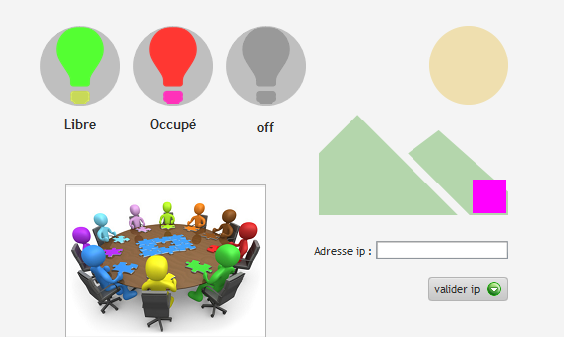
We don't know how to help you, because we can't figure out what your problem is. What is preventing you from completing your project?
You posted code, but with no explanation of where you are having trouble with it.
Ok, so at first glance, here are the parts you'll need to look at:
This will have to become 240 instead of 24 obviously.
In all of these if-statements, you'll have to provide for the possibility of specifying a particular led to be addressed. Currently you're apparently only giving a color parameter in the http request (the http address you 'open' with your app), but you'll have to add another parameter that sets the led id. For example "/LEDID=xxx" with xxx being the unique identification number of the led in question. You could still address all leds simultaneously by leaving out this parameter in the http request, as the if-statement will then evaluate to -1 and you can act on that.
This you will have to revise, as it will cycle through all leds one by one and adjust their color. If you want to address just one led, you don't want to use a for-loop! Btw, since you've already defined NUM_LEDS earlier, I would never hard-code that same number (24 in your case, currently) elsewhere in the code. So even in the current version change this line to
for(int n;n<=NUM_LEDS;n++)
That way your code will still work even if you change the number of leds you're working with...
Did you know there's also a French forum (it's actually 'francophone')? Your English is really good, don't get me wrong, but it may help to be able to discuss this in your native language as well. Look here: Français - Arduino Forum
Thank you for taking the time to answer me I will look with your explanation
I understand that my value "n" is my led number if I test deleting my if and with
void loop () {
// Turn the LED on
leds [5] = CRGB :: Red;
FastLED.show ();
} my led 5 is on, but how can I modify my if (request.indexOf ("/ n = RED")! = -1) {
Answered in reply #7...
"add another parameter that sets the led id. For example "/LEDID=xxx" with xxx being the unique identification number of the led in question."
...unless you mean some other modification. But this one seems to be the one you would need the most.
By the way, I tried rubbing my LED and my ESP8266, and no genie appeared...
Create another if-statement within the one where you handle the color change. In that if statement:
- Check the index of a phrase like "/NUMBER="
- If that evaluates to -1, no led number is passed, so execute the code you already have under the RED color (etc.)
- If you do get an index that is >0, apparently a specific led number was called for. Extract the number from the request string. You know where to start as you already checked the index; you also need to figure out where to stop reading the led number - is it 1, 2 or 3 digits (or even more?) You then execute the code that only sets one particular led color.
Btw, your code has a high degree of redundancy that will make it harder and harder as you continue to modify it and add features to it. For instance, you current code for setting the color to red, green or blue is three times more or less the same (only the color is different). I'd suggest solving that in a different way so that you don't have so much redundancy.
Good evening thank you for your advice I will find if I do not answer you during the week I can not go on the internet too much during the lessons
This topic was automatically closed 120 days after the last reply. New replies are no longer allowed.