Hallo Zusammen,
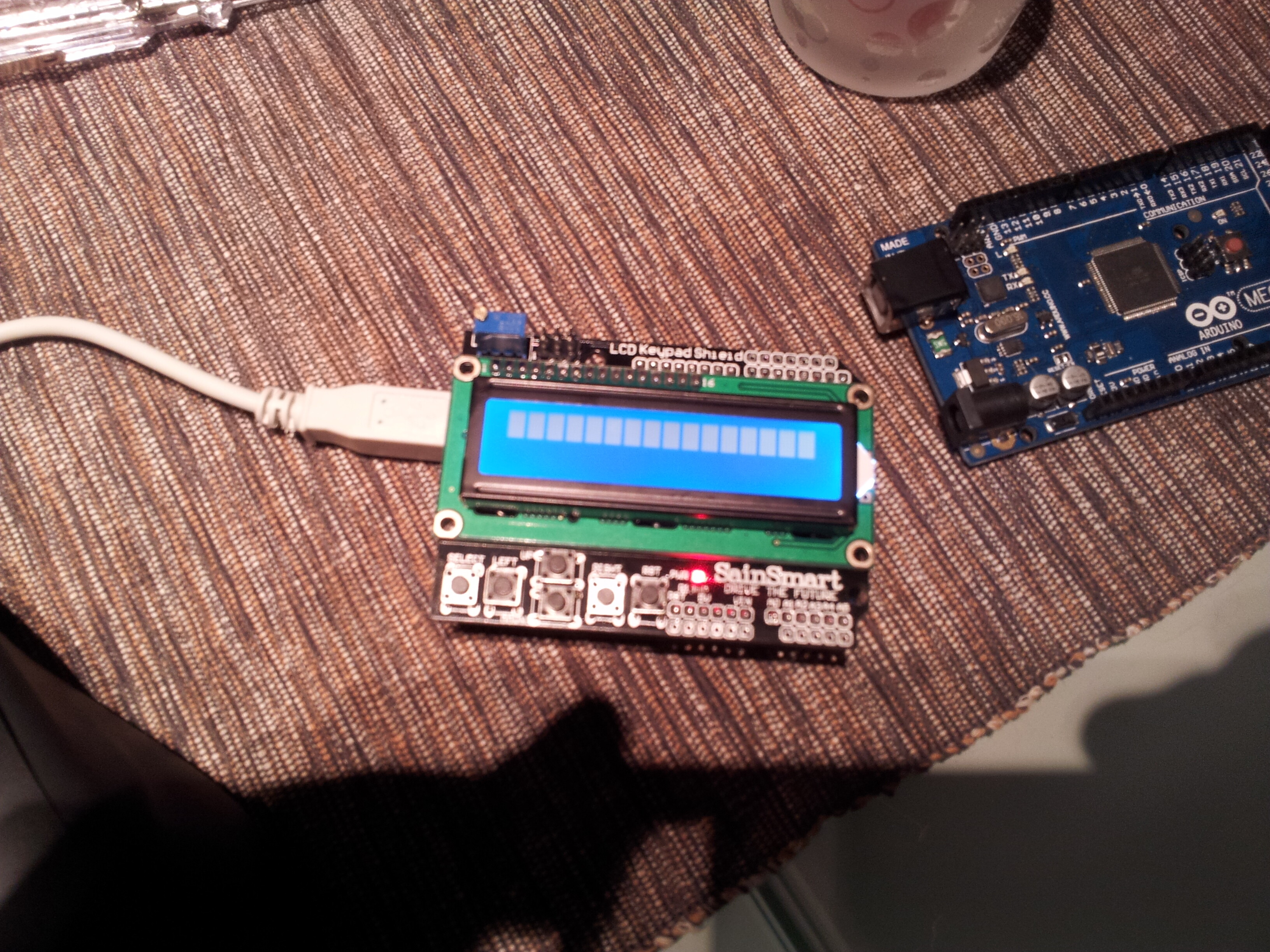
habe mir vor kurzem ein SainSmart 1602 KeyPad Shield berstellt. Heute ist es nun gekommen. Und jetzt nach über 3 Stunden habe ich es noch nicht geschafft einen Text anzeigen zu lassen.
Das einzige was mir angezeigt wird sind Pixelfelder. Am Poti habe ich auch schon jeweils in beide Richtungen bis an Anschlag gedreht. Kein Bild. Das Keypad funktioniert. Habe die Kontakte des Displays mit dem Pins unterhalb durchgemessen. Alles iO.
Woran könnte es noch liegen?
Habe mehrere Beispiel Sketche und auch schon 2 Versionen der LiquidCrystal Lib versucht.
#include <LiquidCrystal.h>
#include "Wire.h"

/*******************************************************

This program will test the LCD panel and the buttons of
the DFRobot LCD Keypad Shield for Arduino
Product code : RB-Dfr-07
http://www.robotshop.com/dfrobot-lcd-keypad-shield-arduino-1.html

Note cct error identified by Arduino forum discussion at:
http://arduino.cc/forum/index.php/topic,96747.0.html
which advises insertion of a Germanium 1n34a or a Schotky 1N5819
diode between pin 10 and the base of Q1 (K to pin 10).

sample code originally by Mark Bramwell, July 2010
modifications by Dion Weston, March 2012


********************************************************/

// select the pins used on the LCD panel
LiquidCrystal lcd(8, 9, 4, 5, 6, 7);

// define some values used by the panel and buttons
int backLight   = 10;    // LCD Panel Backlight LED connected to digital pin 10
int lightLevel  = 255;   // Initialise light full on
int lcd_key     = 0;
int adc_key_in  = 0;
#define btnRIGHT  0
#define btnUP     1
#define btnDOWN   2
#define btnLEFT   3
#define btnSELECT 4
#define btnNONE   5

// read the buttons
int read_LCD_buttons()
{
 adc_key_in = analogRead(0);      // read the value from the sensor
 // my [Mark Bramwell's] buttons when read are centered at these valies: 0, 144, 329, 504, 741
 // we add approx 50 to those values and check to see if we are close
 if (adc_key_in > 1000) return btnNONE; // We make this the 1st option for speed reasons since it will be the most likely result
 if (adc_key_in < 50)   return btnRIGHT;
 if (adc_key_in < 195)  return btnUP;
 if (adc_key_in < 380)  return btnDOWN;
 if (adc_key_in < 555)  return btnLEFT;
 if (adc_key_in < 790)  return btnSELECT;
 return btnNONE;  // when all others fail, return this...
}

void setup()
{
 lcd.begin(16, 2);              // start the LCD library
 lcd.setCursor(0,0);            // move cursor to beginning of line "0"
 lcd.print("Backlight adjust"); // print a simple message

}

void loop()
{
 analogWrite(backLight, lightLevel);
 lcd.setCursor(13,1);            // move to position 13 on the second line
 lcd.print(lightLevel);

 lcd.setCursor(0,1);            // move to the begining of the second line
 lcd_key = read_LCD_buttons();  // read the buttons

 switch (lcd_key)               // depending on which button was pushed, we perform an action
 {
   case btnRIGHT:
     {
     lcd.print("LED On          ");
     lightLevel = 255;
     break;
     }
   case btnLEFT:
     {
     lcd.print("LED Off         ");
     lightLevel = 1;
     break;
     }
   case btnUP:
     {
     lcd.print("LED Fade Up     ");
     if (lightLevel < 255) lightLevel += 1;
     break;
     }
   case btnDOWN:
     {
     lcd.print("LED Fade Down   ");
     if (lightLevel > 1) lightLevel -= 1;
     break;
     }
   case btnSELECT:
     {
     lcd.print("Select          ");
     break;
     }
     case btnNONE:
     {
     lcd.print("                ");
     break;
     }
 }

}
/*
  LiquidCrystal Library - Hello World

 Demonstrates the use a 16x2 LCD display.  The LiquidCrystal
 library works with all LCD displays that are compatible with the
 Hitachi HD44780 driver. There are many of them out there, and you
 can usually tell them by the 16-pin interface.

 This sketch prints "Hello World!" to the LCD
 and shows the time.

  The circuit:
 * LCD RS pin to digital pin 12
 * LCD Enable pin to digital pin 11
 * LCD D4 pin to digital pin 5
 * LCD D5 pin to digital pin 4
 * LCD D6 pin to digital pin 3
 * LCD D7 pin to digital pin 2
 * 10K resistor:
 * ends to +5V and ground
 * wiper to LCD VO pin (pin 3)

 Library originally added 18 Apr 2008
 by David A. Mellis
 library modified 5 Jul 2009
 by Limor Fried (http://www.ladyada.net)
 example added 9 Jul 2009
 by Tom Igoe
 modified 25 July 2009
 by David A. Mellis


 http://www.arduino.cc/en/Tutorial/LiquidCrystal
 */

// include the library code:
#include "Wire.h"
#include "LiquidCrystal.h"
#include <DFR_Key.h>
DFR_Key keypad;


const int RS = 8;
const int ENABLE = 9;
const int D4 = 4;
const int D5 = 5;
const int D6 = 6;
const int D7 = 7;

int DimLevel = 255;
int localKey = 0;
String keyString = "";


/*
Analog 0 	Button (select, up, right, down and left)
Digital 4 	DB4
Digital 5 	DB5
Digital 6 	DB6
Digital 7 	DB7
Digital 8 	RS (Data or Signal Display Selection)
Digital 9 	Enable
Digital 10 	Backlit Control
*/

// initialize the library with the numbers of the interface pins
  LiquidCrystal lcd(8, 9, 4, 5, 6, 7);

void setup() {
  // set up the LCD's number of rows and columns:
  lcd.begin(16, 2);
  // Print a message to the LCD.
  lcd.print("hello, world!");
  analogWrite(10, DimLevel);
  keypad.setRate(10);
}

void loop() {
  localKey = keypad.getKey();
  switch (localKey) {
    case 2: DimLevel = 0; RenewDimLevel(); break;
     case 3: DimLevel++; RenewDimLevel(); break;
     case 4: DimLevel--; RenewDimLevel(); break;
     case 5: DimLevel = 255; RenewDimLevel(); break;
  }
  // set the cursor to column 0, line 1
  // (note: line 1 is the second row, since counting begins with 0):
  lcd.setCursor(0, 1);
  // print the number of seconds since reset:
  lcd.print(millis()/1000);
  lcd.setCursor(1, 1);
  // print the number of seconds since reset:
  lcd.print(millis()/1000);
}

void RenewDimLevel()
{
  if (DimLevel > 255) { DimLevel = 0; }
  if (DimLevel < 0) { DimLevel = 255; }
   analogWrite(10, DimLevel);
}
Dachte auch schon das bei meinen Arduino Mega vielleicht ein Port defekt sein könnte. Habe es auf einem anderen Arduino Uno Probiert. Gleiches Symptom.