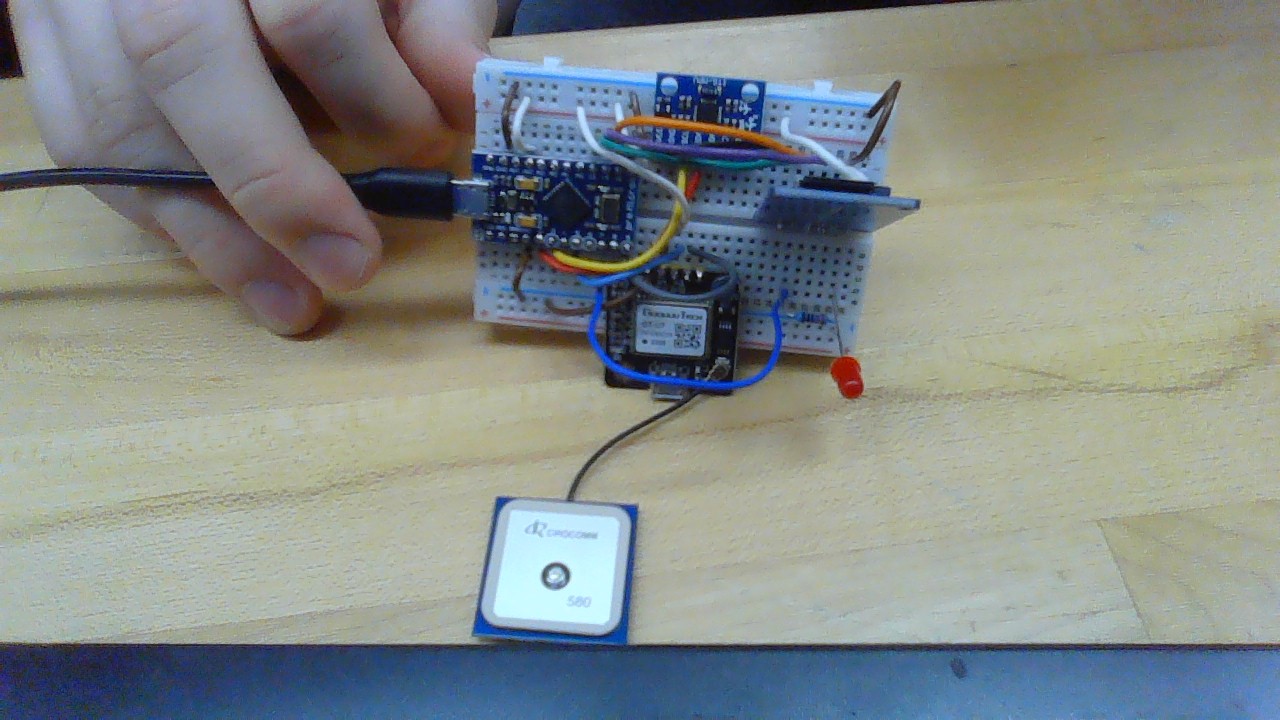
The purpose of this project is to log data from a gyro/accelerometer module and gyro module simultaneously and save the data to a micro SD card. I am using an arduino pro micro, and have wired everything up and have functional code when the arduino is plugged into my computer. However, after I disconnect the arduino from the computer and then reconnect it to the computer, the SD card receives no new data. This also happens when connecting to a 9v battery through the Micro usb port. The end goal is to have this project run purely on battery power, completely disconnected from the computer. I'm unsure whether this is a code or hardware issue, and I would appreciate any thoughts.
#include <Wire.h>

#include <SPI.h>
#include <SD.h>

#include <SoftwareSerial.h>
#include <TinyGPS++.h>


File f;
// The TinyGPS++ object
TinyGPSPlus gps;

static const int TXPin = 9, RXPin = 5;
static const uint32_t GPSBaud = 9600;

SoftwareSerial ss(TXPin, RXPin);

String data;

const int MPU_addr=0x68;  // I2C address of the MPU-6050
double AcX,AcY,AcZ,Tmp,GyX,GyY,GyZ;

String filename;
char filnum = 'a';


void setup() {

  // put your main code here, to run repeatedly:
  Serial.begin(9600);

  Serial.println("");
  delay(100);

  Serial.print("Initializing SD card...");

  if (!SD.begin(4)) {
    Serial.println("initialization failed!");
    while (1);
  }
  Serial.println("initialization done.");

  Wire.begin();
  Wire.beginTransmission(MPU_addr);
  Wire.write(0x6B);  // PWR_MGMT_1 register
  Wire.write(0);     // set to zero (wakes up the MPU-6050)
  Wire.endTransmission(true);
  Serial.begin(9600);

  ss.begin(GPSBaud);

  filename = "RIDE"+String(filnum)+".txt";

  while(SD.exists(filename)){
    filnum += 1;
    filename = "RIDE"+String(filnum)+".txt";
  }
  Serial.println("Writing to"+filename);
  Serial.println(gps.date.month());
}


void SDwrite(String file, String text){

  Serial.begin(9600);
  f = SD.open(file, FILE_WRITE);
  if (f) {
    Serial.print("Writing to " + file + "...");
    f.println(text);
    // close the file:
    Serial.println("done.");
  } else {
    // if the file didn't open, print an error:
    Serial.println("error opening " + file);
  }
  f.close();
}


void loop() {
  if (SD.begin(4)){
    Serial.begin(9600);
    ss.begin(GPSBaud);
    // put your main code here, to run repeatedly:
    Wire.beginTransmission(MPU_addr);
    Wire.write(0x3B);  // starting with register 0x3B (ACCEL_XOUT_H)
    Wire.endTransmission(false);
    Wire.requestFrom(MPU_addr,14,true);  // request a total of 14 registers
    AcX=Wire.read()<<8|Wire.read();  // 0x3B (ACCEL_XOUT_H) & 0x3C (ACCEL_XOUT_L)
    AcY=Wire.read()<<8|Wire.read();  // 0x3D (ACCEL_YOUT_H) & 0x3E (ACCEL_YOUT_L)
    AcZ=Wire.read()<<8|Wire.read();  // 0x3F (ACCEL_ZOUT_H) & 0x40 (ACCEL_ZOUT_L)
    Tmp=Wire.read()<<8|Wire.read();  // 0x41 (TEMP_OUT_H) & 0x42 (TEMP_OUT_L)
    GyX=Wire.read()<<8|Wire.read();  // 0x43 (GYRO_XOUT_H) & 0x44 (GYRO_XOUT_L)
    GyY=Wire.read()<<8|Wire.read();  // 0x45 (GYRO_YOUT_H) & 0x46 (GYRO_YOUT_L)
    GyZ=Wire.read()<<8|Wire.read();  // 0x47 (GYRO_ZOUT_H) & 0x48 (GYRO_ZOUT_L)


    while (ss.available() > 0)
      gps.encode(ss.read());

    data = String(AcX)+","+String(AcY)+","+String(AcZ)+","+String(GyX)+","+String(GyY)+","+String(GyZ)+","+String(gps.location.lat())+","+String(gps.location.lng())+","+String(gps.speed.mph())+","+String(gps.time.hour())+","+String(gps.time.minute());
    Serial.println(data);
    SDwrite(filename, data);
  }else{
    while(!SD.begin(4)){
      Serial.println("SD card Removed");
    }
    filnum += 1;
    filename = "RIDE"+String(filnum)+".txt";
  }
}