Sending Serial Data from one Arduino to Another

Hi,

I have an Arduino Giga and Arduino Every which I'd like to send data from one to another via serial connection. Included is my code which I'm not sure why isn't working. Nothing prints on the Every serial monitor, and the LED isn't turning on. The Arduino boards are grounded and RX/TX pins are connected properly.

Giga:

void setup() {
  Serial.begin(9600);

  while (!Serial);
}

void loop() {
  Serial.print("1");
  delay(500);
  Serial.print("2");
  delay(500);
}

Every:

#include <FastLED.h>

#define NUM_LEDS 1
#define DATA_PIN 3
#define CLOCK_PIN 13

CRGB leds[NUM_LEDS];

int incomingByte = 0;

void setup() { 
  Serial.begin(9600);
  FastLED.addLeds<WS2812, DATA_PIN, RGB>(leds, NUM_LEDS);  
}

void loop() { 
  if (Serial.available() > 0) {
    incomingByte = Serial.read();

    Serial.println(incomingByte);

    if (incomingByte == "1") leds[0] = CRGB(0, 0, 255);
    else leds[0] = CRGB(0, 255, 0);
  }
  
  FastLED.show();
}

The Giga i/o is at 3.3v and is not 5v tolerant and the NanoEvery is 5v device. You should use a level shifter between the two devices or a voltage divider between the NE Tx and the Giga Rx.

The serial connection between the two units should be on Serial1. For the Nano Every thats on pins 0 and 1 which are independent of usb serial and the Giga has multiple hardware serial ports similar to the Mega.

Make certain the grounds of the two boards are connected as well as the cross connection of Rx>Tx and Tx>Rx

 D14/TX3 Digital GPIO 14 / Serial 3 Transmitter
 D15/RX3 Digital GPIO 15 / Serial 3 Receiver
 D16/TX2 Digital GPIO 16 / Serial 2 Transmitter
 D17/RX2 Digital GPIO 17 / Serial 2 Receiver
 D18/TX1 Digital GPIO 18 / Serial 1 Transmitter
 D19/RX1 Digital GPIO 19 / Serial 1 Receiver
if (incomingByte == "1")

incomingByte will never equal "1" because "1" is a string

On the Giga use

  Serial.print('1');

to send a single character and on the Every use

char incomingChar = Serial.read();

    Serial.println(incomingChar);

    if (incomingChar == '1')

Please post an annotated schematic showing how these components are interconnected, something appears to be incorrect. Be sure to indicate any leads longer than 10 inches (25 cm), and clearly show how voltage level conversion is handled. Keep in mind that the processors operate at different voltage levels, and the output of the Every can damage the input of the Giga if not properly shifted.

If I'm only sending data from the Giga to the Every, do I still need the TX connection on the Every?

For the Giga, Similar to the Mega.

For the Nano Every use Serial1 on pins 0 and 1. Use Serial1.begin( baud rate) in setup().

Additionally, which are pins 0 and 1 on the Every?

The pins labeled TX and RX.

If you are only sending from the Giga to the Every, you do not need a connection from the Every Tx to the Giga Rx.

Thank you. Are these connections proper? Is it okay that the wiring is about a foot in length?

Lastly, I would ideally like to send the data in JSON format using the ArduinoJson library. To send data serially using JSON, it would look like this:

JsonDocument data;

data["r"] = red;
data["b"] = blue;
data["g"] = green;

serializeJson(data, Serial);

However, I'm not sure about deserializing. In the documentation, there is a variable that is deserialized. But how do you read and store the JSON data coming from the Serial port?

No. The Nano Every Vin is 7-21V. You could use the Nano Every 5v pin.

I don't know. Once you have the serial connection between the Giga and the Nano Every worked out, I would start a new topic focused specifically at the JSON data transfer.

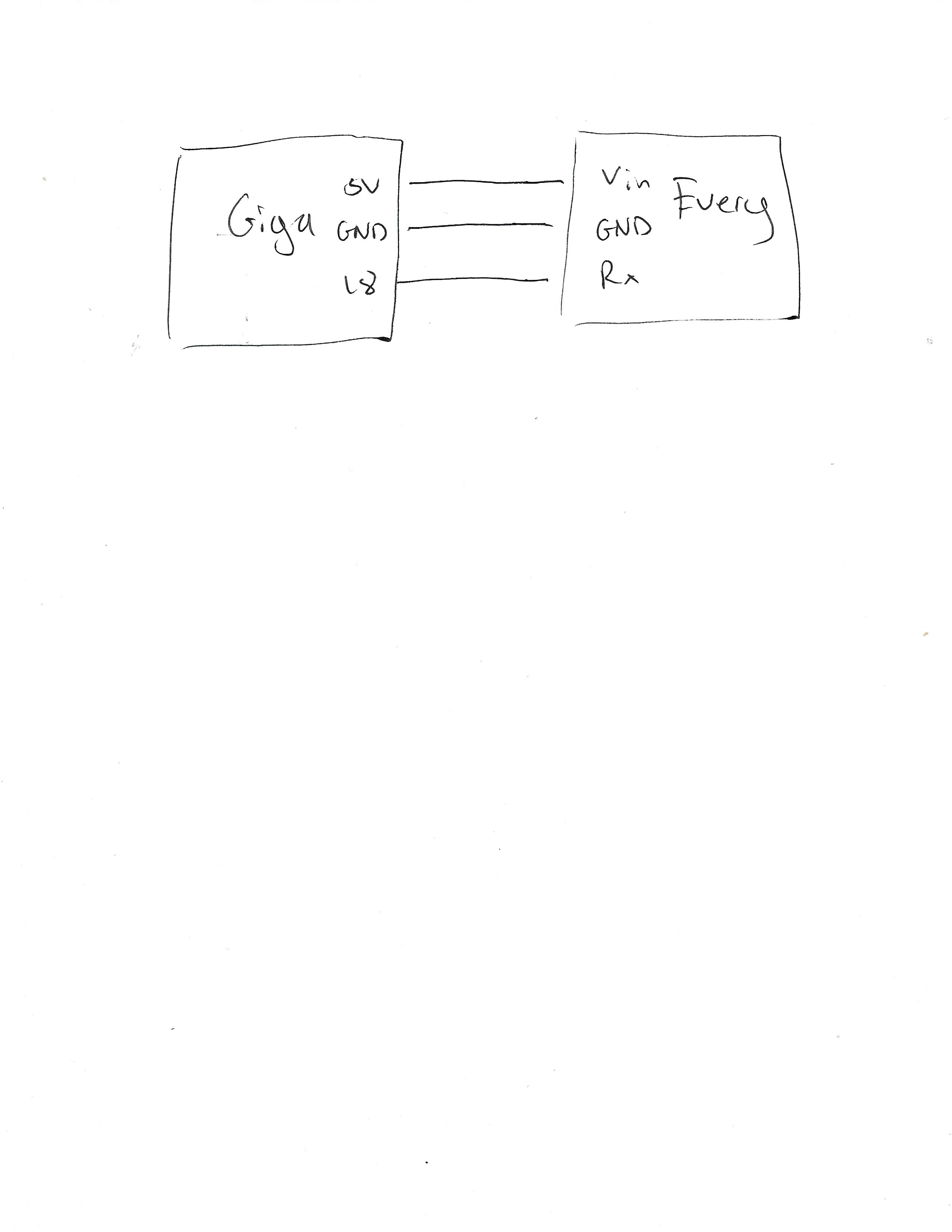
I still haven't got it working, below is my code:

Giga:

void setup() {
    delay(3000);
    Serial1.begin(9600);
    while (!Serial1);
}

void loop() {
  sendData();
}


void sendData() {
  Serial1.println('1');
  delay(500);
  Serial1.println('2');
  delay(500);
}

Every:

#include <FastLED.h>

#define NUM_LEDS 1
#define DATA_PIN 3
#define CLOCK_PIN 13

CRGB leds[NUM_LEDS];

int incomingByte = 0;

void setup() { 
  Serial.begin(9600);
  FastLED.addLeds<WS2812, DATA_PIN, RGB>(leds, NUM_LEDS);  
}

void loop() { 
  if (Serial.available() > 0) {
    incomingByte = Serial.read();

    Serial.println(incomingByte);

    if (incomingByte == "1") leds[0] = CRGB(0, 0, 255);
    else leds[0] = CRGB(0, 255, 0);
  }
  
  FastLED.show();
}

I have TX on the Giga connected to RX on the Every, 5V and GND connected as well.

void setup() { 
  Serial.begin(9600);
  FastLED.addLeds<WS2812, DATA_PIN, RGB>(leds, NUM_LEDS);  
}

As explained in post #6

Replace every use of Serial with Serial1.

Thank you for the help thus far. Here is my current code which is still not working:

void setup() {
  delay(3000);

  Serial1.begin(9600);
  while (!Serial1);
}

void loop() {
  sendData();
}

void sendData() {
  Serial1.println('1');
  delay(500);
  Serial1.println('2');
  delay(500);
}
#include <FastLED.h>

#define NUM_LEDS 1
#define DATA_PIN 3
#define CLOCK_PIN 13

CRGB leds[NUM_LEDS];

int incomingByte = 0;

void setup() { 
  Serial.begin(9600);
  while (!Serial);

  Serial1.begin(9600);
  while (!Serial1);

  FastLED.addLeds<WS2812, DATA_PIN, RGB>(leds, NUM_LEDS);  
}

void loop() { 
  if (Serial1.available() > 0) {
    incomingByte = Serial1.read();

    Serial.println(incomingByte);

    if (incomingByte == '1') leds[0] = CRGB(0, 0, 255);
    else leds[0] = CRGB(0, 255, 0);
  }
  
  FastLED.show();
}

DO NOT connect 5V from giga to every.

No
Connect TX0 (pin 1) of the Giga to RX of the nano every.
Connect GND of Giga to GND of nano every.

That is all.

println sends the character followed by carriage return character(s) (0x0D or 0x0A or both, I don't remember) so

first sets leds[0] to CRGB(0, 0, 255) after receiving '1'but resets leds[0] to CRGB(0, 255, 0) when receiving the carriage return character(s).
Use

Serial1.print('1');

as suggested by @UKHeliBob or

Serial1.write('1');

instead or try

    if (incomingByte == '1') leds[0] = CRGB(0, 0, 255);
    else if (incomingByte == '0') leds[0] = CRGB(0, 255, 0);

or its switch... case equivalent.