Windows 11 Serial-Discovery 1.5 causes flasher.exe to fail when using a HIBCTR ESP32-SC-WROOM-1-N16R8. Flasher.exe works when Serial-Discovery 1.5 is removed from tools and replaced with Serial-Discovery 1.4. Also, flasher will work if Serial-Discovery 1.5 is killed or suspended before upload. If serial-discovery is resumed upload continues to work.
I'm going to ask you to provide the full verbose output from an upload attempt that fails due to serial-discovery 1.5.0. running.
This procedure is not intended to solve the problem. The purpose is to gather more information.
Please do this:
Select File > Preferences... (or Arduino IDE > Settings... for macOS users) from the Arduino IDE menus.
The "Preferences" dialog will open.
Uncheck the box next to Show verbose output during: ☑ compile in the "Preferences" dialog.
Check the box next to Show verbose output during: ☐ upload.
Click the "OK" button.
The "Preferences" dialog will close.
Attempt an upload, as you did before.
Wait for the upload to fail.
You will see an "Upload error: ..." notification at the bottom right corner of the Arduino IDE window. Click the "COPY ERROR MESSAGES" button on that notification.
Open a reply here on this forum topic by clicking the "Reply" button.
Click the <CODE/> icon on the post composer toolbar.
This will add the forum's code block markup (```) to your reply to make sure the error messages are correctly formatted.
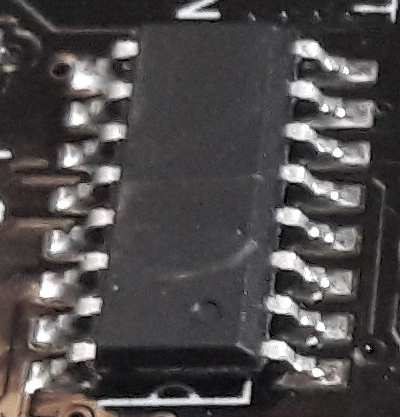
There are some boards on the market that have a USB chip with the same IC package as the WCH CH340, and which are identified by the computer as a CH340. However, these chips don't have the "WCH CH340C ..." labeling like you see on the chip in the picture above:
If it isn't clear, alternatively you can provide the link to where you bought the board from and we'll see if we can determine the chip from the product listing.
serial-discovery versions are identified by three separate numeric components. You have only provided the first two of those components. Which specific version of serial-discovery are you using as the replacement for 1.5.0?:
Sketch uses 277309 bytes (8%) of program storage space. Maximum is 3145728 bytes.
Global variables use 21916 bytes (6%) of dynamic memory, leaving 305764 bytes for local variables. Maximum is 327680 bytes.
"C:\Users\hibctrESP32\AppData\Local\Arduino15\packages\esp32\hardware\esp32\3.3.10\tools\flasher.exe" --esptool "C:\Users\hibctrESP32\AppData\Local\Arduino15\packages\esp32\tools\esptool_py\5.3.0/esptool.exe" --build-dir "C:\Users\hibctrESP32\AppData\Local\arduino\sketches\41EBE7170E9D72AC38F33EE127877AAB" --chip esp32s3 --port "COM5" --baud 921600  --before default-reset --after hard-reset write-flash  -z --flash-mode keep --flash-freq keep --flash-size keep 0x0 "C:\Users\hibctrESP32\AppData\Local\arduino\sketches\41EBE7170E9D72AC38F33EE127877AAB/BareMinimum.ino.bootloader.bin" 0x8000 "C:\Users\hibctrESP32\AppData\Local\arduino\sketches\41EBE7170E9D72AC38F33EE127877AAB/BareMinimum.ino.partitions.bin" 0xe000 "C:\Users\hibctrESP32\AppData\Local\Arduino15\packages\esp32\hardware\esp32\3.3.10/tools/partitions/boot_app0.bin" 0x10000 "C:\Users\hibctrESP32\AppData\Local\arduino\sketches\41EBE7170E9D72AC38F33EE127877AAB/BareMinimum.ino.bin"
esptool v5.3.0
Serial port COM5:
Connecting...
Connected to ESP32-S3 on COM5:
Chip type:          ESP32-S3 (QFN56) (revision v0.2)
Features:           Wi-Fi, BT 5 (LE), Dual Core + LP Core, 240MHz, Embedded PSRAM 8MB (AP_3v3)
Crystal frequency:  40MHz
MAC:                14:c1:9f:2d:ec:cc

Uploading stub flasher...

A fatal error occurred: Failed to write to target RAM (result was 0107: Checksum error)
Failed uploading: uploading error: exit status 2
I tried rolling back the FTDI driver --that didn't work either.
If I try just the flasher command from verbose output in a Powershell console it still produces the error while the IDE/serial-discovery is up. It will not if I suspend or kill the serial-discovery process even while the IDE is up. If multiple IDE's are running the upload will fail until all serial-discovery.exe are killed. The last working version for serial-discovery was 1.4.3. I am assuming is some type of issue with FTDI usb-com staying busy while Serial-Discovery is enumerating (fake FTDI chip?). In previous tests I did try changing the serial enumerator check box in the advance port settings that didn't work. I don't have any other FTDI boards just CP2102 and CH340 boards which have no issue.
Output with no other changes in the windows system or IDE other than suspending serial-discovery.
Sketch uses 277309 bytes (8%) of program storage space. Maximum is 3145728 bytes.
Global variables use 21916 bytes (6%) of dynamic memory, leaving 305764 bytes for local variables. Maximum is 327680 bytes.
"C:\Users\hibctrESP32\AppData\Local\Arduino15\packages\esp32\hardware\esp32\3.3.10\tools\flasher.exe" --esptool "C:\Users\hibctrESP32\AppData\Local\Arduino15\packages\esp32\tools\esptool_py\5.3.0/esptool.exe" --build-dir "C:\Users\hibctrESP32\AppData\Local\arduino\sketches\41EBE7170E9D72AC38F33EE127877AAB" --chip esp32s3 --port "COM5" --baud 921600  --before default-reset --after hard-reset write-flash  -z --flash-mode keep --flash-freq keep --flash-size keep 0x0 "C:\Users\hibctrESP32\AppData\Local\arduino\sketches\41EBE7170E9D72AC38F33EE127877AAB/BareMinimum.ino.bootloader.bin" 0x8000 "C:\Users\hibctrESP32\AppData\Local\arduino\sketches\41EBE7170E9D72AC38F33EE127877AAB/BareMinimum.ino.partitions.bin" 0xe000 "C:\Users\hibctrESP32\AppData\Local\Arduino15\packages\esp32\hardware\esp32\3.3.10/tools/partitions/boot_app0.bin" 0x10000 "C:\Users\hibctrESP32\AppData\Local\arduino\sketches\41EBE7170E9D72AC38F33EE127877AAB/BareMinimum.ino.bin"
esptool v5.3.0
Serial port COM5:
Connecting...
Connected to ESP32-S3 on COM5:
Chip type:          ESP32-S3 (QFN56) (revision v0.2)
Features:           Wi-Fi, BT 5 (LE), Dual Core + LP Core, 240MHz, Embedded PSRAM 8MB (AP_3v3)
Crystal frequency:  40MHz
MAC:                14:c1:9f:2d:ec:cc

Uploading stub flasher...
Running stub flasher...
Stub flasher running.
Changing baud rate to 921600...
Changed.

Configuring flash size...

Writing 'C:\Users\hibctrESP32\AppData\Local\arduino\sketches\41EBE7170E9D72AC38F33EE127877AAB/BareMinimum.ino.bootloader.bin' at 0x00000000...
Flash will be erased from 0x00000000 to 0x00004fff...
Compressed 19984 bytes to 13015...

Writing at 0x00000000 [                              ]   0.0% 0/13015 bytes...
...
...
Writing at 0x000523b4 [============================> ]  97.7% 147456/150859 bytes...

Writing at 0x00053bd0 [==============================] 100.0% 150859/150859 bytes...
Wrote 277456 bytes (150859 compressed) at 0x00010000 in 2.6 seconds (839.4 kbit/s).
Verifying written data...
Hash of data verified.

Hard resetting via RTS pin...
Do you have the Arduino IDE Serial Monitor running? This will be indicated by the presence of a "Serial Monitor" tab in the bottom panel of the Arduino IDE window:
Unfortunately I don't have an ESP32-S3 board with an FTDI FT232R chip. I'm actually quite surprised that your board has one, for two separate reasons:
The ESP32-S3 has native USB capabilities, so these boards can be manufactured without the need to incur the extra cost of a dedicated USB chip.
Even on boards that do use a dedicated USB chip, we typically see the WCH CH340 or Silicon Labs CP210x.
However, I do have an official Arduino Nano board, which uses a genuine FT232R. I also have a cheapo Chinese USB to serial adapter module, which uses a counterfeit FT232R. I tried an upload with both of those (targeting an Arduino Pro Mini via the module) and did not experience any problem while serial-discovery 1.5.0 was running. Obviously there are flaws in my experiment, since I was using a different uploader tool and targeting a different microcontroller. However, it does at least show that there isn't a universal incompatibility between FT232 and serial-discovery 1.5.0.
The monitor was not being used, but your comment about ESP32-S3 having it's own USB was a insight I needed. The board has two ports, and they appear to be opposite of the documentation that displays brand name board. The USB port works fine with serial-discovery running. The doc's read that both can be used, but I'll just use the plain USB port.
I have an update to share on this subject: Since I wasn't able to reproduce the fault, I have not escalated this to the serial-discovery developers. However, we did receive another report of an ESP32-related problem, which I was able to reproduce:
Thanks to your report here, I eventually settled on the hypothesis that the cause of that fault was interference from serial-discovery 1.5.0. Sure enough, this was supported by the results of my experiments. I have submitted a formal report to the developers about serial-discovery's interference with the process of flashing the firmware to the ESP32-S3-based "bridge" module on the UNO R4 WiFi:
I suspect that the mechanism causing that fault is the same as the one causing the upload error you encountered. If so, the fix for the arduino/serial-discovery#128 should also resolve the upload error you are encountering.
I believe this is the change that caused the regression:
This results in serial-discovery actively querying the USB device. It seems like maybe that querying may cause interference with other processes accessing the same device under certain conditions.
Another update. I found we did actually receive a formal bug report from an affected user (it was originally submitted to the wrong issue tracker so I didn't notice it before):
The serial-discovery developer has already prepared a fix:
We have produced tester builds of the fix. If you would like to try it out, I provide instructions here:
If you do try it out, please let us know whether or not it solves the problem for you. We are not able to reproduce the fault of the upload interference, so we are dependent on the feedback from affected users like you to properly validate the prospective fix.
 This procedure is not intended to solve the problem. The purpose is to gather more information.