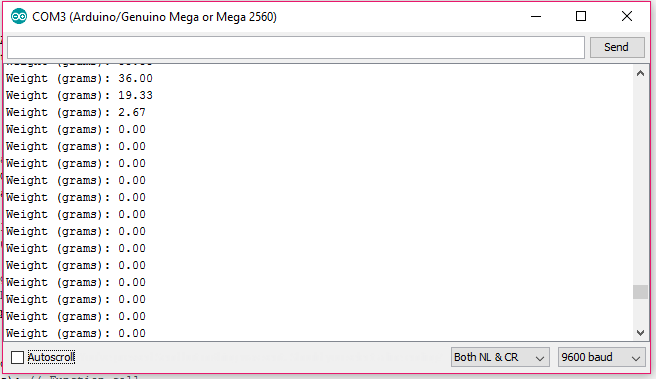
Hello there. it's me again. Sorry for asking many question. Well im still new in this arduino. So here is my code. After the input of grams let say 50g, the parsefloat function seems didnt clear the data after I put 100g on load cell which is the different grams but it still read 50g. How do I change that? meaning I want to automatically change the grams without user input. Just want to use once for the user input.
Thanks.
void setup() {
  Serial.begin(9600);


  // Initialize all samples to 0
  for (int i = 0; i < FILTERSAMPLES; i++) {
    filterSamples[i] = 0;
  }

  Serial.println("Remove all weight from the scale, then type ok and press enter.");
  while (!Serial.find("ok"));
  zeroOffset = readADC(0); // Function call
  Serial.println();
  Serial.println("Place egg on the scale and type its weight in grams, then press enter.");
  grams = Serial.parseFloat();
  while (grams <= 0) {
    grams = Serial.parseFloat();
  }
PaulS:
No, that is NOT all of your code. Take a hike, to http://snippets-r-us.com, where they can help you with snippets.
So here is my full code.
#define ADCPIN          0
#define ADCSAMPLES      5
#define FILTERSAMPLES   3

const int photoSensor = 53;

// Internal state
float grams;
float measure;
float zeroOffset;
int filterIndex = 0;
float gramsPerMeasurement;
float filterSamples[FILTERSAMPLES];


void setup() {
  Serial.begin(9600);

  analogReference(A0);

  // Initialize all samples to 0
  for (int i = 0; i < FILTERSAMPLES; i++) {
    filterSamples[i] = 0;
  }


  Serial.println("Remove all weight from the scale, then type ok and press enter.");
  while (!Serial.find("ok"));
  zeroOffset = readADC(ADCPIN); // Function call
  Serial.println();
  Serial.println("Place egg on the scale and type its weight in grams, then press enter.");
  grams = Serial.parseFloat();
  while(grams <= 0){
    grams = Serial.parseFloat();
  }

  measure = readADC(ADCPIN) - zeroOffset;
  gramsPerMeasurement = grams / measure;

}

void loop() {

  // Take a reading and filter it to generate a sample
  float adc = readADC(ADCPIN); // Function call
  float sample = FS(adc) - zeroOffset;

  // Clamp sample value to 0.
  sample = sample < 0.0 ? 0.0 : sample;

  // Compute the weight and print it out.
  Serial.print("Weight (grams): ");
  Serial.println(sample * gramsPerMeasurement, 2);

  // Photo sensor as a signal to sort the weight's grade
  if (digitalRead(photoSensor) == 1)
    weightGrade(grams); // Function call

  // Wait until it's time for the next sample
  delay(250);

}

// Query the analog pin for a value
// Takes a number of ADC readings and averages them to reduce noise
float readADC(int pin) {
  float total = 0.0;
  for (int i = 0; i < ADCSAMPLES; ++i) {
    total += analogRead(pin);
  }
  return total / (float) ADCSAMPLES;
}

// Apply simple low pass filter by computing a moving average of samples
float FS(float newSample) {
  // Store the sample in the current index and increment the index appropriately
  filterSamples[filterIndex] = newSample;
  filterIndex += 1;
  filterIndex = filterIndex < FILTERSAMPLES ? filterIndex : 0;

  // Sum all the sample values
  float total = 0;
  for (int i = 0; i < FILTERSAMPLES; ++i) {
    total += filterSamples[i];
  }
  // Return the average value of the sample values
  return total / (float) FILTERSAMPLES;
}

// Sort to grade based on the weight
void weightGrade(float g) {
  if (g >= 75 || g >= 100)
    Serial.println("\t Grade : 0");
  if (g >= 70 && g <= 74.9)
    Serial.println("\t Grade : 1");
  if (g >= 65 && g <= 69.9)
    Serial.println("\t Grade : 2");
  if (g >= 60 && g <= 64.9)
    Serial.println("\t Grade : 3");
  if (g >= 55 && g <= 59.9)
    Serial.println("\t Grade : 4");
  if (g >= 50 && g <= 54.9)
    Serial.println("\t Grade : 5");
  if (g >= 45 && g <= 49.9)
    Serial.println("\t Grade : 6");
  if (g >= 1 && g <= 44.9)
    Serial.println("\t Grade : 7");
  if (g == 0)
    Serial.println("\t No egg");
}
I want to change the grams. Means that if I put a thing let say 50g on the load cell, so the grams will be 50g. Not same like the user input. So in this case, do I need to clear the input buffer?
If you don't want user input, why parser the serial input? And why do you want to clear the input buffer? Do you expect there to be useless data? If so, who put it there?
Tip, instead of parseInput() (which is a stupid blocking function) use the methods from Robin.
septillion:
If you don't want user input, why parser the serial input? And why do you want to clear the input buffer? Do you expect there to be useless data? If so, who put it there?
Tip, instead of parseInput() (which is a stupid blocking function) use the methods from Robin.
Pro tip, don't use float. Float != decimal point
I want just one input from user. Actually, I am doing egg weighing machine. So Im testing it using the arduino. So about the egg weighing machine works, the user can adjust the weight in the machine at first based on the egg's weight. Then, the load sensor detects the the rest of the egg's weight and sort them to their weight respectively. So that is why I just only need one input. Do you understand? Thanks for the info anyway!
The attachments are screenshot of the code result. No.1 picture is the user input which is 50g and in the load cell also a 50g egg. The no.2 pic shows 0.00g because I took the egg from the load cell means that there is no egg to be weigh for. No. 3 pictures shows 50g again after I put 100g egg. So, my problem is I want it 100g when I put the 100g egg not 50g egg. In this case I think the input doesnt clear the data of 50g from the user. So how do I change it? Any idea?
The name grams doesn't mean a thing. firstEggWeightInGrams would.
measure = readADC(ADCPIN) - zeroOffset;
What did you measure? The name of the variable should reflect that.
gramsPerMeasurement = grams / measure;
This defining a ratio between what the user said the egg weighed (how did the user determine that?) and what the load cell reported. The name should reflect that.
float adc = readADC(ADCPIN); // Function call
That's a completely stupid name.
float sample = FS(adc) - zeroOffset;
Why does THAT value get passed to FS(), when none of the other values returned by readADC() (specifically, zeroOffset) were passed to that function? What the hell does that name mean? How is anyone supposed to guess what that function does?
awanisshahrin:
I want just one input from user. ... Do you understand?
What I do understand is that you want user input So study the example a bit more and ask WHAT you still don't get. Saying "I don't get it" doesn't cut it
it is just the same if i used Serial.available(). How do I terminate the input (weight of egg) after putting it once then the rest will detect by the load cell using the same name of variable?
awanisshahrin:
it is just the same if i used Serial.available(). How do I terminate the input (weight of egg) after putting it once then the rest will detect by the load cell using the same name of variable?
Which of the earlier Replies is this a response to?
How do I terminate the input (weight of egg) after putting it once then the rest will detect by the load cell using the same name of variable?
See the question mark there? What does it mean?
To me, it means the end of a sentence that poses a question. A ! would mean the end of a sentence that is some sort of exclamation, like Look where you're going, you idiot! A period is the end of a sentence that contains neither a question or an exclamation.
The key, though, is that they all indicate the end of a sentence. So, you need SOMETHING in the serial data stream that means "Hey, this is all you get". When you get that end of sentence marker, whatever marker you choose, you know that there will be no more data. At that time, you can switch from needing to know what the scale reading means to knowing what the scale reading means.
You need a boolean variable in your code that initially is false that defines whether or not you know what the scale reading means in terms of grams. If the variable is false, you need to prompt for, and read, serial data to define the relationship between the number read from the scale and the weight of some egg. You set that to true when you get the end of user data marker.
It would, of course, make far more sense to NOT have the user enter the weight of the first object. It would make more sense to put an object of a known weight on the scale, and simply press a switch when the object was in place. When the switch becomes pressed, the scale reading corresponds to some known weight, and you have the two points (reading at 0 and reading at known weight, along with two weights, zero and the known weight). You can then use the slope of that line to determine the weight of whatever is then placed on the scale.
One thing I don't understand about your project is why you need to define the relationship between the scale reading and some known weight every time you boot up the Arduino. I would not expect that relationship to change, ever.
When the Arduino boots up, all I'd expect to need to know is what the reading of the scale is today with a known weight (that is, with nothing on it) on it.
You do need to define the relationship between the scale reading and known weights, but I'd think that needed to be done once, not every time the Arduino boots up.