Servo acting wierd, pls help

does anyone have an idea as to whats going on here? (sorry i dont know how to send a video here)

it was working perfectly 5 seconds ago until i think it got stuck on something and when i got it unstuck it started moving on its own, while its in this mode it wont move according to my inputs at all

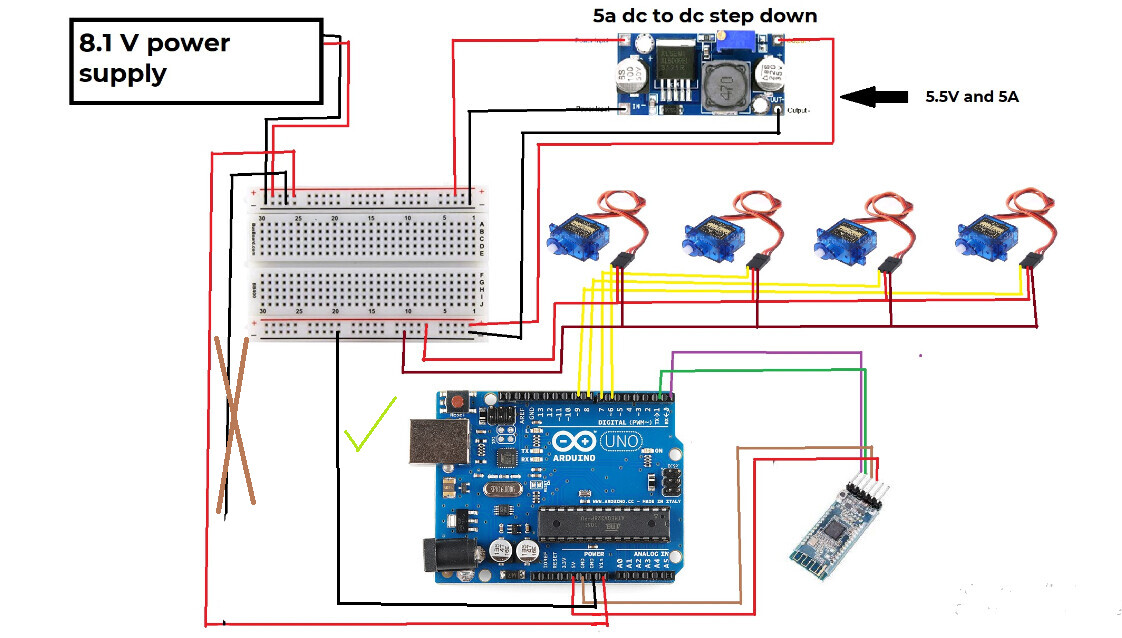
heres the circut

and heres the code

  #include <Servo.h>

  #define servo1 6
  #define servo2 7
  #define servo3 8
  #define servo4 9
  #define servo5 10

  Servo Mservo1;
  Servo Mservo2;
  Servo Mservo3;
  Servo Mservo4;
  Servo Mservo5;

  char Input;

  int Delay = 25;

void setup() {
  // put your setup code here, to run once:
  Serial.begin(9600);
  Mservo1.attach(servo1);
  Mservo2.attach(servo2);
  Mservo3.attach(servo3);
  Mservo4.attach(servo4);
  Mservo5.attach(servo5);

  Mservo1.write(90);
  Mservo2.write(90);
  Mservo3.write(170);
  Mservo4.write(90);
  Mservo5.write(90);

  pinMode(servo1, OUTPUT);
  pinMode(servo2, OUTPUT);
  pinMode(servo3, OUTPUT);
  pinMode(servo4, OUTPUT);
  pinMode(servo5, OUTPUT);
}

void loop() {
  // put your main code here, to run repeatedly:
  if(Serial.available()>0){
    
  Input = Serial.read();

  Serial.print("real input = ");
  Serial.println(Input);` (edited)


  switch (Input){
  case 'L':

    for(int i = Mservo1.read(); i <= 180; i++) //move left
    {
      Mservo1.write(i);
      Serial.print("servo 1= ");
      Serial.println(i);
      
      if(Serial.available()>0)
      {
         if(Input != 'L')
         {
          Serial.println(Input);
          break;  
         }
        Input = Serial.read(); 
      }
      
      delay(Delay);
    }
    break;
    ```


this isnt the full code but the rest of it is just reapeating switch statements

Please follow the advice given in the link below when posting code, in particular the section entitled 'Posting code and common code problems'

Use code tags (the </> icon above the compose window) to make it easier to read and copy for examination

Go back to basics and run the Servo Sweep example to test the servo connections and the servos themselves

That is a very strange voltage from the power supply

you mean 8.1 volts? my bad, its supposed to be 7.4, since each battery is 3.7 and i use 2 of them

also, something i forgot to ask is why when 1 servo got stuck it affected all the other servos around it?

Maybe one servo stalled, took excess current, the supply voltage dropped as a result thus affecting the other servos

just tried it, nope it doesnt work, could the arduino be broken here?

thats what i thought too, but wouldnt that be fixed if the servo was just simply unstuck? when this unstuck it started moving on its own and only returned to normal after waiting a while, and even then after using it for a couple more seconds it returned back to the problem

Hi,

If it was working and is now misbehaving, look to see if your gnd circuit is complete.
Check that the gnd of the UNO and the power gnd to the servos is connected together.

Do you have a DMM?

Thanks.. Tom... :smiley: :+1: :coffee: :australia:

it isnt actually, the uno is powered straight from the power supply (7.4v) while the servo is powered by a DC to DC stepdown (5.5V)

Did you try the Sweep example with each of the servos or only one ?

One, it was a relatively new servo

The signal from the UNO to the servo is with respect the the UNO gnd, that gnd has to be connected to the servo gnd so that the signal can be properly interpreted by the servo.

Tom.... :smiley: :+1: :coffee: :australia:

is this a right way of doing it?

or would this be better?

Hi,
Just add this link:

Tom... :smiley: :+1: :coffee: :australia:

thanks, i think it fixed... something, but its still not working, this time it moved for a while before stopping completely

edit: it was doing this before too

Hi,
Can you please post some images of your project?
So we can see your component layout.

Do you have a Digital MultiMeter?

Thanks.. Tom... :smiley: :+1: :coffee: :australia:

this is only 1 servo

also yes i have a digital multimeter

it says here that i cant reply for another 22 hours but i have a question

so i tested my arduino by pulling it out and putting it on another project, but this project doesnt use PWM like the project now does, only HIGH or LOW

so can the PWM on an arduino be broken while still being able to function with HIGH or LOW values?

You need to get to trust level 1, you can get there by:

  • Entering at least 5 topics
  • Reading at least 30 posts
  • Spend a total of 10 minutes reading posts

Users at trust level 1 can…

  • Use all core Discourse functions; all new user restrictions are removed
  • Send PMs
  • Upload images and attachments