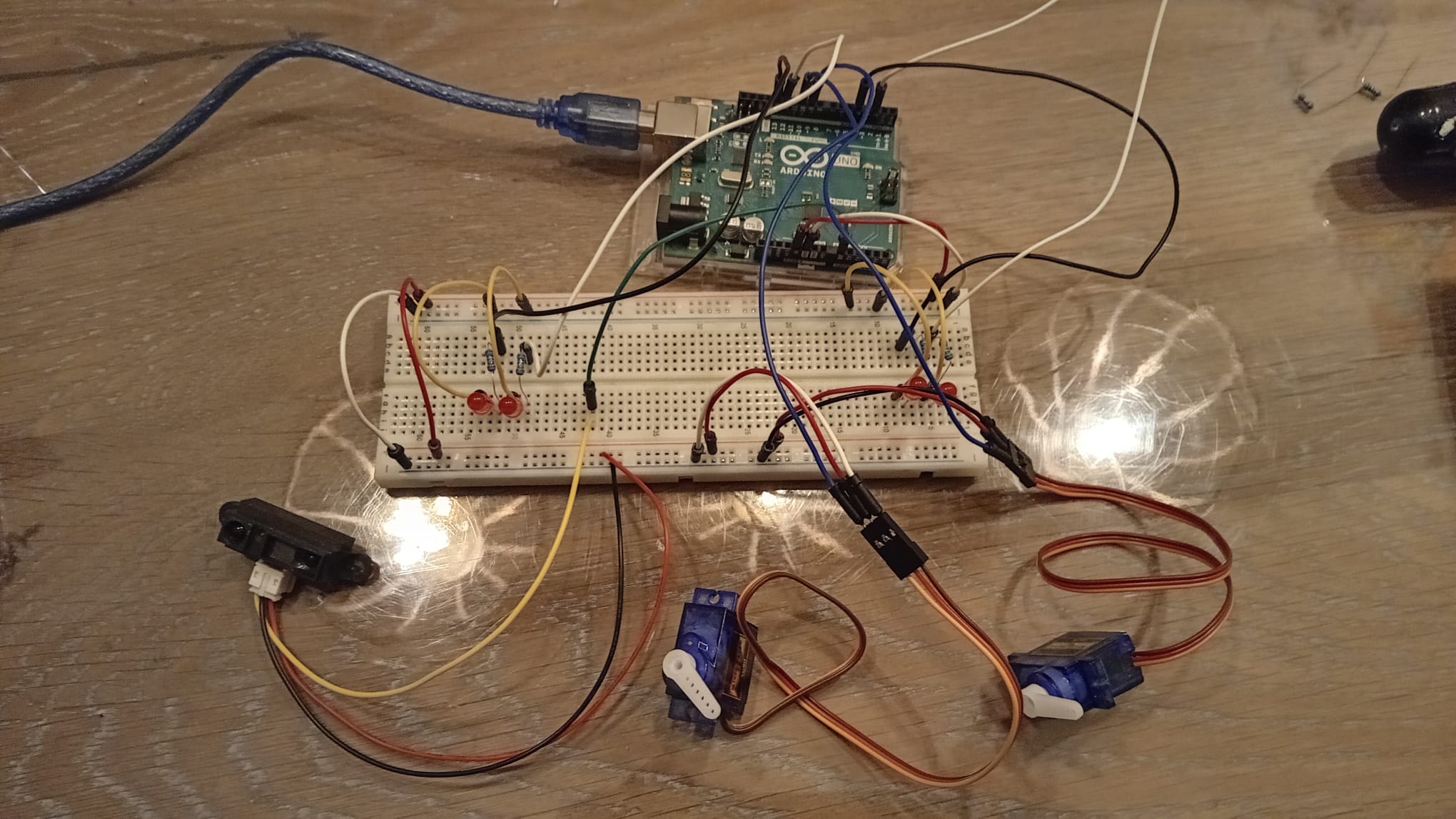
I'm not sure this is the right category, but I'm trying to make a railroadcrossing for my modelrailroad using an Arduino. At the moment, I have a Sharp IR-sensor to detect a passing train. I have four LEDs blinking when the sensor detects something. This works all fine. But then I want two servomotors(SG90) to make the barriers go up and down. When I connect them, it goes wrong. The sensor and LEDs are working inconsistently and the servomotors are not moving at all, moving with shocks or just spinning around like crazy. I am not sure why this is happening. Can someone help me solve this issue?
Welcome to the forum
Please post your sketch, using code tags when you do
Posting your code using code tags prevents parts of it being interpreted as HTML coding and makes it easier to copy for examination
In my experience the easiest way to tidy up the code and add the code tags is as follows
Start by tidying up your code by using Tools/Auto Format in the IDE to make it easier to read. Then use Edit/Copy for Forum and paste what was copied in a new reply. Code tags will have been added to the code to make it easy to read in the forum thus making it easier to provide help.
It is very difficult to see how the hardware of your project is interconnected from your pictures. Please post a schematic of your project. A 'photo of a hand drawn circuit is good enough as long as all devices and their pins are labelled
It appears that the servos are being powered from the 5v pin of the Uno. Is this what you have done? As @UKHeliBob says, please supply a schematic.
If so, give then a separate supply from the Arduino, but connect the grounds.
A single SG90 will draw 650 +/-85 mA when it starts moving.
Two SG90s will therefore draw up to 1.47 AMPS if they both start moving at the same time.
Your USB port will not supply anywhere near that amount of current.
And before you ask, neither will the Uno's onboard 5V regulator. Since it doesn't have a heatsink, I'd keep the current draw on that below 300mA just to be safe and avoid thermal shutdown. And the Uno will want about 45mA of that.
Servos need their own dedicated power supply. Ground and signal should be the only connections to the Uno.
Yeah, it's powered by the 5v pin.
I'm not sure what you and @UKHeliBob mean tho. Do you want a schema of my hardware or my code? Or both?
Ah, thanks for the clear answer! What type of power supply would you suggest to use?
Something that delivers 5-6V which is capable of supplying 2A minimum.
There may also be something wrong with your code and servos.
You should post you code before you start buying more components.
Do you have any power supplies, battery packs or maybe USB chargers?
This is my code. The servo's seem to work when I test them individually.
#include <Servo.h>

#define servoPin1 10
#define servoPin2 9
#define led1 13
#define led2 12
#define led3 4
#define led4 2
#define sensor A0

Servo servo1;
Servo servo2;

unsigned long previousMillisLED = 0;
unsigned long previousMillisServo = 0;
unsigned long previousMillisTrain = 0;
const long ledInterval = 300;
const long servoInterval = 1;
const int detectionThreshold = 20;
const long deactivateDelay = 5000;

bool systemActive = false;
int servoAngle = 140;
bool servoIncreasing = true;
bool ledToggle = false;
bool deactivationPending = false;

void setup() {
  pinMode(led1, OUTPUT);
  pinMode(led2, OUTPUT);
  pinMode(led3, OUTPUT);
  pinMode(led4, OUTPUT);

  servo1.attach(servoPin1);
  servo2.attach(servoPin2);
  servo1.write(servoAngle);
  servo2.write(servoAngle);

  Serial.begin(9600);
}

void activateSystem() {
  unsigned long currentMillis = millis();

  if (currentMillis - previousMillisLED >= ledInterval) {
    previousMillisLED = currentMillis;
    ledToggle = !ledToggle;
    digitalWrite(led1, ledToggle);
    digitalWrite(led2, !ledToggle);
    digitalWrite(led3, ledToggle);
    digitalWrite(led4, !ledToggle);
  }

  servo1.write(40);
  servo2.write(40);
}

void deactivateSystem() {
  unsigned long currentMillis = millis();

  digitalWrite(led1, LOW);
  digitalWrite(led2, LOW);
  digitalWrite(led3, LOW);
  digitalWrite(led4, LOW);

  servo1.write(140);
  servo2.write(140);
}

bool detectTrain() {
  float totalVolts = 0;
  int samples = 10;

  for (int i = 0; i < samples; i++) {
    totalVolts += analogRead(sensor) * 0.0048828125;
    delay(10);
  }
  float avgVolts = totalVolts / samples;
  int distance = 27.86 * pow(avgVolts, -1.15);

  if (distance > 0 && distance < 100) {
    if (distance <= detectionThreshold) {
      return true;
    }
  }
  return false;
}

void loop() {
  unsigned long currentMillis = millis();

  if (detectTrain()) {
    previousMillisTrain = currentMillis;
    delay(100);
    if(detectTrain()){
      systemActive = true;
      activateSystem();
    }
  }
  else {
    if (systemActive) {
      if (!deactivationPending) {
        deactivationPending = true;
        previousMillisTrain = currentMillis;
      }

      if (deactivationPending && (currentMillis - previousMillisTrain < deactivateDelay)) {
        activateSystem();
      }
      else if (deactivationPending && (currentMillis - previousMillisTrain >= deactivateDelay)) {
        systemActive = false;
        deactivationPending = false;
        deactivateSystem();
      }
    }
  }
}
As everyone has already said you need a separate power supply
Give the solution to @cattledog. He was the first to point out you need a separate supply