Ceramic tweezers.  Thank you for sharing.
You've just finished soldering the components on your pretty PCB, and you're happy with your work.
But there are still those pesky pin headers to be soldered, and it's always tricky to get them all squared up.
Fortunately, you've got a friend to help you with the job, and that friend is cyanoacrylate glue.
Put a few micro-drops of it on the edge of the connector that will be in contact with the PCB, and immediately put the connector in place. It will take up its position on its own, even if there is only one pin. All you have to do now is wait 20 seconds, and you can turn the PCB over to solder, without worrying about anything else.


Larry, you are the gadget wizard! All that are your photos of tools you made?
No, just an old man.


Machine Pin Removable Wire Connectors
Use high quality Machine Sockets and Pins to make DIY cable connectors.
-
From time to time, you might need a low Profile cable connector in your projects.
-
DuPont and JST type connectors often fit this bill.
-
You can use the following idea shown in the images below to make DIY cable connectors.
-
The key in this discussion is to prevent the soldered wire connections from breaking at the solder points.
-
4:1 glue lined heat shrink captures 2 unused male pins and gives needed strain relief.
-
The connector described in the images is about 7mm high.


Using WS2812b LEDs as panel or diagnostic lights

Aside from their usual use in lighting projects, they have properties that make them extremely useful as diagnostic indicators in projects that use low pin count microcontrollers because they only use a single data pin, have a fast update rate and produce three vivid primary colors.
The ones I use come in 65mm strips of 8 on a rigid black or white PCB and can be daisy chained.
This allows you to give each project its own personal logic analyzer that can be a permanent or temporary fixture.
To show momentary events I drive them with the shortest possible pulse allowed by the driver and hardware (~ 1 millisecond on an ESP32) together with the highest brightness setting.
When driven continuously these LED are still perfectly visible at their lowest brightness setting.
You can chain these two modes to give a momentary flash with a persistent afterglow. This is useful for variables that are updated on a periodic basis. The flash tells you that it's been updated and the afterglow is a reminder of the last reported state.
Heat Insertion of Brass Inserts
- I use M2, M3 and 2-56 brass inserts in electronic enclosures.
600, M2 brass inserts cost less than $20.00. - For years I have used a soldering iron tip to install these Brass Inserts in plastic.
- 10 months ago, I upgraded to proper Heat Insertion Iron Tips.
- These tips are easy to install, fit the HAKKO FX888D soldering iron, fit standard 936 soldering irons, easy to use and highly effective.
- You can buy 3 different styles of these tips sets.
These are inexpensive, between $4.50 to $7.00 (per set) from Ali Express and are very good quality. See images below. - A tool set can accommodate M2 through M8 brass inserts.
- The two YouTube attached videos show how easily brass inserts are installed.
Use an aluminum Flushing Plate to insure flush mounting of the insert. See videos. - The soldering iron’s temperature is set to 350° for acrylic, however, different plastics and thicknesses may need a different temperature.
- If you want perfection, guilty here, the soldering iron can be mounted in a drill press to get perfect vertical insertion.
3mm or 4mm long inserts really don’t need to be inserted perfectly as there is usually some play in the threads.


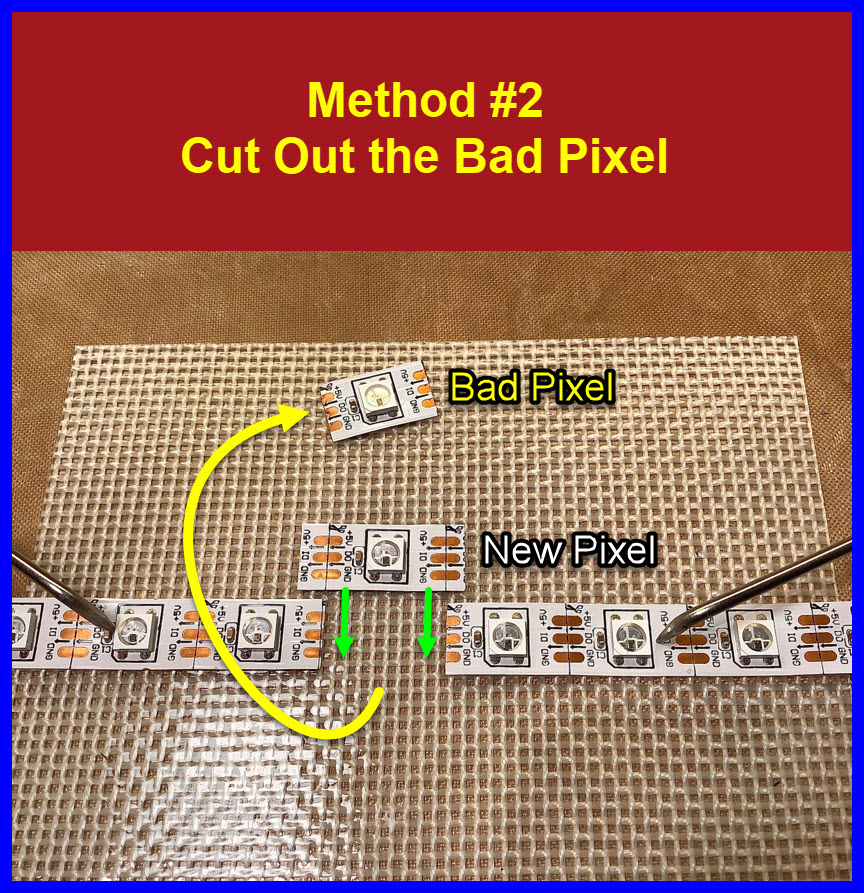
Replacing a Bad Pixel on a Neo Pixel Strip
-
Lately I have had to replace some bad pixels on some malfunctioning Neo Pixel strips.
-
The Images below describe 3 replacement methods .
-
In Method #1, we place a new pixel section on top of the old pixel location.
We place Kapton tape on the bottom of the new pixel section as insulation. -
In Method #2, we cut out the bad pixel section and solder in the new pixel section.
-
In Method #3, we remove the bad pixel component and solder in a new pixel component.
You should tin the new pixel leads before attempting this method.



Soldering Iron Tip Temperature
-
Prior to a soldering session, we should always confirm our soldering irons are set up.
-
If you have a medium entry soldering iron, the tip end temperature may not be monitored directly.
-
It only takes a few seconds to check if the iron tip’s temperature is what we expect.
-
When changing soldering iron heating elements or tips we should check to see if the tip comes up to temperature.
-
A useful tool on our workbench is an inexpensive temperature meter.
These should be able to be found on eBay and AliExpress for $15.00 to $20.00. -
See the images below for what we should be checking.


(post deleted by author)
-
Oxidation can lead to poorer heat transfer, physically resetting the components can break thru this .
-
More than that, in time the heating/expansion and cooling/contraction cycles can loosen the nut.
Attention to this nut can help keep the iron work as it should.
-
BTW, I have 3 soldering irons for my HAKKO.
-
These irons each have a favourite tip.
To change a tip, I plug in a different iron.
A quick temperature check is easy to do.

(post deleted by author)


When I'm doing a PCB that has parts that interface with a case, I'll sometimes 3D print a blank of the PCB with holes for the parts in question to see if I've got it right. I'll use OpenSCAD to lay out the blank, using measurements taken from the PCB editor in KiCad for the dimensions.

I'd much rather find out at this stage that something I was sure was going to fit, won't, than after the real PCB arrives.

SMD Component Desoldering Tip
-
Most of the time you can easily remove/desolder SMDs with your regular soldering iron tip.
-
The images show how you can make a dedicated SMD desoldering tool.
-
The threaded brass insert iron tip shown a few posts back will be used as our heating element for the new SMD tip.
-
This heating element has an M4 thread, we will use a M4 flat headed screw in this modification.
-
14AWG solid copper wire is used as the new SMD tip material.
-
Using Silver Soldering Wire Flow Point: 1450°F (788°C) Using a blow torch .
This 14 AWG copper wire is silver soldered to our M4 screw. -
After tinning the 14AWG wire, we are ready to use our new tip to remove SMDs.
-
This is great for de-soldering hard to remove SMD capacitors.
-
The copper wire is easily bent to SMD dimensions.
-
See the attached YouTube video for tip usage.


SMD Component Desoldering Tip
Addendum
-
It became obvious the following changes to the DIY SMD de-soldering tip construction method could be easier.
-
Here you can see the 14AWG wire is captured between the M4 screw head and a washer.
-
This method lets you adjust the length of the copper tips.
-
De-soldering temperature is set to 350°C .
-
No Silver Wire Soldering necessary.


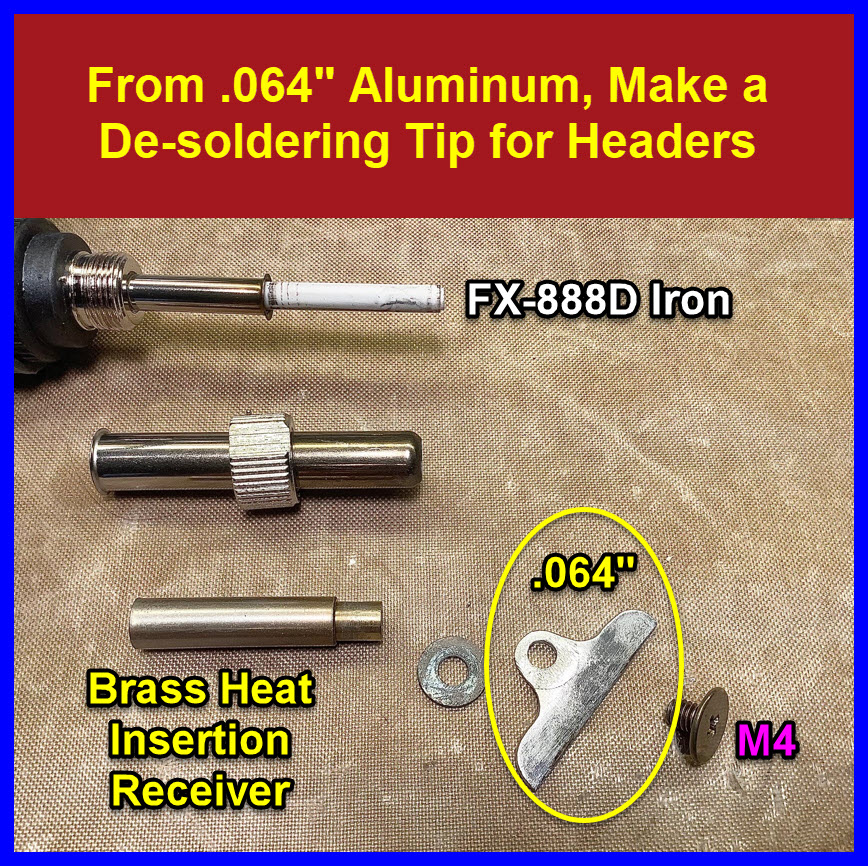
Desoldering Header Strips in One Simple Process
-
The images below show how to use a DIY de-soldering tip to remove header pin strips.
-
.064” aluminum is cut with a coping saw or similar, to the shape you desire.
-
Use the same Brass Heat Insert Receivers from Post #1269.

-
Before using, make sure the aluminum tip is straight, clean the tip with a stainless-steel brush.
-
Set the Iron’s temperature to 450 degrees C.
-
Soldering paste is added to the header pads to speed the de-soldering process.
Damn , unfortunately I did not use enough flux in the accompanying YouTube video.
 -
Pad holes can be cleared with de-soldering braid, solder sucker,
de-soldering needles . . .