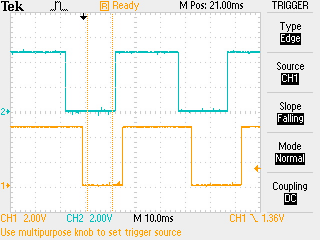
Hours I've spent on what seems to be a very basic project and it refuses to work.
Given:
1 Arduino NANO
1 simple mechanical rotary encoder (no switch function) with dents.
Goal:
Turn CW = count up
Turn CCW = count down
I've tried countless examples of code, libraries (Encoder, NewEncoder, RotEnc, ezButton,...), with or without (poll) interrupts, changing data rates, RC filtering, internal and external VDC board powering and swapping encoder with spare ones.
The result is always one of the following:
-It does not register movement.
-Encoder only counts up or only counts down no matter the direction of turning.
-Encoder counts +1 and -1 in one cycle so total count remains unchanged.
I was thinking the same thing, but that would be a last resort, as I would like to use the leds and buttons etc on it and the current form factor of the pcb.. I did however for now connect the leads directly to the pins of the encoder to run all tests. All leads on the pcb go to a ribon cable connector which is not attached so no connections are made internally.
if I run the following code (variation of example from encoder library referenced in post 2) on a Nano (pins 2 and 3 used) it works OK
// Leonardo - File>Examples>Encoder>Basic
// also tested on a Nano

/* Encoder Library - Basic Example
 * http://www.pjrc.com/teensy/td_libs_Encoder.html
 *
 * This example code is in the public domain.
 */

#include <Encoder.h>

// Change these two numbers to the pins connected to your encoder.
//   Best Performance: both pins have interrupt capability
//   Good Performance: only the first pin has interrupt capability
//   Low Performance:  neither pin has interrupt capability
//Encoder myEnc(4, 5);   // arduino uno pins 2 and 2
Encoder myEnc(2, 3);   // Leonardo pins 2 and 3
//   avoid using pins with LEDs attached
int switchPin=5;       // switch is pin 5

void setup() {
  Serial.begin(115200);
  Serial.println("Basic Encoder Test:");
    pinMode(switchPin, INPUT_PULLUP);
}

long oldPosition  = -999;

void loop() {
  static int sw=0, offset=0;
  // display switch on press and reset position to 0
  if(!digitalRead(switchPin) != sw)
  {
    sw=!digitalRead(switchPin);
    if(!digitalRead(switchPin))Serial.println("switch");
    offset=oldPosition;
  }
  long newPosition = myEnc.read();
  if (newPosition != oldPosition) {
    oldPosition = newPosition;
    Serial.println(newPosition-offset);
  }
}
Not sure. On the guitar pedal (zoom g2) it was used to scroll through settings or change tone values. Output of the scrolling was reflected on the 2x 7 digit segment display.
in addition to rotating the encoder has a press switch which is used to reset the count (connected in the code of post 8 to pin D5)
when using such encoders with menus I use the rotation to scroll up/down the menu and the press to select the menu item