Simplifying Code for a DCC Accessory Decoder

I am wondering if anyone is interested or kind enough to help me compress and simplify the code for a DCC Accessory Decoder to control multiple building lights.

I have attached the code below. There are 8 LEDs connected to pins 3-10 on an Arduino.

Ideally the code would have a simple way at the beginning to allow the user to assign a DCC accessory address to each of the LEDs.

I am sure there will be a more compact way of assigning each LED to an output pin as well as configuring each pin as an output, for example using a for() loop.

However, I am not fluent enough in c++ and am not (yet) familiar enough with the different variables to find an obvious way to do this.

Thank you in advance for your help!


#include "NmraDcc.h"

NmraDcc  Dcc ;

const int DCC_Pin = 2;                                     //define DCC input pin - a DCC interface is required andshould be attached to pin 2
const int LED1Pin = 3;                                     //define DCC arduino pin that controls LED1
const int LED2Pin = 4;                                     //define DCC arduino pin that controls LED2
const int LED3Pin = 5;                                     //define DCC arduino pin that controls LED3
const int LED4Pin = 6;                                     //define DCC arduino pin that controls LED4
const int LED5Pin = 7;                                     //define DCC arduino pin that controls LED5
const int LED6Pin = 8;                                     //define DCC arduino pin that controls LED6
const int LED7Pin = 9;                                     //define DCC arduino pin that controls LED7
const int LED8Pin = 10;                                    //define DCC arduino pin that controls LED8

void notifyDccAccTurnoutOutput( uint16_t Addr, uint8_t Direction, uint8_t OutputPower )
{ 
  switch(Addr){
    case 301:                                               //DCC Accessory Decoder Address for LED1
      if(Direction == 1){
       digitalWrite (LED1Pin,HIGH);
      }
      else{
        digitalWrite (LED1Pin,LOW);
      }
      break;
    case 302:                                                //DCC Accessory Decoder Address for LED2
      if(Direction == 1){
       digitalWrite (LED2Pin,HIGH);
      }
      else{
        digitalWrite (LED2Pin,LOW);
      }
      break;
    case 303:                                                //DCC Accessory Decoder Address for LED3
      if(Direction == 1){
       digitalWrite (LED3Pin,HIGH);
      }
      else{
        digitalWrite (LED3Pin,LOW);
      }
      break;
    case 304:                                                //DCC Accessory Decoder Address for LED4
      if(Direction == 1){
       digitalWrite (LED4Pin,HIGH);
      }
      else{
        digitalWrite (LED4Pin,LOW);
      }
      break;
    case 305:                                                //DCC Accessory Decoder Address for LED5
      if(Direction == 1){
       digitalWrite (LED5Pin,HIGH);
      }
      else{
        digitalWrite (LED5Pin,LOW);
      }
      break;
    case 306:                                                //DCC Accessory Decoder Address for LED6
      if(Direction == 1){
       digitalWrite (LED6Pin,HIGH);
      }
      else{
        digitalWrite (LED6Pin,LOW);
      }
      break;
    case 307:                                                //DCC Accessory Decoder Address for LED7
      if(Direction == 1){
       digitalWrite (LED7Pin,HIGH);
      }
      else{
        digitalWrite (LED7Pin,LOW);
      }
      break;
    case 308:                                                //DCC Accessory Decoder Address for LED8
      if(Direction == 1){
       digitalWrite (LED8Pin,HIGH);
      }
      else{
        digitalWrite (LED8Pin,LOW);
      }
      break;
    default:
      break;
  }
}

void setup()
{
  Dcc.pin(digitalPinToInterrupt(DCC_Pin), DCC_Pin, false);
  Dcc.init(MAN_ID_DIY, 1, FLAGS_DCC_ACCESSORY_DECODER | FLAGS_OUTPUT_ADDRESS_MODE, 0);
  pinMode(LED1Pin, OUTPUT);
  pinMode(LED2Pin, OUTPUT);
  pinMode(LED3Pin, OUTPUT);
  pinMode(LED4Pin, OUTPUT);
  pinMode(LED5Pin, OUTPUT);
  pinMode(LED6Pin, OUTPUT);
  pinMode(LED7Pin, OUTPUT);
  pinMode(LED8Pin, OUTPUT);
}

void loop()
{
  Dcc.process();  
}
Please, verify. Not tested.

#include "NmraDcc.h"
NmraDcc  Dcc ;
const int DCC_Pin = 2;                                     //define DCC input pin - a DCC interface is required andshould be attached to pin 2
const int LEDpin[] = {3, 4, 5, 6, 7, 8, 9, 10};
byte arraySize = sizeof(LEDpin) / sizeof(LEDpin[0]);

void notifyDccAccTurnoutOutput( uint16_t Addr, uint8_t Direction, uint8_t OutputPower ) {
  Addr301 = Addr - 301; // index Addr from 0
  if (Direction)
    digitalWrite(LEDpin[Addr301], HIGH);
  else
    digitalWrite(LEDpin[Addr301], LOW);
}

void setup() {
  Dcc.pin(digitalPinToInterrupt(DCC_Pin), DCC_Pin, false);
  Dcc.init(MAN_ID_DIY, 1, FLAGS_DCC_ACCESSORY_DECODER | FLAGS_OUTPUT_ADDRESS_MODE, 0);
  for (int i = 0; i < arraySize; i++)
    pinMode(LEDpin[i], OUTPUT);
}

void loop()
{
  Dcc.process();
}

Newbie here......
forgive me to barge in here. I saw you had a post earlier about dimming LED's and I was too late to respond to it. I am trying to do the same and I am having a hard time any help.

did you solve the problem? and would you share your sketch so I can understand how it all connects and learn the coding?

I know it sounds like stealing your ideas.. but i truly want to leanr this coding. I did it in Basic years and years ago, and I am having a hard time grasping the new coding.

Thanks, I would really appreciate it.
Patrick

Hi Patrick,

Thanks for your message. Yes I did get it to work well.

Just to clarify are you looking to dim LED lights in response to a DCC Accessory signal? That was the topic of my previous post. This post was about a different DCC accessory decoder I was building.

I ended up making the fading LEDs more complicated as I had two sets of LEDs (1 x Warm White and 1 x Natural Light) and I made them fade up and fade down staggered from each other to mimic the colour changes at sunset and sunrise.

Could you maybe explain exactly what you are trying to achieve and I'll share the relevant part of the code with you? Also, let me know if you need any information about the circuit I used as well.

Thanks,

Duncan

1 Like

Duncan,

thanks ! really appreciate it..

(if we need to start a new thread, we can. let me know.. don't want to hijack yours)

I am looking into using arduino receive a signal from my DCC function to start both the dimming process and the lighting up process. I already have the LED system, but i have spotligths in my ceiling and I want to dim/brighten those in conjunction with the LED strips like you discussed.

I got my arduino, and found the ARD-DCCshield and i also connected a triac AC Dimmer to steer the 120V LED lights.

The signal to the triac AC Dimmer is PWM, and I can figure that out.

The part that is really missing is the DCC part. getting a signal from function A-'1' needs to start triggering start of the dimming. Function A-'0' should brighten trigger a PWM signal to brighten the spotlights (so reverse)

I cannot find any good info on the DCC coding.

Lots of info.. hope this will help to get started.

Patrick

Hi Patrick,

If you have already managed to use the arduino to control the dimming process but want the fade up and fade down to be controlled by DCC then the code below should work for you. DCC input pin is 2. PWM output pin is 9 (feel free to change).

It is important you don't use the delay() function and instead use millis() for timing your fade up and fade down so that your arduino can continue to receive further DCC signals if required.

I have set the DCC accessory decoder address to 1 but you can obviously change this. Changing the value of stepTime will alter the speed of the fade. This is an 8 bit fade - so analogWrite() values from 0 to 255.

Also, make sure you have downloaded the NMRA DCC Library (you can easily look up how to do this).

I am by no means an expert and I have not tested this code, but let me know how you get on. Would be very happy for anyone else to comment and point out mistakes / clean this code up.

#include <NmraDcc.h>

NmraDcc Dcc;

const int DCC_Pin = 2;                  //define DCC input pin - a DCC interface is required and should be attached to pin 2
const int ledPin = 9;                   //define LED output pin
const int Decoder_Addr = 1;             //define DCC accessory decoder address to initiate fade up or fade down

unsigned long lastStep = 0;             //time of last PWM step change
const long stepTime = 50;               //time between PWM steps during fade (ms)
int brightness = 255;                   //define initial brightness of LEDs

enum {FULL_ON, FULL_OFF, FADE_UP, FADE_DOWN} lightstate = FULL_ON;

void setup() {
  Dcc.pin(digitalPinToInterrupt(DCC_Pin), DCC_Pin, false);
  Dcc.init(MAN_ID_DIY, 1, FLAGS_DCC_ACCESSORY_DECODER | FLAGS_OUTPUT_ADDRESS_MODE, 0);
  pinMode(ledPin, OUTPUT);              //set pin 9 as output
}

void notifyDccAccTurnoutOutput(uint16_t Addr, uint8_t Direction, uint8_t OutputPower) {

  if (Addr == Decoder_Addr) {
     if( Direction == 0 ) {
        lightstate = FADE_UP;
     } else {
        lightstate = FADE_DOWN;
     }
  }
}

void loop() {
  Dcc.process();
  switch(lightstate) {
    case FULL_ON:
      brightness = 255;
      analogWrite(ledPin, brightness);
      break;
    case FULL_OFF:
      brightness = 0;
      analogWrite(ledPin, brightness);
      break;
    case FADE_DOWN:
      if( millis() - lastStep > stepTime ) {
          brightness--;         
      if( brightness > 0) {         
          analogWrite(ledPin, brightness);
          lastStep = millis();
        } else {
          lightstate = FULL_OFF;
        }
      }
      break;
    case FADE_UP:
      if( millis() - lastStep > stepTime ) {
        brightness++;
        if( brightness < 255) {
          analogWrite(ledPin, brightness);
          lastStep = millis();
        } else {
          lightstate = FULL_ON;
        }
      }
      break;
   }   
}

Some other things I found were that a linear fade of LEDs does not look linear to the eye. Changes in brightness are very obvious at low light intensity and less obvious at the top end of the fade. So you may want to adjust the code to get an exponential fade and more visually pleasing effect.

I also found that an 8 bit fade resulted in a flickering effect due to step changes in analogWrite() being visible to the naked eye at the lowest intensities. That is why I ended up using a 16 bit fade instead.

Let me know how you get on! Happy to help again if you need it.

This should get me closer to my goal.

thanks Duncan ! (i'll let you know how it goes.)

Have you tried mapping the undesired step range to desired step range? For example, giving less brightness to red, more to blue...

int valueRed = map (stepValRed, 0, 255, 0, 240);
int valueBlu = map (stepValBlu, 0, 255, 75, 255);

Duncan,

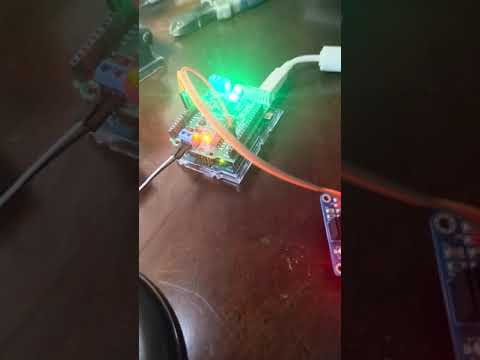
here is the temporary test setup.. With your help, I got it done.. I like it !

Thanks !!
Patrick

type or paste code here

Great work! Glad you managed to get it doing what you wanted.

This topic was automatically closed 180 days after the last reply. New replies are no longer allowed.