Quick question, would powering a smd rgb led with just gnd and vcc be enough to make it light up green, without the data line attached. Ive followed the datasheet to show what pin is which and nothing lit up when connected with basic example on arduino and fastled. By accident i turned the smd 90 degrees and it lit green but doesnt change colour.
To what pins were Vcc and GND actually connected to during the accident?
A link to the datasheet might be needed.
What SMD RGB LED?
Please post a link to data/spec of the LED?
What basic example?
Please post code and schematic?
https://forum.arduino.cc/t/how-to-get-the-best-out-of-this-forum
Thanks.. Tom... 


Before i was given the datasheet i looked at others and noticed most of the sheets of different brands had the champher on the ground side.

And this id the pcb i had made up
Verify if RGBLED or SK6812.
RGBLED common cathode needs ground on the shared cathode, and signal lines (to VCC) on each anode. Common anode needs VCC on the shared anode, and three signal lines (to ground) on the cathodes.
SK6812 is addressable, and needs low-level programming, usually avoided by using an Adafruit library to address each SK6812. (adafruit datasheet)
I have made wiring mistakes on WS2812, the result being turning it "on"... (a sickly pink color)... but I think you have an RGBLED with the green LED powered.
The datasheet given by the seller on ebay says sk6812. And the description says as much too.
I was just trying to work out if it’s possible that given power it would light up, i always thought it never lit up until data line was plugged in
Correct datasheet
Im starting to think these cant be controlled with arduino.
Hi,
Can we have a schematic of your circuit please?
What ever CAD program you are using, you should be able to export an image in jpg, png or pdf.
The Export should be under the Files tab.
Thanks.. Tom..
Datasheet;
SK6812 MINI 3535 LED Datasheet.pdf (468.4 KB)
coinslot_2023-10-27.pdf (62.0 KB)
its actually rotated 180 degrees the champher is in the top left corner instead of the bottom right. this is green on power up
No, unfortunately.
They need code to operate.
What is the application?
Thanks... Tom...
just a set of lights to go behind the coinslot for an r2 d2 droid build. using an arduino nano with 5v buck for the leds.currently just testing with the 5v pin from the nano as only 1 of the leds is soldered
How many? It might be RGBW.
#include <SK6812.h>
#define NUM 2

SK6812 LED(NUM); // number of SK6812

RGBW color1 = {0, 0, 255, 50}; // 255 blue, 50 white

void setup() {
  LED.set_output(4); // Digital Pin 4

  LED.set_rgbw(0, color1); // Set first LED to color1
}

void loop() {

  LED.set_rgbw(1, {0, 0, 0, 255}); // Set second LED to white (using only W channel)
  LED.sync(); // Send the values to the LEDs
  delay(500);

  LED.set_rgbw(1, {255, 255, 255, 0}); // Set second LED to white (using only RGB channels)
  LED.sync();
  delay(500);
}
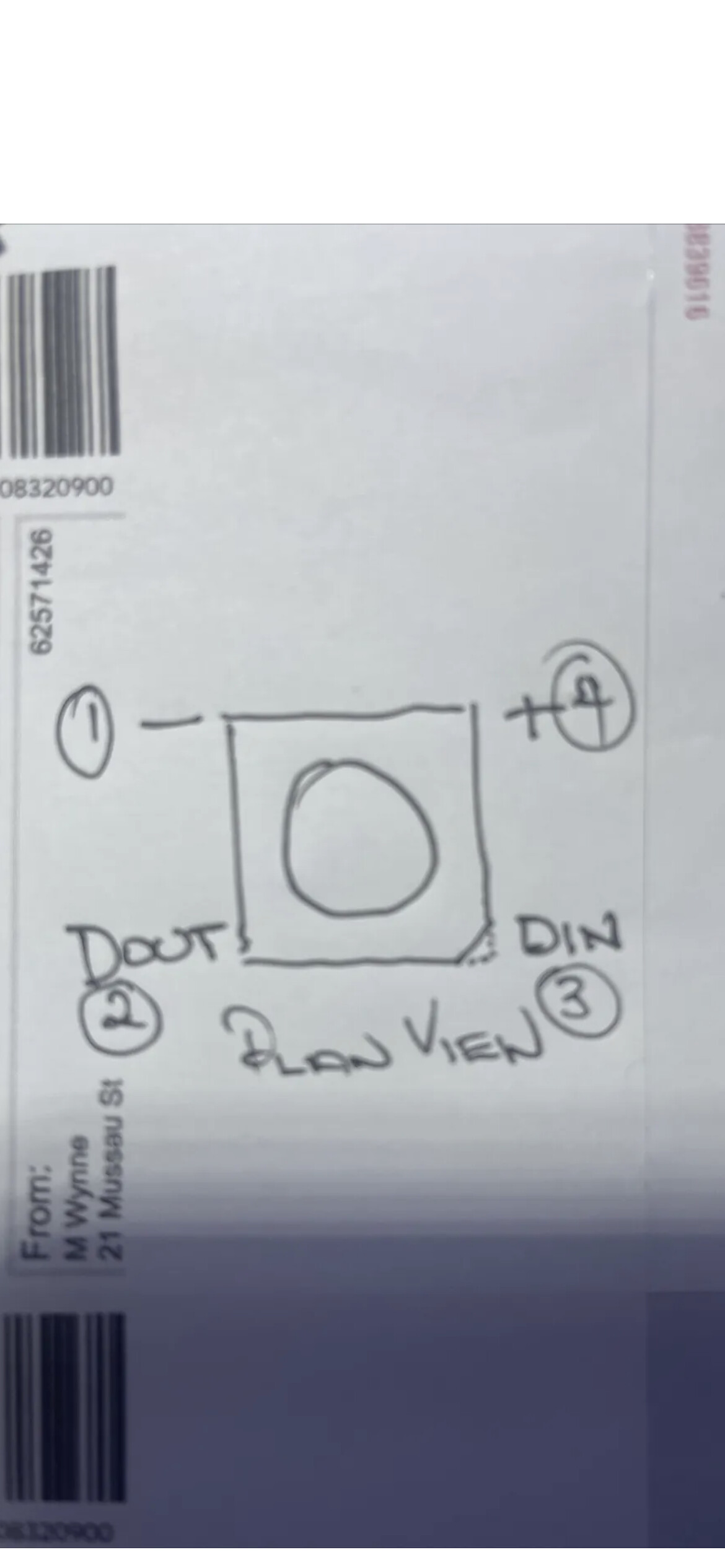
Actually it turns out the data sheet i was given had the wrong pin configuration. This is the correct one as confirmed by the seller who soldered wires to one to confirm. Ive never seen one layed out like that before.
This topic was automatically closed 180 days after the last reply. New replies are no longer allowed.