Sketch to compare voltages for series parallel capacitor switching circuit

Could you give a complete schematic, with the values and the optocouplers. Which Arduino board do you use ?
On this forum we sometimes say the the problem is in the part that someone is not showing :face_with_raised_eyebrow:

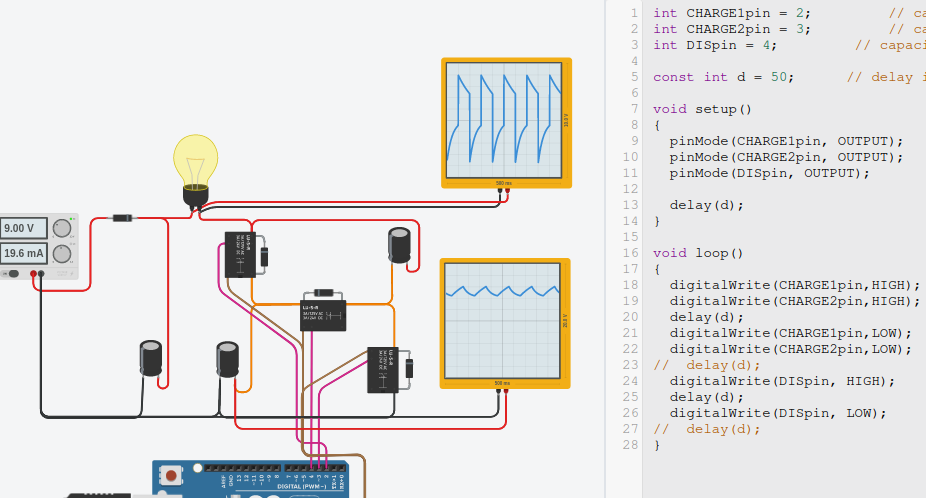
This is doing something as you can see on the oscilloscope. I use digitalWrite() and delay() to turn the pins off and on. Tinkercad has mosfets and optocouplers, but I wanted to test it with relays first. I did add the internal diodes of the mosfets.


The large capacitor on the left is 0.1F and the other two capacitors are 1000µF (that is 100 times smaller than the large capacitor).

So… look at the Process or decision making section. This is code that matches your prose.

    if (charging) {
        if (capvolt == VCC)
            charging = false;  // stop charging!
    }
    else { // not charging
        if (capvolt < VCC / 2)
            charging = true;   // start charging!
    }

Set that in between Input, read all values, and Output, set all outputs accordion to what's become of charge, which single variable holds the "state" of you process, are we charging or discharging (not charging).

Have to ask, will capvolt ever be exactly equal to VCC? You might want to aim for capvolt to be greater than some small voltage less than VCC. Just sayin'.

edit: nevermind, I see in the code you are allowing 10 units, maybe CAPvolt will get to within 0.05 volts of VCC. If it never goes into discharge, maybe that allowance has to be larger.

a7

1 Like

I forgot to add a oscilloscope for the capacitor C1 in the previous picture. Here it is:

For a maximum energy put into the load, the surface area of the curve in the upper oscilloscope is important. If waiting for too long, not much energy is put into the load.

I tuned the delay for a good amount of energy that is put into the load. As you can see, the voltage of C1 is useless.

Therefor my idea is to measure the voltage on the right side of the load. Instead of calculating the surface, I think that calculating the slope of the curve is enough. At a certain volts-per-second the circuit can switch over to the other state. Different volts-per-seconds might be needed for both states.

Maybe measuring the current through the load is an alternative method. If the load is inductive or has a low resistance, then the current might be more accurate than the voltage on the right side of the load.

It also shows that it is not a "alternating" voltage for the load. There is a DC component, which is inherit to the circuit.

What are the advantages of this circuit over a normal H-bridge that everyone has been using for many decades ?

Absolutely none!

1 Like

I solved the problem with the code I wrote yesterday but as I am new i can only post so many replies a day.

int CHARGE1pin = 2;         // capacitor 1 in parallel
int CHARGE2pin = 3;         // capacitor 2 in parallel
int DISpin = 4;         // capacitors in series
int VCCPin = A0;   // Voltage sensor 'S'
int CAPpin = A1;   // Voltage sensor 'S'


int VCC = 0;
int CAPvolt = 0;


void setup () {
                           
 pinMode(CHARGE1pin, OUTPUT);                  // mosfet
 pinMode(CHARGE2pin, OUTPUT);                  // mosfet
 pinMode(DISpin, OUTPUT);                  // mosfet
}


void loop () {

  digitalWrite(CHARGE1pin, HIGH);  // charge mosfet ON
  digitalWrite(CHARGE2pin,  HIGH);  // charge mosfet ON

  VCC = analogRead(VCCPin);  // read input voltage 
  CAPvolt = analogRead(CAPpin);  // read cap voltage

   if (CAPvolt + 10 < VCC)
   { return 0;}
  else
  digitalWrite(CHARGE1pin, LOW);  // charge mosfet Off
  digitalWrite(CHARGE2pin,  LOW);  // charge mosfet Off
   delayMicroseconds(100);
  digitalWrite(DISpin,  HIGH);  // discharge mosfet ON
   VCC = analogRead(VCCPin);  // read input voltage 
   CAPvolt = analogRead(CAPpin);  // read cap voltage 
   CAPvolt -10 > (VCC / 2);

 while (CAPvolt -30 > (VCC / 2))
 {
  VCC = analogRead(VCCPin);  // read input voltage 
   CAPvolt = analogRead(CAPpin);  // read cap voltage 
 }
  digitalWrite(DISpin, LOW);  // discharge mosfet on capacitors in series
}

this automatically controls chare and discharge based on load, voltage and capacitor value, even works down to very low ohms and uf, Im now using smaller capacitors at a higher frequency and I am able to put 20 watts into the input. If you are going to reproduce this circuit use high quality capacitors as they take a pounding with this circuit, a 100watt bulb across the input load and you can hear them screaming inside, they get quite warm, I m now using MKP power film capacitors which are designed for this kind of throughput.

Im going to modify the code so there is a discharge offset voltage setting with a potentiometer, as the curve is quite shallow at the end of the discharge cycle which affects the power you can get across the load over time.

You have already posted an incorrect statement on my thread about capacitors charging through a switch when the circuit I posted was visible to you to see, maybe there is a use driving non linear loads? can you think of any that might work?

interesting, I have not been able to measure that or have not noticed it on the scope, is it a bias over the load?

OK, I am glad you got your original working with our help.

If you are going forward with this, I urge you to look again at the IPO solution.

while statements hang up your loop, meaning you won't be able to think about anything else, or do anything else.

 while (CAPvolt -30 > (VCC / 2))
 {
  VCC = analogRead(VCCPin);  // read input voltage 
   CAPvolt = analogRead(CAPpin);  // read cap voltage 
 }

It may not matter. Take a look at


Link to : IPO model Charge / Discharge

in the wokwi simluator. Move the slider towards the LED that is illiminated. This simulates the charging and discharging.

The loop runs full speed, leaving 99 percent of the processor power left over and fully available.

// https://forum.arduino.cc/t/sketch-to-compare-voltages-for-series-parallel-capacitor-switching-circuit/1046639

const int CHARGE1pin = 2;     // capacitor 1 in parallel
const int CHARGE2pin = 3;     // capacitor 2 in parallel
const int DISpin = 4;         // capacitors in series
const int VCCPin = A0;        // Voltage sensor 'S'
const int CAPpin = A1;        // Voltage sensor 'S'


int VCC = 0;
int CAPvolt = 0;

bool charging = false;
const int chargeLamp = A2;        // move the slider right to simulate charging
const int dischargeLamp = A3;     // move the slider left to simulate discharging

void setup () {
                          
 pinMode(CHARGE1pin, OUTPUT);     // mosfet
 pinMode(CHARGE2pin, OUTPUT);     // mosfet
 pinMode(DISpin, OUTPUT);         // mosfet

 pinMode(chargeLamp, OUTPUT);     // lamp
 pinMode(dischargeLamp, OUTPUT);  // lamp
}

void loop () {

// INPUT

  VCC = analogRead(VCCPin);       // read input voltage 
  CAPvolt = analogRead(CAPpin);   // read cap voltage
  int difference = VCC - CAPvolt;

// PROCESS

  if (charging) {
      if (CAPvolt > VCC - 30)
          charging = false;       // stop charging!
  }
  else { // (not charging)
      if (CAPvolt < VCC / 2)
          charging = true;        // start charging!
  }

// OUTPUT

  if (charging) {
    digitalWrite(DISpin,  LOW);       // discharge mosfet Off
    digitalWrite(CHARGE1pin, HIGH);   // charge mosfet ON
    digitalWrite(CHARGE2pin,  HIGH);  // charge mosfet ON

    digitalWrite(chargeLamp, 1);
    digitalWrite(dischargeLamp, 0); 
  }
  else {
    digitalWrite(CHARGE1pin, LOW);    // charge mosfet Off
    digitalWrite(CHARGE2pin,  LOW);   // charge mosfet Off
    digitalWrite(DISpin,  HIGH);    // discharge mosfet ON

    digitalWrite(chargeLamp, 0);
    digitalWrite(dischargeLamp, 1); 
  }
}

Anything you want to add, just use the IPO model and add to the I, P and O sections of the loop.

I may not have your functionality correct, but the idea is sound.

Tip o' the hat to @paulpaulson, indefatigable proponent of IPO.

a7

That's amazing, i was using the wokwi simulator yesterday to check my code, I drew exactly the same circuit as you did using a potentiometer. I mean exactly....
Thanks for the example, i will try and understand it, it seems more difficult to comprehend than a step by step code design. I will give it a go in the real world and see how fast i can get them to switch. Thanks for your help.

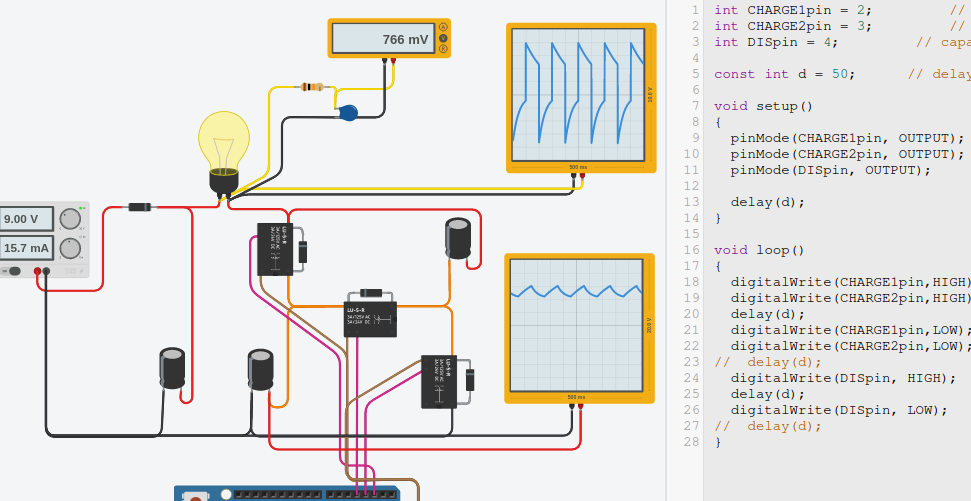
The voltage over the load through a RC filter shows the DC component:


The charging and discharging are both set to 50ms. I don't know what the influence of the relays is.
The Wokwi simulator adds a delay to the relays, just like relays in real life. I don't know about the relays in Tinkercad.

With the 50ms, the capacitors are not fully charged and not fully discharged.
When I look at the graph of the oscilloscope, then the average positive voltage is +3.2V (guessed) and the average negative voltage is -1.5V (guessed). The load gets an average of +1.7V. That is not near the 766mV of the Voltmeter, so something is not optimal.

afbeelding

It is not a push-pull configuration for the load. There will always be a DC component.

There is no DC component, that's just an average voltage of a non symmetrical waveform.
Try using my code in your sim, then you can adjust the values of offset to switch when its charged or discharged to a certain level, it should give you a fully charged or discharged capacitor with the way its written now. I have an addition which varies the offset based on a potentiometer value.

By definition this is the DC component being the zero-frequency Fourier component.

I don't think art any point you have actually said what you are trying to achieve with this arrangement. If we understood this it would help a lot

There is no need to get things complicated. the orginal statement was "it is not a push-pull configuration for the load. There will always be a DC component."
The capacitor is charged and discharged exactly the same on the top side and the bottom side of the waveform produced, if it was not then the capacitor would be fully charged or fully discharged after x amount of cycles.
the only thing that changes is that discharge and charge are not equal in the time it takes to complete, hence non symmetrical.
The current in the load always returns to zero, there is no DC bias across the load.

It is a free energy machine !
If there is no DC component then the load sees the same amount of current going to left as going to the right. The average current through the load would be zero. The 0.1F large capacitor on the left keeps the voltage fixed and the voltage on the right side would go up and down with energy from nowhere.

Unfortunately there is no such thing in a closed system, You asked what the benefits are well I was hoping for better efficiency, Here are some pics of the real waveform and input power, with it setup as a mains step up inverter, i cant tell you the power in the bulb because i don't have any equipment to measure it accurately but i tried to set the brightness as close as i could by eye compared to it being plugged into the mains


. The mosfets run surprisingly cool without a heatink, the most heat comes from the input diode.

This topic was automatically closed 180 days after the last reply. New replies are no longer allowed.