[SOLVED] I2C MH + LCD 2004A + Arduino Uno display issues [/SOLVED]

Dear All,

First, thank you in advance for the time you'll spent reading my question.

I've been searching, reading and tinkering around for almost 5 hours now, so I'd thought I would ask you fellows.

I know my way around IT but I'm pretty new to anything electronic especially when it comes down to the lower layers of things.

So I'm trying to make a LCD 2004A linked to a I2C MH chipset and an Arduino Uno display an simple hello world. All I can get it to do is initialize and blink (basically tell the display to backlight on and backlight off) When it comes to displaying a simple print() the screen stays lit as per the last instruction before the print function and does nothing else. (Code will follow below)

I've applied many of the getting started tutorials you can find on arduino.cc or instructables.com.
I found this tutorial which is around for a long time and helped a lot of people to make this work.

https://arduinoinfo.mywikis.net/wiki/LCD-Blue-I2C

  • This seems to be exactly the type of hardware I have. I looked up the specs sheets. They seem to
    have the same pins at the same places
  • The jumper cables are properly set VCC to 5v, GND to GND, SDA to A4 and SCL to A5
  • I have the last version of the IDE.
  • I wiped clean any LCD library from the environment, user's and IDE's and downloaded the latest
    new-liquidcrystal library.
  • The jumper at the back of the I2C module is placed properly and I tested without it (it cuts the power
    off)
  • I scanned the I2C address which is 0x27 (confirmed multiple times)
  • I tried every pin configuration for addressing the above mentioned tutorial contains
    I am referring to that part LiquidCrystal_I2C lcd(0x27, 2, 1, 0, 4, 5, 6, 7, 3, POSITIVE);

I used the code provided in the tutorial and simplified it to its minimum to make sure this is not a code issue. I also used the examples in other tutorials and provided by default with the library. Same issue, or nothing happen and the screen stays lit, or if there's a blink configured it will blink and nothing else.

/* YourDuino.com Example Software Sketch
 20 character 4 line I2C Display
 Backpack Interface labelled "LCM1602 IIC  A0 A1 A2"
 terry@yourduino.com */

#include <Wire.h>
#include <LiquidCrystal_I2C.h>

/*-----( Declare objects )-----*/
// set the LCD address to 0x20 for a 20 chars 4 line display
// Set the pins on the I2C chip used for LCD connections:
//                    addr, en,rw,rs,d4,d5,d6,d7,bl,blpol
LiquidCrystal_I2C lcd(0x27, 2, 1, 0, 4, 5, 6, 7, 3, POSITIVE);  // Set the LCD I2C address

void setup()   /*----( SETUP: RUNS ONCE )----*/
{
  lcd.begin(20,4);         // initialize the lcd for 20 chars 4 lines and turn on backlight

// ------- Quick 3 blinks of backlight  -------------
  for(int i = 0; i< 3; i++)
  {
    lcd.backlight();
    delay(250);
    lcd.noBacklight();
    delay(250);
    lcd.backlight(); // finish with backlight on
  }
 
//-------- Write characters on the display ----------------
// NOTE: Cursor Position: CHAR, LINE) start at 0  
 
  lcd.setCursor(0,0);
  lcd.print("Hello, world!");
  delay(1000);

}/*--(end setup )---*/


void loop()   /*----( LOOP: RUNS CONSTANTLY )----*/
{

}/* --(end main loop )-- */

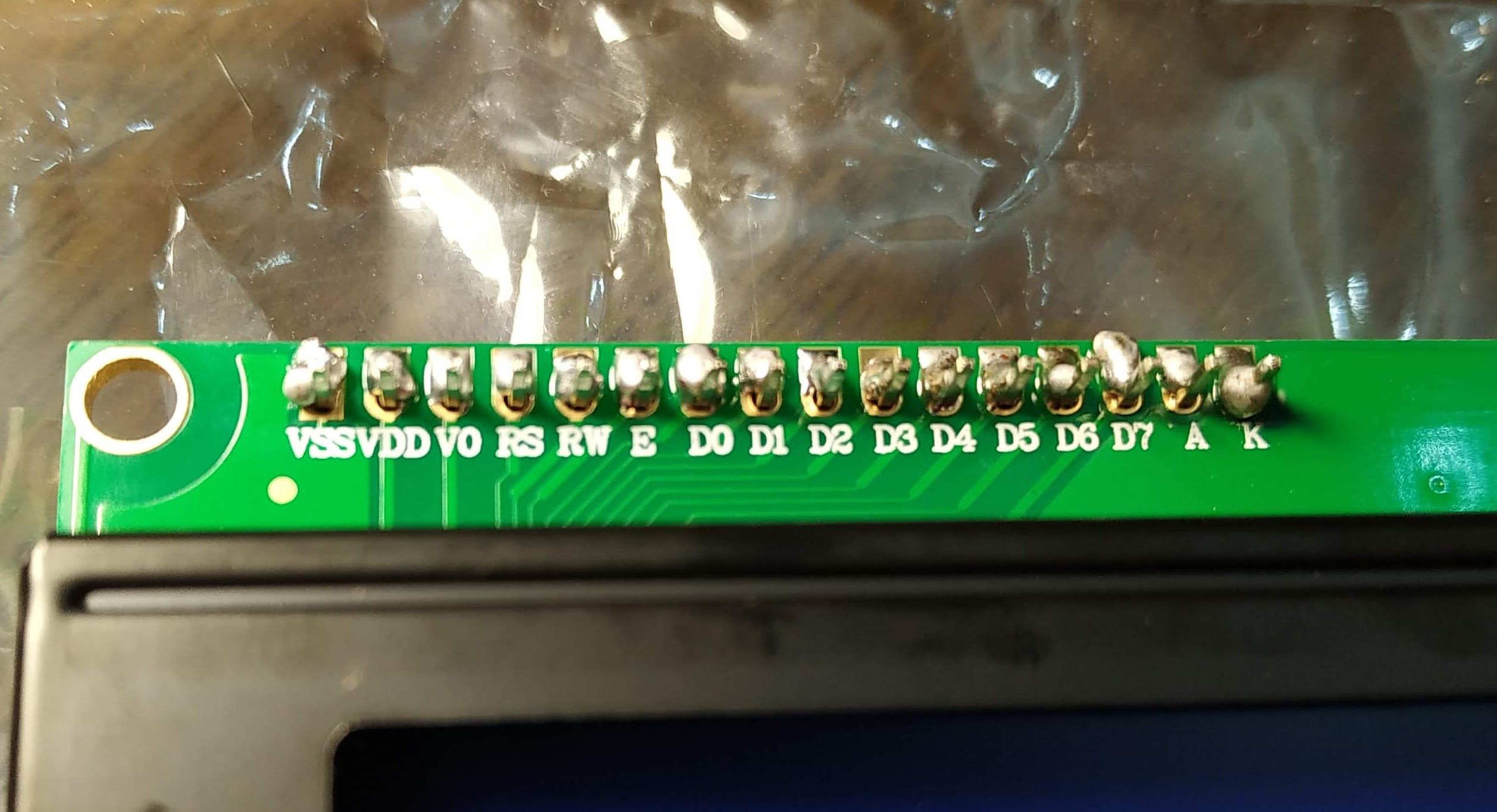
Attached you will find pictures of the pin from I2C module connected to the LCD before and after I soldered them.

My best guess is either they're are very poorly soldered and some pins are not connected.
Or, the configuration of the pins in the code, to which I known next to nothing, is wrong.

If you guys have any clues I'll be very grateful!
Regards,
Tom

OK, let's go!

IMG_20190726_175204.jpg
So, that's a fairly standard I2C backpack with a less-than-usual branding. So many "clones"! :roll_eyes:

IMG_20190726_144945.jpg
Yes, definitely pins there!

IMG_20190726_175148.jpg
Yes, I have to agree. Atrocious soldering. :astonished: Possibly some pins not connected. Need help from someone with skills in soldering (and the right equipment). Note that pins D0 to D3 are not used anyway.

The "latest new-liquidcrystal library" is in fact, out-of date. Install Bill's "HD44780" library from the library manager in the IDE, and work through the examples it provides, including the "test" sketches.

That's all. :grinning:

Top marks by the way, for inserting links and code properly. Images the next exercise. :grinning:


And just a note - the UNO is for "prototyping" - the Nano for most real projects.

@Paul__B Thank you for your feedback!

I'll try Bill's "HD44780" library instead.

Regarding the soldering, I'll have to redo them myself for now, I'll pay more attention, be more careful and try to make them better, I hope it will help.

D0 to D3 are not used anyway

Duly noted, I'll avoid touching them, good I learned something about these pins ^^

Top marks by the way, for inserting links and code properly. Images the next exercise. :grinning:

Thanks! :smiley: :smiley:
I'll insert images next time :wink:

Second attempt, still ugly but they all appear to be connected (D7 and A don't touch I made sure of it)

But still, when I use Bill's hd44780 Library and run an hello world, evrything runs without any errors but the screen doesn't display the text message. I can get it to backlit on and backlit off but that's all.

:astonished: That's really grinding my gears ...

Have you tried adjusting the contrast pot? You will need a small (jewler's) screwdriver.

If you still get no display, load and run the diagnostic sketch for the I2Cexp class (look in the library examples) and copy the results from serial monitor to a post here. If no one else sees what may be wrong, Bill Perry (the library author) visits here regularly and often can spot the problem.

Solved !

I read this thread : Contrast problem using 1602A LCD over I2C [SOLVED] - Displays - Arduino Forum

I ran a few tests and i2cguesser, I learned about my device, that's cool, but still negative or positive no way to see anything on the display.
So I followed Don's link to this thread: Arduino i2c for 16x2 lcd no backlight or text after upload [solved] - Displays - Arduino Forum

And I learned that there's a blue trimmer which allows you to adjust the contrast with a screwdriver.
Thanks Nadir!

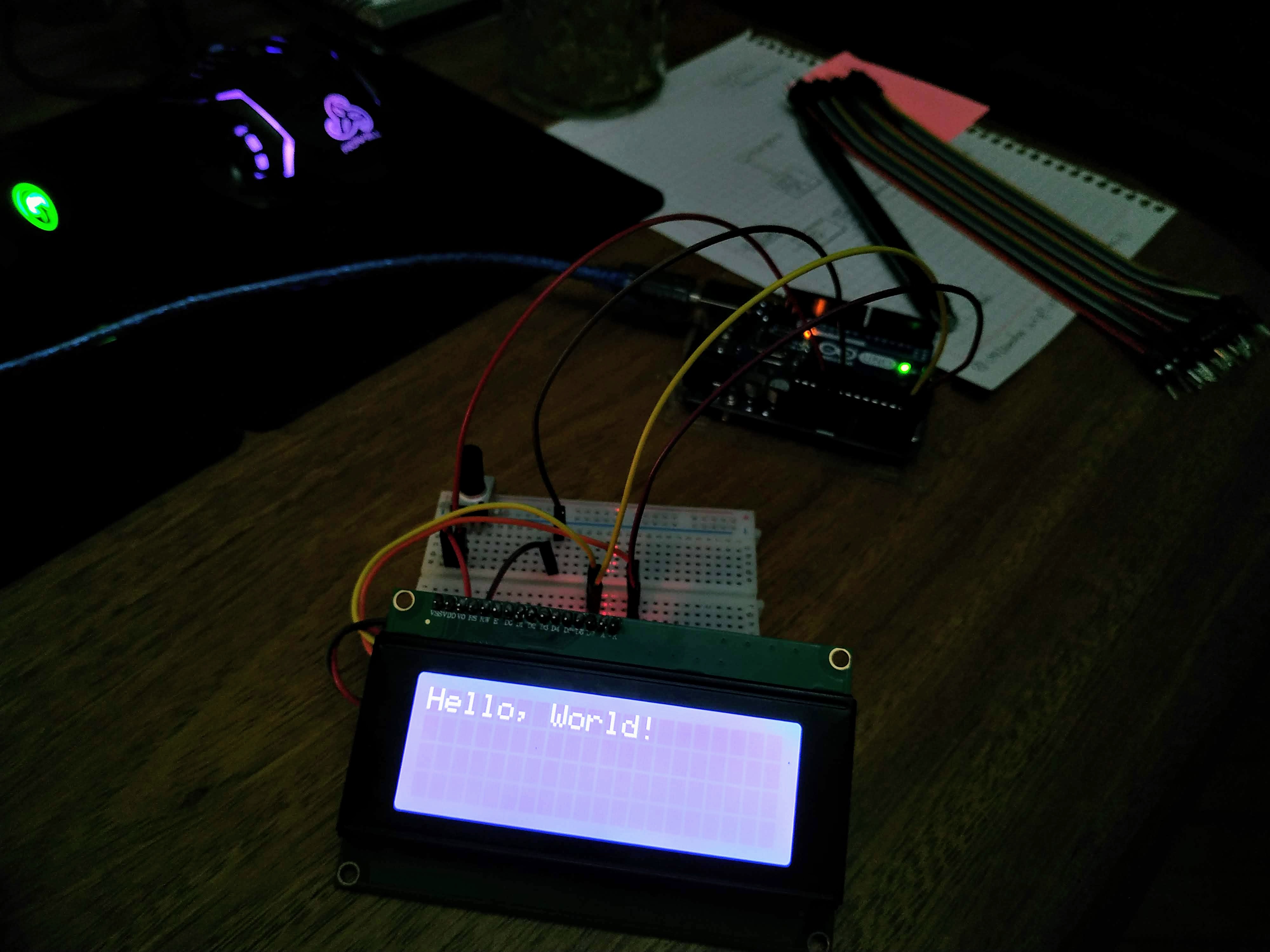
It was a contrast issue all along! It was printing the result of the scripts but I just couldn't see it.

1 Like

@groundFungus
Thank you for your reply. You are indeed right! Just figured it out a minute ago and posted my conclusion at the same time you were.

Thank you again to you and all the others for your help!

Oops!

Sorry, inattention on my part - I was in a hurry this morning (which is not unusual). I daresay had I seen your picture of the totally lit but blank screen I would have twigged about the contrast - it's not as if we don't discuss it all the time here - because it is such a puzzle to people. :grinning:

And I might have expected any given "tutorial" to include this detail. Terry needs to update that Wiki for more than one reason - notwithstanding the respect we have always had for fmalpartida, his library is no longer the latest and greatest! :roll_eyes:

@Paul__B

Indeed, I realized while keeping on reading about this issue that many people would have encountered it.
It's so simple it made me feel foolish but on the other hand debugging this issue while not knowing about this trimmer allowed me to learn a lot about I2C and tools used to either control or test it.
This, was a lot of fun.
Though, to avoid every beginner like me asking the same question over and over, it might be a good idead to indicate this point on the wiki page. Just as a prerequisite to check in case of any attempt at troubleshooting. :slight_smile:

Thank you again for your support, much appreciated.
I feel like I already love this community, as much as I loved having fun yesterday tinkering with the Arduino and the breadboard in every way possible.

Have a great day Paul!

PS: I've looked for this option but I cannot seem to find it, do you know how I can rename this thread to prefix it with [SOLVED] ?
Thank you

t0m_a:
But still, when I use Bill's hd44780 Library and run an hello world, evrything runs without any errors but the screen doesn't display the text message. I can get it to backlit on and backlit off but that's all.

The first sketch to run on that type of LCD device when using the hd44780 library is the included I2CexpDiag sketch.
It is a diagnostic tool that will test the i2c signals then run a full memory test on the internal LCD RAM.
If this passes, there are no issues with the i2c signals, no soldering issues on the backpack pins, and the internal LCD RAM is working properly.

The hd44780 library and the included I2CexpDiag tool is far superior to the i2cLCDguesser code which was a tool I wrote to help getting fm's LiquidCrystal_I2C i/o class working.

From looking at the photos it is likely you originally had soldering issues in addition to the maladjusted contrast pot.

Glad you go it working.

If you didn't end up using the hd44780 library, you may still want to have a look at using it as it offers a plug-n-play capability for the i2c lcd backpack LCDs. i.e. you can swap out devices that have a different I2C address and pin wiring on the backpack between the PCF8574 chip and the LCD (not all backpacks are the same) and the same sketch code will still work, with no modifications as the library figures all that out for you during initialization.

--- bill

bperrybap:
The first sketch to run on that type of LCD device when using the hd44780 library is the included I2CexpDiag sketch.
It is a diagnostic tool that will test the i2c signals then run a full memory test on the internal LCD RAM.
If this passes, there are no issues with the i2c signals, no soldering issues on the backpack pins, and the internal LCD RAM is working properly.

Thanks a lot! I'll make sure to look it up.

bperrybap:
If you didn't end up using the hd44780 library, you may still want to have a look at using it as it offers a plug-n-play capability for the i2c lcd backpack LCDs. i.e. you can swap out devices that have a different I2C address and pin wiring on the backpack between the PCF8574 chip and the LCD (not all backpacks are the same) and the same sketch code will still work, with no modifications as the library figures all that out for you during initialization.

That's awesome, it will save me trouble for my next installs with LCD display.

Thank you very much for your help and for the information.
Have a great day!

t0m_a:
PS: I've looked for this option but I cannot seem to find it, do you know how I can rename this thread to prefix it with [SOLVED] ?
Thank you

Edit the title on your first post.