Hi all,
New to the forum and to Arduino's / Nodemcu's.
I am currently working on a project to read the level of heating oil in my oil tank.
Using a LoLin ESP8622 Nodemcu, I am using the following:
VL53L0X - TOF laser range finder - to measured distance from top of tank to the top of the oil
DS18B20 - Temperature module - to measure the temperature at the tank (not in the oil!)
An analogue input to pin A0 - through a voltage divider - to measure the voltage of the battery
SSD1306 - To give a local display of the above values.
All the above information is also transferred to Thingspeak for access on the internet.
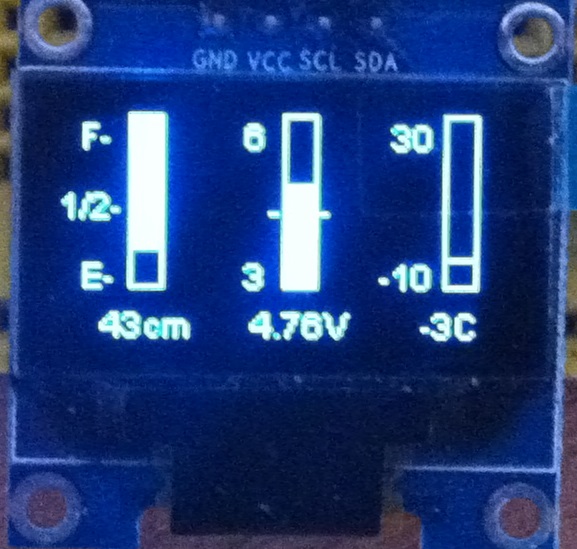
On the OLED display, I can display the values and small bar graphs using 'display.drawRect' command to draw the box.
The problem is with the 'display.fillRect' command, in that I can only get it to fill the rectangles from the top, down.
This is fine for the oil tank as the 'lit' area at the top of the rectangle represents the air gap at the top of the tank and the dark 'unlit' area at the bottom can represent the oil in the tank. (looks pretty cool).
But for the battery voltage, I would like the display to 'light' from the bottom of the rectangle and move up.
I thought I cracked it the other day as I got the 'lit' area to move up from the bottom, but it was filling from the bottom of the display (64 pixels down) and not from the bottom of the rectangle (50 pixels down).
I have been at this for days now, and I think I am finally beaten so I resorted to just using a horizontal line to represent the level as can be seen in the attached image. (if its attached).
Has anyone, any idea how to fill a rectangle from the bottom, up, rather than top, down.
Even though my codes is probably a mess, everything does function correctly, even the horizontal line position on the bar graph moves up and down as it should, I just can't 'fill' from that position down.
This is the section of code...
// *************** Draw second bar *********************
void drawBar2(int x, int y, int w, int h, float value) {
float posReal; // needed to calculate the height of the bar to fill in
int posInt; // converts the real width to an integer one
float volts;
display.drawRect(x, y, w, h); // draw the outline box
posReal = (6-value) * 16.66; // this just calculates where the line or fill section should start
if (posReal <= 50){ // this stops (or should stop) the value reaching over 50 (bottom of the box)
posInt = posReal;
}
else {
posInt = 50;
}
Serial.print(value); Serial.println (" Batt");
Serial.print(posReal); Serial.println (" posReal");
Serial.print(posInt); Serial.println (" posInt");
// display.fillRect(x, posInt, w, y); // fill in the bar to the value indicated (this is the problem line!)
display.drawHorizontalLine(64, posInt, 9); // Draw line at position
display.drawString(53,0,"6"); // print the value at top of the bar
display.drawString(53,40,"3"); // print the value at bottom of the bar
display.drawHorizontalLine(60, 28, 3); // Draw line at position - to indicate minimum battery level
display.drawHorizontalLine(74, 28, 3); // Draw line at position - same the other side of the rectangle
display.drawString(55,54,String(value)+"V"); // print the voltage reading under the bottom of the bar
}
I bet the solution is probably simple and obvious, but I'm at a loss.
Thanks for your help.
Martin