Stepper motor won't turn

I'm unable to get the motor to turn, it just sort of buzzes around on my desk like an angry bumble bee, making a high pitched between-radio-frequencies/interference sort of a noise.

driver pdf: http://www.kelinginc.net/KL-4030.pdf
motor pdf: http://ge.tt/8X8qBb22/v/0?c

Arduino code:

int pulPin = 5;
int dirPin = 6;

void setup() {
  pinMode(pulPin, OUTPUT);
  pinMode(dirPin, OUTPUT);
}

void loop() {
  digitalWrite(dirPin, HIGH);
  digitalWrite(pulPin, LOW);
  delay(100);
  digitalWrite(pulPin, HIGH);
  delay(100);
}

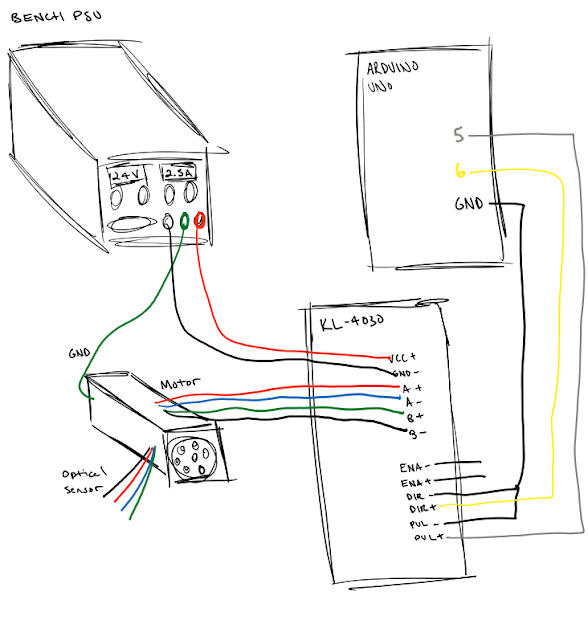
How its wired:

KL-4030 | where it goes
-----------------------------
VCC+    | +24V bench psu
GND     | - bench psu

A+      |  red wire on motor   (see page 10 of motor pdf)
A-      |  blue wire on motor  (see page 10 of motor pdf)
B+      |  green wire on motor (see page 10 of motor pdf)
B-      |  black wire on motor (see page 10 of motor pdf)

EN+     |  unconnected
EN-     |  unconnected
PUL+    |  arduino pin 5
PUL-    |  arduino ground
DIR+    |  arduino pin 6
DIR-    |  arduino ground

M1      |  1
M2      |  1
M3      |  0
M4      |  0
M5      |  0
M6      |  1
M7      |  1
M8      |  0

Really stumped. I don't know if my code is bad, if my wiring is bad, or if one of the components are bad... or even where to begin troubleshooting it. Any suggestions are appreciated.

Thanks!

It sounds, if you're at least getting the buzzing noise from the motor, that one of the windings is reversed, and the two are fighting against each other, pulling 1 direction, then back the other. try swapping the pins for Winding A 1st.

From what I can see of the driver PDF, ENA-, DIR-, and PUL- are being drawn to GND, which would mean the ENA+ , DIR+, and PUL+ would be driven off the Arduino's digital pins. (through a resistor, I would guess 1K Maximum, for +5V logic.) (the schematic they give in the PDF, run like the uA2003 but a logic-High (+5) would connect the xxx- pins to GND through transistors on the controller.. (thus, all of the xxx+ pins are being connected to VCC.)

DON'T use the stepper.h library, as this is not for the driver you're using (obviously), you need only 3 logic signals from the arduino.. a +5, resistor in series, pulse to the xxx+ pins (ENA+ pulled high to Enable, this strikes me as a Power-Down/power saver. DIR+ to either +5 or GND to change direction, and a stable clock pulse (variable duration, but equal High/Low timing.) to PUL+ to step the driver circuit.)

As a mock-up, connect all of the xxx- pins to GND, a 1K resistor to each xxx+ pin, and the following as a test.

// bare metal stepper control

void setup() {

pinMode(8,OUTPUT);  //Use Pin 8 as your pulse signal (connect to resistor for PUL+ )
pinMode(9,OUTPUT);  //Use Pin 9 as your Direction Control (connect to resistor for DIR+ )
pinMode(10,OUTPUT); //Use Pin 10 as your Enable (connect to resistor for ENA+ )

//Enable the circuit 1st.

digitalWrite(10,HIGH);

}

void loop() {

// first, let's step 10 in one direction..

digitalWrite(9,HIGH);

for ( int i=0; i>=9; i++ ){

digitalWrite(8,HIGH);
delay(60);
digitalWrite(8,LOW);  // entire run should be roughly 1.2 seconds, about 120uS per step
delay(60);
 }

// Now, the other direction.

digitalWrite(9,LOW);

for ( int i=0; i>=9; i++ ) {

digitalWrite(8,HIGH);
delay(60);
digitalWrite(8,LOW);
delay(60);
 }

}

(Excuse any errors, I'm writing this from off the top of my head, without the arduino in front of me, the code above did pass the compiler in 1.0.6)

the program should only step 10 times 1 direction, then back 10 times. no waiting between direction change. >>>>>>>>>><<<<<<<<<<>>>>>>>>>>><<<<<<<<<<

But, the ENA pins strike me as they should be connected..

Hope this helps. But as good a logical start as there could be. Stephen (gelfling6)

You have another long Thread about stepper motors.

Is this Thread completely unrelated to it?

...R

That thread helped me understand how motors work and find a driver.

Now that I have, I'm having wiring/coding/other? issues. There is no information in the other thread that would be necessary for this one.

gelfling6, Why do you suggest putting 1k resistors on the DIR+/PUL+ pins? As far as I can see, the resistor is the only difference in the setup you've described and what I've currently got.

I did try switching the A coil wires. Same result.

Also, according to the driver pdf, it says leaving both EN pins disconnected means the board is enabled (calling it a "disable" pin would've been more appropriate I think)

I like the simple code you have in your original post in this Thread. However I would change it like this

void loop() {
  digitalWrite(dirPin, HIGH);
  digitalWrite(pulPin, LOW);
  digitalWrite(pulPin, HIGH);
  delay(200);
}

This gives shorter pulses and puts all the timing / speed in one place. I am not saying that your version, with a 100msec pulse, will not work. But it is very much longer than the required minimum of 1.2 microsecs.

In any case there is no point trying any more complex code until you get this to work.

I can't figure from the datasheet how you tell the driver whether to use single-pulse or double-pulse mode. Could it be that it is set for double-pulse mode and your code is just telling it to move one step left and one step right.?

...R

Robin, wouldn't there need to be some sort of delay between the pulse LOW and the pulse HIGH?

I have also been trying to figure out how you set single-pulse or double-pulse mode on the driver.

Hmm, that would be worth a shot. What would the new code for double pulse look like?

I also just tried something interesting... which is that I commented out all of my code and disconnected the PUL+ and DIR+ pins. The arduino essentially does nothing now. And yet, the motor still buzzes? It behaves the exact same as before.... confused...

The digitalWrite() function is slow enough to provide a suitable pulse. If you want to be extra cautious you could add delayMicroseconds(10);

I Googled double pulse stepper driver and the PDF I looked at (for a different driver) said there is a jumper to select the pulse mode. Has your device any jumpers? Can you post a photo of it.

I think (from reading your PDF and the other one which uses similar language) in double pulse mode it goes one way with pulses on the STEP pin and the other way with pulses on the DIR pin.

I don't have a device like that so I can't experiment.

...R

Well, the code you posted still behaves the same. In fact it behaves the same as if I don't even have the pins connected.

It appears that the buzzing I get is just from the motor being "on"

Would this suggest that the code is bad, or the wiring?

I tested the (A) blue/red and (B) green/black wire pairs on the motor for continuity, and that checked out. So I know that that's right...

sarink:
Well, the code you posted still behaves the same. In fact it behaves the same as if I don't even have the pins connected.

The code should work fine. Leave it as it is until we have looked at everything else.

Draw a careful diagram of how everything is actually connected and post a photo of it.
Also (as I asked earlier) post a photo of the stepper driver (perhaps 2 photos - top and bottom). I want to be able to compare the photo to the drawings in the PDF.

...R

Hi, how are you powering the system.
Can you post a complete circuit diagram, either CAD or a picture of a hand drawn circuit.

Thanks, Tom....... :slight_smile:

I've created both a hand-drawn version and one with actual photos. Examine whichever you prefer :stuck_out_tongue:

Thanks again

Thanks. That is very comprehensive.

I note that there are 8 switches on the DIP switch but only 6 of them 123 and 567 are listed on the box. You have Sw4 on and Sw8 on - what do they do?

Also, as far as I can see, Sw 3 represents 1/8th microstepping. I would start with full steps - all switches off.

The link for the motor in your first post does not work so I don't know if 1.2amps is the correct setting.

In another web page I looked at (for a Leadshine driver) it said the jumper for selecting the pulse mode is inside the box. If it was my box I would look inside - but don't do so unless you are confident that you won't break something.

And, just a wild idea, try setting the DIR pin to low and see what happens.

...R

Does http://ge.tt/8X8qBb22 work for you? The link is still fine for me. I drew my diagrams accurately to the wire colors, which are labeled in that link. If it still doesn't work I will find somewhere else to upload it - It is a vital piece of this puzzle I believe.

SW4 is labeled on the front of the driver - "full current" or "half current"
SW8 is unlabeled, so I'm not sure.

I opened the box, and there are 7 jumpers. This leads me to believe that the 7 switches on the outside are used to control them, and SW8 is unlabeled for that reason - that is has no jumper to control on the inside.

I've disabled microstepping and tried writeLow on the dirPin - Still nothing.

Man, I sure am lost...

As I said, there is no code I write that can do anything to the motor. Connecting it to the arduino and writing code is the same as writing an empty loop() function or even disconnecting it from the arduino entirely.

A few observations (I'm apparently bad at electronics so I don't know if this means anything interesting or not):

  • The "buzz" the motor makes definitely changed slightly when turning microstepping off
  • The manual states that the motor should operate at 24V, up to 2.5A - but my bench shows me it is only ever drawing 12V? And if I turn up the dial, it will draw nearly 4A (still 12V), at which point the buzzing gets significantly faster. (When no devices are connected to it, the bench is calibrated to 24V)

The link does not work - maybe you need to be logged in.

Can you post a photo of the inside showing the jumpers. It seems unlikely that the jumpers and switches duplicate each other.

...R

try this link: motor pdf

Given that the box is not meant to be opened, I find it perfectly reasonable that there are accessible outside switches meant to control hidden inside jumpers.

It sounds to me like the buzzing noise is the sound of the chopping regulator making the coils vibrate.

but my bench shows me it is only ever drawing 12V?

Your bench what? A 12V draw does not make sense, draw in current in amps not volts.
If you are using a meter to measure voltages and currents then forget it, a meter will not give meaningful readings on pulsed signals.

if I turn up the dial, it will draw nearly 4A

What dial?

Use your meter to see if you are indeed getting pulses to the driver. Measure the pulsing on the step line and increase the time between pulses to 2 seconds so your meter has time to settle. Then disconnect the direction control and just have the step.
If it still does not move swap the coil + and - on one coil only.

sarink:
perfectly reasonable that there are accessible outside switches meant to control hidden inside jumpers.

No sane manufacturer would pay for duplicate switches - and which would have priority?

That link for the motor works. It seems to be rated for 1.8A so I would expect 1.2A to work.

How about a photo of the inside showing the jumpers and everything else written on the PCB.

...R

Here is a picture of the board with the box opened up:

Grumpy,
I turn the voltage dial until the bench reads 24V. I keep the current dial at zero. Then I hook up the motor, and as I turn the current dial up, both the voltage and amperage readings increase. The voltage reading will never go beyond 12V, and the amperage will increase up to about 4A as I turn the current dial. As this increases, the "buzzing" gets faster and faster.

I have already tried swapping the +/- on the A coil (swapping blue/red wires) - it had no effect.

So I should place the meter on the A+ and A- on the driver board and see what the voltage fluctuation is?

I wonder if the stepper driver is fighting with your sophisticated power supply.

Your photo is not clear enough to enlarge and read the print on the PCB.

Are the jumpers the things at the bottom of the photo?

...R

The voltage reading will never go beyond 12V, and the amperage will increase up to about 4A as I turn the current dial.

Is, by chance, the maximum your bench supply can produce is 4A?

The meter on the bench supply will mean little because this is a chopping driver. It sounds like you need a bit of a conventional supply.