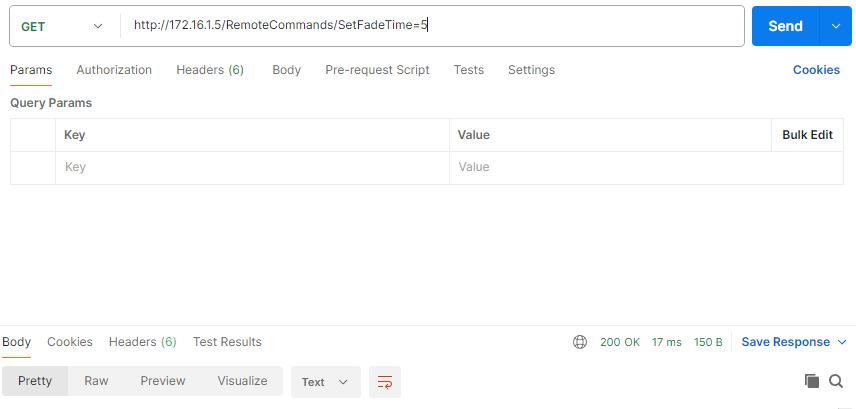
I'm struggling for weeks now to get a basic GET-request with an Arduino UNO in combination with the Ethernet shield. I want to use this configuration due to the stability of a wired network. The Arduino kit talks to a computer which runs a lighting program and which can accept HTTP-requests. On a trigger input a sequence of requests (with acceptable delay between each request) is send to trigger a lightshow.
Important to mention that it is a basic HTTP request, https gives issues.
There is not authentication or anything.
The computer is set to a static IP, and so is the arduino set in the same range.
If I test the GET-requests with Postman, it works as supposed.
Somehow I can't get the GET-request working on Arduino.
I've removed the whole sequence to sort out why it isn't working and just send a single request after boot every second, but nothing happens.
Anyone with advise how to make this working?
#include <SPI.h>
#include <Ethernet.h>

byte mac[] = { 0xDE, 0xAD, 0xBE, 0xEF, 0xFE, 0xED };

EthernetClient client;
// const char server[] = "192.168.178.201";  // server address [on-site]
const char server[] = "172.16.1.5";  // server address [office]
const int port = 80;

void setup() {
  // You can use Ethernet.init(pin) to configure the CS pin
  //Ethernet.init(10);  // Most Arduino shields
  //Ethernet.init(5);   // MKR ETH shield
  //Ethernet.init(0);   // Teensy 2.0
  //Ethernet.init(20);  // Teensy++ 2.0
  //Ethernet.init(15);  // ESP8266 with Adafruit Featherwing Ethernet
  //Ethernet.init(33);  // ESP32 with Adafruit Featherwing Ethernet

  // Open serial communications and wait for port to open:
  Serial.begin(9600);
  while (!Serial) {
    ;  // wait for serial port to connect. Needed for native USB port only
  }

  // start the Ethernet connection:
  Serial.println("Initialize Ethernet with DHCP:");
  if (Ethernet.begin(mac) == 0) {
    Serial.println("Failed to configure Ethernet using DHCP");
    // Check for Ethernet hardware present
    if (Ethernet.hardwareStatus() == EthernetNoHardware) {
      Serial.println("Ethernet shield was not found.  Sorry, can't run without hardware. :(");
      while (true) {
        delay(1);  // do nothing, no point running without Ethernet hardware
      }
    }
    if (Ethernet.linkStatus() == LinkOFF) {
      Serial.println("Ethernet cable is not connected.");
    }
  } else {
    Serial.print("  DHCP assigned IP ");
    Serial.println(Ethernet.localIP());
  }
  // give the Ethernet shield a second to initialize:
  delay(1000);
}

void loop() {
  Serial.println("Sending request");
  client.println("GET /RemoteCommands?SetFadeTime=4 HTTP/1.1");
  client.println("Host: " + String(server));
  client.println("User-Agent: arduino-ethernet");
  client.println("Connection: close");
  // client.println("Connection: keep-alive");
  client.println();

  // if (client.connect(server, port)) {
  //   Serial.println("Sending request");
  //   client.println("GET /RemoteCommands?SetFadeTime=4 HTTP/1.1");
  //   client.println("Host: " + String(server));
  //   client.println("User-Agent: arduino-ethernet");
  //   // client.println("Connection: close");
  //   client.println("Connection: keep-alive");
  //   client.println();
  // }

  delay(1000);
}
That returns in connection failed, but that makes sense since the ethernet shield is connected to a computer which has it's adapter settings to static, so the shield won't reach google.com.
And of course that is how the configuration has to be, the commands to be used are not through internet but directly to the software it's webserver.
I moved your topic to an appropriate forum category @darthvader072.
In the future, please take some time to pick the forum category that best suits the subject of your topic. There is an "About the _____ category" topic at the top of each category that explains its purpose.
so the computer has IP 172.16.1.5 and there is a webserver running which listens on this IP address and port 80 and the firewall is open for that IP and port?
Hi @Juraj
Thank you, that works, almost!
The arduino is connected and the software receives the commands.
However, the software can't handle this request yet but logs it with "request without host in http header".
The GET-request is likely made as HTTPS-request. however the software wants a real basic http-request. I've seen this issue before when I worked on this.
So I've tried to set a sequence already, but that gives issues. It seems like only the first request is handled. Do you know the reason why I can't sequence requests?
The response on the software side is that it sometimes still responds with "request without host in http header. "
All other requests (SetFadeTime=3/2/1) are ignored..
This works but it unstable, I sometimes get the same response again "request without host in http header. "
A delay with a second between each request should work. Network is also stable and reliable (it is a 25cm shielded cable between ethernet shield and computer)
If I fire a lot of requests with postman it works as supposed.
I think I'm doing something wrong with the header I guess?
Hmm basically responds the same. It works but it still responds sometimes with the same error. if you follow the timecode you can see that it is sometimes that the error occurs. Of course I see visibly that it works on the other moments.