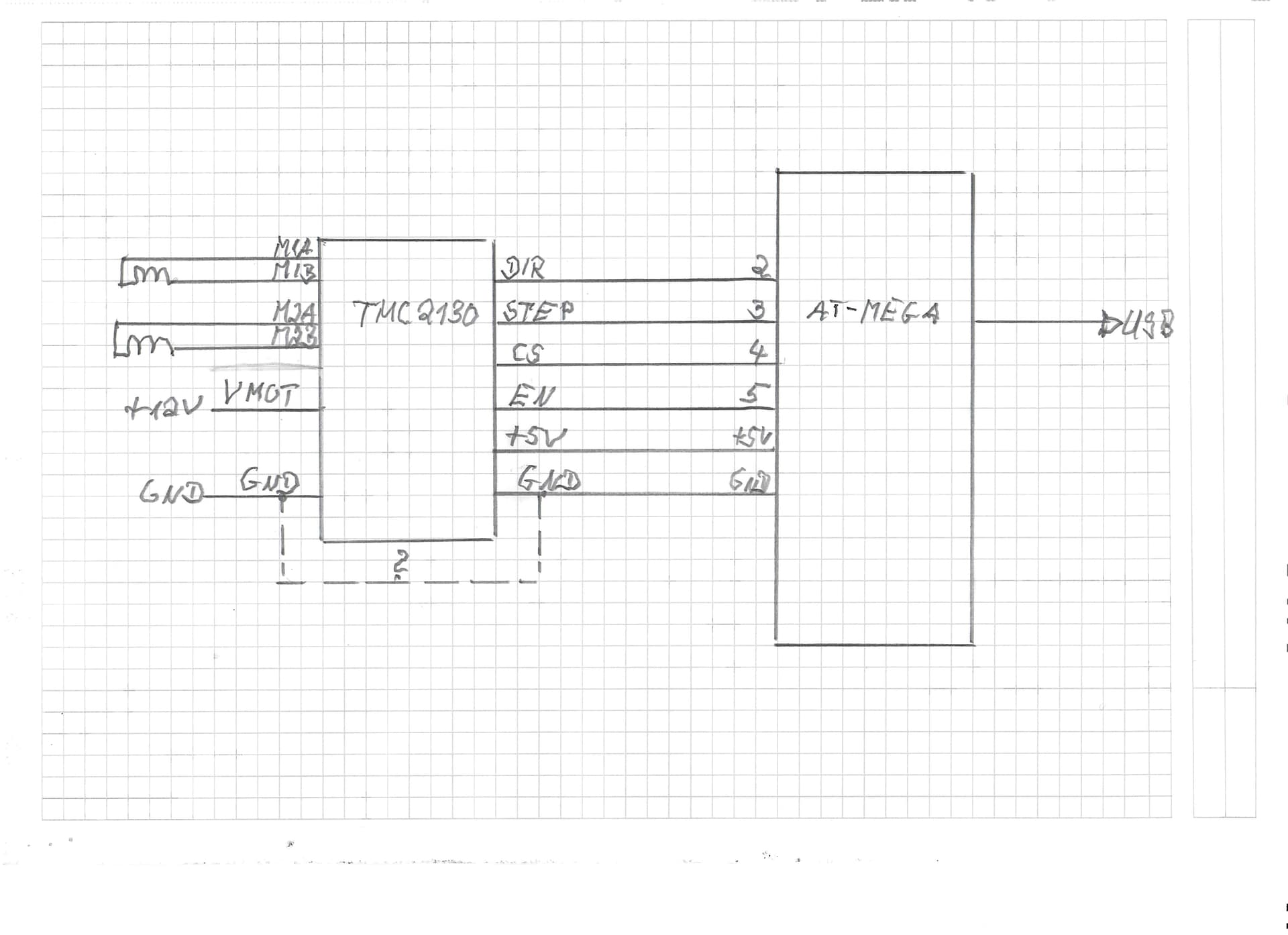
I have an Arduino Mega, which I would like to connect to a TMC2130 V3.0. I followed the connection diagram from Julian Hespenheide and a simple program given in the library called "TMCStepper --> simple. Sadly, the motor isn't turning, and my power supply gives displays me a current of 10 mA. As far as I know, this is a standby current.
My question is: what did I wrong? I tried to awake my motor for several days now without success including double check my wiring again and again as well as the little program. Has anybody of you a suggestion for me please?
Can you please post a copy of your circuit, a picture of a hand drawn circuit in jpg, png?
Hand drawn and photographed is perfectly acceptable.
Please include ALL hardware, power supplies, component names and pin labels.
I've done all this, but nothing happend. The motor is not rotating. I am not using the SPI, because I assume that the driver will work in the stand-alone mode.
The wiring connections are correct
My power supply is working and delivers enough current
I double-checked the motor connections, everything seems OK
Step-driver configuration - how?
My code is ok so far (I hope)
There are no error messages in the serial monitor
Are there some special things regarding the version V3.0 of the motor driver compared with versions 1.0 and 2.0?
If you've checked the wiring and power supply, and there are no error messages, the issue may be with the step-driver configuration. The A4988 chip used in version 3.0 of the driver has specific parameters to set microstepping mode, step pulse duration, and current limit. Make sure your configuration is set up correctly, and check the A4988 datasheet for more information.
Julian here
I see in your code that your pulling the CS_PIN to LOW. I just checked with my code and I have it there on HIGH. Could be a problem since you are not activating the CS / driver itself?
Additionally I am using a (the?) TMC2130 library, but I don't think it makes so much of a difference and is more of a convenience.
I succeeded in working with the TMC2130 now. I want to work in the standalone-mode. Therefore, I have to put off the SPI-mode. There is a tiny jumper on the backside of the TMC-Board, which has to be closed. Normally, it is open. I soldered the jumper, so that he is closed. Now the TMC is working as expected.