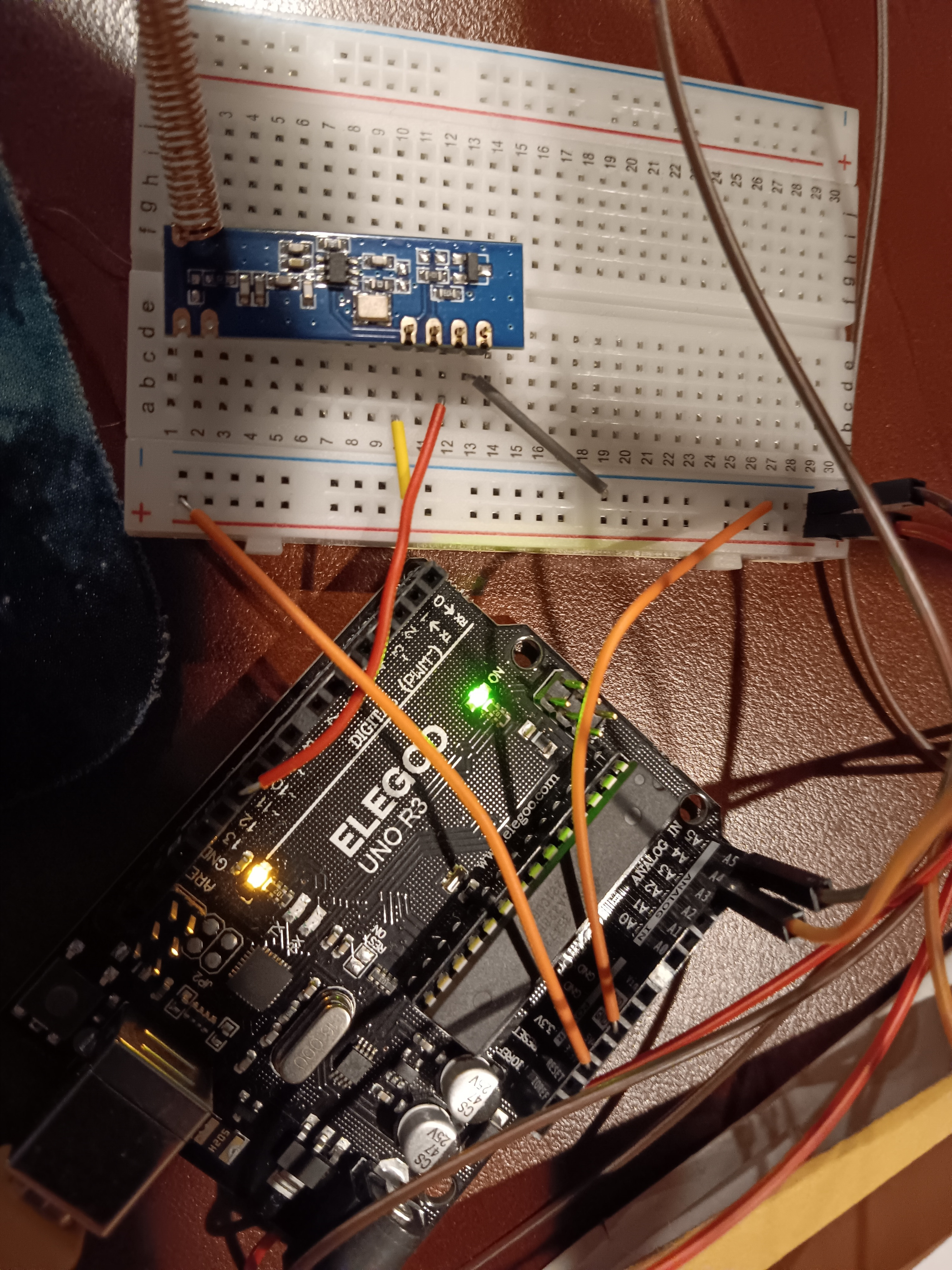
Transmitting/receiving sensor data over 433mhz, maybe buffer issues

I'm making a sensor to stick out in our well house to monitor light levels (did the door come open?), humidity (is there another leak?), and temperature. Transmission is via 433mHz, which appeared to be the best choice.
Board is an Elegoo R3 Uno atmega 328p, and the transmitter/receiver are SRX882s.

The sensor unit is working fine, and as far as I know is transmitting data.
The receiver doesn't seem to get anything. At one point it was printing ovf (overflow) where it was supposed to print data, but now it doesn't print anything.
I used code borrowed the first reply to this post.

Apologies for the messy code. The data transmission/receiving is the most programming I've ever done in my life. I am about 60% sure that the problem is somewhere in the coding based around buffers and buflen and such, but I don't know how to find out what the length of the message being transmitted is since I can't tell how many digits everything is actually being measured to and thus how many numbers or bytes it'd be, or whether the structure is sending plaintext labels along, etc.

Here's the transmitter code:

//temp & humidity sensor
#include "DHT.h"
#define DHT22_PIN 5
DHT dht22(DHT22_PIN, DHT22);
//light sensor
int temt6000Pin = A0;
float light;
int light_value;
//LCD display
#include <LiquidCrystal_I2C.h> // Library for LCD
LiquidCrystal_I2C lcd(0x27, 16, 2); // declare it exists I2C address 0x27, 16 column and 2 rows
//Wireless Tx
// Include RadioHead Amplitude Shift Keying Library
#include <RH_ASK.h>
// Include dependant SPI Library 
#include <SPI.h> 
// Create Amplitude Shift Keying Object
RH_ASK rf_driver;
//now this is where I create a data structure.
struct dataStruct{
  float light; 
  float tempF;
  float humi;
  unsigned long counter;
   
}myData;


byte tx_buf[sizeof(myData)] = {0}; //testing copied from internet

void setup() {

Serial.begin(9600);
dht22.begin(); //initialize DHT sensor
lcd.init(); //initialize the lcd
lcd.backlight(); //open the backlight 

// Initialize ASK Object for wireless Tx
rf_driver.init();

myData.light=4; //setting base values for the float
myData.humi=30; //same
myData.tempF=70; //same

}

void loop() {

int light_value = analogRead(temt6000Pin);
light = light_value * 0.0976; //percentage calculation
Serial.print("Light: ");
Serial.print(light);

Serial.print(" | "); //spacer

float humi = dht22.readHumidity();
float tempF = dht22.readTemperature(true);
//check for failures
if (isnan(humi) || isnan(tempF)){
   Serial.println("failed to read from DHT22 sensor");
}else{
  Serial.print("DHT22# Humidity: ");
  Serial.print(humi);
  Serial.print("%");

  Serial.print(" | "); //spacer
  Serial.print("Temperature: ");
  Serial.print(tempF);
  Serial.println("F");
}
lcd.clear(); //clear display
lcd.setCursor(0,0);//moves to there
lcd.print("Light:");
lcd.print(light,1); //set to round to 1 decimal
lcd.setCursor(0,1);//moves to there
lcd.print("Temp:");
lcd.print(tempF,0);//set to round to 0 decimal
lcd.print("F");
lcd.setCursor(9,1);//moves to there
lcd.print("Hum:");
lcd.print(humi,0);//set to round to 0 decimal
lcd.print("%");

memcpy(tx_buf, &myData, sizeof(myData) );
  byte zize=sizeof(myData);

rf_driver.send((uint8_t *)tx_buf, zize); //note the test code just had driver. this will need to be changed for the receiver too probably

   // driver.send((uint8_t *)msg, strlen(msg));
    rf_driver.waitPacketSent();
    myData.counter++;


delay(2000);
}

Here's the receiver unit

//LCD display
#include <LiquidCrystal_I2C.h> // Library for LCD
LiquidCrystal_I2C lcd(0x27, 16, 2); // declare it exists I2C address 0x27, 16 column and 2 rows
//Wireless Rx
// Include RadioHead Amplitude Shift Keying Library
#include <RH_ASK.h>
// Include dependant SPI Library 
#include <SPI.h> 
// Create Amplitude Shift Keying Object
RH_ASK rf_driver;
//now this is where I create a data structure. Same as transmitter
struct dataStruct{
  float light; 
  float tempF;
  float humi;
  unsigned long counter;
   
}myData;


byte rx_buf[sizeof(myData)] = {0}; //testing copied from internet, doesn't seem to do anything

void setup() {

Serial.begin(9600);
lcd.init(); //initialize the lcd
//turned off backlight until I'm at the LCD printout phase lcd.backlight(); //open the backlight 

// Initialize ASK Object for wireless Rx
rf_driver.init();

myData.light=4; //setting base values for the float
myData.humi=30; //same
myData.tempF=70; //same

}

void loop() {

// Set buffer to size of expected message
uint8_t buf[RH_ASK_MAX_MESSAGE_LEN];
uint8_t buflen = sizeof(buf);
// Check if received packet is correct size
if (rf_driver.recv(buf, &buflen))
{
int i;


// Message with a good checksum received, dump it.
	rf_driver.printBuffer("Got:", buf, buflen);
        memcpy(&myData, buf, sizeof(myData));
        
        Serial.print("Light ");
       Serial.print(myData.light);
        
    //                  Serial.print("Temp: ");
    //    Serial.print(myData.tempF);
     //   Serial.print("F");

    //                      Serial.print("Humidity: ");
    //    Serial.print(myData.humi);
     //   Serial.println("%");
        
        //commenting out LCD because it's giving errors
//lcd.clear(); //clear display
//lcd.setCursor(0,0);//moves to there
//lcd.print("Light:");
//lcd.print(light,1); //set to round to 1 decimal
//lcd.setCursor(0,1);//moves to there
//lcd.print("Temp:");
//lcd.print(tempF,0);//set to round to 0 decimal
//lcd.print("F");
//lcd.setCursor(9,1);//moves to there
//lcd.print("Hum:");
//lcd.print(humi,0);//set to round to 0 decimal
//lcd.print("%");

delay(2000);}
}

thank you!

You are getting 10 steps ahead of where you should be. Get the data transmission bugs out first! Use a fixed length know message back and forth until you can get 100% reliable messages. Then put that code in your well monitoring program.

Start with one or two of the simple examples in the RadioHead library, to verify the the transmitter and receiver are working.

Yes, I'm in the US.

There are about a dozen different examples in the Radiohead library. How do I know which ones to try? They have short and non-descriptive labels. None seem to correspond to the specific hardware or frequency being used.

Any of them, to verify that the setup actually works. Start with the shortest, simplest code.

None seem to correspond to the specific hardware or frequency being used.

They all work with any of the cheap 315 or 433 MHz TX/RX modules, similar to the SRX882.

What are you using for the transmitter? The SRX882 is a receiver.

I have a transmitter/receiver pair.

I have commented out my attempts at transmitting data in favor of the rf_ask example (had to get it online, clicking examples in the IDE doesn't seem to bring anything up). The two boards are across the room from each other with nothing metallic in the way, and the receiver does not seem to get or print anything on the serial monitor.

  1. Why doesn't the code example have me defining an input data pin or output data pin to the transmitters? I have to do that for all the sensor projects in the tutorial book.

  2. I'm going to put the code below, but I have a feeling I have a wiring issue that I have missed. I can stare at stuff and re-check it repeatedly and still get that wrong sometimes... so photos are below the code.

It's entirely possible I have two or more errors stacked on top of each other!

thank you

Sensor/transmitter code

//temp & humidity sensor
#include "DHT.h"
#define DHT22_PIN 5
DHT dht22(DHT22_PIN, DHT22);
//light sensor
int temt6000Pin = A0;
float light;
int light_value;
//LCD display
#include <LiquidCrystal_I2C.h> // Library for LCD
LiquidCrystal_I2C lcd(0x27, 16, 2); // declare it exists I2C address 0x27, 16 column and 2 rows
//Wireless Tx
// Include RadioHead Amplitude Shift Keying Library
#include <RH_ASK.h>
// Include dependant SPI Library 
#include <SPI.h> 
// Create Amplitude Shift Keying Object
RH_ASK driver;
//now this is where I create a data structure.
struct dataStruct{
  float light; 
  float tempF;
  float humi;
  unsigned long counter;
   
}myData;


byte tx_buf[sizeof(myData)] = {0}; //testing copied from internet

void setup() {

Serial.begin(9600);
dht22.begin(); //initialize DHT sensor
lcd.init(); //initialize the lcd
lcd.backlight(); //open the backlight 

// Initialize ASK Object for wireless Tx
//commenting this out rf_driver.init();

  if (!driver.init())
         Serial.println("init failed");

myData.light=4; //setting base values for the float
myData.humi=30; //same
myData.tempF=70; //same

}

void loop() {


int light_value = analogRead(temt6000Pin);
light = light_value * 0.0976; //percentage calculation
Serial.print("Light: ");
Serial.print(light);

Serial.print(" | "); //spacer

float humi = dht22.readHumidity();
float tempF = dht22.readTemperature(true);
//check for failures
if (isnan(humi) || isnan(tempF)){
   Serial.println("failed to read from DHT22 sensor");
}else{
  Serial.print("DHT22# Humidity: ");
  Serial.print(humi);
  Serial.print("%");

  Serial.print(" | "); //spacer
  Serial.print("Temperature: ");
  Serial.print(tempF);
  Serial.println("F");
}
lcd.clear(); //clear display
lcd.setCursor(0,0);//moves to there
lcd.print("Light:");
lcd.print(light,1); //set to round to 1 decimal
lcd.setCursor(0,1);//moves to there
lcd.print("Temp:");
lcd.print(tempF,0);//set to round to 0 decimal
lcd.print("F");
lcd.setCursor(9,1);//moves to there
lcd.print("Hum:");
lcd.print(humi,0);//set to round to 0 decimal
lcd.print("%");

{
    const char *msg = "Hello World!";
    driver.send((uint8_t *)msg, strlen(msg));
    driver.waitPacketSent();
    
}

delay(2000);
}

Receiver code


//LCD display
#include <LiquidCrystal_I2C.h> // Library for LCD
LiquidCrystal_I2C lcd(0x27, 16, 2); // declare it exists I2C address 0x27, 16 column and 2 rows
//Wireless Rx
// Include RadioHead Amplitude Shift Keying Library
#include <RH_ASK.h>
// Include dependant SPI Library 
#include <SPI.h> 
// Create Amplitude Shift Keying Object
RH_ASK rf_driver;
//now this is where I create a data structure. Same as transmitter
struct dataStruct{
  float light; 
  float tempF;
  float humi;
  unsigned long counter;
   
}myData;


byte rx_buf[sizeof(myData)] = {0}; //testing copied from internet, doesn't seem to do anything

void setup() {

Serial.begin(9600);
if (!rf_driver.init())
 Serial.println("init failed");
lcd.init(); //initialize the lcd
//turned off backlight until I'm at the LCD printout phase lcd.backlight(); //open the backlight 

//commenting out my attempts at receiver // Initialize ASK Object for wireless Rx
//rf_driver.init();
//myData.light=4; //setting base values for the float
//myData.humi=30; //same
//myData.tempF=70; //same

}

void loop() {
{
    uint8_t buf[12];
    uint8_t buflen = sizeof(buf);
    if (rf_driver.recv(buf, &buflen)) // Non-blocking
    {
      int i;
      // Message with a good checksum received, dump it.
      Serial.print("Message: ");
      Serial.println((char*)buf);         
    }
//commenting out my attempts at a receiver
//// Set buffer to size of expected message
//uint8_t buf[RH_ASK_MAX_MESSAGE_LEN];
//uint8_t buflen = sizeof(buf);
// Check if received packet is correct size
//if (rf_driver.recv(buf, &buflen))
//{
//int i;


// Message with a good checksum received, dump it.
	//rf_driver.printBuffer("Got:", buf, buflen);
    //    memcpy(&myData, buf, sizeof(myData));
      //  
        //Serial.print("Light ");
       //Serial.print(myData.light);
        
    //                  Serial.print("Temp: ");
    //    Serial.print(myData.tempF);
     //   Serial.print("F");

    //                      Serial.print("Humidity: ");
    //    Serial.print(myData.humi);
     //   Serial.println("%");
        
        //commenting out LCD because it's giving errors
//lcd.clear(); //clear display
//lcd.setCursor(0,0);//moves to there
//lcd.print("Light:");
//lcd.print(light,1); //set to round to 1 decimal
//lcd.setCursor(0,1);//moves to there
//lcd.print("Temp:");
//lcd.print(tempF,0);//set to round to 0 decimal
//lcd.print("F");
//lcd.setCursor(9,1);//moves to there
//lcd.print("Hum:");
//lcd.print(humi,0);//set to round to 0 decimal
//lcd.print("%");

delay(2000);}
}

And here are photos.
Sensor/Transmitter

Receiver

The RadioHead library examples DO define transmit and receive data pins. Since your code doesn't, it probably won't transmit anything. Or it may use a default pin that is not connected to the transmitter or receiver.

Start with the library examples and get one or more to work.

Ok, then the examples I found online were incomplete. Frustrating.
Example sketches still don't load in the IDE, but I hit the library documentation page and found an examples tab there containing what look to be the missing definitions.

when testing the SRX822 on an ESP32 I used the Radiohead library and ran the File>Examples>RadioHead>ask>ask_receiver.ino and ask_transmitter.ino

I have implemented the RH_ask examples. It didn't work, so I followed a suggestion made on another thread a couple of years ago, and directly connected the transmit pin on the sending board to the receiving pin on the receiver board.
I successfully got it to print
48 65 6C 6C 6F 20 57 6F 72 6C 64 21
which is apparently "hello world" in hexadecimal.

That's a bit odd, but it confirms that the programming of "send data" and "receive data" is functional.

When I swap back to the transmitter and receiver, nothing comes though, even when they are 6 inches apart.

This makes me suspect that one of the two modules, or some piece of wire somewhere, is faulty.

You forgot to solder the connections to the header pins on the transmitter and receiver. That explains part, and possibly all of the failure to function. Properly soldered joints is a requirement, for the antenna connections as well.

Adafruit and Sparkfun have excellent soldering tutorials. Follow them carefully.

Capture

Capture

Fair warning, but the 433 MHz TX module shown is just a single transistor oscillator (the can is a surface wave 433 MHz filter), and pretty low power, so it may have survived the mistreatment.

Oh, thanks. I thought I could breadboard and test the whole thing first to make sure it works, then do final connections. Once I know it works, I'll have to rig up enclosures for mounting these, and I haven't even started looking at that to know what length of wires, etc. to build in.

There's no way to test without soldering?

No.

This topic was automatically closed 180 days after the last reply. New replies are no longer allowed.