Trouble Programming ATmega1284 with MCP2221A USB to UART Converter

Hello,
As the title suggests, I'm having some issues uploading programs to a standalone ATmega1284 using the MCP2221A USB to UART converter. I've attached photos of my schematic, with the only difference between the photo and reality being that I'm using the internal 8MHz oscillator rather than the external 12MHz oscillator as the schematic shows. There is a lot more to the schematic than what is shown, as I've planned out a rather large project, but I'm currently still suck at uploading anything, so I don't even have anything else connected.
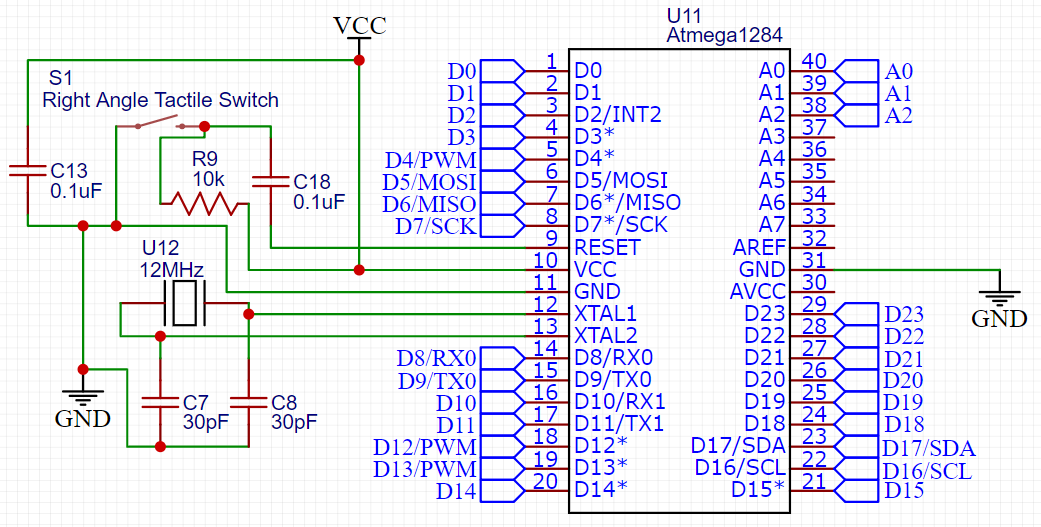

I have burned the bootloader using a Arduino Uno, which worked out well enough. Now, after switching to the MCP2221A and clicking "Upload", the program (standard blink sketch) compiles, but then gives me this avrdude error after a few seconds:

avrdude error: programmer is not responding
avrdude warning: attempt 1 of 10: not in sync: resp=0x00

This is somewhat confusing because I selected the serial port of the MCP2221A, which showed up prefectly fine in the dropdown menu. (COM5, in case you're wondering)

Just because I was curious, I also tried burning the bootloader using the MCP2221A, which I didn't think would actually work, and surprise! it didn't work. This is the avrdude error that I got:

avrdude: Version 7.1-arduino.1
         Copyright the AVRDUDE authors;
         see https://github.com/avrdudes/avrdude/blob/main/AUTHORS

         System wide configuration file is C:\Users\aiden\AppData\Local\Arduino15\packages\MightyCore\hardware\avr\2.2.2\avrdude.conf

         Using Port                    : usb
         Using Programmer              : avrispmkii
avrdude: usbdev_open(): did not find any USB device "usb" (0x03eb:0x2104)
avrdude main() error: unable to open programmer avrispmkii on port usb

avrdude done.  Thank you.

Failed chip erase: uploading error: exit status 1

I've also attached the photo of my fuse settings, jut in case it might be useful:

This whole standalone microcontrollers thing is quite new to me, so it's entirely possible that I'm just doing something silly, but I suppose I'm just wondering if you have any idea what I might be doing wrong that is blocking me from uploading programs.

If you think any more details would be helpful in solving the problem, please feel free to ask and I'll be happy to provide.

This is an ISP programmer, which uses the SPI port (not the serial port) to program the chip directly.

You need to make a different choice of programmer, or just "upload" with the proper Arduino board selected.

Note that if the serial Baud rate is not accurate, upload may fail due to transmission errors. So I wonder about the choice of clock for the MCP2221A.

This might be a silly question, but what programmer should I be using for programming through the serial port? I can't seem to find a suitable one in the dropdown menu.

Do you mean that I should just click the upload button in the IDE? I've already tried doing that, but do you have to select the proper programmer for this to work?

The upload button assumes "serial port" as the default programming interface, and that you have a bootloader on the Arduino.

The board selection determines what type of bootloader, the processor, clock speed, voltage, serial port Baud rate and other parameters.

Since you have a nonstandard system, you may have to experiment quite a bit to get anything working. Look around on the web to see if anyone has ever done what you are trying to do, and succeeded.

I have burned the bootloader using a Arduino Uno

Which bootloader? Post a link to the procedure you followed.

The guide that I followed is the following:
http://www.technoblogy.com/show?19OV

There were a few changes that I made, including using the MightyCore boards package (https://github.com/MCUdude/MightyCore) and a different ATmega1284 clock speed (8MHz instead of 16MHz)

The MightyCore package comes with the required bootloader settings, to my understanding. All I had to do was select "ATmega1284" for the board, select the COM port of my Arduino Uno, change the programmer to Arduino as ISP, and click "Burn Bootloader".

Did you add this file to the boards menu, and select the appropriate board?

Add the following sections to the boards.txt file in the Arduino AVR directory:

I don't think I will be able to offer any more useful advice, except that if you get stuck and just want to get on with the project, this programmer (both UART serial and ISP) is by far the best and most versatile one that I have used.

Did you add this file to the boards menu, and select the appropriate board?

Add the following sections to the boards.txt file in the Arduino AVR directory:

Looking at the boards.txt file that comes with the MightyCore package, it looks like that stuff is already in there. At least, it gives me all of the options described in the above procedure, plus some more. (I think my screenshot of the tools dropdown menu from my first post shows this pretty well)

I guess I'll be spending a few more hours (or days) hunting around on the internet and testing different combinations of settings :slight_smile:

Thanks a lot for your help so far!
I'll report back if I ever get this figured out :thinking: