It seems that adding the serial output in my latest code-version added too much RAM-use
and this is causing the message.
I will revise the code to use less RAM....
It seems that adding the serial output in my latest code-version added too much RAM-use
and this is causing the message.
I will revise the code to use less RAM....
I was aware that creep was a bit of a concern. You might find this kind of odd but for a hobby I grow giants vegetables for competitions. Have been doing that for over 30 years. Things like giant pumpkin, squash. cabbage tomato, watermelon etc.t I want to try and a build scale to put under my giant watermelons as they are growing during the summer months to monitor their daily gains. I have the melons growing on a wooden frame covered with a soft mesh material. It is sort of like a hammock. The scale will go under the wooden frame. The whole thing will be covered with a tarp structure to keep off water. Accuracy is not critical as long as the creep is not too much. Last year I grew a watermelon that was 173 lbs. I hope to beat that this year.
So here comes a new code-version which is RAM-use optimised
There is a macro called the F-macro which puts text that you want to print into flash-ROM instead of RAM.
Putting all fixed text freed up about 500 bytes of RAM.
So now it should run without error-message.
This code has additional serial printing inside loop
This makes visible what result you get from the function-call
LoadCell.update();
I change the baudrate to the modern standard of 115200
you have to adjust the serial monitor to 115200 baud
The code is organised in functions
Now void setup() looks pretty short:
void setup() {
  Serial.begin(115200);
  Serial.println( F("Serial.begin(115200) done delay(2000)") );
  delay(2000);
  Serial.println();
  Serial.println( F("Starting...") );
  PrintFileNameDateTime();

  OLED_Setup();
  HX711_setup();

  Serial.println( F("exiting setup()") );
}
here is the entire code
if you move the mouse to the upright edge of the code-section a copy symbol appears you can copy the complete sktech by a single leftclick into the clipboard
// MACRO-START * MACRO-START * MACRO-START * MACRO-START * MACRO-START * MACRO-START *
#define dbg(myFixedText, variableName) \
  Serial.print( F(#myFixedText " "  #variableName"=") ); \
  Serial.println(variableName);

#define dbgi(myFixedText, variableName,timeInterval) \
  { \
    static unsigned long intervalStartTime; \
    if ( millis() - intervalStartTime >= timeInterval ){ \
      intervalStartTime = millis(); \
      Serial.print( F(#myFixedText " "  #variableName"=") ); \
      Serial.println(variableName); \
    } \
  }

#define dbgc(myFixedText, variableName) \
  { \
    static long lastState; \
    if ( lastState != variableName ){ \
      Serial.print( F(#myFixedText " "  #variableName" changed from ") ); \
      Serial.print(lastState); \
      Serial.print( F(" to ") ); \
      Serial.println(variableName); \
      lastState = variableName; \
    } \
  }

#define dbgcf(myFixedText, variableName) \
  { \
    static float lastState; \
    if ( lastState != variableName ){ \
      Serial.print( F(#myFixedText " "  #variableName" changed from ") ); \
      Serial.print(lastState); \
      Serial.print( F(" to ") ); \
      Serial.println(variableName); \
      lastState = variableName; \
    } \
  }
// MACRO-END * MACRO-END * MACRO-END * MACRO-END * MACRO-END * MACRO-END * MACRO-END *

#include <HX711_ADC.h>
#include <SPI.h>
#include <Wire.h>
#include <Adafruit_GFX.h>
#include <Adafruit_SSD1306.h>
#include <U8g2lib.h>

#if defined(ESP8266) || defined(ESP32) || defined(AVR)
#include <EEPROM.h>
#endif

#define SCREEN_WIDTH 128  // OLED display width, in pixels
#define SCREEN_HEIGHT 32  // OLED display height, in pixels
#define Y_POS_0 0
#define X_POS_0 0
#define Y_POS_10 10
#define X_POS_10 10
#define TEXT_SIZE_SMALL 1
#define TEXT_SIZE_MED 2
#define TEXT_SIZE_LARGE 3
#define LONG_DELAY 4000
#define MED_DELAY 2000
#define SHORT_DELAY 1000

#define OLED_RESET -1         // Reset pin # (or -1 if sharing Arduino reset pin)
#define SCREEN_ADDRESS 0x3C  ///< See datasheet for Address; 0x3D for 128x64, 0x3C for 128x32
//Adafruit_SSD1306 display(SCREEN_WIDTH, SCREEN_HEIGHT, &Wire, OLED_RESET);
Adafruit_SSD1306 display(SCREEN_WIDTH, SCREEN_HEIGHT, &Wire, -1);

//pins:
//OLED USES I2C -> ON ARDUINO UNO: SCL @ A5, SDA @ A4
const int HX711_dout = 4;  //mcu > HX711 dout pin
const int HX711_sck  = 5;   //mcu > HX711 sck pin

//HX711 constructor:
HX711_ADC LoadCell(HX711_dout, HX711_sck);

const int calVal_eepromAdress = 0;
const int tareOffsetVal_eepromAdress = 4;
unsigned long t = 0;

void PrintFileNameDateTime() {
  Serial.println( F("Code running comes from file ") );
  Serial.println( F(__FILE__) );
  Serial.print( F("  compiled ") );
  Serial.print( F(__DATE__) );
  Serial.print( F(" ") );
  Serial.println( F(__TIME__) );
}

void HX711_setup() {
  //SETUP LOAD CELLS
  LoadCell.begin();
  Serial.println( F("LoadCell.begin() done") );
  //LoadCell.setReverseOutput();
  float calibrationValue;
  //20.9  // calibration value (see example file "Calibration.ino")

#if defined(ESP8266) || defined(ESP32)
  EEPROM.begin(512);
#endif

  EEPROM.get(calVal_eepromAdress, calibrationValue);  // uncomment this if you want to fetch the calibration value from eeprom
  Serial.println( F("EEPROM.get(calVal_eepromAdress done") );
  dbg("1:", calVal_eepromAdress);
  dbg("2:", calibrationValue);
  if ( calibrationValue == 0.0) {
    calibrationValue = 1.0;
    Serial.println( F("calibrationValue == 0.0 set to 1.0") );
  }

  dbg("nan", isnan(calibrationValue) );
  if ( (isnan(calibrationValue) == 1) ) {
    Serial.println( F("calibrationValue nan set to 2.0") );
    calibrationValue = 2.0;
  }
  dbg( F("finally") , calibrationValue);

  //restore the zero offset value from eeprom:
  long tare_offset = 0;
  EEPROM.get(tareOffsetVal_eepromAdress, tare_offset);
  Serial.println( F("EEPROM.get(tareOffsetVal_eepromAdress, tare_offset) done") );
  dbg("3:", tareOffsetVal_eepromAdress);
  dbg("4:", tare_offset);

  if (tare_offset == 0) {
    tare_offset = 10;
  }
  dbg("finally", tare_offset);


  LoadCell.setTareOffset(tare_offset);
  Serial.println( F("LoadCell.setTareOffset(tare_offset) done") );

  unsigned long stabilizingtime = 2000;  // preciscion right after power-up can be improved by adding a few seconds of stabilizing time
  LoadCell.start(stabilizingtime, false);
  if (LoadCell.getTareTimeoutFlag()) {
    Serial.println( F("Timeout, check MCU>HX711 wiring and pin designations") );
    while (1);
  }
  else {
    LoadCell.setCalFactor(calibrationValue);  // set calibration value (float)
    Serial.println( F("HX771-Startup is complete") );
  }
}


void OLED_Setup() {
  //SETUP OLED
  // SSD1306_SWITCHCAPVCC = generate display voltage from 3.3V internally
  if(!display.begin(SSD1306_SWITCHCAPVCC, 0x3C)) {
    Serial.println(F("SSD1306 allocation failed"));
    for(;;);
  }
  /*
  if (!display.begin(SSD1306_SWITCHCAPVCC, SCREEN_ADDRESS)) {
    Serial.println(F("SSD1306 allocation failed"));
    for (;;)
      ;  // Don't proceed, loop forever
  }
  */
  Serial.println( F("if (!display.begin( done") );

  // Clear the buffer
  display.clearDisplay();
  Serial.println( F("display.clearDisplay() done") );

  // Draw a single pixel in white
  Serial.println( F("start printing to display") );
  display.clearDisplay();
  display.setTextSize(TEXT_SIZE_SMALL);
  display.setTextColor(SSD1306_WHITE);  // Draw white text
  display.setCursor(Y_POS_0, X_POS_0);  // Start at top-left corner
  display.println( F("watermelons 2023") );  //customize your own start screen message
  display.println( F("\nInitializing") );
  display.display();
  Serial.println( F("printing to display done") );
  delay(SHORT_DELAY);
}


void setup() {
  Serial.begin(115200);
  Serial.println( F("Serial.begin(115200) done delay(2000)") );
  delay(2000);
  Serial.println();
  Serial.println( F("Starting...") );
  PrintFileNameDateTime();

  OLED_Setup();
  HX711_setup();

  Serial.println( F("exiting setup()") );
}


void setDisplayParameters(int cursorPosY, int cursorPosX, int textSize) {
  Serial.println( F("entering setDisplayParameters()") );

  display.clearDisplay();
  display.setTextSize(textSize);
  display.setTextColor(SSD1306_WHITE);        // Draw white text
  display.setCursor(cursorPosY, cursorPosX);  // Starting point of display
  Serial.println( F("exiting setDisplayParameters()") );
}


void displayWeightInKGs(float weightInGrams, int cursorPosY, int cursorPosX, int size, int delayTime) {
  Serial.println( F("entering displayWeightInKGs()") );
  setDisplayParameters(cursorPosY, cursorPosX, size);
  float weight = weightInGrams / 1000;
  if (weight < 0) {
    weight = 0.00;
  }

  String weightInKGs = String(weight);
  display.println(weightInKGs);
  display.display();
  delay(delayTime);
  Serial.println(F("exiting displayWeightInKGs()") );
}


void loop() {
  //GET VALUES FROM LOAD CELLS
  float value = 0.0;
  static boolean newDataReady = 0;
  const int serialPrintInterval = 2000;  //increase value to slow down serial print activity

  // check for new data/start next conversion:
  uint8_t updateResult;
  updateResult = LoadCell.update();
  if (updateResult) {
    dbgi( F("LCU") , updateResult, 1000);
    newDataReady = true;
    //Serial.println("newDataReady = true;");
  }
  else {
    dbgi( F("LCU") , updateResult, 1000);
  }

  // get smoothed value from the dataset:
  if (newDataReady) {
    if (millis() - t >= serialPrintInterval) {
      float value = LoadCell.getData();
      Serial.print( F("Load_cell output val: ") );
      Serial.println(value);
      //DISPLAY VALUE ON THE OLED
      displayWeightInKGs(value, Y_POS_10, X_POS_10, TEXT_SIZE_LARGE, SHORT_DELAY);
      newDataReady = false;
      t = millis();
    }
  }
}
best regards Stefan
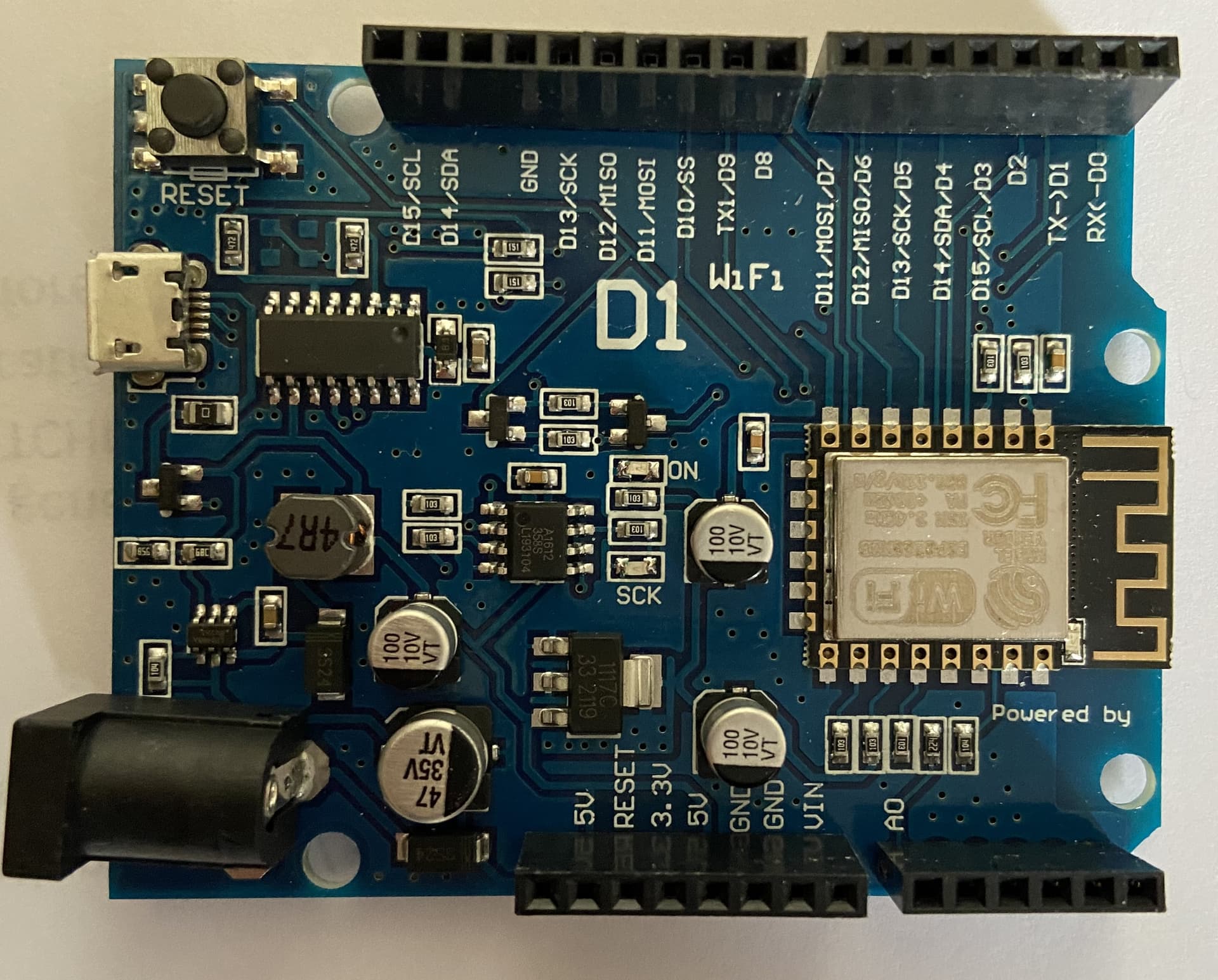
I just wanted to say that I originally purchased a WeMos D1 CH340 Wifi Arduino Uno R3 compatible esp8266 but I was have too many problems trying to get it to work I decided to get the board I am using now. The real Arduino.
This is a picture of the other board I have (but not using)
This tutorial shows step for step how to add ESP8266-support to the arduino IDE
except for the different look. The same should apply for Arduino IDE 2.0.X
That sounds ok. You’ll be monitoring weight for progress, not absolute accuracy. The creep would be systemic and slow moving. When you take the pallet off at the end of the season you could check the long-term creep of zero and scale for use next season
Thanks Stafan,
Actually I did follow that exact tutorial but when uploading sketches to the board the code didn't produce the desired outcome of the sketch. I was wondering if it needs a new bootload. But that is for another question. I realize this should be a one question at time post.
If uploading worked then it is a different problem.
If you are interested you just post in a pretty detaild way what you did and what the code was doing and what the code is not doing
And then users will help
Thanks Dave,
That is good to hear. I mainly just want to use the scale to see how the melon reacts to things I do to the plant during the course of the season. For instance, too much water, not enough water, fertilizer, insecticide and such. I believe a scale could be a valuable tool to determine what is good for the melon growth and what is bad for the weigh gains.
This is the reading of the serial monitor after uploading your recent code. I now have a display reading on the OLED of approximately 396.87. If it stand on the scale the number goes up to about 491. The readings from the serial monitor goes on for a long time. I just copied the top part.
Thanks!
Serial.begin(115200) done delay(2000)

Starting...
Code running comes from file
C:\Users\elain\AppData\Local\Temp\.arduinoIDE-unsaved202338-20888-t0uvp5.dsyo\sketch_apr8a\sketch_apr8a.ino
  compiled Apr  8 2023 18:24:53
if (!display.begin( done
display.clearDisplay() done
start printing to display
printing to display done
LoadCell.begin() done
EEPROM.get(calVal_eepromAdress done
"1:" calVal_eepromAdress=0
"2:" calibrationValue=20.68
"nan" isnan(calibrationValue)=0
F("finally") calibrationValue=20.68
EEPROM.get(tareOffsetVal_eepromAdress, tare_offset) done
"3:" tareOffsetVal_eepromAdress=4
"4:" tare_offset=-1
"finally" tare_offset=-1
LoadCell.setTareOffset(tare_offset) done
HX771-Startup is complete
exiting setup()
F("LCU") updateResult=1
Load_cell output val: 0.05
entering displayWeightInKGs()
entering setDisplayParameters()
exiting setDisplayParameters()
exiting displayWeightInKGs()
F("LCU") updateResult=1
F("LCU") updateResult=0
F("LCU") updateResult=0
F("LCU") updateResult=1
Load_cell output val: 396846.31
entering displayWeightInKGs()
entering setDisplayParameters()
exiting setDisplayParameters()
exiting displayWeightInKGs()
F("LCU") updateResult=1
F("LCU") updateResult=0
F("LCU") updateResult=0
F("LCU") updateResult=1
Load_cell output val: 396844.81
So the reason why it did not work before is
double-use of an IO-pin
IO-pin 4 was used for OLED_RESET
#define OLED_RESET 4 // Reset pin # (or -1 if sharing Arduino reset pin)
and
const int HX711_dout = 4; //mcu > HX711 dout pin
I assume that your 128 x 32 pixel OLED looks similar to this one
which has only four pins GND, VCC SCL, SDA.
There is no reset-pin at all. In this case OLED_RESET must be defined as -1
#define OLED_RESET -1 // Reset pin # (or -1 if sharing Arduino reset pin)
To be able to identify the running code version for sure, I added a define CodeVersion.
I recommend the following procedure for further programming:
If a code version is running, use the Archive Sketch function to back up the working code.
Then before you change anything
Save the *.ino file with a consecutive version number
You should not just leave the default name sketch20230409 but use a meaningful name.
And then append -00X to the end.
Example for the filename
HX711-scale-005.ino
Where "-005" stands for the version number.
and additionally
increase the #define CodeVersion by one number
Diese Zeile ist die erste Zeile im Code
#define CodeVersion "Code-Version 005"
in this way you can keep track of the versions and for others it is easy to identify by the Serial monitor output which code-version you used
The function-call
LoadCell.update();
checks if a new scale-reading has finished
if the result is "1" a new scale-reading has finished
if the result is "0" a new scale-reading has not yet finished
lines that are mean as comments that will be ignored by the compiler
start with a double slash "//"
If you want a single line to be not compiled simply add a double-slash on the left
which makes the line a comment which wil be ignored by the compiler
So here is a Code-Version with some serial-printing commented out
and the version-string
#define CodeVersion "Code-Version 005"

// MACRO-START * MACRO-START * MACRO-START * MACRO-START * MACRO-START * MACRO-START *
#define dbg(myFixedText, variableName) \
  Serial.print( F(#myFixedText " "  #variableName"=") ); \
  Serial.println(variableName);

#define dbgi(myFixedText, variableName,timeInterval) \
  { \
    static unsigned long intervalStartTime; \
    if ( millis() - intervalStartTime >= timeInterval ){ \
      intervalStartTime = millis(); \
      Serial.print( F(#myFixedText " "  #variableName"=") ); \
      Serial.println(variableName); \
    } \
  }

#define dbgc(myFixedText, variableName) \
  { \
    static long lastState; \
    if ( lastState != variableName ){ \
      Serial.print( F(#myFixedText " "  #variableName" changed from ") ); \
      Serial.print(lastState); \
      Serial.print( F(" to ") ); \
      Serial.println(variableName); \
      lastState = variableName; \
    } \
  }

#define dbgcf(myFixedText, variableName) \
  { \
    static float lastState; \
    if ( lastState != variableName ){ \
      Serial.print( F(#myFixedText " "  #variableName" changed from ") ); \
      Serial.print(lastState); \
      Serial.print( F(" to ") ); \
      Serial.println(variableName); \
      lastState = variableName; \
    } \
  }
// MACRO-END * MACRO-END * MACRO-END * MACRO-END * MACRO-END * MACRO-END * MACRO-END *

#include <HX711_ADC.h>
#include <SPI.h>
#include <Wire.h>
#include <Adafruit_GFX.h>
#include <Adafruit_SSD1306.h>
#include <U8g2lib.h>

#if defined(ESP8266) || defined(ESP32) || defined(AVR)
#include <EEPROM.h>
#endif

#define SCREEN_WIDTH 128  // OLED display width, in pixels
#define SCREEN_HEIGHT 32  // OLED display height, in pixels
#define Y_POS_0 0
#define X_POS_0 0
#define Y_POS_10 10
#define X_POS_10 10
#define TEXT_SIZE_SMALL 1
#define TEXT_SIZE_MED 2
#define TEXT_SIZE_LARGE 3
#define LONG_DELAY 4000
#define MED_DELAY 2000
#define SHORT_DELAY 1000

#define OLED_RESET -1         // Reset pin # (or -1 if sharing Arduino reset pin)
#define SCREEN_ADDRESS 0x3C  ///< See datasheet for Address; 0x3D for 128x64, 0x3C for 128x32
//Adafruit_SSD1306 display(SCREEN_WIDTH, SCREEN_HEIGHT, &Wire, OLED_RESET);
Adafruit_SSD1306 display(SCREEN_WIDTH, SCREEN_HEIGHT, &Wire, -1);

//pins:
//OLED USES I2C -> ON ARDUINO UNO: SCL @ A5, SDA @ A4
const int HX711_dout = 4;  //mcu > HX711 dout pin
const int HX711_sck  = 5;   //mcu > HX711 sck pin

//HX711 constructor:
HX711_ADC LoadCell(HX711_dout, HX711_sck);

const int calVal_eepromAdress = 0;
const int tareOffsetVal_eepromAdress = 4;
unsigned long t = 0;

void PrintFileNameDateTime() {
  Serial.println(CodeVersion);
  Serial.println( F("Code running comes from file ") );
  Serial.println( F(__FILE__) );
  Serial.print( F("  compiled ") );
  Serial.print( F(__DATE__) );
  Serial.print( F(" ") );
  Serial.println( F(__TIME__) );
}

void HX711_setup() {
  //SETUP LOAD CELLS
  LoadCell.begin();
  Serial.println( F("LoadCell.begin() done") );
  //LoadCell.setReverseOutput();
  float calibrationValue;
  //20.9  // calibration value (see example file "Calibration.ino")

#if defined(ESP8266) || defined(ESP32)
  EEPROM.begin(512);
#endif

  EEPROM.get(calVal_eepromAdress, calibrationValue);  // uncomment this if you want to fetch the calibration value from eeprom
  Serial.println( F("EEPROM.get(calVal_eepromAdress done") );
  dbg("1:", calVal_eepromAdress);
  dbg("2:", calibrationValue);
  if ( calibrationValue == 0.0) {
    calibrationValue = 1.0;
    Serial.println( F("calibrationValue == 0.0 set to 1.0") );
  }

  dbg("nan", isnan(calibrationValue) );
  if ( (isnan(calibrationValue) == 1) ) {
    Serial.println( F("calibrationValue nan set to 2.0") );
    calibrationValue = 2.0;
  }
  dbg( F("finally") , calibrationValue);

  //restore the zero offset value from eeprom:
  long tare_offset = 0;
  EEPROM.get(tareOffsetVal_eepromAdress, tare_offset);
  Serial.println( F("EEPROM.get(tareOffsetVal_eepromAdress, tare_offset) done") );
  dbg("3:", tareOffsetVal_eepromAdress);
  dbg("4:", tare_offset);

  if (tare_offset == 0) {
    tare_offset = 10;
  }
  dbg("finally", tare_offset);


  LoadCell.setTareOffset(tare_offset);
  Serial.println( F("LoadCell.setTareOffset(tare_offset) done") );

  unsigned long stabilizingtime = 2000;  // preciscion right after power-up can be improved by adding a few seconds of stabilizing time
  LoadCell.start(stabilizingtime, false);
  if (LoadCell.getTareTimeoutFlag()) {
    Serial.println( F("Timeout, check MCU>HX711 wiring and pin designations") );
    while (1);
  }
  else {
    LoadCell.setCalFactor(calibrationValue);  // set calibration value (float)
    Serial.println( F("HX771-Startup is complete") );
  }
}


void OLED_Setup() {
  //SETUP OLED
  // SSD1306_SWITCHCAPVCC = generate display voltage from 3.3V internally
  if(!display.begin(SSD1306_SWITCHCAPVCC, 0x3C)) {
    Serial.println(F("SSD1306 allocation failed"));
    for(;;);
  }
  /*
  if (!display.begin(SSD1306_SWITCHCAPVCC, SCREEN_ADDRESS)) {
    Serial.println(F("SSD1306 allocation failed"));
    for (;;)
      ;  // Don't proceed, loop forever
  }
  */
  Serial.println( F("if (!display.begin( done") );

  // Clear the buffer
  display.clearDisplay();
  Serial.println( F("display.clearDisplay() done") );

  // Draw a single pixel in white
  Serial.println( F("start printing to display") );
  display.clearDisplay();
  display.setTextSize(TEXT_SIZE_SMALL);
  display.setTextColor(SSD1306_WHITE);  // Draw white text
  display.setCursor(Y_POS_0, X_POS_0);  // Start at top-left corner
  display.println( F("watermelons 2023") );  //customize your own start screen message
  display.println( F("\nInitializing") );
  display.display();
  Serial.println( F("printing to display done") );
  delay(SHORT_DELAY);
}


void setup() {
  Serial.begin(115200);
  Serial.println( F("Serial.begin(115200) done delay(2000)") );
  delay(2000);
  Serial.println();
  Serial.println( F("Starting...") );
  PrintFileNameDateTime();

  OLED_Setup();
  HX711_setup();

  Serial.println( F("exiting setup()") );
}


void setDisplayParameters(int cursorPosY, int cursorPosX, int textSize) {
  //Serial.println( F("entering setDisplayParameters()") );

  display.clearDisplay();
  display.setTextSize(textSize);
  display.setTextColor(SSD1306_WHITE);        // Draw white text
  display.setCursor(cursorPosY, cursorPosX);  // Starting point of display
  //Serial.println( F("exiting setDisplayParameters()") );
}


void displayWeightInKGs(float weightInGrams, int cursorPosY, int cursorPosX, int size, int delayTime) {
  //Serial.println( F("entering displayWeightInKGs()") );
  setDisplayParameters(cursorPosY, cursorPosX, size);
  float weight = weightInGrams / 1000;
  if (weight < 0) {
    weight = 0.00;
  }

  String weightInKGs = String(weight);
  display.println(weightInKGs);
  display.display();
  delay(delayTime);
  //Serial.println(F("exiting displayWeightInKGs()") );
}


void loop() {
  //GET VALUES FROM LOAD CELLS
  float value = 0.0;
  static boolean newDataReady = 0;
  const int serialPrintInterval = 2000;  //increase value to slow down serial print activity

  // check for new data/start next conversion:
  uint8_t updateResult;
  updateResult = LoadCell.update();
  if (updateResult) {
    dbgi( F("LCU") , updateResult, 1000);
    newDataReady = true;
  }
  else {
    dbgi( F("LCU") , updateResult, 1000);
  }

  // get smoothed value from the dataset:
  if (newDataReady) {
    if (millis() - t >= serialPrintInterval) {
      float value = LoadCell.getData();
      Serial.print( F("Load_cell output val: ") );
      Serial.println(value);
      //DISPLAY VALUE ON THE OLED
      displayWeightInKGs(value, Y_POS_10, X_POS_10, TEXT_SIZE_LARGE, SHORT_DELAY);
      newDataReady = false;
      t = millis();
    }
  }
}
best regards Stefan
Stefan, Yes, that is the same OLED that I am using. Thank you for figuring out the problem and explaining it above. The scale seems to work now. The only problem is the display is not reading zero. Right now it is reading 396.82 KGs with nothing on it. From what I have learned in the last couple of days, I believe I need to add to the code to call the tare method from the serial monitor. I don’t know where that should be placed. In the setup or the loop. I also don’t know exactly how I would put it in so that the serial monitor can call it. I understand it has something to do with LoadCell.tare();. The other thing I was wondering about if there was a way to change the calibration value from the serial monitor just in case I need to adjust the value a little to make the scale more accurate. Should I start a new post to ask these questions? I will look into how to use the Archive sketch Function and save it for sure.
Here is a demo-code from GitHub that does tareing
first of all
save the *.ino-file with the by 1 increased serial number
after that
analyse the tare-demo-code and try to add code to the the existing code
If something does not work post your questions
//
//    FILE: HX_kitchen_scale.ino
//  AUTHOR: Rob Tillaart
// PURPOSE: HX711 demo
//     URL: https://github.com/RobTillaart/HX711


#include "HX711.h"

HX711 scale;

//uint8_t dataPin = 6;
//uint8_t clockPin = 7;
uint8_t dataPin  = 19;//for esp32
uint8_t clockPin = 18;//for esp32

void setup()
{
  Serial.begin(115200);
  Serial.println(__FILE__);
  Serial.print("LIBRARY VERSION: ");
  Serial.println(HX711_LIB_VERSION);
  Serial.println();

  scale.begin(dataPin, clockPin);

  Serial.print("UNITS: ");
  Serial.println(scale.get_units(10));

  Serial.println("\nEmpty the scale, press a key to continue");
  while(!Serial.available());
  while(Serial.available()) Serial.read();

  scale.tare();
  Serial.print("UNITS: ");
  Serial.println(scale.get_units(10));


  Serial.println("\nPut 1000 gram in the scale, press a key to continue");
  while(!Serial.available());
  while(Serial.available()) Serial.read();

  scale.calibrate_scale(1000, 5);
  Serial.print("UNITS: ");
  Serial.println(scale.get_units(10));

  Serial.println("\nScale is calibrated, press a key to continue");
  // Serial.println(scale.get_scale());
  // Serial.println(scale.get_offset());
  while(!Serial.available());
  while(Serial.available()) Serial.read();
}


void loop()
{
  Serial.print("UNITS: ");
  Serial.println(scale.get_units(10));
  delay(250);
}


// -- END OF FILE --
best regards Stefan
Stefan, I wanted to take a moment to thank you for sharing your expertise in the last few days. Your insights and advice have been incredibly helpful to me and I appreciate the time and effort you put into sharing your knowledge with the community. I like your style of assistance by encouraging the person to learn more on their own before offering immediate help. The links to the training course have really helped me understand the very basics things. I will try to play around with the code on my own after making sure I have saved the original. It will be a good learning experience for me to try things to see it they work or not. If I run into problems I will definitely post another question about it on this site. You are a credit to this forum! Thank you again for your valuable contributions!
This topic was automatically closed 180 days after the last reply. New replies are no longer allowed.