Trying to use MCUFRIEND Simple Button Example

I am trying to use the subj example sketch with modifications and have run into a problem. I have a new red MCUFRIEND 3.5" TFT ID 0x9486 installed on a Mega2560 board.
I can get the simple button example sketch to compile and work but want to operate in the landscape mode with 4 buttons.

I can move two buttons around in landscape with edits to the up/down tft.initbutton functions.

I can even rename the up/down names to v_tft and t_tft throughout the example sketch.
When I do this the location of the touch sensitive area is no longer associated with the new button locations.

When I attempt to expand this two button sketch to 4 buttons the new sketch will not compile.

I have enclosed my "latest" attempt plus the compiler error listing.

Is there someplace I can find a complete description of the MCUFRIEND library functions ?
What is the purpose of the empty U3 pas group marked W25032 ?

Any help will be greatly appreciated.

#if 1

#include <Adafruit_GFX.h>
#include <MCUFRIEND_kbv.h>
MCUFRIEND_kbv tft;
#include <TouchScreen.h>
#define MINPRESSURE 200
#define MAXPRESSURE 1000

// ALL Touch panels and wiring is DIFFERENT
// copy-paste results from TouchScreen_Calibr_native.ino
const int XP = 6, XM = A2, YP = A1, YM = 7; //ID=0x9341
const int TS_LEFT = 907, TS_RT = 136, TS_TOP = 942, TS_BOT = 139;

TouchScreen ts = TouchScreen(XP, YP, XM, YM, 300);

Adafruit_GFX_Button v_btn, t_btn;

int pixel_x, pixel_y;     //Touch_getXY() updates global vars
bool Touch_getXY(void)
{
    TSPoint p = ts.getPoint();
    pinMode(YP, OUTPUT);      //restore shared pins
    pinMode(XM, OUTPUT);
    digitalWrite(YP, HIGH);   //because TFT control pins
    digitalWrite(XM, HIGH);
    bool pressed = (p.z > MINPRESSURE && p.z < MAXPRESSURE);
    if (pressed) {
        pixel_x = map(p.x, TS_LEFT, TS_RT, 0, tft.width()); //.kbv makes sense to me
        pixel_y = map(p.y, TS_TOP, TS_BOT, 0, tft.height());
    }
    return pressed;
}

#define BLACK   0x0000
#define BLUE    0x001F
#define RED     0xF800
#define GREEN   0x07E0
#define CYAN    0x07FF
#define MAGENTA 0xF81F
#define YELLOW  0xFFE0
#define WHITE   0xFFFF

void setup(void)
{
    Serial.begin(115200);
    uint16_t ID = tft.readID();
    Serial.print("TFT ID = 0x");
    Serial.println(ID, HEX);
    Serial.println("Calibrate for your Touch Panel");
    if (ID == 0xD3D3) ID = 0x9486; // write-only shield
    tft.begin(ID);
    tft.setRotation(1);            //PORTRAIT=0 LANDSCAPE=1
    tft.fillScreen(BLACK);        // Need to think about what to do here battery testing screen already in place
    v_btn.initButton(&tft,  60, 300, 40, 40, WHITE, CYAN, BLACK, "V", 2);
    t_btn.initButton(&tft, 125, 300, 40, 40, WHITE, CYAN, BLACK, "T", 2);
    s_btn.initButton(&tft, 185, 300, 40, 40, WHITE, CYAN, BLACK, "S", 2);
    u_btn.initButton(&tft, 245, 300, 40, 40, WHITE, CYAN, BLACK, "U", 2);
    v_btn.drawButton(false);
    t_btn.drawButton(false);
    s_btn.drawButton(false);
    u_btn.drawButton(false);
    //tft.fillRect(40, 80, 160, 80, RED);
}

/* two buttons are quite simple
 */
void loop(void)
{
    bool down = Touch_getXY();
    v_btn.press(down && v_btn.contains(pixel_x, pixel_y));
    t_btn.press(down && t_btn.contains(pixel_x, pixel_y));
    s_btn.press(down && s_btn.contains(pixel_x, pixel_y));
    u_btn.press(down && u_btn.contains(pixel_x, pixel_y));
    if (v_btn.justReleased())
        v_btn.drawButton();
    if (t_btn.justReleased())
        t_btn.drawButton();
    if (s_btn.justReleased())
        s_btn.drawButton();
    if (u_btn.justReleased())
        u_btn.drawButton();
        
    if (v_btn.justPressed()) {
        v_btn.drawButton(true);
        //tft.fillRect(40, 80, 160, 80, GREEN); want to pass letter to external battery reading code
    }
    if (t_btn.justPressed()) {
        t_btn.drawButton(true);
        //tft.fillRect(40, 80, 160, 80, RED);
    }
    if (s_btn.justPressed()) {
        s_btn.drawButton(true);
        //tft.fillRect(40, 80, 160, 80, RED);
    }
    if (u_btn.justPressed()) {
        u_btn.drawButton(true);
        //tft.fillRect(40, 80, 160, 80, RED);
    }
}
#endif

<<<<<<<<<<<<<<<<<<<<<<<<<<<<<<<<<<<<<<<<<   Two Button push Error Msg >>>>>>>>>>>>>>>>>>>>>>>>>>>>>>>>>>>>>>>

Arduino: 1.8.10 (Windows 7), Board: "Arduino/Genuino Mega or Mega 2560, ATmega2560 (Mega 2560)"

C:\Users\Alan\Documents\Segway\Segway Battery Monitor\button_simple_test20191128\button_simple_test20191128.ino: In function 'void setup()':

C:\Users\Alan\Documents\Segway\Segway Battery Monitor\button_simple_test20191128\button_simple_test20191128.ino:55:72: warning: ISO C++ forbids converting a string constant to 'char*' [-Wwrite-strings]

     v_btn.initButton(&tft,  60, 300, 40, 40, WHITE, CYAN, BLACK, "V", 2);

                                                                        ^

C:\Users\Alan\Documents\Segway\Segway Battery Monitor\button_simple_test20191128\button_simple_test20191128.ino:56:72: warning: ISO C++ forbids converting a string constant to 'char*' [-Wwrite-strings]

     t_btn.initButton(&tft, 125, 300, 40, 40, WHITE, CYAN, BLACK, "T", 2);

                                                                        ^

button_simple_test20191128:57:5: error: 's_btn' was not declared in this scope

     s_btn.initButton(&tft, 185, 300, 40, 40, WHITE, CYAN, BLACK, "S", 2);

     ^~~~~

C:\Users\Alan\Documents\Segway\Segway Battery Monitor\button_simple_test20191128\button_simple_test20191128.ino:57:5: note: suggested alternative: 't_btn'

     s_btn.initButton(&tft, 185, 300, 40, 40, WHITE, CYAN, BLACK, "S", 2);

     ^~~~~

     t_btn

button_simple_test20191128:58:5: error: 'u_btn' was not declared in this scope

     u_btn.initButton(&tft, 245, 300, 40, 40, WHITE, CYAN, BLACK, "U", 2);

     ^~~~~

C:\Users\Alan\Documents\Segway\Segway Battery Monitor\button_simple_test20191128\button_simple_test20191128.ino:58:5: note: suggested alternative: 't_btn'

     u_btn.initButton(&tft, 245, 300, 40, 40, WHITE, CYAN, BLACK, "U", 2);

     ^~~~~

     t_btn

C:\Users\Alan\Documents\Segway\Segway Battery Monitor\button_simple_test20191128\button_simple_test20191128.ino: In function 'void loop()':

button_simple_test20191128:73:5: error: 's_btn' was not declared in this scope

     s_btn.press(down && s_btn.contains(pixel_x, pixel_y));

     ^~~~~

C:\Users\Alan\Documents\Segway\Segway Battery Monitor\button_simple_test20191128\button_simple_test20191128.ino:73:5: note: suggested alternative: 't_btn'

     s_btn.press(down && s_btn.contains(pixel_x, pixel_y));

     ^~~~~

     t_btn

button_simple_test20191128:74:5: error: 'u_btn' was not declared in this scope

     u_btn.press(down && u_btn.contains(pixel_x, pixel_y));

     ^~~~~

C:\Users\Alan\Documents\Segway\Segway Battery Monitor\button_simple_test20191128\button_simple_test20191128.ino:74:5: note: suggested alternative: 't_btn'

     u_btn.press(down && u_btn.contains(pixel_x, pixel_y));

     ^~~~~

     t_btn

Multiple libraries were found for "Adafruit_GFX.h"
 Used: C:\Users\Alan\Documents\Segway\libraries\Adafruit_GFX_Library
Multiple libraries were found for "MCUFRIEND_kbv.h"
 Used: C:\Users\Alan\Documents\Segway\libraries\MCUFRIEND_kbv
Multiple libraries were found for "TouchScreen.h"
 Used: C:\Users\Alan\Documents\Segway\libraries\Adafruit_TouchScreen
Multiple libraries were found for "SPI.h"
 Used: C:\Users\Alan\Documents\ARDUNIO
exit status 1
's_btn' was not declared in this scope

This report would have more information with
"Show verbose output during compilation"
option enabled in File -> Preferences.
I tend to stick with the Portrait Calibration. Then map the results according to the Orientation.

Look at the Touch_Shield example. You can alter the Rotation and the code should adjust appropriately.

In practice, most apps only ever use one orientation e.g. Portrait.
So I made the "Button_Simple" example as straightforward as possible.

David.

David, thanks for the pointer. I have modified the New Shield for my needs....sort of. I am unable to get the touch sensitive area to relocate to the position of my new buttons(filled areas).
It appears the appropriate code is in place to adjust the ts area to where I want it in landscape mode but alas the touch areas seem to stay in the same place as the original code.
What am I missing?

I also have a question about ISO C++ warning as I have encountered it several times and while it is a warning it bothers me. I tried to find info on the web regarding this warning but got nowhere.

Edit: I think I have found my error, the portion of the code where the switch function is located needed a modification. That and a change to the code where the if statement for xpos seems to move the touch area. I'll keep working on it.

C:\Users\Alan\Documents\Segway\Touch_shield_new_115200\Touch_shield_new_115200.ino:11:14: warning: ISO C++ forbids converting a string constant to 'char*' [-Wwrite-strings]

 char *name = "Please Calibrate.";  //edit name of shield

              ^~~~~~~~~~~~~~~~~~~
			  
************************************************* Modified New Shield Code 20191201AK  ************************************			  
			  
			  
// the regular Adafruit "TouchScreen.h" library only works on AVRs

// different mcufriend shields have Touchscreen on different pins
// and rotation.
// Run the TouchScreen_Calibr_native sketch for calibration of your shield

#include <MCUFRIEND_kbv.h>
MCUFRIEND_kbv tft;       // hard-wired for UNO shields anyway.
#include <TouchScreen.h>

char *name = "Please Calibrate.";  //edit name of shield
const int XP=6,XM=A2,YP=A1,YM=7; //ID=0x9341
const int TS_LEFT=907,TS_RT=136,TS_TOP=942,TS_BOT=139;

TouchScreen ts = TouchScreen(XP, YP, XM, YM, 300);
TSPoint tp;

#define MINPRESSURE 200
#define MAXPRESSURE 1000

int16_t BOXSIZE;
int16_t PENRADIUS = 1;
uint16_t ID, oldcolor, currentcolor;
uint8_t Orientation = 1;    //PORTRAIT=0 Landscape=1

// Assign human-readable names to some common 16-bit color values:
#define BLACK   0x0000
#define BLUE    0x001F
#define RED     0xF800
#define GREEN   0x07E0
#define CYAN    0x07FF
#define MAGENTA 0xF81F
#define YELLOW  0xFFE0
#define WHITE   0xFFFF

/*
 * // New color definitions.  thanks to Bodmer
#define TFT_BLACK       0x0000      //   0,   0,   0 
#define TFT_NAVY        0x000F      //   0,   0, 128 
#define TFT_DARKGREEN   0x03E0      //   0, 128,   0 
#define TFT_DARKCYAN    0x03EF      //   0, 128, 128 
#define TFT_MAROON      0x7800      // 128,   0,   0 
#define TFT_PURPLE      0x780F      // 128,   0, 128 
#define TFT_OLIVE       0x7BE0      // 128, 128,   0 
#define TFT_LIGHTGREY   0xC618      // 192, 192, 192 
#define TFT_DARKGREY    0x7BEF      // 128, 128, 128 
#define TFT_BLUE        0x001F      //   0,   0, 255 
#define TFT_GREEN       0x07E0      //   0, 255,   0 
#define TFT_CYAN        0x07FF      //   0, 255, 255 
#define TFT_RED         0xF800      // 255,   0,   0 
#define TFT_MAGENTA     0xF81F      // 255,   0, 255 
#define TFT_YELLOW      0xFFE0      // 255, 255,   0 
#define TFT_WHITE       0xFFFF      // 255, 255, 255 
#define TFT_ORANGE      0xFDA0      // 255, 180,   0 
#define TFT_GREENYELLOW 0xB7E0      // 180, 255,   0 
#define TFT_PINK        0xFC9F      // 

*/


void setup(void)
{
    uint16_t tmp;

    tft.reset();
    ID = tft.readID();
    tft.begin(ID);
//    Serial.begin(115200);
//    show_Serial();
    tft.setRotation(Orientation);
   // tft.fillScreen(BLACK);
   // show_tft();

    BOXSIZE = tft.width() / 14; //was 6
    //tft.fillScreen(BLACK);

    tft.fillRect(60, 275, BOXSIZE, BOXSIZE, CYAN);
    tft.setTextColor(WHITE, CYAN);
    tft.setTextSize(4);
    tft.setCursor(67, 278);
    tft.print("V");
    tft.fillRect(120, 275, BOXSIZE, BOXSIZE, CYAN);
    tft.setTextColor(WHITE, CYAN);
    tft.setTextSize(4);
    tft.setCursor(127, 278);
    tft.print("T");
    tft.fillRect(180, 275, BOXSIZE, BOXSIZE, CYAN);
    tft.setTextColor(WHITE, CYAN);
    tft.setTextSize(4);
    tft.setCursor(187, 278);
    tft.print("S");
    tft.fillRect(240, 275, BOXSIZE, BOXSIZE, CYAN);
    tft.setTextColor(WHITE, CYAN);
    tft.setTextSize(4);
    tft.setCursor(247, 278);
    tft.print("U");
    tft.drawRect(60, 275, BOXSIZE, BOXSIZE, WHITE);
    currentcolor = YELLOW;
    delay(1000);

    
}

void loop()
{
    uint16_t xpos, ypos;  //screen coordinates
    tp = ts.getPoint();   //tp.x, tp.y are ADC values

    // if sharing pins, you'll need to fix the directions of the touchscreen pins
    pinMode(XM, OUTPUT);
    pinMode(YP, OUTPUT);
    // we have some minimum pressure we consider 'valid'
    // pressure of 0 means no pressing!

    if (tp.z > MINPRESSURE && tp.z < MAXPRESSURE) {
        // most mcufriend have touch (with icons) that extends below the TFT
        // screens without icons need to reserve a space for "erase"
        // scale the ADC values from ts.getPoint() to screen values e.g. 0-239
        //
        // Calibration is true for PORTRAIT. tp.y is always long dimension 
        // map to your current pixel orientation
        switch (Orientation) {
            case 0:
                xpos = map(tp.x, TS_LEFT, TS_RT, 0, tft.width());
                ypos = map(tp.y, TS_TOP, TS_BOT, 0, tft.height());
                break;
            case 1:
                xpos = map(tp.y, TS_TOP, TS_BOT, 0, tft.width());
                ypos = map(tp.x, TS_RT, TS_LEFT, 0, tft.height());
                break;
            case 2:
                xpos = map(tp.x, TS_RT, TS_LEFT, 0, tft.width());
                ypos = map(tp.y, TS_BOT, TS_TOP, 0, tft.height());
                break;
            case 3:
                xpos = map(tp.y, TS_BOT, TS_TOP, 0, tft.width());
                ypos = map(tp.y, TS_LEFT, TS_RT, 0, tft.height());
                break;
        }

        // are we in top color box area ?
        if (ypos < BOXSIZE) {               //draw white border on selected color box
            oldcolor = currentcolor;

            if (xpos < 60) {
                currentcolor = RED;
                tft.drawRect(60, 275, BOXSIZE, BOXSIZE, WHITE);
            } else if (xpos < 120) {
                currentcolor = BLACK;
                tft.drawRect(120, 275, BOXSIZE, BOXSIZE, WHITE);
            } else if (xpos < 180) {
                currentcolor = CYAN;
                tft.drawRect(180, 275, BOXSIZE, BOXSIZE, WHITE);
            } else if (xpos < 240) {
                currentcolor = CYAN;
                tft.drawRect(240, 275, BOXSIZE, BOXSIZE, WHITE);
           
            }

            if (oldcolor != currentcolor) { //rub out the previous white border
                if (oldcolor == CYAN) tft.fillRect(60, 275, BOXSIZE, BOXSIZE, RED);
                if (oldcolor == CYAN) tft.fillRect(120, 275, BOXSIZE, BOXSIZE, RED);
                if (oldcolor == CYAN) tft.fillRect(180, 275, BOXSIZE, BOXSIZE, RED);
                if (oldcolor == CYAN) tft.fillRect(240, 275, BOXSIZE, BOXSIZE, RED);
               
            }
        }
        // are we in drawing area ?
      //  if (((ypos - PENRADIUS) > BOXSIZE) && ((ypos + PENRADIUS) < tft.height())) {
      //      tft.fillCircle(xpos, ypos, PENRADIUS, currentcolor);
       // }
        // are we in erase area ?
        // Plain Touch panels use bottom 10 pixels e.g. > h - 10
        // Touch panels with icon area e.g. > h - 0
        if (ypos > tft.height() - 10) {
            // press the bottom of the screen to erase
            tft.fillRect(0, 0, tft.width(), tft.height() - 0, BLACK);
        }
    }
}

So I made the "Button_Simple" example as straightforward as possible.

It works for me, and i more or less understand it. by any chance can you direct me to a similarly simple example of setting up two pages and buttoning between them ? mcufriend, 3.5", mega.

I attached an example to this message some time ago.

Make sure that you copy-paste your Touch calibration.

Ask if you have a problem.

David.

hello -
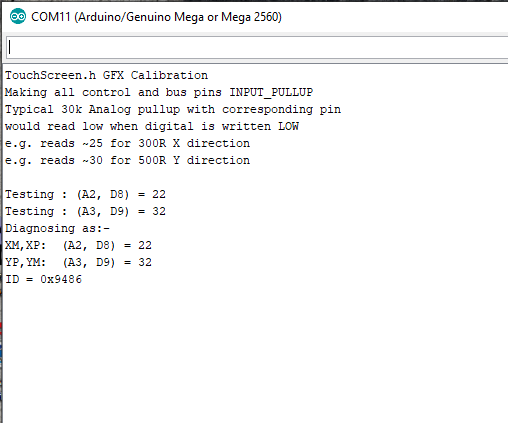
thanks. yes, i had run across your multiple buttons about a week ago, but for some reason i couldn't get it to go. but it goes now. i ran the calibration (see attached image).

i put the info into the Multiple Buttons sketch.

// copy-paste results from TouchScreen_Calibr_native.ino
/*
TouchScreen.h GFX Calibration
Making all control and bus pins INPUT_PULLUP
Typical 30k Analog pullup with corresponding pin
would read low when digital is written LOW
e.g. reads ~25 for 300R X direction
e.g. reads ~30 for 500R Y direction

Testing : (A2, D8) = 22
Testing : (A3, D9) = 32
Diagnosing as:-
XM,XP:  (A2, D8) = 22
YP,YM:  (A3, D9) = 32
ID = 0x9486
*/


const int XP=8,XM=A2,YP=A3,YM=9; //0x9486

but when i got down to the switch stuff, it errors about orientation. see attch. I only need landscape orientation.

also, the 4th switch statement looks wrong (two p.y's). and the calib. says x=map(p.y,LEFT=955,RT(91,0,480). yet in the switch statements, p.y, is not followed by LEFT.
also, is this right ?

//TouchScreen ts = TouchScreen(XP, YP, XM, YM, 300);
TouchScreen ts = TouchScreen(8, A3, A2, 9, 480);      // ????

from what i can see, it looks as tho if i can just get it to run, i should be able to figure out the page switching. but i'm a little confused right now.

Cal 1.png

Please copy-paste text. Do not send PNG files

The example should run out of the box. Obviously it needs your calibration to give accurate Touch.

You replace these two lines with your result

// copy-paste results from TouchScreen_Calibr_native.ino
const int XP=7,XM=A1,YP=A2,YM=6; //320x480 ID=0x6814
const int TS_LEFT=134,TS_RT=906,TS_TOP=114,TS_BOT=924;

You should run examples without changes. If you have a problem, I can reproduce it.

Confession. The sketch was posted some time ago. I have not actually run it today.
Just run it. It works fine. (with my Touch calibration)

Obviously it is written for a 240x320. You just edit the initButton() to put the buttons in different x, y position

David.

Started with a fresh multi button example. only changed what you said to change. worked right out of the box. what a relief.
if i can't figure it out from here, i am a dunce.

David, i can't thank you enough. if you hadn't taken the time to help me, well i was considering radical measures, like giving up.

d_p -

at the risk of trying your patience, i have a couple of more questions.

in working my way thru your multi button example, and modifying it to suite me, i have stumbled across a couple of issues using button.

am i correct that i can only get 8 characters of text on to a button ?
and will a button only allow some certain default font ?
and does pb stand for press button ?

From Adafruit_GFX.h:

 private:
  Adafruit_GFX *_gfx;
  int16_t       _x1, _y1; // Coordinates of top-left corner
  uint16_t      _w, _h;
  uint8_t       _textsize_x;
  uint8_t       _textsize_y;
  uint16_t      _outlinecolor, _fillcolor, _textcolor;
  char          _label[10];

  boolean currstate, laststate;

So you can have 9 chars (and NUL) on a button label.

button label will be printed in the current font. But it assumes you are using the default 7x5 font.
If the current font is a FreeFont, the label will not be centred properly.

pb probably stands for pointer to button

David.