Hi there,
I wondered if anybody would be able to help resolve an issue with the current code I'm using to run a DFPlayer Mini and 7 segment display (TM1637) from an Uno. The code currently seems to skip through the mp3's really quickly (0.5 - 1 secs of each song).
Video available here:
Also attaching an image of the circuit.
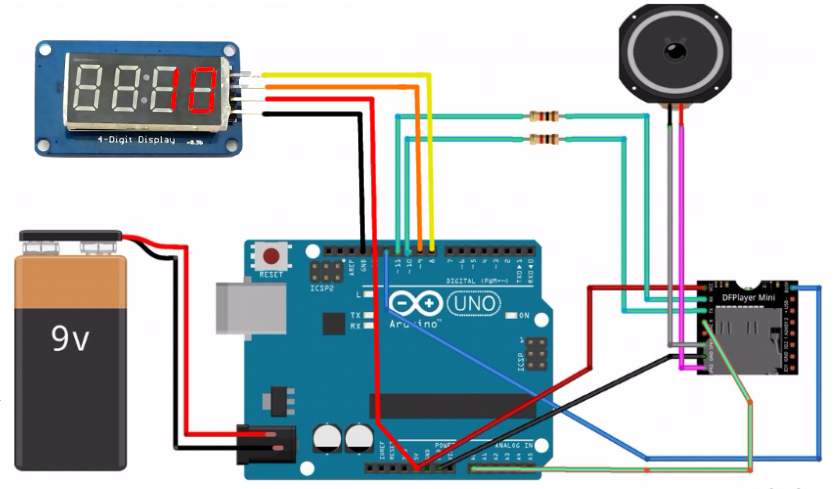
Thanks for taking a look!
L
/* 04_dfplayer_mp3_test_nextbutton
 * This is LCBBs basic mp3 test code (based on DRRobot's DFPlayer code) for sequential
 * mp3 playing tests and basic functionality. Other related code including more advnaced
 * functioanlity and LED track displays can be found at:
 * https://github.com/LetsCodeBlacksburg/arduino-mp3-player
 *
 *  This version cleans up the playback code a bit and adds
 *  structure for reading buttons and navigating playlists. This
 *  version is also best suited for tracking the song # for
 *  displaying on a display device.
 *
 *  tweeks-pub1@theweeks.org, 2018-06-27
 */

#include "Arduino.h"
#include <SoftwareSerial.h>
#include <DFRobotDFPlayerMini.h>


// LED Display
#include <TM1637Display.h>
// Module connection pins (Digital Pins). Should match your connections.
#define CLK 8
#define DIO 9
#define TEST_DELAY   20
TM1637Display display(CLK, DIO);
boolean leadingZeros = false;


//// HARDWARE SETTINGS/HOOKUPS
///////////////////////////////////////
// Hardware wiring of DFPlayer
//
// DFPlay mini  --Vcc(1)--RX(2)--TX(3)--DACR(4)--GND(7)  +(6) -(8)  ...  _BUSY
//                 |       |      |       |       |      |    |           |
//     Arduino    5v      11*    10*     A0      GND     |    |          12*
//                                                       \Spkr/
//                              * requires 1k resisitor
//DFPlayer mp3 player settings
const int ardRX=10;       // The arduino software Receive lins (goes to DFPlayer TX)
const int ardTX=11;       // The arduino software Transmit line (goes to DFPlayer RX)
const int dfBusy=12;      // From DFPlayer pin 16, active low (HIGH != playing sound)

int sndFile=1;            // Sound file pointer (all files must start with 0001 format).
                          // All files assumed to be in dir named "MP3"
int fileCount=12;         // Either set the max # of files here, or load
                          // it from myDFPlayer.readFileCounts()
  // NOTE: readFileCounts() also sees deleted files and is less reliable.
  // One way to address is by reformatting the SDcard before re-loading musuc.

int setVol=20;            //Set volume value (0~30)

// Set up Arduino control buttons to do stuff here (and in setup)
const int buttonNext = 2;

// Software Serial Pins To DFPlayer
SoftwareSerial mySoftwareSerial(10,11); // RX, TX

DFRobotDFPlayerMini myDFPlayer;
void printDetail(uint8_t type, int value);

//// LARGE SETUP BLOCK
//////////////////////////////////
void setup(){
  // non MP3 stuff
  pinMode(buttonNext, INPUT);
  display.setBrightness(0xff);


  //  Set up DFPlay mini
  delay(250);
  pinMode(ardRX, INPUT);
  pinMode(ardTX, OUTPUT);
  pinMode(dfBusy, INPUT);
  delay(100);
  mySoftwareSerial.begin(9600);
  delay(100);
  Serial.begin(9600);
  Serial.println(F("DFRobot DFPlayer Setup"));
  Serial.println(F("Initializing DFPlayer ... (May take 3~5 seconds)"));

  // Check for DFPlay initialization via softserial
  if (!myDFPlayer.begin(mySoftwareSerial)) {
    // if it did not work
    delay(20);
    Serial.println(F("Unable to begin:"));
    Serial.println(F("1.Please recheck the connection!"));
    Serial.println(F("2.Please insert the SD card!"));
    // T-SHOOTING
    Serial.print("INFO: player state / file counts: ");
    Serial.print(myDFPlayer.readState()); //read mp3 state
    Serial.print(" / ");
    Serial.println(myDFPlayer.readFileCounts()); //read all file counts in SD card
    while(true);      // Hang forever if error
  }

  // if serial setup worked
  Serial.println(F("DFPlayer Mini online."));
  Serial.println(F("Reinsert SD card to start playing."));
  // configure settings
  myDFPlayer.setTimeOut(500); //Set serial communictaion time out 500ms
  myDFPlayer.volume(setVol);  //Set volume value (0~30).
  myDFPlayer.EQ(DFPLAYER_EQ_NORMAL);
  myDFPlayer.outputDevice(DFPLAYER_DEVICE_SD);

///// Print Status:
  Serial.print("SETUP-INFO: player state= ");
  Serial.print(myDFPlayer.readState());         //read mp3 state
  Serial.print(" / volume setting(0-30)= ");
  Serial.print(myDFPlayer.readVolume());        //read current volume
  Serial.print(" / EQ setting= ");
  Serial.print(myDFPlayer.readEQ());          //read EQ setting
  Serial.print(" / fileCount= ");
  Serial.println(myDFPlayer.readFileCounts());  //read all file counts in SD card
}


//// MAIN LOOP
///////////////////////////////////////////
void loop()
{


  // If at the last sound file, then loop back to the top (1)
  if (sndFile == (fileCount+1) ) {
    sndFile = 1;
  }

  // Begin playing the next sound file...
  Serial.print("************** PLAYING SONG #");
  Serial.println(sndFile);
  myDFPlayer.playMp3Folder(sndFile);
  display.showNumberDec(sndFile, leadingZeros);   // This is it
  delay(100);                 // wait to start


  // If DFPlayer _BUSY line is active(low), while/scan for button presses.
  if (!digitalRead(dfBusy) == true ){
    Serial.println("Player _BUSY, still playing...");
    Serial.print("Watching for button presses.");
    while(!digitalRead(dfBusy) == true ){
      int x=x+1;
      if(x%50 == 0)
        Serial.print("\n");
      Serial.print(".");
      if(digitalRead(buttonNext) == LOW){   // If detect buttonNext, go to next song.
        sndFile++;                          // Incriment to the next sound file
        if(sndFile>fileCount)
          sndFile=1;
        myDFPlayer.playMp3Folder(sndFile);  // Play it (from the MP3 directory)
        Serial.print("\nPlaying file # ");
        Serial.println(sndFile);
        display.showNumberDec(sndFile, leadingZeros);   // This is it
      }
    delay(250);
    }

  delay(150);
  sndFile++;     // Increment to the next sound file
  }
}

//// printDetail()
/////////////////////////////////////
void printDetail(uint8_t type, int value){
  switch (type) {
    case TimeOut:
      Serial.println(F("Time Out!"));
      break;
    case WrongStack:
      Serial.println(F("Stack Wrong!"));
      break;
    case DFPlayerCardInserted:
      Serial.println(F("Card Inserted!"));
      break;
    case DFPlayerCardRemoved:
      Serial.println(F("Card Removed!"));
      break;
    case DFPlayerCardOnline:
      Serial.println(F("Card Online!"));
      break;
    case DFPlayerPlayFinished:
      Serial.print(F("Number:"));
      Serial.print(value);
      Serial.println(F(" Play Finished!"));
      break;
    case DFPlayerError:
      Serial.print(F("DFPlayerError:"));
      switch (value) {
        case Busy:
          Serial.println(F("Card not found"));
          break;
        case Sleeping:
          Serial.println(F("Sleeping"));
          break;
        case SerialWrongStack:
          Serial.println(F("Get Wrong Stack"));
          break;
        case CheckSumNotMatch:
          Serial.println(F("Check Sum Not Match"));
          break;
        case FileIndexOut:
          Serial.println(F("File Index Out of Bound"));
          break;
        case FileMismatch:
          Serial.println(F("Cannot Find File"));
          break;
        case Advertise:
          Serial.println(F("In Advertise"));
          break;
        default:
          break;
      }
      break;
    default:
      break;
  }
}