Upload files to Arduino Nano ESP32

Can somebody please explain how you upload your files to the Arduino Nano esp32? The well known plugin that works in the Arduino IDE version 1 for many ESP 32 boards is not working for the Arduino Nano esp32. If you try to use this tool to upload files to littleFS or an SPIFFS file system, then the tool will crash with an unknown baud rate.
On the Arduino Nano IDE version 2 there is no possibility to upload files to the Arduino Nano ESP32.

How is this board supposed to work with files?

Hi @svenvandevelde

Arduino IDE 2.x is a complete rewrite of the Arduino IDE on a different framework and in a new language. The "Tools" system of Arduino IDE 1.x used by the Tool (AKA "plugin") you were using with the old IDE is very specific to the Java language that version series of Arduino IDE was written in, so it was not possible to add support for Arduino IDE 1.x Tools to Arduino IDE 2.x.

Full support for making equivalent (and even better) expansions on the default capabilities of Arduino IDE was recently added to Arduino IDE. However, it will still be necessary for the community to create Arduino IDE 2.x extensions to replace the Arduino IDE 1.x tools, and as far as I know nobody has done that yet for the ESP32 filesystem upload tools (though it has now been done for ESP8266 and RP2040 microcontrollers so there is reason to hope it might happen sometime in the near future).

For now, I can suggest a solution which is to use the command line tools directly.

You didn't specify which filesystem uploader Tool you are using, so I'll reference the popular "ESP32 sketch data upload" Tool. Under the hood, what the "ESP32 sketch data upload" Tool does is:

  1. Generate a SPIFFS filesystem image from the contents of the data subfolder of your sketch.
  2. Upload the filesystem to the ESP32 board.

It does these things using two command line tools:

So instead of using the "ESP32 sketch data upload" Tool from Arduino IDE, you can just work directly with those two tools from the command line terminal.

There is some information on that here:

https://docs.espressif.com/projects/esp-idf/en/latest/esp32/api-reference/storage/spiffs.html

Thank you. Where can I find the documentation to add an expansion in IDE 2?

Other point. I've been reading the text on the link you have shared to use the mkspiffs and esptool many times and these command line tools are not for the average user. What is needed is a good tool that allows for end user user friendly file uploads.
The nano ESP32 has a very weird way how to upload files and till today I still don't understand how it should be done properly.
I mean, it has all to do with partitions and it's a huge confusion to me. Is it required that every time you build a new version of your program the new partition needs to be created containing the files to be uploaded?
Or can the partition be created once and then upload new files like on a pc file system?

Are you asking how you can install them? If so, the instructions are available here:

https://github.com/arduino/arduino-ide/blob/main/docs/advanced-usage.md#3rd-party-themes

The instructions are targeted to the use case of installing a VS Code extension for the purpose of customizing the Arduino IDE 2.x UI theme, but any VS Code extension extension can be installed using the same procedure.

It is possible that such a thing exists. Maybe one of the other forum users can suggest something.

Unfortunately I don't know anything about this subject and don't have any experience working with filesystems on microcontrollers. Hopefully one of the more knowledgeable forum members will be able to provide an explanation.

This tool does not work for the Arduino nano ESP32! Try it yourself. You'll see that the baud rate variable that it expects is not given by the IDE because it simply isn't there as a parameter ...

Although I appreciate your help, I have no idea what parameters these tools expect. This is such a complex matter that it requires a study of its own.

And this all to make just an index.html and a style.css file as part of the compilation so that the web server can read those files from SPIFFS...

It would be greatly beneficial if the files placed in the /data folder in the sketch would be packaged by the IDE 2 and embedded in the SPIFFS image when uploading. That would be a start ...

OK. I have found the solution, finally, but it has been a journey, let me tell you that! And the solution is without using the Arduino IDE for the following reasons:

What a mess ...

Developing web pages using the built-in WIFI of the Arduino Nano ESP32 has become such a horrible mess for novice people like me ... It is incredible ... When you purchase the Arduino Nano ESP32 and it arrives in your mail box, you get overwhelmed by "tutorials", "posts", "youtube videos" and they all speak like "It is very easy to upload files to your SPIFFS using PlatformIO", or even "more easier using the Arduino IDE 1 ESP32 file upload tool".

The truth using the Arduino Nano ESP32 is different however ...

Root cause ... Where are the data files ???

The issue originates that the Arduino Nano ESP32 uploads sketches using the DFU tool. However, in these sketches, which finally result in "program images", there aren't any data files included! There is no single way to include data files in program images. So the search starts: "How to upload data files to the Arduino Nano ESP32", for example an index.html file???

"The remedy" -> Use Arduino IDE 1

Then you will quickly learn that there is a tool out there, for which you can find "installation manuals" like this: ESP file upload tool installation manual for the ESP32 file system.... All a waste of time ... The Arduino IDE 2 does not support this tool, so the Arduino IDE 1 must be used.

OK ... So I use the Arduino IDE 1, installed the tool and tried it ...

The user interface of this tool seems to work on the IDE 1 apparently. Here I select to upload files to the SPIFFS ... (At this time I had hardly any idea what SPIFFS is and what it REALLY means ...)

So when i press enter, I see this:

The upload failed!

Reason? Very simple: The Arduino Nano ESP32 does not have a BAUD setting in the menu!

OKAY. So that didn't result in much ... That is not working. I have checked the code of this tool and indeed, there is a setting as a parameter given that requires the BAUD rate to be specified, which is retrieved from the IDE parameter settings ... Which is null in case of the Arduino Nano ESP32 in the IDE 1 ...

So back to the IDE 2 ...

Then I started to wonder ... What exactly is this SPIFFS and I walked into the partitions topic, an other horrible unclarity for the Arduino Nano ESP32 ...

To make a long story short, it turns out that the "default.csv" is not used !!!** for the Arduino Nano ESP. Instead, when you carefully observe the logs in the IDE 2, you'll find that for SPIFFS it uses a specific csv for the partitioning of the Arduino Nano ESP32 ... I created a new, empty sketch and uploaded it ... In the logs I find the following:

I open this file and I see:

So the spiffs partition is written from 0x610000 to 0x960000 on the ESP32.

Platform IO

Then I learn that there is an other IDE in existence, the "Platform IO based on VSCODE" that you can use to build and create your sketches, but also to burn your own data files on SPIFFS in a data partition!

So I tried this ... But it didn't work for the following issues (i'm going to spare you the details...)

  1. There is no Arduino Nano ESP32 board when you initially start platform IO and you want to create a new project.
  2. When you finally understand what a "platform.ini" file is, and you then find the right settings, you'll learn that there is an arduino_nano_esp board setting, but that is uses it's own .csv files for partitioning, when you compile the file system or the sketches!!!

And the partition file it uses for the Arduino Nano ESP32 does not match the one that the IDE 2 uses!!!!

So to make a long story short: this is my platformio.ini file:

[env:arduino_nano_esp32]
platform = espressif32
board = arduino_nano_esp32
framework = arduino
board_build.filesystem = spiffs
; upload_protocol = esptool
board_build.partitions = app3M_spiffs9M_fact512k_16MB.csv
monitor_speed = 9600
board_build.mcu = esp32s3
lib_deps = 
	wnatth3/WiFiManager@^2.0.16-rc.2
	me-no-dev/ESP Async WebServer@^1.2.3

You can see the board_build.partitions = app3M_spiffs9M_fact512k_16MB.csv which I've included specifically to make the partitioning correct using the PlatformIO file manager, so it writes the data to the addresses 0x610000 to 0x960000 !

Next, you have the issue that for the Arduino Nano ESP32 firmware, it writes sketches using the DFU tool but file images using the ESP tool!

So when you flash file images, you need to configure your platformio.ini file, enabling the upload_protocol = esptool before you create the file image! When you do this, the PlatformIO will use the ESPTOOL as the upload tool. You need to double press the Arduino Nano ESP32 reset button, so it goes into "loader mode" ... The COM port changes, but the ESP tool should automatically find the correct COM6 port. If not the first time, then retry the 2nd time to do the file upload.

Once you have the files written, you need to comment the upload_protocol = esptool again to ; upload_protocol = esptool adding a ; in front or pressing CTRL-:

Then you can upload your sketches using PlatformIO, it works great, but the only caveat is that when you change the platformio.ini, the tool will RESCAN your complete project, and will RECOMPILE your whole solution. So try to minimize the upload of your data folder, updating your file images on SPIFFS, so save a lot of time!

I've given up on the Arduino IDE 2 for the Arduino Nano ESP32, for the moment ...

I also noticed that PlatformIO compiles the solution much faster. It doesn't spend wasting time to find the "correct libraries" and does a much better job identifying the compilation needs when you change source code.

To the Arduino Developer Team

If you want to make the Arduino IDE 2 a success, ensure that you get either this IDE 1 plug-in working, or even better to include a file upload function as a standard function in the IDE 2 !!!!. Also, it is completely UNCLEAR how to add new plug-ins to the IDE 2, spite the friendly help given (which I appreciate).

This journey has taken me 10 days to conclude all this ... right now I'm building asynchronous web sites using PlatformIO for the Arduino Nano ESP32 ...

Sven

Even more ... I'm asking how to create new IDE 2 extensions plug ins, to develop them.

Is there a link with a good explanation? And can I retrieve the properties of the IDE2 like board type, com port, file system and others?

So when I want to develop a new vscode theme, which option do i chose from the yo code?

Sven

Hi @svenvandevelde.

Cool project!

The most important thing to understand is that Arduino IDE 2.x extensions are VS Code extensions. Any information you find about writing VS Code extensions is applicable to making an extension for Arduino IDE 2.x. VS Code is tremendously popular so you will be able to find plenty of information about making VS Code extensions. You can get started here:

Yes. Starting from Arduino IDE 2.2.0, the IDE comes with a VS Code extension named "VS Code Arduino API" preinstalled. This extension makes the Arduino state data available to all other extensions.

You can learn about this from the extension's documentation:

https://github.com/dankeboy36/vscode-arduino-api/tree/main#readme

You can use the source code of this Arduino IDE extension as a reference model:

as well as this one:

Cool project!

You should select "New Color Theme".

There are some additional instructions for making a custom Arduino IDE 2.x theme extension here:

I appreciate your efforts indeed. It is unacceptable, that we buy an arduino nano esp32 and it does not work properly, you have made a lot of effort and I until i saw this post i wasted more than 100 hours for nothing.
Please could you tell us the procedure to read and write a data with the flash memory in arduino nano esp32?
I am very,very upset with this situation

I know. It is interesting and nobody on the community seems to care much ...

I think the issue arises that the Nano ESP is actually a "clone" with an Arduino stamp on it from an other brand name.
The software of Arduino IDE 2 is simply not ready. They've taken certain design decisions that simply result in making new plugins too complicated. Everything has to be redeveloped and you have a wall of complexity of you try to do so. (I tried). They use Frameworks I've never heard of and sorry but there isn't a decent manual to build a new plugin utility in the Arduino IDE 2.

The best way forward for you is that you read carefully the PLATFORM IO section. There is no other way. Invest time in Platform IO to solve your file upload issue.

to avoid to waste a lot time could send us the file app3M_spiffs9M_fact512k_16MB.csv ?
Thank you in advance

Here is the file in the source repository:

You can download it here:

https://raw.githubusercontent.com/arduino/arduino-esp32/2.0.13/tools/partitions/app3M_spiffs9M_fact512k_16MB.csv

Thank you for summarizing all of your work. It helps me believe that the many hours I have spent on what should be a simple process were wasted not by my own failings, but by a large and unacknowledged flaw in this system.

Had I known that all of the tools and tutorials out there did not apply to the Arduino Nano I could have started on my workaround, which took less than a day, rather than wasting many days trying to get the "official" approaches to work. In my case I have a microSD slot, so I was able to modify the SPIFFS_Test example to read files from SD and write them to SPIFFS. It's not ideal, but at least I can now put files in SPIFFS with one run of that sketch and then use them from others I install later.

Thanks again for pulling all your attempts together in one post.

Fascinating to see how such a fundamental feature as creating and uploading files, is failing miraculously using the official Arduino 2 software for the Arduino Nano 32. The lack of file upload functionality to a dedicated partition makes the device unusable for many use cases. However I did manage to get file upload working using platformIO ...

I wonder when such function will be added in the official software. Is there a roadmap or a release schedule?

Good news, everyone! Uploading filesystems to ESP32 boards using Arduino IDE 2.x is now possible by using the community created "arduino-littlefs-upload" extension:

Hello,
I want to install the plugin but I can't do it.
I am on mac catalina my ide version is 2.3.3.
I went to the page GitHub - earlephilhower/arduino-littlefs-upload: Build and uploads LittleFS filesystems for the Arduino-Pico RP2040, RP2350, ESP8266, and ESP32 cores under Arduino IDE 2.2.1 or higher.
I recovered the arduino-littlefs-upload-1.2.0.vsix file.
I installed it in the indicated directory.
I restarted the ide but nothing.

Did I forget something?
Kind regards
Capture d’écran 2024-10-03 à 21.37.37
Capture d’écran 2024-10-03 à 21.36.48

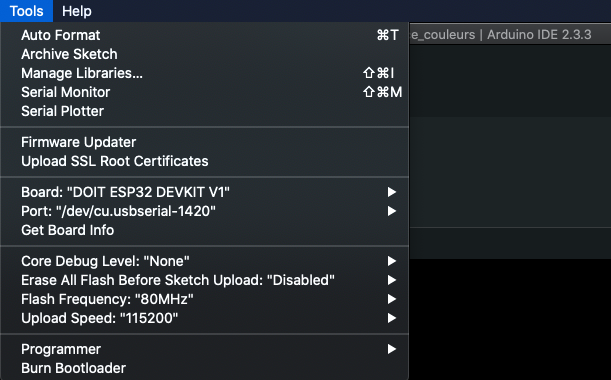
Hi @philippe974. Unlike the Arduino IDE 1.x Tool, the Arduino IDE 2.x plugin does not add a menu item under Arduino IDE's "Tools" menu.

You must instead use the extension through a special advanced user interface called the "Command Palette". You can learn how to do that by reading the "Usage" instructions in the extension's readme here:

https://github.com/earlephilhower/arduino-littlefs-upload#usage

Please give that a try and then let us know if anything is unclear or you have any problems. It sounds like you performed the installation perfectly.

Hi @ptillish.
Thanks for the quick response.
For my part I have problems with gdb that appear even when doing the manipulation of changing cards.
I reinstalled a version 1.x.x of the ide seeing that we can have both versions installed.
Kind regards