Hello, I want to design a system that can measure the water level and EC of the solution. I connect all of them into a ELEGO Arduino Mega, and use the code of the EC from atlas scientific and the code of grove water level. Each code works pretty well when it works by itself. However, when I mix them into the whole body, only the Water Level Sensor works. The EC does not work.

#include <Wire.h>

#ifdef ARDUINO_SAMD_VARIANT_COMPLIANCE
#define SERIAL SerialUSB
#else
#define SERIAL Serial
#endif

unsigned char low_data[8] = {0};
unsigned char high_data[12] = {0};


#define NO_TOUCH       0xFE
#define THRESHOLD      100
#define ATTINY1_HIGH_ADDR   0x78
#define ATTINY2_LOW_ADDR   0x77

String inputstring = "";                              //a string to hold incoming data from the PC
String sensorstring = "";                             //a string to hold the data from the Atlas Scientific product
boolean input_string_complete = false;                //have we received all the data from the PC
boolean sensor_string_complete = false;               //have we received all the data from the Atlas Scientific product


void getHigh12SectionValue(void)
{
  memset(high_data, 0, sizeof(high_data));
  Wire.requestFrom(ATTINY1_HIGH_ADDR, 12);
  while (12 != Wire.available());

  for (int i = 0; i < 12; i++) {
    high_data[i] = Wire.read();
  }
  delay(10);
}

void getLow8SectionValue(void)
{
  memset(low_data, 0, sizeof(low_data));
  Wire.requestFrom(ATTINY2_LOW_ADDR, 8);
  while (8 != Wire.available());

  for (int i = 0; i < 8 ; i++) {
    low_data[i] = Wire.read(); // receive a byte as character
  }
  delay(10);
}

void check()
{
  int sensorvalue_min = 250;
  int sensorvalue_max = 255;
  int low_count = 0;
  int high_count = 0;
  while (1)
  {
    uint32_t touch_val = 0;
    uint8_t trig_section = 0;
    low_count = 0;
    high_count = 0;
    getLow8SectionValue();
    getHigh12SectionValue();

    Serial.println("low 8 sections value = ");
    for (int i = 0; i < 8; i++)
    {
      Serial.print(low_data[i]);
      Serial.print(".");
      if (low_data[i] >= sensorvalue_min && low_data[i] <= sensorvalue_max)
      {
        low_count++;
      }
      if (low_count == 8)
      {
        Serial.print("      ");
        Serial.print("PASS");
      }
    }
    Serial.println("  ");
    Serial.println("  ");
    Serial.println("high 12 sections value = ");
    for (int i = 0; i < 12; i++)
    {
      Serial.print(high_data[i]);
      Serial.print(".");

      if (high_data[i] >= sensorvalue_min && high_data[i] <= sensorvalue_max)
      {
        high_count++;
      }
      if (high_count == 12)
      {
        Serial.print("      ");
        Serial.print("PASS");
      }
    }

    Serial.println("  ");
    Serial.println("  ");

    for (int i = 0 ; i < 8; i++) {
      if (low_data[i] > THRESHOLD) {
        touch_val |= 1 << i;

      }
    }
    for (int i = 0 ; i < 12; i++) {
      if (high_data[i] > THRESHOLD) {
        touch_val |= (uint32_t)1 << (8 + i);
      }
    }

    while (touch_val & 0x01)
    {
      trig_section++;
      touch_val >>= 1;
    }
    SERIAL.print("water level = ");
    SERIAL.print(trig_section * 5);
    SERIAL.println("% ");
    SERIAL.println(" ");
    SERIAL.println("*********************************************************");
    delay(1000);
  }
}

void setup() {
  SERIAL.begin(9600);
  Wire.begin();
  Serial.begin(9600);                                 //set baud rate for the hardware serial port_0 to 9600
  Serial3.begin(9600);                                //set baud rate for software serial port_3 to 9600
  inputstring.reserve(10);                            //set aside some bytes for receiving data from the PC
  sensorstring.reserve(30);                           //set aside some bytes for receiving data from Atlas Scientific product

}

void serialEvent() {                                  //if the hardware serial port_0 receives a char
  inputstring = Serial.readStringUntil(13);           //read the string until we see a <CR>
  input_string_complete = true;                       //set the flag used to tell if we have received a completed string from the PC
}


void serialEvent3() {                                 //if the hardware serial port_3 receives a char
  sensorstring = Serial3.readStringUntil(13);         //read the string until we see a <CR>
  sensor_string_complete = true;                      //set the flag used to tell if we have received a completed string from the PC
}

void loop()
{
  if (input_string_complete == true) {                //if a string from the PC has been received in its entirety
    Serial3.print(inputstring);                       //send that string to the Atlas Scientific product
    Serial3.print('\r');                              //add a <CR> to the end of the string
    inputstring = "";                                 //clear the string
    input_string_complete = false;                    //reset the flag used to tell if we have received a completed string from the PC
  }

  if (sensor_string_complete == true) {               //if a string from the Atlas Scientific product has been received in its entirety
    if (isdigit(sensorstring[0]) == false) {          //if the first character in the string is a digit
      Serial.println(sensorstring);                   //send that string to the PC's serial monitor
    }
    else                                              //if the first character in the string is NOT a digit
    {
      print_EC_data();                                //then call this function
    }
    sensorstring = "";                                //clear the string
    sensor_string_complete = false;                   //reset the flag used to tell if we have received a completed string from the Atlas Scientific product
  }
  check();
}

void print_EC_data(void) {                            //this function will pars the string

  char sensorstring_array[30];                        //we make a char array
  char *EC;                                           //char pointer used in string parsing
  char *TDS;                                          //char pointer used in string parsing
  char *SAL;                                          //char pointer used in string parsing
  char *GRAV;                                         //char pointer used in string parsing
  float f_ec;                                         //used to hold a floating point number that is the EC

  sensorstring.toCharArray(sensorstring_array, 30);   //convert the string to a char array
  EC = strtok(sensorstring_array, ",");               //let's pars the array at each comma
  TDS = strtok(NULL, ",");                            //let's pars the array at each comma
  SAL = strtok(NULL, ",");                            //let's pars the array at each comma
  GRAV = strtok(NULL, ",");                           //let's pars the array at each comma

  Serial.print("EC:");                                //we now print each value we parsed separately
  Serial.println(EC);                                 //this is the EC value

  Serial.print("TDS:");                               //we now print each value we parsed separately
  Serial.println(TDS);                                //this is the TDS value

  Serial.print("SAL:");                               //we now print each value we parsed separately
  Serial.println(SAL);                                //this is the salinity value

  Serial.print("GRAV:");                              //we now print each value we parsed separately
  Serial.println(GRAV);                               //this is the specific gravity
  Serial.println();                                   //this just makes the output easer to read

//f_ec= atof(EC);                                     //uncomment this line to convert the char to a float
}
This is my code
It seems likely that a signal from the water level sensor would interfere with the conductivity sensor.
For a more informed answer, post links to the sensors, and a picture of a hand drawn wiring diagram, with pins, connections and parts clearly labeled.
Avoid using Strings on an AVR-based Arduino. They lead to program crashes due to poor memory management.
EC probe (measuring the conductive of water): Conductivity Probe K 0.1 | Atlas Scientific
EC conductive circuit ( Reciving and processing data from probe): EZO™ Conductivity Circuit | Atlas Scientific
Water level sensor: Grove - Water Level Sensor | Seeed Studio Wiki
EC probe (measuring the conductive of water): Conductivity Probe K 0.1 | Atlas Scientific
EC conductive circuit ( Reciving and processing data from probe): EZO™ Conductivity Circuit | Atlas Scientific
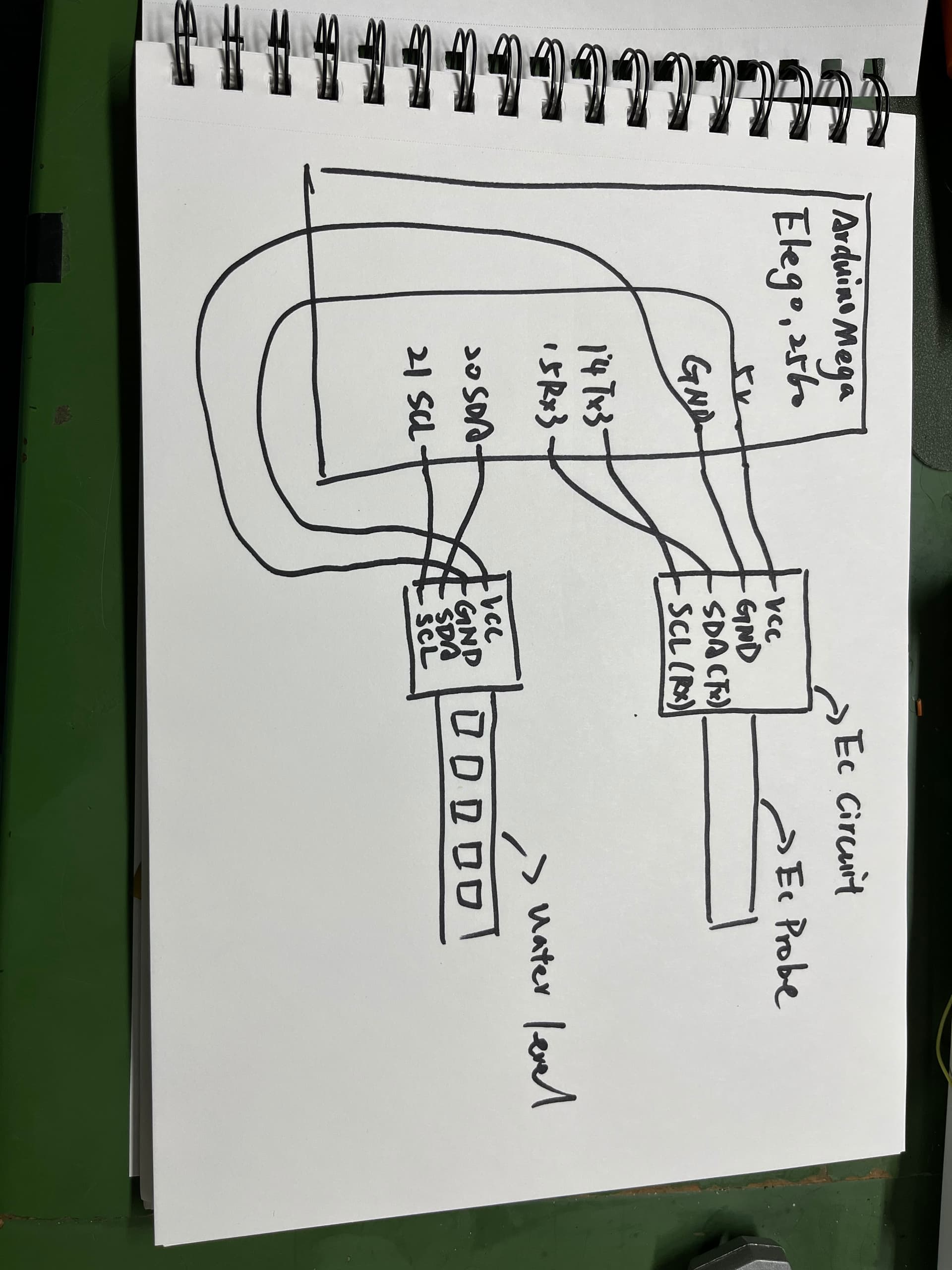
The Atlas scientific EC is working in UART mode, it seems like using the TX & RX, the water level sensor uses the I2C.
Thanks for posting those details.
The Grove water level probe makes electrical contact with the water and injects current, which is extremely likely to interfere with the very high impedance conductivity sensor.
You can verify this by simply inserting the (connected) water level sensor into the water, while the EC meter is making measurements. If the EC readings become erratic, the sensors are incompatible.
In that case, look for a non-contact water level sensor. An inductive proximity sensor can detect water through several mm of glass or plastic.
sorry, sir. I think I find the problem. it seems like the both sensors are working. The problem is that they do not show up in the serial monitor. I think there must something wrong or bugs in the code. I am a noob for this kind of thing. Thank you for your help, I really appreciate that.