Hello, I have now also bought this ESP32 C3 SuperMini from AliExpress
Unfortunately I also have problems, I can't read out the A0.
A0 constantly returns a value of 4095. I have tried a potentiometer on it.
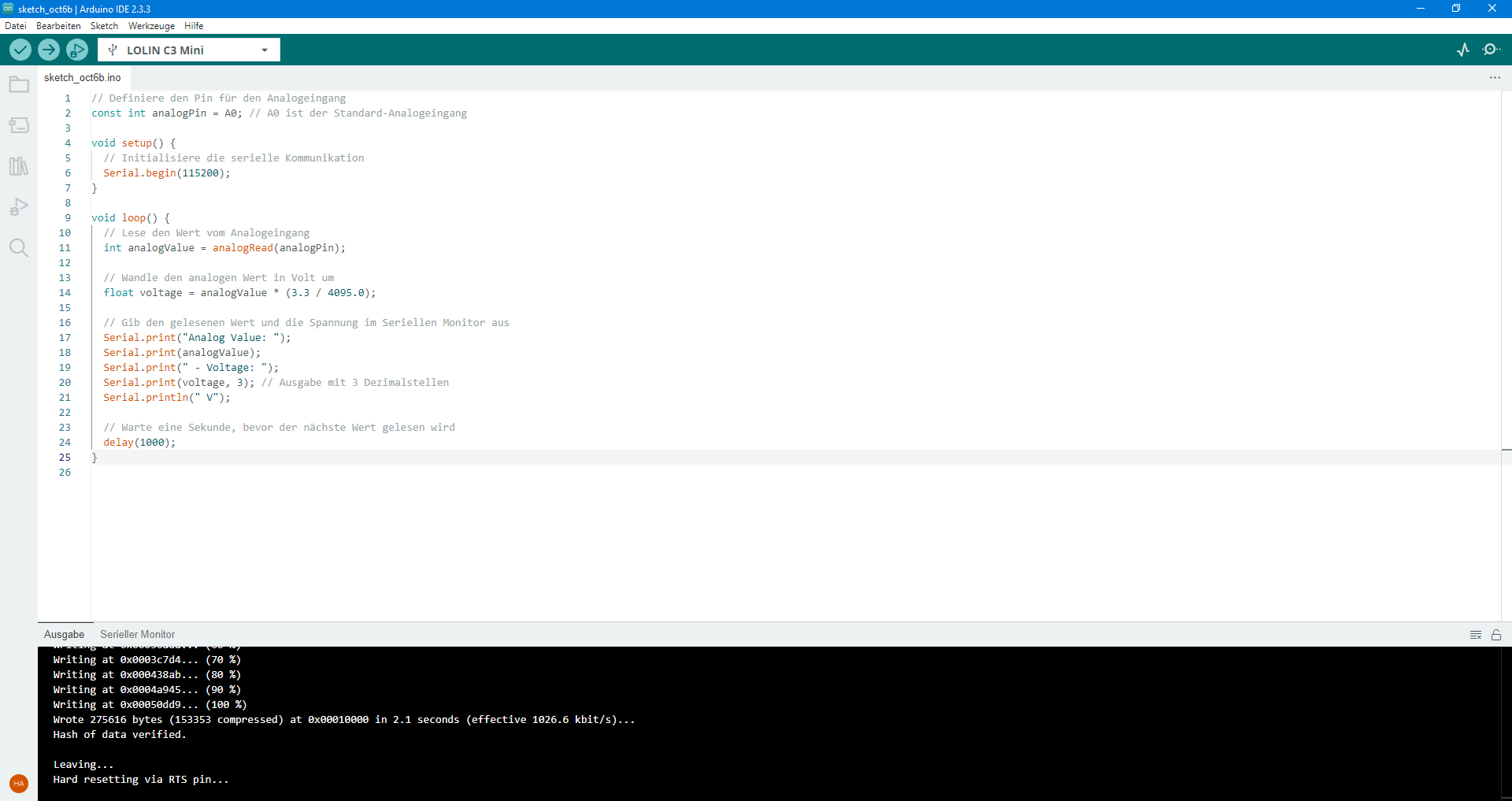
// Definiere den Pin für den Analogeingang
const int analogPin = A0; // A0 ist der Standard-Analogeingang

void setup() {
  // Initialisiere die serielle Kommunikation
  Serial.begin(115200);
}

void loop() {
  // Lese den Wert vom Analogeingang
  int analogValue = analogRead(analogPin);

  // Wandle den analogen Wert in Volt um
  float voltage = analogValue * (3.3 / 4095.0);

  // Gib den gelesenen Wert und die Spannung im Seriellen Monitor aus
  Serial.print("Analog Value: ");
  Serial.print(analogValue);
  Serial.print(" - Voltage: ");
  Serial.print(voltage, 3); // Ausgabe mit 3 Dezimalstellen
  Serial.println(" V");

  // Warte eine Sekunde, bevor der nächste Wert gelesen wird
  delay(1000);
}
I hope my sketch is correct?
Does anyone know how exactly this ADC works, is it very accurate or very inaccurate like other previous models?
Well, it could depend on how you have wired the potentiometer or which board you selected from the IDE (the Super Mini is not listed) or which of the pinout diagrams you used from the quoted article (the first two contradict each other). Your code looks OK.
I have executed OP's sketch of post #1. My ESP32 C3 Super Mini Board is working alright! Board: LOLIN C3 Mini IDE 2.2.1.
A0 at G-pin (GND-pin): Readings are:
08:53:00.516 -> Analog Value: 119 - Voltage: 0.096 V
08:53:01.506 -> Analog Value: 122 - Voltage: 0.098 V
A0 at 3.3 V pin: Readings are:
08:50:54.182 -> Analog Value: 4095 - Voltage: 3.300 V
08:50:55.164 -> Analog Value: 4095 - Voltage: 3.300 V
Also, the MCU is eponding well to a Pot:
09:25:33.260 -> Analog Value: 123 - Voltage: 0.099 V
09:25:34.276 -> Analog Value: 122 - Voltage: 0.098 V
09:25:35.265 -> Analog Value: 555 - Voltage: 0.447 V
09:25:36.265 -> Analog Value: 553 - Voltage: 0.446 V
09:25:37.285 -> Analog Value: 1337 - Voltage: 1.077 V
The dealer says in the article description that the board “ESP32C3 Dev Module” should be compatible.
With this I can at most upload the blinking example, but no more.
I had used “XIAO_ESP32C3”, so A0 was always at high level (4095).
“LOLIN C3 Mini” was the right module, now my example sketch works!
Thank you very much for the solution.
A0 not connected
Analog Value: 1913 - Voltage: 1.542 V
Analog Value: 1917 - Voltage: 1.545 V
Analog Value: 1082 - Voltage: 0.872 V
Analog Value: 1050 - Voltage: 0.846 V
Analog Value: 765 - Voltage: 0.616 V
Analog Value: 777 - Voltage: 0.626 V
Analog Value: 1771 - Voltage: 1.427 V
Analog Value: 1784 - Voltage: 1.438 V
A0 to GND
Analog Value: 6 - Voltage: 0.005 V
Analog Value: 7 - Voltage: 0.006 V
Analog Value: 6 - Voltage: 0.005 V
Analog Value: 6 - Voltage: 0.005 V
Analog Value: 4 - Voltage: 0.003 V
Analog Value: 7 - Voltage: 0.006 V
Analog Value: 7 - Voltage: 0.006 V
Analog Value: 4 - Voltage: 0.003 V
Analog Value: 5 - Voltage: 0.004 V
A0 to 3V3
Analog Value: 4095 - Voltage: 3.300 V
Analog Value: 4095 - Voltage: 3.300 V
Analog Value: 4095 - Voltage: 3.300 V
I was looking for a board that could work very energy-efficiently. For battery operation.
At some point I happened to read that the ADC converters of the ESP32 series work very inaccurately and that it is recommended to deactivate radio for higher accuracy.
Now I was also interested in whether this ESP C3 Super Mini board has an accurate ADC converter, as I want to use it as a battery monitor.
However, I can now make comparative measurements as the sketch is now working.
What I have noticed now is that my Arduino IDE 2.3.3 is very slow for sketch checking, compiling and uploading. I have noticed this with the ESP32.
26 seconds.
Most of the time is used for checking and compiling.
Is this normal?
For Arduino Nano the process never took long, I guess about 10 seconds.
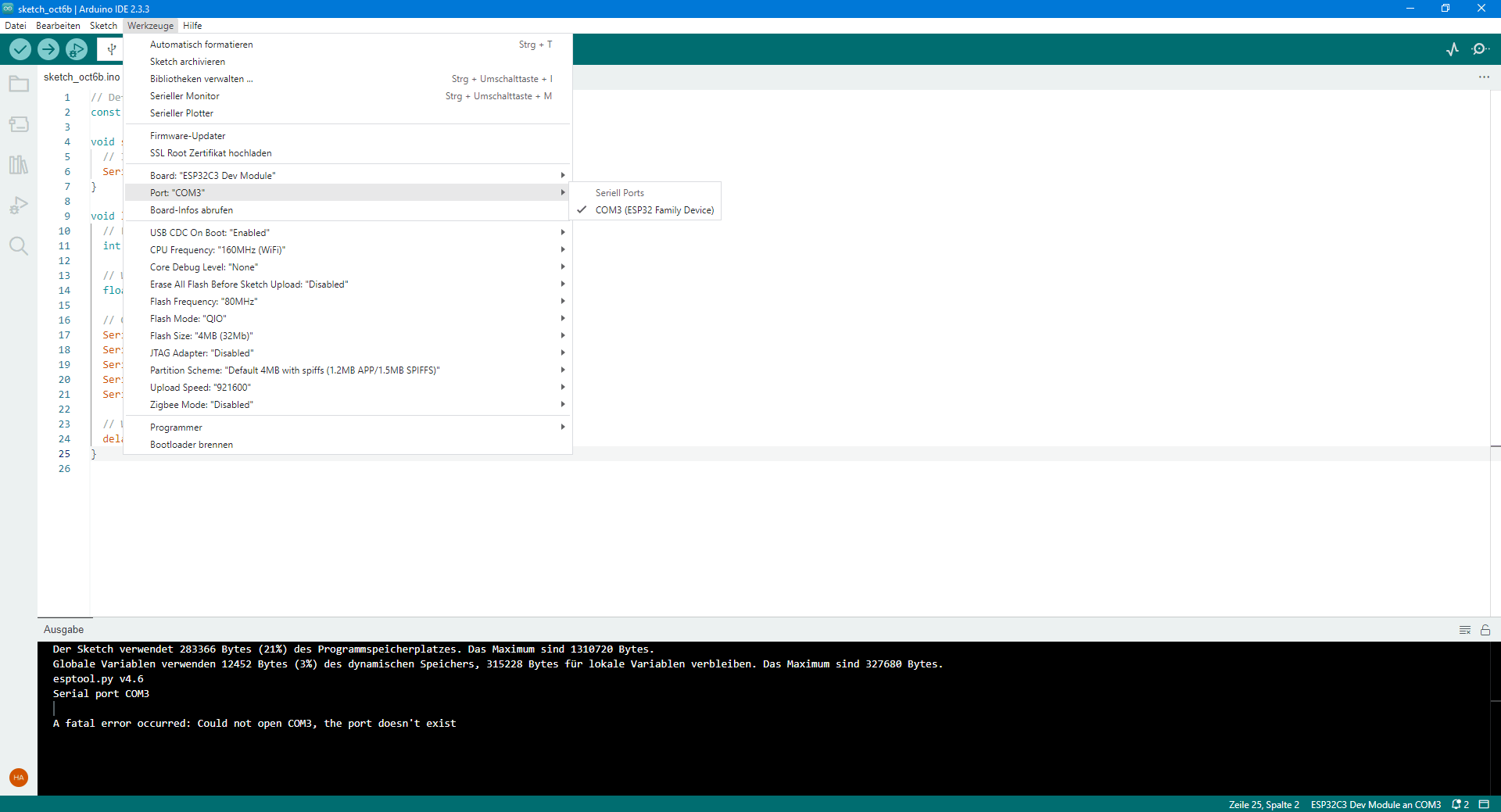
You can use “ESP32C3 Dev Module” but then you also have to enable "CDC on Boot" in the Tools menu in the IDE in order to use Serial.print() etc.
The XIAO ESP32-C3 has a completely different pinout to the Supermini. A0 on this device is GPIO2 which is a "strapping" pin and is pulled high (at least at boot time). It does not seem ideal as an analog pin.
Here are two screenshots showing that the sketch upload via the board selection “ESP32C3 Dev Module” does not work. I have already tried it many times. But blinking has already worked.
It almost always works via the “LOLIN C3 Mini” board.
If there are problems I have to disconnect the ESP32 from USB and restart Arduino IDE.
As long as LOLIN works, it is already progress.
Thanks to you all!