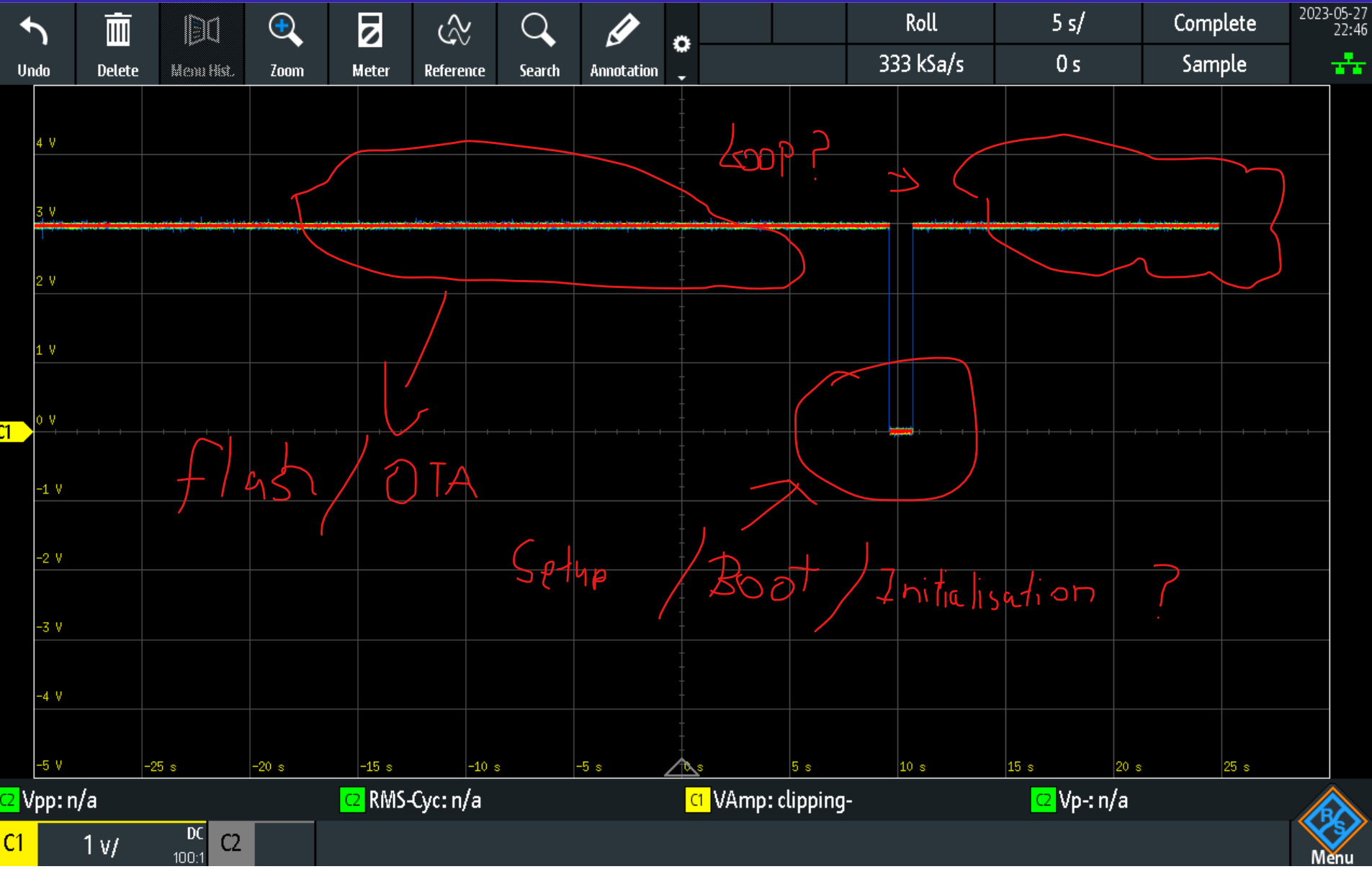
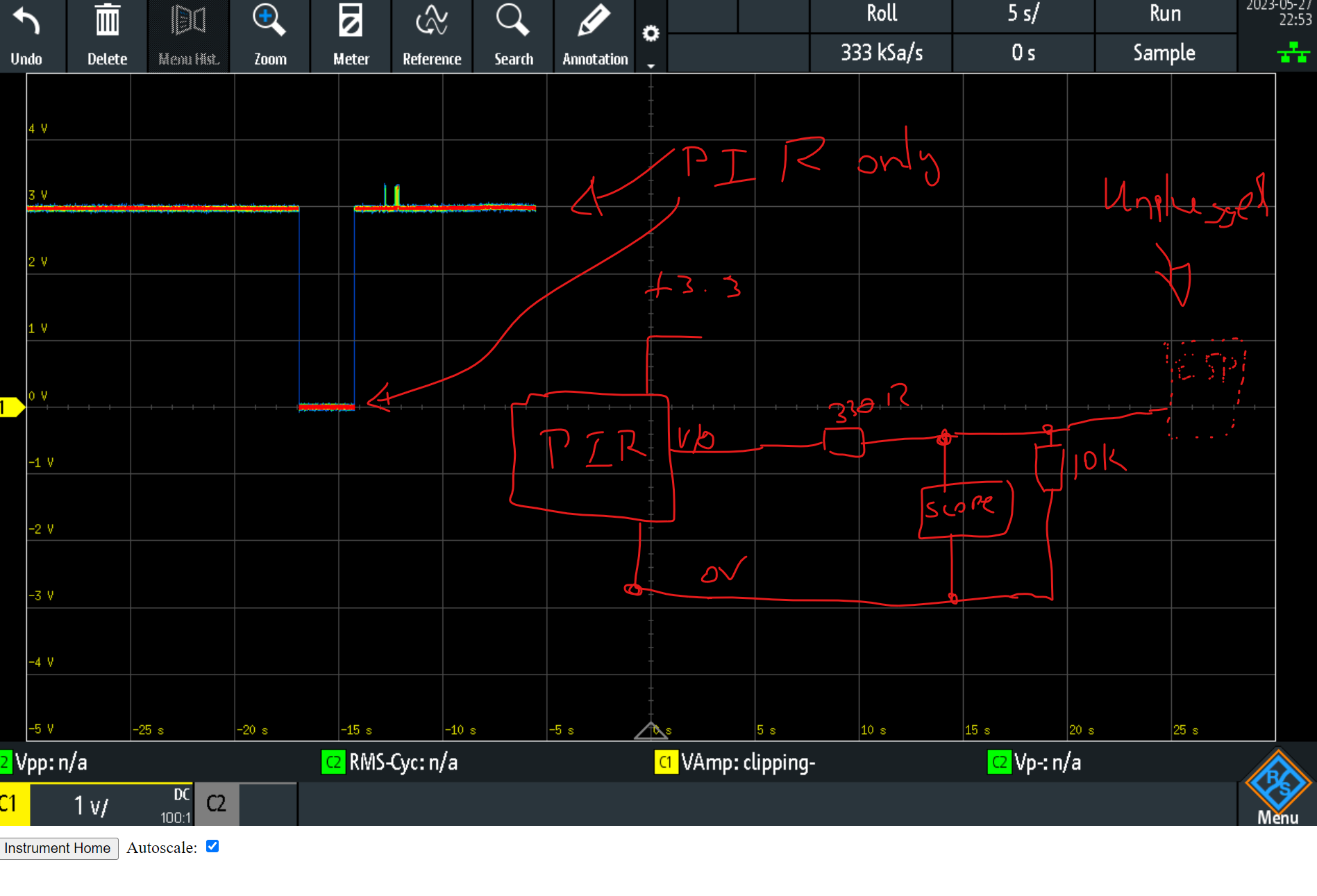
Ok, I' want to start by saying that i've tried to google/CGPT answers until i'm blue in the face, and dumbed my code down to the point where i'm second-guessing myself at almost every point.
At it's most basic form, my watered down code should keep the RX pin of the ESP-01 low and read it's state as an input.
The schematic (very basic) is attached below.
I have been using this (HC-SR505) PIR sensor to output a 3.3V signal to the RX Pin of the ESP 01, using the ESP-01S DHT11 with the DHT11 sensor removed.
I have so far, put in series with the PIR sensor output and the RX pin input a 330R resistor + a pulldown resistor (10K) on the RX side of the micro, but the GPIO3 (RX) still decides to float to ~3VDC.
Removing the ESP-01 from the socket, proves that the PIR sensor is working while measuring on the RX pin from the ESP-01S DHT11 socket.
The following is my code:
const int switchPin1 = 3; // PIR Sensor on RX PIN

WiFiClient wifiClient;
PubSubClient client(MQTT_SERVER, MQTT_SERVER_PORT, callback, wifiClient);

void callback(char *topic, byte *payload, unsigned int length)
{

  // convert topic to string to make it easier to work with
  // String topicStr = topic;
  // EJ: Note:  the "topic" value gets overwritten everytime it receives confirmation (callback) message from MQTT

  // Print out some debugging info
  // Serial.println("Callback update.");
  // Serial.print("Topic: ");
  // Serial.println(topicStr);

  // EJ: copy and paste this whole else-if block, should you need to control more switches
}

// generate unique name from MAC addr
String macToStr(const uint8_t *mac)
{

  String result;

  for (int i = 0; i < 6; ++i)
  {
    result += String(mac[i], 16);

    if (i < 5)
    {
      result += ':';
    }
  }

  return result;
}
void reconnect()
{

  // attempt to connect to the wifi if connection is lost
  if (WiFi.status() != WL_CONNECTED)
  {
    // debug printing
    // Serial.print("Connecting to ");
    // Serial.println(ssid);

    // loop while we wait for connection
    while (WiFi.status() != WL_CONNECTED)
    {
      delay(500);
      //   Serial.print(".");
    }

    // print out some more debug once connected
    //  Serial.println("");
    //  Serial.println("WiFi connected");
    //  Serial.println("IP address: ");
    //  Serial.println(WiFi.localIP());
  }

  // make sure we are connected to WIFI before attemping to reconnect to MQTT
  if (WiFi.status() == WL_CONNECTED)
  {
    // Loop until we're reconnected to the MQTT server
    while (!client.connected())
    {
      //  Serial.print("Attempting MQTT connection...");

      // Generate client name based on MAC address and last 8 bits of microsecond counter
      String clientName;
      clientName += "esp8266-";
      uint8_t mac[6];
      WiFi.macAddress(mac);
      clientName += macToStr(mac);

      // if connected, subscribe to the topic(s) we want to be notified about
      // EJ: Delete "mqtt_username", and "mqtt_password" here if you are not using any
      if (client.connect(MQTT_CLIENT_ID, MQTT_USER, MQTT_PASSWORD)) // if (client.connect((char *)clientName.c_str()), MQTT_USER, MQTT_PASSWORD)
      {                                                             // EJ: Update accordingly with your MQTT account
        // Serial.print("\tMQTT Connected");
        client.subscribe(switchTopic1);
        // EJ: Do not forget to replicate the above line if you will have more than the above number of relay switches
      }

      // otherwise print failed for debugging
      else
      {
        // Serial.println("\tFailed.");
        abort();
      }
    }
  }
}

void updateOTA()
{

  // Port defaults to 8266
  ArduinoOTA.setPort(8266);

  // Hostname defaults to esp8266-[ChipID]
  ArduinoOTA.setHostname(MQTT_CLIENT_ID);

  // No authentication by default
  // ArduinoOTA.setPassword("admin");

  // Password can be set with it's md5 value as well
  // MD5(admin) = 21232f297a57a5a743894a0e4a801fc3
  // ArduinoOTA.setPasswordHash("21232f297a57a5a743894a0e4a801fc3");

  ArduinoOTA.onStart([]()
                     {
                       String type;
                       // client.publish(MQTT_CLIENT_DEBUG_TOPIC, "OTA Start");
                       if (ArduinoOTA.getCommand() == U_FLASH)
                       {
                         type = "sketch";
                       }
                       else
                       { // U_FS
                         type = "filesystem";
                       }

                       // NOTE: if updating FS this would be the place to unmount FS using FS.end()
                       // client.publish(MQTT_CLIENT_DEBUG_TOPIC, "Start updating");
                       // Serial.println("Start updating " + type);
                     });
  ArduinoOTA.onEnd([]()
                   {
                     // Serial.println("\nEnd");
                   });
  ArduinoOTA.onProgress([](unsigned int progress, unsigned int total)
                        {
                          // Serial.printf("Progress: %u%%\r", (progress / (total / 100)));
                        });
  ArduinoOTA.onError([](ota_error_t error)
                     {
    //Serial.printf("Error[%u]: ", error);
    if (error == OTA_AUTH_ERROR)
    {
      //Serial.println("Auth Failed");
    }
     else if (error == OTA_BEGIN_ERROR)
      {
      //Serial.println("Begin Failed");
    }
     else if (error == OTA_CONNECT_ERROR)
    {
      //Serial.println("Connect Failed");
    } else if (error == OTA_RECEIVE_ERROR)
     {
      //Serial.println("Receive Failed");
    }
    else if (error == OTA_END_ERROR)
     {
      //Serial.println("End Failed");
    } });
  ArduinoOTA.begin();
  // Serial.println("OTA update handler ready");
  // client.publish(MQTT_CLIENT_DEBUG_TOPIC, "OTA update handler ready");
}

void setup()
{
  pinMode(switchPin1, FUNCTION_3); // PIR Switch 1
  delay(10);                       // Delay after setting pin mode
  pinMode(switchPin1, INPUT);     // PIR Switch 1
  delay(10);
  digitalWrite(switchPin1, LOW); // Disabling internal pull-up

  // Start WiFi subsystem
  WiFi.mode(WIFI_STA);
  WiFi.begin(ssid, password);

  // Attempt to connect to the WiFi network and then connect to the MQTT server
  updateOTA();
  delay(100);
  reconnect();

  while (WiFi.status() != WL_CONNECTED)
  {
    delay(500);
  }

  delay(2000);
}

void loop()
{
  // reconnect if connection is lost
  if (!client.connected() && WiFi.status() == 3)
  {
    reconnect();
  }

  // maintain MQTT connection
  client.loop();

  //  MUST delay to allow ESP8266 WIFI functions to run
  delay(10);

  ArduinoOTA.handle();
}
Please tell me that the ESP-01 will not disable the internal pullups when defining the GPIO pins as inputs? Or am i wrong by this assumption?
So I can eliminate all faults with the ESP-01 otuput being damaged, i also set it as an output and drove it low, i got about 0.5VDC.
If i force the GPIO pin to 0vdc with a 330R resistor (directly connected) it will register a LOW input.