Hello,
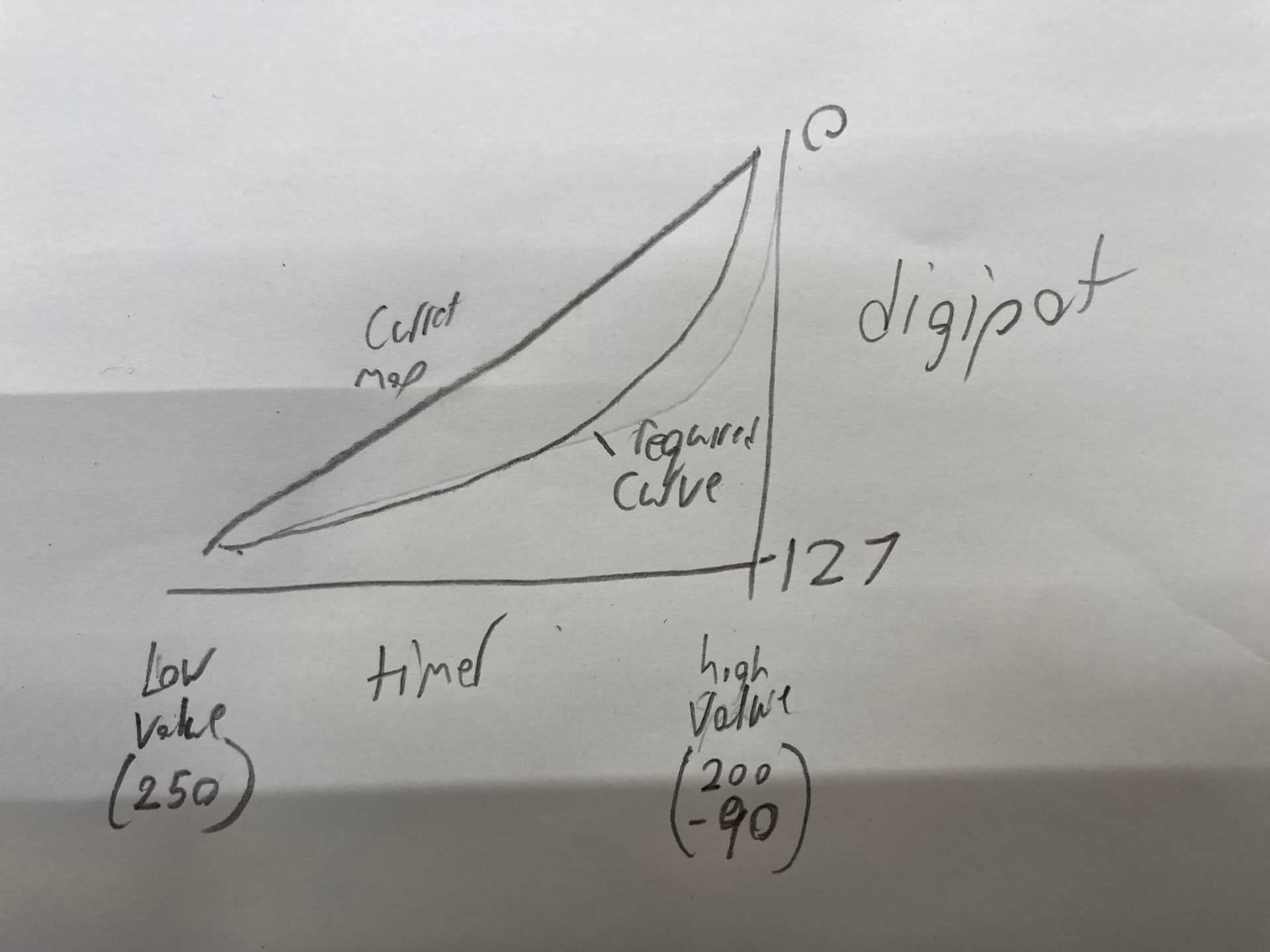
I have a working program that maps a digipot to a timer. I have been trying to create a curve to the mapping that I'm struggling with. With the math the digipot is either at 0 or 127 nothing in-between. the math is with int but returns numbers that have decimal places. that should just round to the nearest whole number wouldn't it?
digitalPot = constrain(temp, 127, 0); //stay within the 0-127 range
digitalpot = sq(digitalpot)/(sq(digitalpot)/127); //math
digitalpot = map(digitalpot, 127, 0, 0, 127); // swap back to correct digipot orentation
ds3502.setWiper(digitalPot);
#include <Adafruit_DS3502.h>                  // <-----<<<<<
Adafruit_DS3502 ds3502 = Adafruit_DS3502();   // <-----<<<<<
//the DS3502 can be set from 0 to 127 using I2C // <-----<<<<<


#define magnetDetected       HIGH
#define noMagnet             LOW

#define weAreTiming          true
#define weAreNotTiming       false


#define BRAKE_IN_PIN A0
const byte CLUTCH_IN_PIN    =A3;
const byte POTL            = A1;  // Pot on Analog Pin 1
const byte POTH            = A2;  // Pot on Analog Pin 2

bool timerRunningFlag      = weAreNotTiming;

const byte sensor          = 2;
const byte heartbeatLED    = 13;

byte lastWheelState        = noMagnet;

int brake_value           = 0;
int clutch_value          = 0;
int clutch_temp           = 0;
int digitalPot                ;
int lowspeed               = 0;   // Low speed set
int highspeed              = 0;   // High Speed set
int lowrpm                 = 0;   // Low RPM kick in
int highrpm                = 0;   // High RPM kick in
int lowValue               = 0;
int highValue              = 0;
int digitalpot             =127;


const int lowLow           = 500; //reading 0
const int lowHigh          = 250; //reading 1023

const int highLow          = 251; //reading 0
const int highHigh         = 50; //reading 1023

//timing stuff
unsigned long startTime;
unsigned long endTime;
unsigned long duration;
unsigned long timerMillis;
unsigned long heartbeatMillis;
unsigned long wheelMillis;

//*********************************************************************
void setup()
{
  ds3502.setWiper(0);
  pinMode (sensor, INPUT_PULLUP);

  pinMode (heartbeatLED, OUTPUT);

  Serial.begin(9600);

  while (!Serial)
  {
    delay(1);
  }

  Serial.println("Adafruit DS3502 Test");

  if (!ds3502.begin())                             // <-----<<<<<
  { // <-----<<<<<
    Serial.println("Couldn't find DS3502 chip");   // <-----<<<<<
    while (1);                                     // <-----<<<<<
  }                                                // <-----<<<<<

  Serial.println("Found DS3502 chip");

} //END of setup()


//*********************************************************************
void loop()

{
  //***********************
  //time to toggle the heartbeatLED ?
  if(millis() - heartbeatMillis >= 500);
  {
    //restart the TIMER
    heartbeatMillis = millis();

    //toggle the LED
    digitalWrite(heartbeatLED, !digitalRead(heartbeatLED));
  }

  //***********************
  //time to check the wheel sensor ?
  if (millis() - wheelMillis >= 10)
  {
    //restart the TIMER
    wheelMillis = millis();
    checkWheelSensor();
  }

  //***********************
  //if we are timing, have we reached the upper timing limit ?
  if (timerRunningFlag == weAreTiming && millis() - timerMillis >= 1000)
  {
    //disable the timing
    timerRunningFlag = weAreNotTiming;

    duration = 1000;

    printDigitalPot();
  }

  //***********************
  //Other non-blocking code goes here
  //***********************

  while (brake_value < 900) {
    ds3502.setWiper(127);
    Serial.print("Brake on ");
    Serial.println(brake_value);
    brake_value = analogRead(BRAKE_IN_PIN);
  }

  while (clutch_value < 920 && brake_value > 900) {
    clutch_temp = map(clutch_value, 800, 80, digitalPot, 127);
    clutch_temp = constrain(clutch_temp, 0, 127);
    ds3502.setWiper(clutch_temp);
    Serial.print("Clutch on ");
    Serial.print(clutch_value);
    Serial.print("  Digitalpot value:  ");
    Serial.println(clutch_temp);
    brake_value = analogRead(BRAKE_IN_PIN);
    clutch_value = analogRead(CLUTCH_IN_PIN);
  }


} //END of loop()


//*********************************************************************
void checkWheelSensor()
{
  byte thisState = digitalRead(sensor);

  //***********************
  //was there a change in state ?
  if (lastWheelState != thisState)
  {
    //update to the new state
    lastWheelState = thisState;

    //***********************
    //if we are 'not' timing has the sensor detected the magnet ?
    if (timerRunningFlag == weAreNotTiming && thisState == magnetDetected)
    {
      //enable timing
      timerRunningFlag = weAreTiming;

      //start this TIMER
      startTime = millis();

      //start this TIMER
      timerMillis = millis();
    }

    //***********************
    if (timerRunningFlag == weAreTiming && thisState == noMagnet)
    {
      //disable the timing
      timerRunningFlag = weAreNotTiming;

      endTime = millis();

      duration = endTime - startTime;

      printDigitalPot();
    }

  } //END of  if(lastWheelState != thisState)

} //END of checkWheelSensor()


//*********************************************************************
void printDigitalPot()
{brake_value = analogRead(BRAKE_IN_PIN);
clutch_value = analogRead(CLUTCH_IN_PIN);


  //read manual pots, map to the required thresholds
  lowspeed = analogRead(POTL);  //0 to 1023
  lowValue = map(lowspeed, 0, 1000, lowLow, lowHigh);

  highspeed = analogRead(POTH); //0 to 1023
  highValue = map(highspeed, 0, 1000, highLow, highHigh);

  int temp = map( duration, highValue, lowValue, 127, 0);       // these have been swapped since previous programs to allow for math


  digitalPot = constrain(temp, 127, 0);   //stay within the 0-127 range

  digitalpot = sq(digitalpot)/(sq(digitalpot)/127);    //math

  digitalpot = map(digitalpot, 127, 0, 0, 127);               // swap back to correct digipot orentation

  ds3502.setWiper(digitalPot);


  Serial.print("LOW ");
  Serial.print(lowspeed);
  Serial.print(" Time ");
  Serial.print(lowValue);

  Serial.print("  ");

  Serial.print("HIGH ");
  Serial.print(highspeed);
  Serial.print(" Time  ");
  Serial.print(highValue);

  Serial.print ("  Time in millis = ");
  Serial.print (duration);
  Serial.print("   Digital pot set to: ");
  Serial.print(digitalPot);
  Serial.print("\t");
  Serial.print("Brake : ");
  Serial.print(brake_value);
  Serial.print("Clutch : ");
  Serial.println(clutch_value);
  Serial.println("");