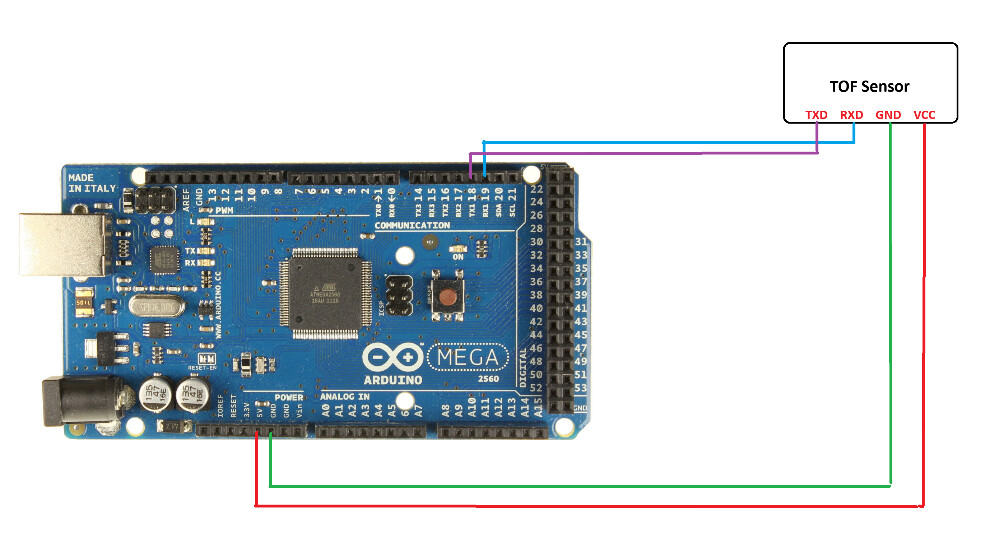
Since this topic TOF Laser Sensor won't connect and output data has been closed and won't allow any more comments, so I have been facing same issue and wasn't able to figure out how to solve it?
I am using an Arduino Mega 2560
I am fairly new to using the Waveshare ToF sensor. I went through their documentation and followed similar connections but no success.
I started off with the implementation of demo code, which is mentioned in waveshare documentation but no data is being displayed over Serial monitor or the TOFAssistant software which constantly displays 'recognize failed'. (I believe a UART adapter might help in this scenario but I don't have any as of now)
Questions:
I still don't understand the problems that are there and how to resolve it?
How should I display the data over the Serial Monitor without using the ToFAssistant software?
are you using SoftwareSerial or AltSoftSerial?
why have you selected pins 10 and 11
recommend using hardware serial, e.g. Serial1 TX pin18 and Rx pin 19
give a link to the demo program?
SoftwareSerial has problems operating over 38400baud also transmitting and receiving at the same time
recommend you the Mega Hardware Serial port Serial1
e.g. delete or comment out the following two lines
#include <SoftwareSerial.h>
SoftwareSerial Serial1(11,10); //Serial1 connected to TOF Serial:10<-->RX, 11<-->TX
I have attached the updated code here but I still don't see anything over the Serial Monitor making sure that the baud rate is 115200. @jremington Could you please share the modified code, if you had any success running it?
I am currently following the code that Waveshare has mentioned in their documentation, with the only update of using hardware serial over software serial.
This is one of the reddit posts that I followed: UART - TOF and was receving some output but then again couldn't understand on how should I proceed next?