Weactstudio 2.13" eink display not working when connected to ESP32

Hi,
I'm trying for the first time to use a tricolor WeactStudio e-ink 2.13" display connected to an ESP32 ( the goal is to display data from temp & hum sensors sent every 15 minutes so the refresh time won't be any problem) and I used the example reported by the seller on Github for these displays just to understand how it works.
The link is GitHub - WeActStudio/WeActStudio.EpaperModule: WeAct Studio 2.13/2.9 Inch Epaper Module EPD
and the example is
EpaperModuleTest_Arduino_ESP32
However I was not able to obtain any result and the screen still displays the same image it had when I received it.

The display is connected in the following way according to the example suggestion
ESP32 E-ink
VCC VCC
GND GND
21 SDA
22 SCL
5 CS
0 D/&C
2 RES
15 BUSY

Since I'm a newbie I've found very confusing the example reported and I was not able to adapt it to my needs : however, if I've interpreted the code in the correct way, the code contains two different functions, one for BW display that allows for partial refresh and the other for the 3color display that doen't have this chracteristic. This is not a big issue since I'm planning to do only complete refresh of the screen every 15 minutes.

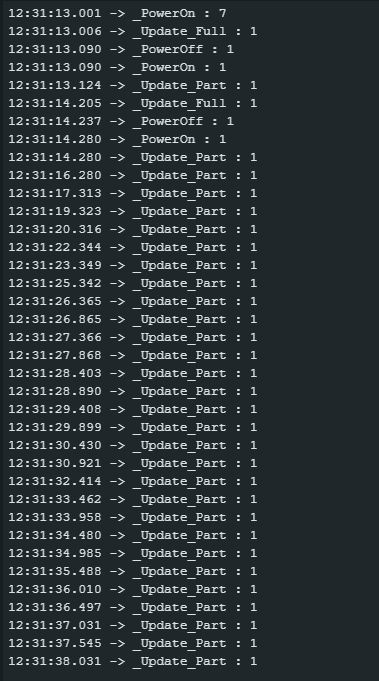
When I run the code of the example nothing happens on the screen but in the serial monitor that is a long list of Update_part:1 that stops only when i disconnect the MCU
I suppose that the first three lines show a full refresh, the following four lines a full and partial refresh, then after a new PowerOn there is an endless list of Update_Part: 1 .

In conclusion, while I was able to "decode" the different examples with OLED or TFT displays so that I was able to adapt them for my needs with this display I' am just in a dead stop.
Could a good Samaritan help me by explaining in simple words how to refresh this blocked screen and display just text messages ?
Thanks in advance for your help.

@bruno1950, Hi,

Thank you for the link to GitHub. I was able to locate the example you used there. Of course a link to the example would have been helpful, too.

In the example I can see that it uses GxEPD2.
I assume you installed this library through Library Manager, to have got the actual version.

Did you uncomment the correct constructor line for your 3-color display?

// ESP32 SS=5,SCL(SCK)=18,SDA(MOSI)=23,BUSY=15,RST=2,DC=0

// 2.13'' EPD Module
GxEPD2_BW<GxEPD2_213_BN, GxEPD2_213_BN::HEIGHT> display(GxEPD2_213_BN(/*CS=5*/ 5, /*DC=*/ 0, /*RST=*/ 2, /*BUSY=*/ 15)); // DEPG0213BN 122x250, SSD1680
//GxEPD2_3C<GxEPD2_213_Z98c, GxEPD2_213_Z98c::HEIGHT> display(GxEPD2_213_Z98c(/*CS=5*/ 5, /*DC=*/ 0, /*RST=*/ 2, /*BUSY=*/ 15)); // GDEY0213Z98 122x250, SSD1680

the second line?
Your wiring differs from the comment in the example!

report the inking found on the flexible connector of the e-paper panel.
-jz-

check your wiring, too:

// mapping suggestion for ESP32, e.g. LOLIN32, see .../variants/.../pins_arduino.h for your board
// NOTE: there are variants with different pins for SPI ! CHECK SPI PINS OF YOUR BOARD
// BUSY -> 4, RST -> 16, DC -> 17, CS -> SS(5), CLK -> SCK(18), DIN -> MOSI(23), GND -> GND, 3.3V -> 3.3V

from GxEPD2_wiring_examples.h

Hi,
thx really for your prompt answer and I'm even more grateful since I know that you are a "guru" of e-paper displays.
To your first question the answer is
I uncommented the line
GxEPD2_3C<GxEPD2_213_Z98c, GxEPD2_213_Z98c::HEIGHT> display(GxEPD2_213_Z98c(/CS=5/ 5, /DC=/ 0, /RST=/ 2, /BUSY=/ 15)); // GDEY0213Z98 122x250, SSD1680
so I hope that this is correct but, please, confirm it.
For the wiring I followed what is written in the example CS = 5, DC=0; RST = 2 BUSY = 15 but I realize that I made a mistake connecting SCL to 21 and SDA to 22 as for an I2C connection when this display works through SPI. I was confused by the fact that they call these pins SCL and SDA instead of MOSI and MISO even if in the back of the panel it's clearly written 4-lines SPI.
So your remark that my wiring was wrong is quite right and I was able to realize my mistake thanks to your observation.
To your second question I have no flexible connector on the e-paper panel but I post a picture of the back of the display where there are the connections, hoping this could help.

However, with wiring SDA to 23 and SCL to 18 now I succeeded in refreshing the screen and running the code.
Really a big thx for your help.
Now I can work trying to have the eink display show the data from sensors...
Have a nice day**

Hi ZinggJM
I'm writing again because, after having successfully displayed the data collected from temp and hum sennsor together with time stamp on the eink display I met another problem that I was not able to solve even after many trials.
The problem is: how can I connect a SD card module to my ESP32 while the eink display is connected with SDA to 23, SCL to 18, CS to 5, D/C to 0, RES to 2, BUSY to 15 ?
I tried to define CS, SCK, MOSI and MISO for the SD card as 33, 25, 26, 32 but I encountered in one case a "Stack smashing protect failure" with continuous rebooting and after some changes in the cose now simply the message "Card Mount failed".
In any case I was not able to make the SD card work.
I know that ESP32 has a VSPI and a HSPI with GPIO 13 GPIO 12 GPIO 14 GPIO 15 for HSPI and GPIO 23 GPIO 19 GPIO 18 GPIO 5 for VSPI ( MOSI MISO SCLK CS) but the eink is already connected to pin 5 for CS and to pin 15 for BUSY. so I was forced to define "custom SPI pins" that however in my hands do not work.
If you can help me I'd be very grateful.
Thx for your patience and attention but as a newbie as I am I'm completely lost.
I'm enclosing the NOT WORKING code even if compiling and uploading are OK

#include <SPI.h>
#include <Wire.h>

#include <SD.h> // library for the SD card
#define SD_CS   33
#define SD_SCK  25
#define SD_MISO 32
#define SD_MOSI 26

// Create a file to store the data
File myFile;

#include <RTClib.h> // for the RTC
RTC_DS3231 rtc; 

//libraries for e-paper display
#define ENABLE_GxEPD2_GFX 0

#include <GxEPD2_BW.h>
#include <GxEPD2_3C.h>
#include <Fonts/FreeMonoBold9pt7b.h>

// ESP32 SS=5,SCL(SCK)=18,SDA(MOSI)=23,BUSY=15,RST=2,DC=0

// 2.13'' EPD Module
GxEPD2_3C<GxEPD2_213_Z98c, GxEPD2_213_Z98c::HEIGHT> display(GxEPD2_213_Z98c(/*CS=5*/ 5, /*DC=*/ 0, /*RST=*/ 2, /*BUSY=*/15)); // GDEY0213Z98 122x250, SSD1680

#include <Adafruit_Sensor.h>
#include <Adafruit_BME280.h>

#define SEALEVELPRESSURE_HPA (1013.25)
Adafruit_BME280 bme; // I2C

#include <SHT3x.h>
SHT3x Sensor; 
 
// variables to store data from sensors ( float type because they are value with a decimal part)
   float temp;
   float hum;
   float TEMP;
   float HUM;
    

String timeStamp;

// variables to define sleep time; the first multiplies the value to get seconds from microseconds; the second says the sleep time in seconds (1200 = 30 minutes)
uint64_t uS_TO_S_FACTOR = 1000000; 
uint64_t TIME_TO_SLEEP = 180; //sleep for 10 minutes

String dataMessage;

// setting a counter for data readings; it will increase every time data from sensors are collected
RTC_DATA_ATTR int sensor_data = 0;

// initializing string data to save data collected from sensors
String Data;

#define sensor_data(temp,hum,TEMP,HUM);

void gettimeStamp() {
    DateTime now = rtc.now();

char timeStamp[9];
 sprintf(timeStamp, "%02i:%02i:%02i", now.hour(), now.minute(), now.second());

  Serial.println(timeStamp);
}

void Read_TempHum()
{  
  Serial.print("Temp_BME280 = ");
  Serial.print(temp);
  Serial.println(" C");
  Serial.print("Hum_BME280 = ");
  Serial.print(hum);
  Serial.println(" %");
  Serial.print("Temp_SHT3x = ");
  Serial.print(TEMP);
  Serial.println(" C");
  Serial.print("Hum_SHT3X = ");
  Serial.print(HUM);
  Serial.println(" %");
}

void displayReadings() {
   DateTime now = rtc.now();

char timeStamp[9];
  sprintf(timeStamp, "%02i:%02i:%02i", now.hour(), now.minute(), now.second());
display.init(115200,true,50,false);  
display.setRotation(1);
display.setFont(&FreeMonoBold9pt7b);
  display.setTextColor(GxEPD_BLACK);
  display.setFullWindow();
  display.firstPage();
  do
  {
  display.fillScreen(GxEPD_WHITE);
  display.setCursor(0,10); 
     display.print("temp_BME= ");
    display.print(temp);
    display.println(" C");
    display.setCursor(0,30);
    display.print("temp_SHT= ");
    display.print(TEMP);
    display.println(" C");
    display.setCursor(0,50);
    display.print("hum_BME= ");
    display.print(hum);
    display.println(" %");
    display.setCursor(0,70);
    display.print("hum_SHT= ");
    display.print(HUM); 
    display.println(" %");
    display.setCursor(0,90);
    display.setTextColor(GxEPD_RED);
    display.print("sleeping for 15 min");
    display.setCursor(0,110);
    display.print("# ");
    display.print(sensor_data);
    display.print("    ");
    display.print(timeStamp);
  }
    while(display.nextPage());
    delay(100);
    display.hibernate();
      }

      void setup() {

  //initializing Serial monitor
  Serial.begin(115200);
    while(!Serial);
  delay(100);

    // Initialize SD card  

  if (!SD.begin(SD_CS)){
    Serial.println("Card Mount Failed");
    return;
  }
  uint8_t cardType = SD.cardType();

  if(cardType == CARD_NONE){
    Serial.println("No SD card attached");
    return;
  }
  //initializing E-paper display
   display.init(115200,true,50,false);
      delay(3000);

//initializing BME280
bme.begin(0x76);  
 temp = bme.readTemperature();
 hum= bme.readHumidity();

 // checking the BME280 connections and initializing the sensor

  if (!bme.begin(0x76)) {
    Serial.println("Could not find a valid BME280 sensor, check wiring!");
    while (1);
  }

  //initializing the SHT31 sensor
Sensor.Begin();
Sensor.UpdateData();
TEMP = Sensor.GetTemperature(); 
 HUM = Sensor.GetRelHumidity();

    //Initialize DS3231
Serial.println("Initialize DS3231");
  while(!Serial); 
  delay(100);
 if(! rtc.begin()) {
      Serial.println("Couldn't find RTC");
      while (1);
    }
    else {
      // following line sets the RTC to the date & time this sketch was compiled
rtc.adjust(DateTime(F(__DATE__), F(__TIME__)));
    }

  Read_TempHum();
  logSDCard();
  SDwriting();
  displayReadings();

  delay(3000);
display.hibernate();

  // increasing the counter for the next data readings
  sensor_data++;
  
    Serial.println("Sensor data logged successfully! Going to sleep");

// ESP32 going to sleep for the amount of time you decided
   esp_sleep_enable_timer_wakeup(TIME_TO_SLEEP * uS_TO_S_FACTOR);
  delay(4000);

  esp_deep_sleep_start(); 
}
 
 void logSDCard() {
   DateTime now = rtc.now();
char timeStamp[9];
  sprintf(timeStamp, "%02i:%02i:%02i", now.hour(), now.minute(), now.second());

 dataMessage =  String(sensor_data) + "," + String(timeStamp) + "," + 
               String(temp) + "," + String(hum)+ "," + String(TEMP)+","+ String(HUM) +"\r\n";
  Serial.print("Save data: ");
  Serial.println(dataMessage);
 }

void SDwriting() {
      DateTime now = rtc.now();
char dateString[11];
  sprintf(dateString, "%04i-%02i-%02i  ", now.year(), now.month(), now.day());
  
char timeString[9];
  sprintf(timeString, "%02i:%02i:%02i", now.hour(), now.minute(), now.second());
  
 myFile = SD.open("DATA.txt", FILE_WRITE);
  if (myFile) {
    myFile.print(dataMessage);
    
     myFile.close();
} 
}

void loop()
{}

Hi,
in the code there is a mistake in the duration of sleep that is indicated as "10 minutes" in the comment, 15 minutes in the display but it's only 3 minutes (180 seconds) in the instruction for deepsleep. Sorry for this confounding item but I've tried several options of deepsleep.

Did you try to connect both to the same SPI bus? Just using a different pin for SD CS?
Did you see GxEPD2_SD_Example?

Hi,
thx for your very prompt and useful answer.
I'v carefully read the example of SD card and EPD and I spent these hours trying to modify the EPD wiring according to your suggestion ( since this should be the optimal option) but, even if I get no error, the display does not show any refresh and seems to be blocked.
So i tried to modify the SD card wiring ( the less optimal option, but however working) and I connected SCL to different pins while leaving MISO, MOSI and SCK fixed.
But I'm just receiving different error messages after uploading::
a) with SD_CS connected with pin 2 A fatal error occurred: Failed to connect to ESP32: No serial data received.
b) with SD_CS connected to pin 33 or pin 25 or pin 15 the error message is the same
A fatal error occurred: MD5 of file does not match data in flash!
Before your suggestions I'd tried (based on the factory example of Lilygo TTGO , that has a TFT display working through SPI and suggests to use for SD card a HSPI with 33, 25, 27, 26 pins ) this configuration and in fact the SD card was correctly mounted but there was a continuous rebooting with the message "Stack smashing protect failure".
I'm enclosing the code I used that is derived from the SD example you suggested and I'm sure that iI made some ( many) trivial mistakes that cause the problem ( for example the lines 49-51 of the code are for me mysterious
/*#if defined(ESP32) && defined(USE_HSPI_FOR_EPD)
hspi.begin(18, 0, 23, 5); // remap hspi for EPD (swap pins)
display.epd2.selectSPI(hspi, SPISettings(4000000, MSBFIRST, SPI_MODE0));
*/
so I commented them and I decided to use the line 59 that works with my display BUT without SD)

Would you be so kind to show me where the mistakes are and how I can correct them ?
Apologize for my clumsiness (old and newbie, a fatal combination!)
Thanks again for your help.

#define ENABLE_GxEPD2_GFX 0

#include <GxEPD2.h>
#include <GxEPD2_3C.h>
#include <GxEPD2_BW.h>
#include <GxEPD2_EPD.h>
#include <GxEPD2_GFX.h>

GxEPD2_3C<GxEPD2_213_Z98c, GxEPD2_213_Z98c::HEIGHT> display(GxEPD2_213_Z98c(/*CS=5*/ 5, /*DC=*/ 0, /*RST=*/ 2, /*BUSY=*/15)); // GDEY0213Z98 122x250, SSD1680


#define USE_HSPI_FOR_SD

#if defined(ESP32)

#include "FS.h"
#include "SD.h"
#include "SPI.h"

#else

#include <SPI.h>
#include <SD.h>

#endif

#if defined(ESP32)
#if defined(USE_HSPI_FOR_EPD) || defined(USE_HSPI_FOR_SD)
#define SD_CS SS
#define EPD_CS 5
SPIClass hspi(HSPI);
#else
#define SD_CS 25  // adapted to my wiring
#endif
#endif


// select the display class and display driver class in the following file (new style):
// don't forget to modify or override EPD_CS if needed
//#include "GxEPD2_display_selection_new_style.h"

void setup()
{
  Serial.begin(115200);
  Serial.println();
  Serial.println("GxEPD2_SD_Example");
  //  display.init(115200,true,50,false);
/*#if defined(ESP32) && defined(USE_HSPI_FOR_EPD)
 hspi.begin(18, 0, 23, 5); // remap hspi for EPD (swap pins)
display.epd2.selectSPI(hspi, SPISettings(4000000, MSBFIRST, SPI_MODE0));
*/
#if defined(ESP32) && defined(USE_HSPI_FOR_SD)
  SPI.begin(13, 12, 14, 25); // remap SPI for EPD  or should it be SD ?
  hspi.begin(SCK, MISO, MOSI, SS); // remap hspi for SD
#endif
 
 
  display.init(115200, true, 50, false); 

  Serial.print("Initializing SD card...");
#if defined(ESP32) && defined(USE_HSPI_FOR_SD)
  if (!SD.begin(SD_CS, hspi))
  {
    Serial.println("SD failed!");
    return;
  }
#else
  if (!SD.begin(SD_CS))
  {
    Serial.println("SD failed!");
    return;
  }
#endif
  Serial.println("SD OK!");
}

void loop()
{}

One more thought
Maybe I've tried to forcefully use for SD_CS a pin that is not compatible with HSPI but I really do not know if this is true or not and which pins I could use by leaving those wired to EPD without any modification since they work
Thanks

I can't follow and understand what you tried.

Please provide a link to your ESP32. Is it a common ESP32 or some ESP32Sn or ESP32Cn?

Avoid all pins that are used for internal flash or SRAM.

Hi,
the ESP32 I'm using in Arduino IDE works as ESP32 Dev Module. and it's the usual clone with 30 pins and with the "ESP32-WROOM-32D" written on the processor.
What I'm trying to do is to use , instead of an OLED screen that works through I2C and I've always used without problems together with a SDcard module, an Epaper that works through SPI.
I tried to use the suggestions of Random Nerd Tutorials ESP32 SPI Communication: Pins, Multiple SPI, Peripherals (Arduino) | Random Nerd Tutorials and obviously the suggestions you gave me in order to use simultaneously two different devices with SPI
However, due to my ignorance, I am not able to obtain this result.
if I leave the pins of the Epaper I use connected to ESP32- SDA to 23, SCL to18, CS to 5, D/C to 0, RES to 2 and BUSY to 15 - in the configuration that works without SD card I am not able to write a code working with a SD card and to find which are the pins for MOSI,MISO,SCK,CS for the SDcard.
So what I've done without success is to try different configurations that use the other pins that are not used by the Epaper display.
Looking at the pinout picture I'm enclosing the HSPI uses GPIO 12, 13, 14 that in my configuration are free but in my case the GPIO15 that is used in HSPI for CS is wired to BUSY of Eink display and I do not know which pin I can use in its place.
I tried the example of RandomNerdTutorias of using "Custom ESP32 SPI pins" : they used to connect a BME280 sensorthe following pins SCK 25 MISO 32 MOSI 26 CS 33 but in my hands it didn't work.
So at the present I'm completely stuck.

I am still not able to understand what you tried. I read your text multiple times, but am still confused.

I think you tried both options, one using common SPI pins, and one using separate SPI channels.
If you provide schematics of both your wirings, I might understand better.

Note that you can freely chose the other pins for your e-paper displays, as long as the wiring and the constructor parameters match. Your e-paper board has no level converters, so you should not have any strapping pin issues with the pins used with it.

You could provide a link to your SD card adapter.
The widely used "MicroSD Card Adapter" is for 5V Arduinos and has an LDO and a level converter chip. I successfully use this for tests with a Wemos LOLIN32 Lite, but with VCC supplied with 3.3V and a jumper to bridge the LDO. With my wiring I have no boot mode issue, no strapping pin conflict. But I have to remove it for e-paper boards that use MISO.

Hi,

sorry for the time you're losing with my problem and for my inability of making clear my problem.

I think that you are confused because I am confused.

However, the SD card module that works without any problema when my OLED display is connected through I2C is this one ( the link of AliExpress seems not working so I'm enclosing a picture of the page where the item is advertised).

I thought that there was an easy way of using both the Epaper display and a SD card module through SPI but it seems that this particular display with the wiring suggested (requested ?) by the seller is not compatible with a SD card module.

My wiring for the Epaper display is
WeactStudio Epaper ESP32
VCC 3V3
GND GND
SDA 23
SCL 18
CS 5
D/C 0
RES 2
BUSY 15

For what attains the wiring of SD card all my trials were unsuccessful with different error messages, as I told you.
Which could be a wiring and a code that could work for SD card in this situation according to your opinion ( if there is this possibility) ?
If this Epaper is NOT compatible with a SD card , for me it could be better to move to Wavehare displays or even better to LlLiygo T5 2.13 display which has a clear description of pinouts for Epaper display AND the SD card that are NOT in conflict.
Here enclosed you'll find a pinout scheme because again the link to aliexpress seems not working.

Which is your suggestion?
Thanks again
Bruno

Didn't get, so I am out. My only suggestion is to wire according to GxEPD2_SD_Example.

Ok thanks
I'll follow your suggestion
Have a nice day

This topic was automatically closed 180 days after the last reply. New replies are no longer allowed.